Freedom251 › Image Compression Software
MozJPEG
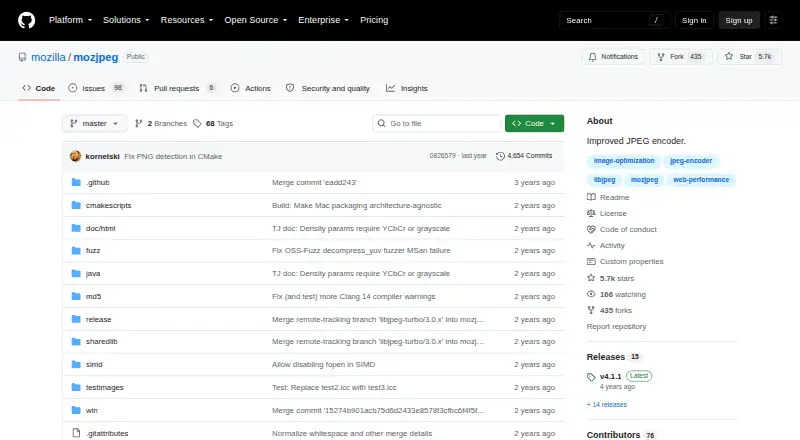
What MozJPEG is
MozJPEG is a free, open-source library project intended to improve JPEG compression efficiency, producing smaller files and higher visual quality. It is designed for graphics programs and image-processing tools, and software that uses the libjpeg API can integrate it without MozJPEG-specific integration code. It is compatible with the JPEG standard and the vast majority of deployed JPEG decoders. When converting other formats to JPEG, it uses trellis quantization to balance quality and file size. Its progressive encoding with jpegrescan optimization can losslessly reduce a JPEG's size when applied with jpegtran. MozJPEG improvements can be disabled at runtime, after which it behaves exactly like libjpeg-turbo. The repository includes a demo cjpeg command-line tool, which the project says is not intended for serious use. Build instructions cover Unix-like systems, macOS, Linux, Windows with Visual C++, and Windows with MinGW. The repository's latest release page identifies version 4.1.1. For additional build help, the project points to libjpeg-turbo documentation.
Who it suits
MozJPEG suits developers of graphics programs and image-processing tools who want to integrate JPEG compression through the libjpeg API. Its build instructions cover Unix-like systems and Windows toolchains.
What it does well
- Compatible with the JPEG standard.
- Integrates through the libjpeg API.
- Progressive encoding can losslessly reduce JPEG size.
- Improvements can be disabled at runtime.
- Build instructions cover macOS, Linux, and Windows.
What to know first
- The cjpeg command-line tool is described as a demo.
- The project points elsewhere for additional build help.
- The repository page states no security certifications or compliance claims.
Plans
| Plan | Billed and limits | Price |
|---|---|---|
| MozJPEG | Open-source JPEG encoder library; demo cjpeg tool | Free |
As github.com lists them, read 7 Oct 2026. The maker's own page has the final word.
Getting started
- Open the MozJPEG GitHub repository.
- Choose a build route for a Unix-like system, macOS, Linux, or Windows with Visual C++ or MinGW.
- Build the library using the project’s instructions.
- Integrate it into a program that uses the libjpeg API.
- Consult libjpeg-turbo documentation for additional build help.
MozJPEG is an open-source JPEG encoder library for developers building graphics software and image-processing pipelines. It fits teams that already use the libjpeg API and need smaller JPEG files without sacrificing broad decoder compatibility. The trade-off is that it is an integration component, not a polished standalone conversion application.
Overview
MozJPEG targets better JPEG compression efficiency, producing smaller files while preserving visual quality. Its output remains within the JPEG standard and works with the vast majority of deployed JPEG decoders, so it is a sensible choice when bandwidth or storage matters but introducing a different image format would create compatibility work.
Existing programs using the libjpeg API can adopt MozJPEG without writing MozJPEG-specific integration code. Improvements can be disabled at runtime, making the library behave exactly like libjpeg-turbo when compatibility or predictable legacy behavior takes priority. The project is open source and self-hostable, with version 4.1.1 identified as the latest release.
Key features
- Progressive JPEG optimization: Progressive encoding with jpegrescan can losslessly reduce the size of any JPEG when used with jpegtran. It is valuable for optimizing an established JPEG collection without altering image data, although it assumes a workflow built around those tools.
- Trellis quantization: When converting PPM, PGM, BMP, GIF or Targa images to JPEG, trellis quantization works toward a better quality-to-file-size ratio. This gives conversion pipelines a more deliberate compression step than simply selecting a quality number.
- Metadata controls: Metadata handling is supported, allowing an image-processing application to include metadata policy in its own workflow rather than treating it as an afterthought.
- API compatibility: A libjpeg-compatible integration path is the main practical advantage for software teams. The runtime fallback to libjpeg-turbo also provides a way to turn MozJPEG behavior off without replacing the library interface.
- Demo command line: The repository includes cjpeg, but it is a demonstration tool rather than a serious command-line product. Teams wanting a finished batch-conversion utility should build or choose a separate application around the library.
Pricing
The MozJPEG plan costs free and is free software under its open-source model. It includes the JPEG encoder library and the demo cjpeg tool, with no free trial because the offering is already free. There are no paid tiers, seat charges, usage quotas or renewal terms to weigh, making it suitable for individual developers and teams that can operate their own integration.
Platforms
MozJPEG is available through an API and supports Linux, macOS, Windows and self-hosted deployments. Build guidance covers Unix-like systems, macOS, Linux, Windows with Visual C++, and Windows with MinGW. Supported build systems include CMake, Cargo and GNU Make. Compiler and language coverage spans assembler, C, C++, Rust, CUDA via nvcc, ROCm HIP, GCC, Clang, MSVC, NVC++ and Wind River Diab. The project also lists GitHub Actions and Jenkins for CI, remote execution, line/branch/function coverage, pull-request annotations and report formats including LCOV, Coveralls, covdir JSON, Markdown, HTML and Cobertura XML. Language support includes Rust, C, C++, JavaScript, Go, Java and Kotlin.
Who it's for
MozJPEG is for developers maintaining image libraries, web services, desktop software or processing pipelines that can integrate a C-compatible JPEG library and want lower JPEG weight with familiar decoder support. It is especially appropriate when an existing libjpeg-based codebase needs an incremental improvement rather than a new image stack. It is a poor fit for nontechnical users seeking a graphical editor or a dependable command-line converter, because cjpeg is supplied only as a demo and the project’s value is in library integration.
Pros and cons
Pros
- Broad compatibility: Standard JPEG output and support from the vast majority of deployed decoders reduce rollout risk.
- Drop-in integration path: Libjpeg API users can adopt it without MozJPEG-specific integration code.
- Useful optimization techniques: Progressive jpegrescan processing and trellis quantization address both existing JPEGs and new conversions.
- Flexible deployment: Open-source, self-hosted operation and wide build-tool and compiler coverage suit varied engineering environments.
Cons
- Not a finished end-user tool: The bundled cjpeg utility is explicitly a demo, so teams must provide their own production workflow.
- JPEG-only output: It improves JPEG encoding rather than offering a broader modern image-format strategy.
- Integration overhead: Its benefits matter mainly inside software that can build and maintain a native library integration.
Alternatives
Choose Ccache instead when the problem is caching single-file compilations across Linux, macOS, Windows or self-hosted builds, rather than compressing images. Bitrise is a better choice for hosted mobile and CI workflows, with Android, iOS, web and API platforms and a free Hobby plan for a solo team. For remote build caching, EngFlow Remote Caching offers a free tier with one machine and 32 CPU cores, while FosterStack provides a self-hosted cache server and a paid Team tier at $49 a month.
cachepot, NativeLink and bazel-remote are open-source build-cache alternatives; pick them when build-artifact caching, not JPEG encoding, is the requirement. BuildFetch Cache suits teams wanting a hosted/web cache with a free plan limited to 20GB fast storage, 50GB network traffic, 100,000 requests and 45-day LRU retention. Browse Image Compression Software for broader image-focused options, or Build Cache Software and Test Coverage Tools for those specific engineering needs.
Verdict
Choose MozJPEG if you are integrating a JPEG library and want smaller, visually strong files with standard-decoder compatibility and a free open-source license. Look elsewhere if you need a complete command-line or graphical converter, or if your priority is build caching rather than image encoding.
Verdict
MozJPEG is a library for programs seeking improved JPEG compression while retaining broad decoder compatibility. The included cjpeg tool is only a demo, so the project is aimed at library integration rather than serious command-line use.
Questions
How much does MozJPEG cost?
MozJPEG is free. Its listed plan is free.
Is MozJPEG open source?
Yes. It is an open-source JPEG encoder library.
What formats does MozJPEG support?
The listed formats are PPM, PGM, BMP, GIF, and Targa.
Which platforms can I build it on?
The build instructions cover Unix-like systems, macOS, Linux, Windows with Visual C++, and Windows with MinGW.
Can I use MozJPEG from a program that uses libjpeg?
Yes. Programs using the libjpeg API can integrate MozJPEG without writing MozJPEG-specific integration code.
Is the cjpeg command-line tool intended for production use?
The repository includes a demo cjpeg tool, which the project says is not intended for serious use.
Facts from MozJPEG's own pages
- API access
- Yes · github.com, 20 Sept 2026
- Build platforms
- The build instructions describe Unix-like systems, macOS, Linux, Windows with Visual C++, and Windows with MinGW. · github.com, 7 Oct 2026
- Command-line tool
- The repository includes a demo cjpeg command-line tool, which the project says is not intended for serious use. · github.com, 7 Oct 2026
- Compatibility
- It is compatible with the JPEG standard and the vast majority of deployed JPEG decoders. · github.com, 7 Oct 2026
- Compression modes
- both · github.com, 20 Sept 2026
- Distribution
- The GitHub repository provides a latest release page, which identifies version 4.1.1 as the latest release. · github.com, 7 Oct 2026
- Free plan
- Yes · github.com, 20 Sept 2026
- Integration
- Programs using the libjpeg API can integrate MozJPEG without writing MozJPEG-specific integration code. · github.com, 7 Oct 2026
- Library use
- The project is intended as a library for graphics programs and image processing tools. · github.com, 7 Oct 2026
- Metadata controls
- Yes · github.com, 20 Sept 2026
- Progressive encoding
- Progressive encoding with jpegrescan optimization can losslessly reduce the size of any JPEG when applied with jpegtran. · github.com, 7 Oct 2026
- Purpose
- MozJPEG improves JPEG compression efficiency to achieve smaller files and higher visual quality. · github.com, 7 Oct 2026
- Runtime behavior
- MozJPEG improvements can be disabled at runtime, in which case it behaves exactly like libjpeg-turbo. · github.com, 7 Oct 2026
- Security
- The repository page does not state security certifications or compliance claims. · github.com, 7 Oct 2026
- Support
- The project points users to libjpeg-turbo documentation for additional build help. · github.com, 7 Oct 2026
- Supported formats
- PPM,PGM,BMP,GIF,Targa · github.com, 20 Sept 2026
- Trellis quantization
- Trellis quantization is used when converting other formats to JPEG to maximize the quality-to-file-size ratio. · github.com, 7 Oct 2026
Where MozJPEG stands on Freedom251
- Image Compression Software#14 of 85