Freedom251 › Image Compression Software

TinyPNG
by TinyPNG
What TinyPNG is
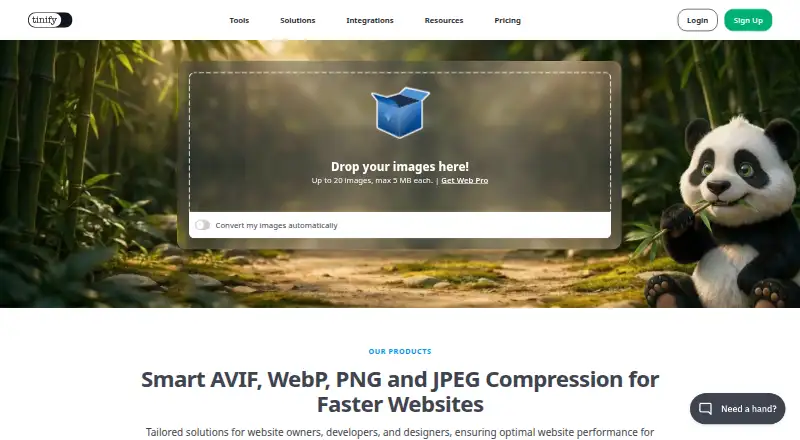
TinyPNG is an image compression service with lossy compression, batch processing, resizing, metadata controls, and API access. It supports JPEG XL, AVIF, WebP, JPG, PNG, and APNG. Free web use allows up to 20 image compressions per session, with each image limited to 5 MB, and up to three conversions per session. The Developer API includes 500 free compressions each month; unused free compressions reset at the start of each calendar month and do not roll over. Above the free allowance, users pay for successful compressions, without a subscription fee or minimum charge. Uploaded images are accessible only to the uploader and retained for up to 48 hours. TinyPNG removes unnecessary metadata, while the API can preserve selected copyright, location, and creation-date metadata. The maker also lists official WordPress and Figma plugins and a beta Zapier integration. Web Pro offers unlimited compressions and a 75 MB image limit; Web Ultra offers unlimited compressions and conversions with a 150 MB image limit. The maker is headquartered in Hoevelaken, Netherlands.
Who it suits
TinyPNG may suit people who need to compress or resize supported image files in batches, or integrate compression through its API. Its free web allowance may fit occasional sessions.
What it does well
- Supports JPEG XL, AVIF, WebP, JPG, PNG, and APNG.
- Free web plan includes 20 compressions per session.
- API includes 500 free monthly compressions.
- Uploaded images are retained for up to 48 hours.
What to know first
- Free web conversions are limited to three per session.
- Free web images are limited to 5 MB each.
- Unused free API compressions do not roll over.
Limits
The free web plan allows 20 compressions per session, with images up to 5 MB, and three conversions. Developer API Free includes 500 compressions per month; unused free compressions reset each calendar month and do not roll over.
Plans
| Plan | Billed and limits | Price |
|---|---|---|
| Web Free | 20 compressions per session · 5 MB per image · 3 conversions per session | Free |
| Web Pro | billed yearly per user · 75 MB per image · Unlimited compressions · 3 conversions per session | On request |
| Web Ultra | billed yearly per user · 150 MB per image · Unlimited compressions · Unlimited conversions | On request |
| Developer API: first 500 compressions | 500 compressions per month | On request |
| Developer API: next 9,500 compressions | 9,500 compressions at this tier | On request |
| Developer API: next 10,000 compressions | 10,000 compressions at this tier | On request |
| Developer API Free | — | Free |
| Developer API Volume Pricing | billed monthly based on API usage | Free |
The first 8 of 9 plans, as tinypng.com lists them, read 27 Sept 2026. The maker's own page has the final word. Every plan
Getting started
- Visit tinypng.com to use the web service.
- Choose the free web plan for up to 20 compressions per session and three conversions per session.
- For API use, start with the Developer API Free allowance of 500 compressions each month; no payment details are needed.
- Choose Web Pro or Web Ultra for larger image limits and unlimited compression.
- Use the official WordPress or Figma plugin, or try the beta Zapier integration.
Overview
TinyPNG is a lossy image-compression service for web users and developers who want to reduce image files in batches or through an API. It is strongest for recurring image-preparation work where resizing, conversion, and workflow integrations matter; its free web limits make it less suited to large one-off sessions.
Key features
It handles JPEG XL (JXL), AVIF, WebP, JPG, PNG, and APNG, and supports batch processing and resizing. That breadth helps when preparing assets for different formats, while lossy compression is a poor fit when images must remain unchanged. TinyPNG reports file-size reductions exceeding 85% in a visible-quality comparison, but results will depend on the image.
Unnecessary metadata is removed, and the API can retain selected copyright, location, and creation-date information. Uploaded images are accessible only to the uploader and retained for no more than 48 hours. Official WordPress and Figma plugins and a beta Zapier integration provide ways to incorporate it into publishing and design workflows.
The web and API allowances are distinct. Web Free permits 20 compressions per session, up to 5 MB per image, and three conversions per session. Free API use provides 500 compressions each calendar month; unused compressions expire rather than carrying over. API charges apply only to successful compressions beyond the allowance, with no subscription fee or minimum charge.
Pricing
Web Free costs nothing and fits occasional work within its session caps. The 5 MB image ceiling and three-conversion limit can quickly constrain larger batches.
Web Pro has custom pricing, billed yearly per user. It removes the compression cap and raises the maximum image size to 75 MB, but still allows only three conversions per session. It suits regular compression work that does not require frequent conversion. Each license gives one user access for one year, so teams need multiple licenses; moving from Web Pro to Web Ultra refunds the remaining Web Pro months.
Web Ultra also has custom pricing and is billed yearly per user. It includes unlimited compressions and conversions and accepts images up to 150 MB, making it the more suitable web tier for large files or conversion-heavy work. Its higher limits come with an individual annual license.
Developer API Free costs nothing, includes 500 compressions each month, and requires no payment details. That is a useful starting point for modest recurring workloads, but unused allowance does not roll over.
Developer API Pay Per Compression is billed monthly based on usage. The first 500 compressions each month are free; the next 9,500 cost $0.009 per compression. This avoids a subscription commitment, though costs rise with successful compression volume. The API also offers tiers for the first 500, the next 9,500, and the next 10,000 compressions, plus volume pricing: the next 10,000 monthly compressions receive a discount. Those tier prices are custom pricing. The volume-pricing plan is shown at no cost, billed monthly based on API usage.
Platforms
The listed platform is API. TinyPNG also offers a web workflow, reflected in its separate Web plans, and integrations for WordPress, Figma, and beta Zapier.
Who it's for
TinyPNG fits developers who want usage-based API billing and a monthly free allowance, and web users who need batch compression, resizing, or several image formats. Web Free is best for small sessions; Web Pro suits ongoing compression below the 75 MB ceiling, while Web Ultra is the better fit when conversions or larger files are central. Users who need lossless processing or substantial free conversion capacity should look elsewhere.
Pros and cons
- Pros: Broad format support, batch processing, and resizing cover several common asset-preparation needs.
- Pros: API billing has no subscription fees or minimum charges, and the first 500 compressions each month are free.
- Pros: Selected metadata can be preserved through the API, while uploaded images are restricted to the uploader and retained for at most 48 hours.
- Cons: Web Free is limited to 20 compressions per session, 5 MB per image, and three conversions, so it is a narrow fit for larger jobs.
- Cons: Web Pro keeps the three-conversion cap, and both paid web plans use yearly per-user licensing.
- Cons: Lossy compression may not suit work that requires unchanged image detail.
Alternatives
For a web image-compression category overview, see Image Compression Software.
Optimole may suit website operators who prefer a free plan measured by 2,000 monthly visits, with unlimited images and sites. Fastly Image Optimizer is worth considering when the listed API, Linux, and web platforms or its 100,000 free monthly image requests better match the workload.
Kraken.io offers a free 100 MB testing quota, a useful alternative for testing within a quota rather than TinyPNG's per-session web limit. Imagify may fit users who want a free monthly allowance of 20 MB, approximately 200 images, with a 2 MB per-image limit and unlimited websites.
ShortPixel Adaptive Images is a web alternative with a free 500 MB monthly CDN-traffic allowance; its Unlimited plan lists 500 GB per month for $9.99 a month. JPEGmini is another option for readers who want a seven-day trial of Pro features and a free tier limited to 50 images per day on one device.
TinyJPG has the same stated Web Free caps as TinyPNG, so those limits alone do not distinguish it. Optimizilla may suit readers who prefer a free browser-based option described as unlimited, with no registration, daily limits, or watermarks.
Verdict
Choose TinyPNG if you need lossy batch compression and resizing across multiple formats, especially through an API with a free monthly allowance and usage-based billing beyond it. Look elsewhere if you need lossless results, more generous free web conversion, or predictable pricing for a paid web plan.
Verdict
TinyPNG offers both web compression and an API, with distinct session limits and a monthly free API allowance. Check the image-size and conversion limits against your workload.
Questions
Is TinyPNG free?
Yes. Web Free costs nothing and includes 20 compressions per session, a 5 MB per-image limit, and three conversions per session. Developer API Free costs nothing and includes 500 compressions each month without requiring payment details.
How much does API use cost?
Developer API Pay Per Compression is listed at $0.01 a month, billed monthly based on API usage. The first 500 compressions each month are free; the next 9,500 cost $0.009 per compression. Successful compressions above the free allowance are billed without a subscription fee or minimum charge.
Which image formats does TinyPNG support?
It supports JPEG XL (JXL), AVIF, WebP, JPG, PNG, and APNG.
Which platforms and integrations are available?
The listed platform is API. TinyPNG also offers official WordPress and Figma plugins and a beta Zapier integration.
What are the Web Pro and Web Ultra limits?
Web Pro provides unlimited compressions, a 75 MB per-image limit, and three conversions per session. Web Ultra provides unlimited compressions and conversions, with a 150 MB per-image limit.
How long are uploaded images retained?
Uploaded images are accessible only to the uploader and retained for a maximum of 48 hours.
Facts from TinyPNG's own pages
- API access
- Yes · tinypng.com, 20 Sept 2026
- API Billing
- Users pay for successful compressions above the free allowance, with no subscription fees or minimum charges. · tinify.com, 27 Sept 2026
- API Free Reset
- Unused free API compressions do not roll over and reset at the start of each calendar month. · tinify.com, 27 Sept 2026
- Batch processing
- Yes · tinypng.com, 20 Sept 2026
- Company History
- TinyPNG added JPEG compression in 2014, animated PNG support in 2016, and later WebP and AVIF support. · tinypng.com, 27 Sept 2026
- Compression modes
- lossy · tinypng.com, 20 Sept 2026
- Compression Result
- TinyPNG reports reducing file size by more than 85% in a visible-quality comparison. · tinypng.com, 27 Sept 2026
- Free Conversion Limit
- Free users can convert up to 3 images. · tinypng.com, 27 Sept 2026
- Free plan
- Yes · tinypng.com, 20 Sept 2026
- Free Web Limit
- Free users can compress up to 20 images per session, with each image up to 5 MB. · tinypng.com, 27 Sept 2026
- Headquarters
- Hoevelaken, Netherlands · tinypng.com, 28 Sept 2026
- Image Retention
- Uploaded images are accessible only to the uploader and retained for a maximum of 48 hours. · tinypng.com, 27 Sept 2026
- Image Resizing
- The Developer API can automatically resize, convert, and compress images. · tinify.com, 27 Sept 2026
- Available Integrations
- Tinify offers official WordPress and Figma plugins, plus a beta Zapier integration. · tinypng.com, 27 Sept 2026
- Max upload size
- 75 · tinypng.com, 20 Sept 2026
- Metadata Controls
- The Developer API offers an option to retain certain metadata. · tinypng.com, 27 Sept 2026
- Metadata Removal
- Unnecessary metadata is removed; the API can retain selected copyright, location, and creation-date metadata. · tinypng.com, 27 Sept 2026
- Image resizing
- Yes · tinypng.com, 20 Sept 2026
- Support Channel
- Tinify provides contact support, a knowledge base, a blog, and a status page. · tinify.com, 27 Sept 2026
- Supported formats
- JPEG XL (JXL),AVIF,WebP,JPG,PNG,APNG · tinypng.com, 20 Sept 2026
- Team Licenses
- Multiple licenses can be purchased, with one license providing one user access for one year. · tinify.com, 27 Sept 2026
- Upgrade Refund
- Upgrading from Web Pro to Web Ultra refunds the remaining months of Web Pro. · tinify.com, 27 Sept 2026
Where TinyPNG stands on Freedom251
- Image Compression Software#12 of 85