Freedom251 › Minecraft Pixel Art Generators
Minecraft Image Converter
What Minecraft Image Converter is
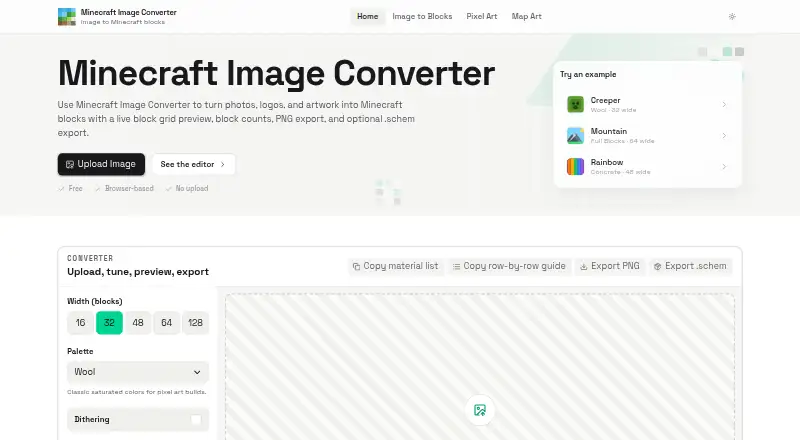
Minecraft Image Converter is a free web tool that turns photos, logos, and artwork into Minecraft block grids and build plans. It accepts PNG, JPG, JPEG, and WebP images, then maps them to Wool, Concrete, Terracotta, or Full Blocks palettes. Dithering, brightness and contrast controls, zoom, and grid lines let users adjust the result. For building, it provides block counts, a copyable material list, and a row-by-row guide. Exports include PNG references and Sponge .schem v3 files for WorldEdit-style workflows. A schematic is a one-block-thick vertical wall rather than a full 3D model. Current palettes are based on Java Edition blocks; Bedrock compatibility is described as planned for a future update. Image processing takes place locally in the browser, and images are not uploaded, stored, or reviewed by the maker. The site may collect aggregated usage data, such as page views and feature interactions, without identifying individuals. The tool is free for personal and commercial use, with no sign-up or watermark.
Who it suits
It suits Survival builders, Creative architects, and server build teams who want to turn images into block layouts. It is aimed at Java Edition palettes, with Bedrock compatibility planned for a future update.
What it does well
- Accepts PNG, JPG, JPEG, and WebP images.
- Provides block counts and a row-by-row guide.
- Exports PNG and Sponge .schem files.
- Images are processed locally in the browser.
What to know first
- Schematics are one-block-thick walls, not 3D models.
- Current palettes are based on Java Edition blocks.
- Bedrock compatibility is planned for a future update.
Limits
The free plan costs nothing and includes PNG and .schem export without sign-up or watermark. The schematic is a one-block-thick vertical wall, and current palettes are based on Java Edition blocks.
Plans
| Plan | Billed and limits | Price |
|---|---|---|
| Free | Free to use · no sign-up or watermark · PNG and .schem export | Free |
As minecraftimageconverter.com lists them, read 4 Oct 2026. The maker's own page has the final word.
Getting started
- Open https://minecraftimageconverter.com/.
- Use it in a web browser; no sign-up is required.
- Provide a PNG, JPG, JPEG, or WebP image.
- Choose a palette and adjust the available image controls.
- Use the block counts and row-by-row guide to plan the build.
- Export a PNG reference or Sponge .schem v3 file.
Minecraft Image Converter is a browser-based tool that turns ordinary artwork into Minecraft block layouts, material requirements, and build instructions. It is most useful to Java Edition Survival builders, Creative planners, and server teams who need a practical wall-building reference rather than a finished 3D model. The combination of local image processing and free schematic export is compelling, but the Java-only palettes and flat-wall output narrow its audience.
Overview
The converter accepts PNG, JPG, JPEG, and WebP files and translates them into block grids based on a selected palette. Its purpose is straightforward: turn a logo, photo, or illustration into something a Minecraft builder can reproduce. The workflow suits projects where a two-dimensional image is being placed on a wall and where preparation matters as much as the visual reference.
It is a particularly sensible choice for builders who do not want to upload personal artwork. Processing takes place locally in the browser, and images are not uploaded, stored, or reviewed by the maker. The privacy policy does allow aggregated, non-identifying usage data such as page views and feature interactions.
Key features
Wool, Concrete, Terracotta, and Full Blocks palettes cover common material approaches, from colorful pixel art to broader block selection. The palette control is fixed rather than customizable, so you can choose among the supplied families but cannot build a bespoke palette around the blocks you already own. Current palettes are based on Java Edition blocks; Bedrock compatibility is planned, making this a poor fit for Bedrock-first projects today.
Dithering, brightness and contrast controls provide useful ways to simplify or rebalance an image before construction. Zoom and grid lines make individual cells easier to inspect. These are practical adjustments for producing a readable pattern, but there is no 3D build preview, so the tool cannot show how a design behaves when it has depth or sits in a larger structure.
The planning aids are the strongest part of the package. Block counts and a copyable material list turn an image into a shopping and preparation checklist, while the row-by-row guide gives builders a direct sequence to follow. That is valuable in Survival, where gathering the right quantities is part of the challenge, and for server teams that need a shared construction reference.
Exports include PNG references and Sponge .schem v3 files for WorldEdit-style workflows. The schematic is limited to a one-block-thick vertical wall, however. It can accelerate importing a mural-like design, but it is not a representation of a complete 3D build.
Pricing
The Free plan costs nothing. It requires no sign-up and adds no watermark, while including PNG and .schem export. There is no trial because the tool is already free, and the maker permits personal and commercial use. With no paid tier, there is no upgrade path for larger projects or additional palette control; the trade-off is the fixed feature set and wall-only schematic format.
Platforms
Minecraft Image Converter runs on the web. Its output is aimed at Java Edition, with Sponge .schem v3 files supporting WorldEdit-style workflows. Bedrock support is not current, so Bedrock builders should wait for the planned compatibility update or select a tool that exports formats suited to that edition.
Who it's for
Choose it for Survival builds that need reliable counts and a material list, Creative architects planning a pixel-art wall, or server build teams coordinating rows of work. It also suits anyone who wants browser-local image handling. Do not choose it as your primary tool for volumetric structures, custom block palettes, 3D previews, or current Bedrock work.
Pros and cons
Pros
- Actionable planning output: Counts, a copyable list, and row-by-row instructions reduce guesswork during construction.
- Useful free exports: PNG and Sponge .schem v3 files cover visual references and WorldEdit-style importing without an account or watermark.
- Local processing: Images stay in the browser instead of being uploaded, stored, or reviewed by the maker.
- Common input support: PNG, JPG, JPEG, and WebP files handle the formats most users already have.
Cons
- Flat output only: A one-block-thick wall schematic cannot describe a full 3D model.
- No 3D preview: You must infer depth and placement outside the tool.
- Fixed palettes: Wool, Concrete, Terracotta, and Full Blocks are provided, but custom block sets are not.
- Java-focused: Bedrock compatibility is still planned rather than available.
Alternatives
Browse Minecraft Pixel Art Generators for a wider directory comparison. BlockArtLab Minecraft Image Converter is another free web converter, with a no-account browser workflow and PNG blueprint plus CSV material-list output; its paid Starter option costs 9.99 USD once for 300 credits if you need a credit-based tier. Coffee & Fun Minecraft Pixel Art Generator is a free browser tool with no account or installation. Image2Pixel Minecraft Converter offers a free, no-signup, no-watermark workflow with no limits stated. MC Build Tools Pixel Art Generator is another free web option requiring no account or sign-up. MC Schematics Image to Schematic is the better direction when you need outputs such as .litematic, .schem, .nbt, or .mcstructure, as well as PNG, JPG, WebP, or GIF input. mc-pixel provides palette, dimensions, and orientation controls with .litematic export. Minecraft Pixel Art Generator is a no-account free option with no paywall and no image-size limit beyond your device. Minecraft Pixel Art Generator is another free alternative with no limits stated.
Verdict
Minecraft Image Converter is a strong pick for Java Edition builders who want a private, free way to turn artwork into a wall plan with material counts, sequential guidance, and WorldEdit-compatible export. Its main reason to look elsewhere is structural: anyone needing a true 3D build, a custom palette, or current Bedrock support will find the one-block-thick Java-focused workflow too restrictive.
Verdict
Minecraft Image Converter combines image adjustments with practical build guidance and schematic export. Its Java Edition palettes and flat-wall schematic format are important constraints to consider.
Questions
How much does Minecraft Image Converter cost?
The Free plan costs nothing. The tool is provided free for personal and commercial use.
Do I need an account?
No sign-up is required, and exports have no watermark.
Which image formats can I use?
It accepts PNG, JPG, JPEG, and WebP images.
Which Minecraft editions does it support?
Its current palettes are based on Java Edition blocks. Bedrock compatibility is planned for a future update.
What can I export?
It exports PNG references and Sponge .schem v3 schematic files. The schematic represents a one-block-thick vertical wall.
Are uploaded images sent to a server?
Images are processed locally in the browser and are not uploaded, stored, or reviewed by the maker.
Facts from Minecraft Image Converter's own pages
- Audience
- The maker describes it for Survival builders, Creative architects, and server build teams. · minecraftimageconverter.com, 4 Oct 2026
- Build guidance
- Shows block counts and a copyable material list, plus a row-by-row build guide. · minecraftimageconverter.com, 4 Oct 2026
- Editing controls
- Includes dithering, brightness and contrast controls, zoom, and grid lines. · minecraftimageconverter.com, 4 Oct 2026
- Edition support
- Current palettes are based on Java Edition blocks, and Bedrock compatibility is described as planned for a future update. · minecraftimageconverter.com, 4 Oct 2026
- Exports
- Exports PNG references and Sponge .schem v3 schematic files for WorldEdit-style workflows. · minecraftimageconverter.com, 4 Oct 2026
- Image formats
- Accepts PNG, JPG, JPEG, and WebP images. · minecraftimageconverter.com, 4 Oct 2026
- Palettes
- Offers Wool, Concrete, Terracotta, and Full Blocks palettes. · minecraftimageconverter.com, 4 Oct 2026
- Privacy
- Images are processed locally in the browser and are not uploaded, stored, or reviewed by the maker. · minecraftimageconverter.com, 4 Oct 2026
- Project status
- The maker describes the tool as an independent fan project not affiliated with, endorsed by, or sponsored by Mojang Studios or Microsoft. · minecraftimageconverter.com, 4 Oct 2026
- Purpose
- Converts photos, logos, and artwork into Minecraft block grids and build plans. · minecraftimageconverter.com, 4 Oct 2026
- Schematic limit
- The schematic is a one-block-thick vertical wall rather than a full 3D model. · minecraftimageconverter.com, 4 Oct 2026
- Support
- Users can email [email protected] with bug reports, questions, or feature requests. · minecraftimageconverter.com, 4 Oct 2026
- Terms
- The tool is provided free for personal and commercial use. · minecraftimageconverter.com, 4 Oct 2026
- Usage data
- The privacy policy says the site may collect aggregated usage data such as page views and feature interactions, without identifying individual users. · minecraftimageconverter.com, 4 Oct 2026
Where Minecraft Image Converter stands on Freedom251
- Minecraft Pixel Art Generators#11 of 23