Freedom251 › Minecraft Pixel Art Generators

Image2Pixel Minecraft Converter
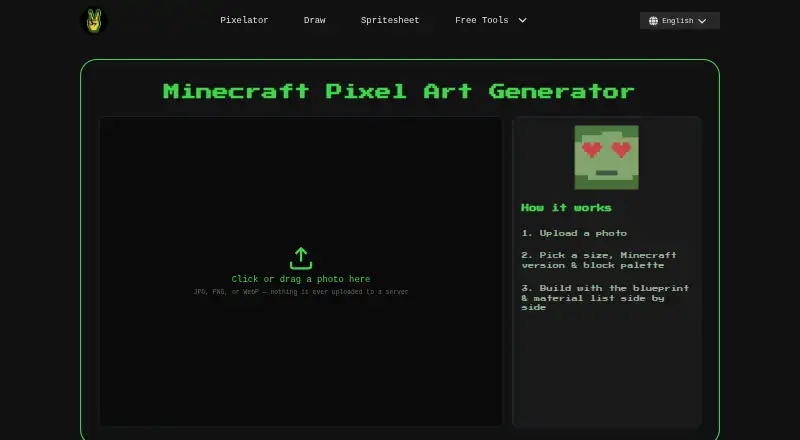
What Image2Pixel Minecraft Converter is
Image2Pixel Minecraft Converter turns an image into Minecraft pixel art and supplies files for building the result. It accepts JPG, PNG, and WebP images, then matches pixels to Minecraft map colors using CIELAB color comparison. Users can choose among twelve block palettes, select a Minecraft version to exclude blocks that did not yet exist, and set the output size to Small (32), Medium (64), Large (96), or Map (128×128). The Java Edition map color table is the basis for its block colors. Exports include PNG map art, a PNG build blueprint, a CSV material spreadsheet, a TXT material list, and a WorldEdit .schem schematic. Images are processed in the browser and are not uploaded to a server. The tool is free, with no signup, watermark, or usage limits. The .schem export is Java-only, and WorldEdit must be installed in the destination environment to paste it into a world. Native .litematic export is described as being on the roadmap, rather than currently available.
Who it suits
It suits Minecraft builders who want to plan a pixel-art build from a photo and download a blueprint or materials list. It is also relevant to Java Edition users who can use WorldEdit for the .schem export.
What it does well
- Accepts JPG, PNG, and WebP.
- Offers twelve block palettes and version filtering.
- Exports map art, blueprint, and materials lists.
- Processes images in the browser.
- Free with no signup, watermark, or usage limits.
What to know first
- .schem export is Java-only.
- WorldEdit must be installed to paste a schematic.
- Native .litematic export is not currently available.
Limits
The free plan costs nothing and has no usage limits. Native .litematic export is not available; the tool currently generates .schem files, and that export is Java-only.
Plans
| Plan | Billed and limits | Price |
|---|---|---|
| Free | No signup · no watermark · no limits | Free |
As image2pixel.com lists them, read 3 Oct 2026. The maker's own page has the final word.
Getting started
- Open https://image2pixel.com/image-to-pixel-art-minecraft in a web browser.
- Choose a JPG, PNG, or WebP image.
- Select a size and one of the available block palettes.
- Optionally filter blocks by Minecraft version.
- Export the map art, blueprint, material list, spreadsheet, or .schem schematic.
- Install WorldEdit in the destination environment to paste the .schem file into a world.
Image2Pixel Minecraft Converter turns images into Minecraft pixel-art plans and build files. It suits players who want a browser-based conversion with materials references, especially Java Edition builders. Its range of exports is useful for planning, but its fixed palettes and Java-based color model narrow the fit for builders who need custom or Bedrock-specific results.
Overview
The tool accepts JPG, PNG, and WebP images and produces map art plus references for constructing it. Image processing happens in the browser, and images are not uploaded to a server. That makes it a practical option for users who prefer not to send source images to a service; the privacy policy also describes HTTPS encryption, restricted server access, and automatic cleanup of temporary files. The same policy says Google Analytics collects aggregate traffic information, including pages visited, approximate location, device and browser type, and referral source.
Key features
Color matching uses CIELAB comparisons against Minecraft map colors. This provides a consistent basis for conversion, but it follows Java Edition’s map-color table, so Bedrock builders should not treat the output as an edition-specific color match. Twelve palettes include All Blocks, Survival-Friendly, Wool Only, and Concrete Only. Version filtering excludes blocks unavailable in a selected release, which is useful when planning for an older world. Palette control is fixed, so builders cannot define a custom block set.
Four sizes are offered: Small (32), Medium (64), Large (96), and Map (128×128). The exports cover both planning and construction: PNG map art, a PNG blueprint, a CSV material spreadsheet, a TXT material list, and a WorldEdit .schem schematic. The visual files help guide placement, while the two material formats suit different ways of tracking a build.
The schematic can be pasted into a world with WorldEdit, but that mod must be installed in the destination environment. The .schem export is Java-only; native .litematic export is on the roadmap, not a current format. Those limits matter most to builders who want a direct schematic workflow or use another edition.
Pricing
The Free plan costs nothing, with no signup, no watermark, and no limits. It includes the converter’s image-to-pixel-art workflow and its available exports, making it suitable for occasional projects as well as repeated use without a quota ceiling. There is no free trial because the plan is free, and no paid tier is part of this offer.
Platforms
Image2Pixel runs on the web. Its .schem output is for Java Edition, and using it to paste a build requires WorldEdit in the destination environment.
Who it's for
Choose it if you want a no-signup browser tool that turns a photo into both a visual plan and a materials list, or if version-aware palettes and multiple export formats will help organize a Java build. It is a weaker fit for Bedrock builders seeking edition-specific color matching, users who need a custom palette, or anyone whose workflow depends on native .litematic files.
Pros and cons
- Pros: Free use has no signup, watermark, or limits, so there is no stated project quota to manage.
- Pros: PNG, CSV, and TXT planning outputs accompany the map art, giving builders both visual and materials references.
- Pros: Version filtering can rule out blocks absent from a chosen Minecraft release.
- Pros: Images are processed in-browser rather than uploaded to a server.
- Cons: Color matching uses Java Edition’s map-color table, which is not an edition-specific Bedrock match.
- Cons: Schematic export is Java-only and requires WorldEdit to paste.
- Cons: Palette choices are fixed, and .litematic export is not yet available.
Alternatives
Minecraft Pixel Art Generators is a directory-wide starting point if you want to compare tools across the category. mc-pixel is worth considering if .litematic export and controls for palette, dimensions, and orientation matter more than Image2Pixel’s listed planning exports. Minecraft Image Converter is another free web option with PNG and .schem export and no sign-up or watermark.
BlockArtLab Minecraft Image Converter offers a free browser converter with no account, PNG blueprint, and CSV material list; its Starter plan is $9.99, paid once as a one-time purchase for readers considering a paid option. MC Build Tools Pixel Art Generator is a free web alternative that requires no account or sign-up. Minecraft Pixel Art Generator is also free on the web, with no account, paywall, or image-size limit beyond the user's device. PixelCraft is a Windows alternative. mcIVASmaker is another Windows option. MinecraftArt is a web alternative.
Verdict
Image2Pixel is a sound choice for Java builders who want a free, browser-based image conversion with useful planning exports and no stated usage limits. Its strongest reason to choose it is the combination of map art, blueprint, material references, and a WorldEdit schematic in one workflow. Look elsewhere if you need Bedrock-specific color matching, a custom palette, or native .litematic output.
Verdict
Image2Pixel provides several planning exports alongside the pixel-art map, including a materials list and blueprint. Check the Java-only schematic limitation and WorldEdit requirement if you need a build file.
Questions
How much does Image2Pixel Minecraft Converter cost?
The Free plan costs nothing. It has no signup, watermark, or usage limits.
Which image formats does it accept?
It accepts JPG, PNG, and WebP images.
What can it export?
Exports include PNG map art, a PNG build blueprint, a CSV material spreadsheet, a TXT material list, and a WorldEdit .schem schematic.
Does it work with Java Edition and Bedrock?
Block colors are based on Java Edition’s map color table, and .schem export is Java-only.
Does pasting a .schem file require anything?
Yes. WorldEdit must be installed in the destination environment to paste the schematic into a world.
Are uploaded images sent to a server?
The page states that images are processed in the browser and are never uploaded to a server.
Facts from Image2Pixel Minecraft Converter's own pages
- Analytics
- The privacy policy says the site uses Google Analytics for aggregate traffic patterns, including pages visited, approximate location, device/browser type, and referral source. · image2pixel.com, 3 Oct 2026
- Block palette
- It offers twelve block palettes, including All Blocks, Survival-Friendly, Wool Only, and Concrete Only. · image2pixel.com, 3 Oct 2026
- Color matching
- The converter matches image pixels to Minecraft map colors using CIELAB color comparison. · image2pixel.com, 3 Oct 2026
- Exports
- Exports include PNG map art, PNG build blueprint, CSV material spreadsheet, TXT material list, and WorldEdit .schem schematic. · image2pixel.com, 3 Oct 2026
- Format limitation
- The tool currently generates .schem files; native .litematic export is described as being on the roadmap. · image2pixel.com, 3 Oct 2026
- Image privacy
- The page states that images are processed in the browser and are never uploaded to a server. · image2pixel.com, 3 Oct 2026
- Input formats
- It accepts JPG, PNG, and WebP images. · image2pixel.com, 3 Oct 2026
- Java and Bedrock
- Block colors are based on Java Edition’s map color table, while .schem export is Java-only. · image2pixel.com, 3 Oct 2026
- Purpose
- The tool converts photos into Minecraft pixel art and provides a blueprint, material list, and .schem export. · image2pixel.com, 3 Oct 2026
- Security safeguards
- The site privacy policy says it uses HTTPS encryption in transit, restricted server access, and automatic cleanup of temporary files. · image2pixel.com, 3 Oct 2026
- Sizes
- Available sizes are Small (32), Medium (64), Large (96), and Map (128×128). · image2pixel.com, 3 Oct 2026
- Support
- The privacy policy says users can contact Image2Pixel by email with questions or requests. · image2pixel.com, 3 Oct 2026
- Version filtering
- Users can select a Minecraft version to filter out blocks that did not exist in that release. · image2pixel.com, 3 Oct 2026
- WorldEdit integration
- The .schem file can be pasted into a world using WorldEdit, which must be installed in the destination environment. · image2pixel.com, 3 Oct 2026
Where Image2Pixel Minecraft Converter stands on Freedom251
- Minecraft Pixel Art Generators#4 of 23