Freedom251 › Minecraft Pixel Art Generators

mc-pixel
What mc-pixel is
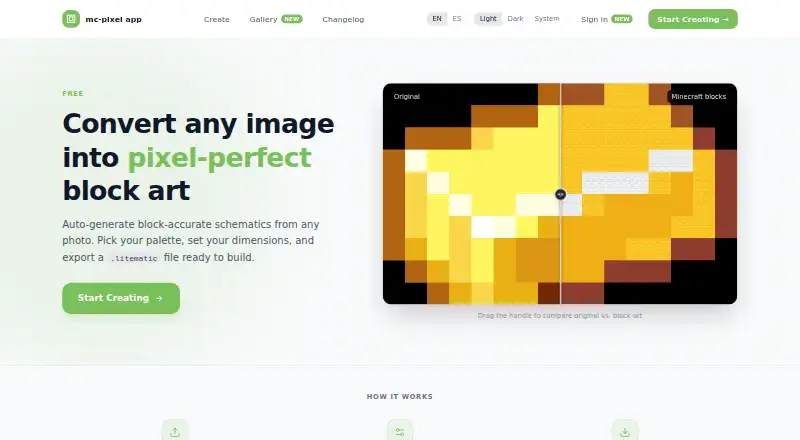
mc-pixel is a free web creator that turns images into Minecraft block-art schematics for Java Edition. It accepts PNG, JPG, WebP, and GIF images, then lets builders choose floor or wall orientation, adjust the palette and dimensions, and export a .litematic file described as ready for the Litematica mod. The creator page displays a total limit of 16,384 blocks and lists 49 available blocks across Wool, Concrete, and Terracotta. Designs can be viewed as a 2D pixel grid or 3D blocks; users can undo changes and consult a materials list. Palette categories are adjustable, and users can fill empty pixels or add a foundation layer. Accounts support saving, editing, deleting, and setting creations private or public. A gallery offers tag filters, previews, and downloads of published schematics. Shareable pages for public creations show a preview, size, author, and download. CSV is also listed as an export format.
Who it suits
It suits Minecraft builders who want to convert images into block-art plans and build from schematics. It is available on the web and offers a free plan.
What it does well
- Accepts PNG, JPG, WebP, and GIF images
- Offers horizontal floor or vertical wall art
- Includes 2D grid and 3D block previews
- Exports .litematic files and CSV
- Gallery supports tag filtering and downloads
What to know first
- Displayed total limit is 16,384 blocks
- Targets Minecraft Java Edition
Limits
The creator page displays a total limit of 16,384 blocks. The Free plan costs nothing and includes image upload, palette, dimension, and orientation controls, plus .litematic export.
Plans
| Plan | Billed and limits | Price |
|---|---|---|
| Free | Image upload · palette, dimensions, and orientation controls · .litematic export | Free |
As mc-pixel.app lists them, read 29 Sept 2026. The maker's own page has the final word.
Getting started
- Open mc-pixel at https://mc-pixel.app/
- Upload a PNG, JPG, WebP, or GIF image
- Choose horizontal floor art or vertical wall art
- Adjust dimensions and the block palette, then preview the design
- Export the finished schematic as .litematic or CSV
mc-pixel is a focused web creator for turning ordinary images into Minecraft block-art schematics. It best suits Java Edition builders who want control over orientation and materials before constructing an image in-game. The free workflow is compelling for modest projects, but the 16,384-block limit is the deciding constraint for larger or highly detailed designs.
Overview
Upload a PNG, JPG, WebP, or GIF and choose whether the result should lie flat as floor art or stand vertically as wall art. mc-pixel maps the image to Minecraft blocks and exports a .litematic schematic intended for the Litematica mod; CSV export is also available. That makes it more useful for a build you intend to place in Minecraft than for a purely visual pixel-art exercise.
The creator page allows a total of 16,384 blocks. A compact logo, sign, or decorative panel should fit comfortably, while a large scene may require reducing dimensions or simplifying the source image. The output is aimed at Minecraft Java Edition, so it is not the right choice when another edition or schematic format is required.
Key features
Image conversion and palette controls
The material palette spans Wool, Concrete, and Terracotta, with 49 blocks available. You can tune block categories, fill otherwise empty pixels, and add a foundation layer. Those settings give builders practical control over the look and construction method: limiting categories can keep a build coherent, while a foundation can provide a ready base. They cannot overcome the fixed selection of blocks or the project-size ceiling, so color-sensitive or very detailed artwork may still need compromise.
Previews and build planning
A 2D pixel grid and 3D block preview show both the image mapping and the resulting volume before export. Undo supports iterative adjustment, and a materials list helps translate the design into an in-game resource plan. Together, these tools reduce surprises during construction, especially when switching between floor and wall orientations.
Saving and sharing
Accounts can maintain public profiles and save creations for later editing or deletion. A creation can be private or public, while the community gallery lets visitors browse published schematics, filter by tag, preview them, and download their .litematic files. Published work gets a shareable page with its preview, size, author, and download, which is useful for distributing a finished design rather than sending a raw file alone.
Pricing
mc-pixel has one free plan at no cost. It includes image upload, palette, dimensions, and orientation controls, plus .litematic export. There are no paid tiers or seat charges to weigh, making it suitable for individual builders and occasional projects. The free plan still carries the 16,384-block project limit, and its Java/Litematica-oriented output may be a poor fit for players needing other editions or formats.
Platforms
mc-pixel runs in a web browser and accepts image files as input. Its target is Minecraft Java Edition, with .litematic and CSV as the stated export formats. A browser-based workflow avoids an installation, but the resulting schematic is designed for a Java/Litematica building setup.
Who it's for
Choose mc-pixel if you build in Java Edition and want to convert a reference image into a construction-ready schematic while deciding between a wall and a floor layout. It is particularly well matched to builders who value a 3D check, materials list, palette restrictions, and an account-backed gallery for saving or sharing work.
Look elsewhere if your image routinely exceeds 16,384 blocks, if you need an edition-neutral or console-oriented result, or if your priority is a different schematic format. The fixed 49-block palette may also be limiting for designs that depend on a broader range of Minecraft materials.
Pros and cons
- Pros: Free access includes image upload, orientation and palette controls, and .litematic export, so there is no paid barrier to the core workflow.
- Pros: PNG, JPG, WebP, and GIF support covers common source images.
- Pros: 2D and 3D previews, undo, and a materials list help catch mapping issues and plan the build.
- Pros: Private/public saving, profiles, tagged gallery browsing, and share pages support an ongoing project collection.
- Cons: The 16,384-block cap can force downscaling or simplification for ambitious artwork.
- Cons: Wool, Concrete, and Terracotta make up a defined 49-block palette, so material choice is not unlimited.
- Cons: The export focus is Minecraft Java Edition and Litematica, excluding users who need another edition or format.
Alternatives
For a broader starting point, browse Minecraft Pixel Art Generators.
BlockArtLab Minecraft Image Converter is a free web option with browser conversion, no account, PNG blueprints, and CSV material lists; its paid Starter plan costs 9.99 USD once for 300 credits.
Coffee & Fun Minecraft Pixel Art Generator is a free browser tool requiring no account or installation.
Image2Pixel Minecraft Converter is a free, no-signup tool with no watermark and no stated limits.
MC Build Tools Pixel Art Generator is free to use without an account or sign-up.
MC Schematics Image to Schematic converts images in the browser and supports PNG, JPG, WebP, and GIF input with .litematic, .schem, .nbt, or .mcstructure output.
Minecraft Image Converter is a free no-sign-up, no-watermark option with PNG and .schem export.
Minecraft Pixel Art Generator is free without an account or paywall, with image size limited only by the device’s capabilities.
Minecraft Pixel Art Generator is another free web alternative with no limits stated.
Verdict
mc-pixel is a strong choice for Java Edition builders who want a free, controlled path from image to Litematica-ready schematic, especially when previews, materials planning, and shareable projects matter. Choose another converter when your design exceeds 16,384 blocks, needs a wider material or output range, or targets a Minecraft edition beyond Java.
Verdict
mc-pixel combines image conversion, palette controls, previews, and schematic export in a web creator. Its gallery and account controls also support saving and sharing creations.
Questions
How much does mc-pixel cost?
The Free plan costs nothing.
Which image formats can I upload?
The creator accepts PNG, JPG, WebP, and GIF images.
Which Minecraft edition is it for?
The listing specifies Minecraft Java Edition.
What file formats can I export?
The listed export formats are .litematic and CSV. The .litematic schematic is described as ready for the Litematica mod.
Can I save or share my creations?
Accounts can save, edit, or delete creations and set them public or private. Published creations can have shareable pages, and the gallery supports browsing and downloading published schematics.
Facts from mc-pixel's own pages
- Accounts and saved work
- Accounts can have public profiles, and creations can be saved, edited, deleted, and set private or public. · mc-pixel.app, 29 Sept 2026
- Block palette
- The creator lists Wool, Concrete, and Terracotta, with 49 blocks available. · mc-pixel.app, 29 Sept 2026
- Community gallery
- The gallery supports browsing published schematics, filtering by tag, previewing creations, and downloading their .litematic files. · mc-pixel.app, 29 Sept 2026
- Dimensions
- The creator page displays a total limit of 16,384 blocks. · mc-pixel.app, 29 Sept 2026
- Image formats
- The creator accepts PNG, JPG, WebP, and GIF images. · mc-pixel.app, 29 Sept 2026
- Integration
- The exported .litematic schematic is described as ready for the Litematica mod. · mc-pixel.app, 29 Sept 2026
- Intended users
- The product is presented for Minecraft builders who want to turn images into block art and build from schematics. · mc-pixel.app, 29 Sept 2026
- Orientation
- Users can configure horizontal floor art or vertical wall art. · mc-pixel.app, 29 Sept 2026
- Palette and foundation
- Users can tune block categories, fill empty pixels, and add a foundation layer. · mc-pixel.app, 29 Sept 2026
- Previews and materials
- The changelog describes 2D pixel grid and 3D block previews, undo, and a materials list. · mc-pixel.app, 29 Sept 2026
- Purpose
- mc-pixel converts images into Minecraft block art schematics that can be exported as .litematic files. · mc-pixel.app, 29 Sept 2026
- Sharing
- Published creations have shareable pages with a preview, size, author, and download. · mc-pixel.app, 29 Sept 2026
Where mc-pixel stands on Freedom251
- Minecraft Pixel Art Generators#7 of 23