Freedom251 › Minecraft Pixel Art Generators
MC Schematics Image to Schematic
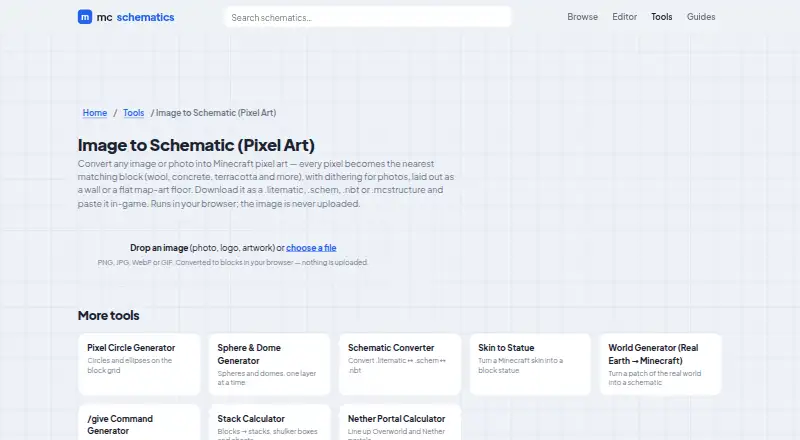
What MC Schematics Image to Schematic is
MC Schematics Image to Schematic is a free browser tool that turns an image or photo into Minecraft pixel art. It maps each pixel to the nearest matching block, then lets users arrange the result as a wall or a flat map-art floor. The tool accepts PNG, JPG, WebP and GIF images, and downloads are available as .litematic, .schem, .nbt or .mcstructure files.
For photos, users can apply dithering; it can be turned off for logos or flat artwork. Conversion happens in the browser, and the site says images are not uploaded. The maker says its browser tools are free and require no signup, and that it does not require an account or sell personal data. The project is fan-run and is not affiliated with Mojang Studios or Microsoft. Questions and feedback can be sent to [email protected]. Downloads come without warranty, and the maker advises backing up a world before pasting a build.
Who it suits
This tool suits Minecraft players who want to turn an image into a block-based build or map-art layout. It also fits users who want conversion to run in their browser without uploading the image.
What it does well
- Accepts PNG, JPG, WebP and GIF images.
- Choose a wall or flat map-art layout.
- Downloads come in four schematic formats.
- Image conversion runs in-browser without uploading the image.
What to know first
- Downloads are provided without warranty.
- The maker advises backing up a world before pasting builds.
- The maker is not affiliated with Mojang Studios or Microsoft.
Plans
| Plan | Billed and limits | Price |
|---|---|---|
| Free | Image conversion runs in browser · PNG, JPG, WebP or GIF inputs · .litematic, .schem, .nbt or .mcstructure output | Free |
As mc-schematics.com lists them, read 8 Oct 2026. The maker's own page has the final word.
Getting started
- Open the Image to Schematic page.
- Choose a PNG, JPG, WebP, or GIF image.
- Set the result layout to a wall or flat map-art floor.
- Adjust dithering for a photo, or turn it off for a logo or flat art.
- Download the result as .litematic, .schem, .nbt, or .mcstructure.
MC Schematics Image to Schematic is a browser tool for turning image files into Minecraft pixel-art schematics. It is best for builders who want to bring a logo, illustration, or photo into a Minecraft world without installing software. Its broad set of export formats and in-browser conversion are useful strengths; the maker provides no warranty for downloads.
Overview
Upload a PNG, JPG, WebP, or GIF and the tool maps each pixel to the nearest matching block. The result can be arranged as a wall or a flat map-art floor, covering two common display formats. This is a direct route from image to build layout, though mapping pixels to blocks necessarily means the output is a block-based interpretation rather than a pixel-perfect reproduction.
Photos can use dithering, while the option to turn it off suits logos and flat artwork better. Conversion runs in the browser, and the site says the image is never uploaded. That is a meaningful privacy advantage for users who prefer not to send source images to a service.
Key features
- Common image inputs: PNG, JPG, WebP, and GIF support makes it practical for many existing image files.
- Wall or floor layouts: Choose a vertical wall or flat map-art floor, depending on how the finished design should appear in the world.
- Dithering control: The photo-oriented effect can be switched off for logos and flat designs, where a cleaner treatment may be more appropriate.
- Multiple schematic exports: Downloads include .litematic, .schem, .nbt, and .mcstructure, giving builders several formats to work with.
- Browser-based privacy: Image conversion happens locally in the browser; the site says images are never uploaded. The maker also says it does not require an account or sell personal data.
The maker describes mc-schematics as fan-run and unaffiliated with Mojang Studios or Microsoft. It provides [email protected] for questions and feedback. Downloads are supplied as-is without warranty, and the maker advises backing up a world before pasting a build into it.
Pricing
The Free plan costs nothing and includes browser image conversion, PNG, JPG, WebP, and GIF inputs, and .litematic, .schem, .nbt, or .mcstructure output. The maker describes its browser tools as free and requiring no sign-up. There is no paid tier to unlock another export format, but the downloads carry no warranty.
Platforms
This is a web tool, with conversion performed in the browser. It suits people who want an image-to-schematic workflow without installing a dedicated desktop application.
Who it's for
Choose it if you want to turn an image into Minecraft block art, need a wall or map-art floor layout, or value keeping the source image in your browser. Its four output formats are useful when a single schematic format is not enough. Look elsewhere if you need a warranted download or a guarantee that an image's fine detail will survive conversion.
Pros and cons
- Pro: Four download formats make the export useful across several schematic workflows.
- Pro: Browser conversion and no-sign-up access avoid account setup and keep the image from being uploaded, according to the site.
- Pro: Wall and flat-floor layouts, plus adjustable dithering, make the conversion more adaptable to different source art.
- Con: Pixel-to-block matching translates rather than preserves an image, so intricate source material may not retain its fine detail.
- Con: Downloads are provided without warranty; the maker recommends backing up a world before using a build.
Alternatives
BlockArtLab Minecraft Image Converter is another free web option, with a basic browser converter that outputs a PNG blueprint and CSV material list; its Starter plan costs $9.99, paid once. Pick it if those outputs suit your workflow better.
Coffee & Fun Minecraft Pixel Art Generator is a free browser tool requiring no account or installation, a straightforward alternative if you want that kind of no-setup access.
Image2Pixel Minecraft Converter offers a free web plan with no signup, watermark, or limits. MC Build Tools Pixel Art Generator is also free on the web and requires no account or sign-up.
mc-pixel offers palette, dimensions, and orientation controls alongside .litematic export, so choose it when those controls matter. Minecraft Image Converter is a free web option with no sign-up or watermark and PNG and .schem exports.
Minecraft Pixel Art Generator offers a free plan with no account, paywall, or image-size limit beyond device capability. A second Minecraft Pixel Art Generator has a free plan with no limits stated. Browse the broader Minecraft Pixel Art Generators list to compare more tools.
Verdict
MC Schematics Image to Schematic is a good fit for builders who want a free, no-sign-up browser conversion with several schematic export choices and local image processing. Its main reason to choose it is the combination of private browser conversion and flexible output formats; its main reason to look elsewhere is the as-is warranty, alongside the unavoidable loss of detail when an image becomes block art.
Verdict
MC Schematics Image to Schematic converts common image formats into Minecraft pixel art and offers several schematic downloads. It is free to use without signup, but downloads carry no warranty.
Questions
Is MC Schematics Image to Schematic free?
Yes. The maker describes its browser tools as free and the Free plan is priced at $0.
Do I need to sign up?
No. The maker says the browser tools require no sign-up, and the site says it does not require an account.
Which image formats can I use?
The page accepts PNG, JPG, WebP, and GIF images.
Which formats can I download?
The listed download formats are .litematic, .schem, .nbt, and .mcstructure.
Is there a free trial?
No. The facts list no free trial.
Is the maker affiliated with Mojang Studios or Microsoft?
No. The maker describes mc-schematics as fan-run and not affiliated with Mojang Studios or Microsoft.
Facts from MC Schematics Image to Schematic's own pages
- Dithering
- The tool offers dithering for photos, which can be turned off for logos or flat art. · mc-schematics.com, 8 Oct 2026
- Free access
- The maker describes its browser tools as free and requiring no sign-up. · mc-schematics.com, 8 Oct 2026
- Input formats
- The page accepts PNG, JPG, WebP, or GIF images. · mc-schematics.com, 8 Oct 2026
- Layouts
- The generated pixel art can be laid out as a wall or a flat map-art floor. · mc-schematics.com, 8 Oct 2026
- Maker status
- The maker describes mc-schematics as fan-run and not affiliated with Mojang Studios or Microsoft. · mc-schematics.com, 8 Oct 2026
- Output formats
- The page lists .litematic, .schem, .nbt, and .mcstructure as download formats. · mc-schematics.com, 8 Oct 2026
- Privacy
- Image conversion runs in the browser and the page states that the image is never uploaded. · mc-schematics.com, 8 Oct 2026
- Privacy policy
- The site says it does not require an account and does not sell personal data. · mc-schematics.com, 8 Oct 2026
- Support
- The About page provides [email protected] for questions and feedback. · mc-schematics.com, 8 Oct 2026
- Warranty
- The maker says downloads are provided as-is without warranty and advises backing up a world before pasting a build into it. · mc-schematics.com, 8 Oct 2026
- What it does
- Converts an image or photo into Minecraft pixel art, mapping each pixel to the nearest matching block. · mc-schematics.com, 8 Oct 2026
Where MC Schematics Image to Schematic stands on Freedom251
- Minecraft Pixel Art Generators#8 of 23