Freedom251 › Minecraft Pixel Art Generators

Coffee & Fun Minecraft Pixel Art Generator
Visit Coffee & Fun Minecraft Pixel Art Generator Alternatives Pricing
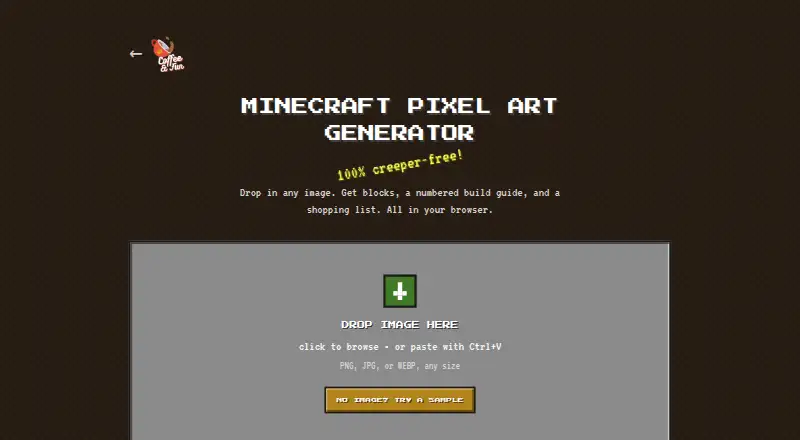
What Coffee & Fun Minecraft Pixel Art Generator is
Coffee & Fun Minecraft Pixel Art Generator converts an image into a Minecraft block build plan in a browser. It accepts PNG, JPG, and WEBP images through file selection, drag and drop, or paste, and accepts images of any size. Users can choose widths of 16, 32, 48, 64, 96, or 128 blocks; height follows the image aspect ratio, and 48 blocks is the default. Optional dithering, off by default, mixes block colors in a speckled pattern to approximate palette colors. Downloads include a pixel art PNG, a numbered build guide PNG, and a block shopping list TXT. The guide marks cells with grid coordinates, and its block numbers correspond to the list. The list gives block types, quantities, and stacks, with 64 blocks per stack. The maker says the palette works with Bedrock, Java, console, and Pocket Edition. The tool runs in the browser, images are not uploaded to a server according to its help guide, and it can work offline in an open tab after loading. It is free, with no account or installation required.
Who it suits
It suits Minecraft players who want to turn an image into a build plan. The maker recommends smaller grids for signs and banners, and larger grids for detailed or creative-mode projects.
What it does well
- Accepts PNG, JPG, and WEBP images of any size.
- Offers six artwork widths.
- Downloads a numbered guide and block shopping list.
- Works offline in an open tab after loading.
- Free without an account or installation.
What to know first
- Does not export schematic, NBT, or Litematica files.
- Does not handle transparency or animation.
- Does not split builds into sections.
Limits
The tool has no paid plan listed; its free browser tool requires no account or installation. It does not export schematic, NBT, or Litematica files, handle transparency, create map art, animate, or split builds into sections.
Plans
| Plan | Billed and limits | Price |
|---|---|---|
| Free | Free browser tool; no account or installation required | Free |
As coffeeandfun.com lists them, read 8 Oct 2026. The maker's own page has the final word.
Getting started
- Open the generator in a web browser.
- Choose an image file, drag and drop it, or paste a PNG, JPG, or WEBP image.
- Select an artwork width from 16, 32, 48, 64, 96, or 128 blocks; 48 is the default.
- Optionally turn on dithering.
- Download the pixel art PNG, numbered build guide PNG, and shopping list TXT.
Coffee & Fun Minecraft Pixel Art Generator is a free browser tool that turns an image into instructions for a Minecraft build. It best suits players prepared to place blocks by hand. Its numbered guide and shopping list make that workflow practical, but it cannot export a file to import into a world.
Overview
Upload or paste a PNG, JPG, or WEBP image, then choose a grid width. The tool produces a pixel-art PNG, a numbered build-guide PNG, and a TXT shopping list. Together, these outputs bridge a picture and a manual build: the guide identifies cells by number and grid coordinates, and the list matches those numbers to block types and quantities.
Image processing runs in the browser; Coffee & Fun says images are never uploaded to a server. Once loaded, the tool can also work offline in an open browser tab. That makes it useful for private image conversion or planning away from a reliable connection, though neither benefit removes the work of building by hand.
Key features
Grid size and color approximation
Widths are 16, 32, 48, 64, 96, or 128 blocks, with height determined by the image’s aspect ratio; 48 blocks is the default. Smaller widths suit signs, banners, and other compact builds, while larger ones preserve more detail for creative projects. The trade-off is a bigger manual job as the grid grows.
Optional dithering mixes block colors in a speckled pattern to approximate palette colors, and is off by default. It gives users another way to represent image colors, but a speckled result may not suit every design.
Build instructions and materials
The guide numbers each cell and includes grid coordinates. Matching numbers in the shopping list identify block types, quantities, and stacks, with one stack counted as 64 blocks. This is a useful pairing for estimating materials and placing blocks systematically; it is not an automated build file.
Pricing
The Free plan costs nothing. It is a browser tool with no account or installation required, and there is no free trial. That makes it a straightforward fit for occasional image-to-build planning without a subscription. The published plan description states no separate quotas or renewal terms.
Platforms
The generator runs on the web. Coffee & Fun says its palette blocks exist in Bedrock, Java, console, and Pocket Edition, so the plans are intended to work across those editions. Offline use is possible in an open browser tab after the tool has loaded.
Who it's for
Choose it if you want a free, browser-based plan for building an image with blocks yourself, especially when cell coordinates and a materials count are more useful than direct world import. It is less suitable for users who need to transfer a design as a schematic, work with transparent images, make map art, animate a design, or divide a large build into sections.
Pros and cons
- Pros: PNG, JPG, and WEBP input can be selected, dragged in, or pasted, giving several ways to start a design.
- Pros: The numbered guide and matching list connect individual cells to block types and quantities, supporting a structured manual build.
- Pros: Browser processing, the maker's no-upload claim, and offline use after loading suit users who value privacy or may lose connectivity.
- Cons: No schematic, NBT, or Litematica export means there is no direct import workflow.
- Cons: It does not handle transparency, map art, animation, or sectioned builds, ruling out several specialized workflows.
Alternatives
Minecraft Pixel Art Generators is the broader directory for comparing tools in this category.
Choose BlockArtLab Minecraft Image Converter if you want a free browser conversion with a PNG blueprint and CSV material list, or are considering its one-time Starter option at $9.99, paid once, described as having no subscription.
Image2Pixel Minecraft Converter is another free web option, described as having no signup, watermark, or limits.
MC Build Tools Pixel Art Generator is a free web option that requires no account or sign-up.
Pick MC Schematics Image to Schematic if you need schematic-style outputs: it accepts PNG, JPG, WebP, or GIF and exports .litematic, .schem, .nbt, or .mcstructure.
mc-pixel is a free web alternative with palette, dimension, and orientation controls, plus .litematic export.
Choose Minecraft Image Converter if you want PNG and .schem export from a free web tool with no sign-up or watermark.
Minecraft Pixel Art Generator is a free web alternative described as requiring no account and having no paywall, with image size limited only by the user's device.
Minecraft Pixel Art Generator is another free web option.
Verdict
Choose Coffee & Fun Minecraft Pixel Art Generator for a free, private-by-design browser workflow that turns an image into a numbered, materials-aware manual build plan. Look elsewhere if your priority is schematic import, transparency, map art, animation, or breaking a project into sections.
Verdict
This browser tool turns an image into a plan with cell coordinates and a matching block list. Its stated limits matter if you need schematic exports, transparency handling, animation, or sectioned builds.
Questions
How much does it cost?
It is free: the listed Free plan costs nothing.
Do I need an account or installation?
No. The free browser tool requires neither an account nor an installation.
Which image formats can I use?
It accepts PNG, JPG, and WEBP images of any size, by file selection, drag and drop, or paste.
What does it download?
It provides a pixel art PNG, a numbered build guide PNG, and a block shopping list TXT.
Which Minecraft editions does it support?
Coffee & Fun’s help center says its palette works with Bedrock, Java, console, and Pocket Edition.
Does it upload my image?
The help guide says images are never uploaded to a server; the tool runs in the browser.
Facts from Coffee & Fun Minecraft Pixel Art Generator's own pages
- Block list
- The shopping list shows block types, quantities, and stacks, with one stack defined as 64 blocks. · coffeeandfun.com, 8 Oct 2026
- Build guide
- The guide numbers each cell and includes grid coordinates, with block numbers matching the shopping list. · coffeeandfun.com, 8 Oct 2026
- Compatibility
- The maker's help center says the generator works with Bedrock, Java, console, and Pocket Edition because its palette blocks exist in all of them. · coffeeandfun.com, 8 Oct 2026
- Dithering
- Optional dithering mixes block colors in a speckled pattern to approximate palette colors; it is off by default. · coffeeandfun.com, 8 Oct 2026
- Downloads
- Downloads include a pixel art PNG, a numbered build guide PNG, and a block shopping list TXT. · coffeeandfun.com, 8 Oct 2026
- Founded
- 2022 · coffeeandfun.com, 28 Sept 2026
- Grid sizes
- Offers art widths of 16, 32, 48, 64, 96, and 128 blocks, with height based on the image aspect ratio; 48 blocks is the default. · coffeeandfun.com, 8 Oct 2026
- Image input
- Accepts PNG, JPG, and WEBP images of any size, by file selection, drag and drop, or paste. · coffeeandfun.com, 8 Oct 2026
- Intended users
- The maker recommends smaller grids for signs, banners, and smaller builds, and larger grids for detailed or creative-mode projects. · coffeeandfun.com, 8 Oct 2026
- Limits
- It does not export schematic, NBT, or Litematica files, handle transparency, create map art, animate, or split builds into sections. · coffeeandfun.com, 8 Oct 2026
- Maker security practices
- Coffee & Fun says it reviews changes before release, monitors dependencies for security fixes, and publishes notices when problems may have affected users. · coffeeandfun.com, 8 Oct 2026
- Offline use
- The tool works offline in an open browser tab after it has loaded. · coffeeandfun.com, 8 Oct 2026
- Privacy
- The tool runs in the browser and its help guide says images are never uploaded to a server. · coffeeandfun.com, 8 Oct 2026
- Purpose
- Converts an image into a Minecraft block build plan. · coffeeandfun.com, 8 Oct 2026
- Support
- Coffee & Fun says help requests can be sent through its support form or by email, and help-center visitors can contact a human if guides do not solve an issue. · coffeeandfun.com, 8 Oct 2026
Where Coffee & Fun Minecraft Pixel Art Generator stands on Freedom251
- Minecraft Pixel Art Generators#3 of 23