Freedom251 › Minecraft Pixel Art Generators

BlockArtLab Minecraft Image Converter
Visit BlockArtLab Minecraft Image Converter Alternatives Pricing
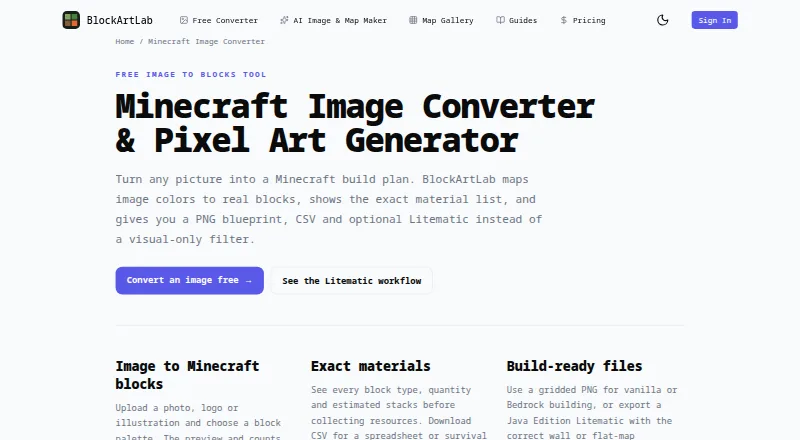
What BlockArtLab Minecraft Image Converter is
BlockArtLab Minecraft Image Converter turns an image into a Minecraft build plan by mapping its colors to blocks. The free browser converter needs no account and provides a preview, a gridded PNG blueprint, and a CSV materials list. Users can set dimensions and choose a block palette; the preview and counts use the same pixel grid as the exports. The materials view lists block types, quantities, and estimated stacks.
Exports include PNG, CSV, and an optional Litematic file. Layout choices cover vertical X/Y wall art and horizontal X/Z flat-map art. PNG and CSV are options for manual building in vanilla, Bedrock, console, and mobile, while Litematic placement requires compatible Java Edition tools. AI map generation costs 20 credits and includes image generation, conversion, materials, and all three output formats. AI maps can appear in a shared gallery, where members can unlock published maps for credits. The maker says image conversion runs in the browser and images stay private. BlockArtLab describes itself as an independent community tool, not approved by or associated with Mojang or Microsoft.
Who it suits
This tool suits Minecraft builders who want to turn an image into a block layout and materials list. Manual builders can use its PNG or CSV outputs, while users with compatible Java Edition tools can use Litematic placement.
What it does well
- Free browser conversion requires no account.
- Shows block counts and estimated material stacks.
- Exports gridded PNG and CSV.
- Supports vertical and horizontal layouts.
- Offers optional Litematic export.
What to know first
- Litematic placement requires compatible Java Edition tools.
- AI map generation costs 20 credits.
- Palette control is fixed.
Limits
Basic conversion is free and includes a block preview, PNG blueprint and exact CSV material list. AI map generation costs 20 credits per map. Litematic placement requires compatible Minecraft Java Edition tools.
Plans
| Plan | Billed and limits | Price |
|---|---|---|
| Basic image converter | Browser conversion · no account · PNG blueprint · CSV material list | Free |
| Free image converter | No account required for basic conversion · PNG/JPG/WebP input · 8–192 blocks per side · PNG, CSV and optional Litematic export | Free |
| Single | One-time purchase; no subscription · 20 credits · 1 AI map generation · PNG, CSV and Litematic export · credits do not expire | $1.99, paid once |
| Studio | One-time purchase; no subscription · 1,000 credits · up to 50 AI generations or 100 community downloads · credits do not expire | $24.99, paid once |
| Starter | One-time purchase; no subscription · 300 credits · up to 15 AI generations or 30 community downloads · credits do not expire | $9.99, paid once |
As blockartlab.com lists them, read 28 Sept 2026. The maker's own page has the final word.
Getting started
- Open the Minecraft Image Converter website.
- Upload an image in the browser.
- Choose a block palette, dimensions and wall-art or flat-map orientation.
- Review the preview, block counts and material list.
- Export a gridded PNG blueprint or CSV for manual building, or use Litematic with compatible Java Edition tools.
- For AI map generation, obtain credits; each generation costs 20 credits.
Overview
BlockArtLab Minecraft Image Converter is a browser tool that turns a picture into a Minecraft block plan. It suits builders who want to plan a pixel-art build and gather materials from an image; its no-account converter makes manual building accessible, while automated placement is limited to compatible Java Edition tools.
Choose a palette and dimensions, then use the preview and material estimates to assess the result before building. Since the preview and counts follow the export’s pixel grid, the plan and its quantities stay aligned.
Key features
- Palette and dimensions: Set the palette and image dimensions to shape the plan. Palette control is fixed, so builders who need to define a custom block set should look elsewhere.
- Material planning: The tool shows block types, quantities and estimated stacks, and provides an exact CSV material list. That makes it useful both for counting resources and for taking a build plan into a separate workflow.
- Blueprints and layouts: Export a gridded PNG blueprint or CSV, with optional Litematic output. Choose vertical X/Y wall art or horizontal X/Z flat-map art to match the intended surface.
- 3D build preview: A 3D preview adds another way to inspect the plan before committing to a build.
- AI maps and community gallery: Complete AI map generation costs 20 credits and includes image generation, block conversion, materials, and PNG, CSV and Litematic outputs. AI maps join a shared gallery, where members can unlock published maps using credits. Prompts are screened before reaching an image model, and generation stops if the moderation service is unavailable.
- Privacy: The maker says image conversion runs in the browser and keeps images private.
Pricing
Basic image converter — free: Browser conversion without an account, with a PNG blueprint and CSV material list. This is the fit for builders who want to convert their own image and build manually without buying credits.
Starter — $9.99, paid once: A one-time purchase, not a subscription, for 300 credits. That covers 15 complete AI map generations or 30 community map downloads; credits do not expire. It suits occasional use of the paid map features.
Studio — $24.99, paid once: A one-time purchase, not a subscription, for 1,000 credits. That covers 50 complete AI map generations or 100 community map downloads, with credits that do not expire. It is better suited to repeated map generation or gallery downloads than Starter, while the free plan is enough for image conversion alone.
Platforms
The converter runs on the web. Its PNG and CSV support manual building in vanilla, Bedrock, console and mobile editions. Litematic placement requires compatible Java Edition tools, so players on other editions should use the PNG or CSV rather than choosing this for automated placement.
Who it's for
Choose BlockArtLab if you want a browser-based path from an image to a block preview, blueprint and material list, or if you want paid credits for AI maps and community downloads. It is less suited to builders who need a custom palette or want Litematic placement outside compatible Java Edition tooling.
Pros and cons
- Pro: Free, no-account conversion includes both a gridded blueprint and exact CSV, so manual builders can plan without buying credits.
- Pro: Palette, dimensions and orientation controls give builders practical ways to shape a plan for a wall or flat map.
- Pro: Paid credits do not expire, and both purchases are one-time rather than recurring.
- Con: Palette control is fixed, limiting builders who need to specify their own block set.
- Con: Litematic placement depends on compatible Java Edition tooling; the PNG and CSV are the manual route for other editions.
- Con: AI generation requires 20 credits per map, so the free converter does not cover that feature.
Alternatives
For a broader comparison, see Minecraft Pixel Art Generators.
- Image2Pixel Minecraft Converter is another free web option; choose it if no signup, no watermark and no limits are the priority.
- mc-pixel is a free web converter with image upload, palette, dimensions and orientation controls, plus .litematic export; choose it if those controls and export match your needs.
- mcIVASmaker is a free Windows alternative.
- Minecraft Pixel Art Generator is a free web option with no account, paywall or image-size limit beyond the device’s capacity; choose it if those terms matter most.
- MinecraftArt is another free web alternative.
- PixelCraft is a free Windows alternative.
- Blockmatic is another free web alternative.
- ImageToPixelApp Minecraft Pixel Art Generator is another free web alternative.
Verdict
BlockArtLab is a strong choice for image-led Minecraft builders who want a free browser converter with a blueprint and exact materials list, or who want to buy non-expiring credits for AI maps. Look elsewhere if you need a custom palette or Litematic placement that works beyond compatible Java Edition tooling.
Verdict
The free converter provides a browser-based route from an image to a preview, blueprint, and materials list. Check edition compatibility before choosing Litematic; PNG and CSV are the listed manual-building options across more editions.
Questions
Is the image converter free?
Yes. Basic browser conversion is free, requires no account and includes a block preview, PNG blueprint and CSV material list.
What do the credit packs cost?
Starter is a $9.99 one-time purchase for 300 credits. Studio is a $24.99 one-time purchase for 1,000 credits; credits do not expire.
How many credits does AI map generation use?
A complete AI map generation costs 20 credits and includes image generation, block conversion, materials and PNG, CSV and Litematic outputs.
Which Minecraft editions can use the exports?
PNG and CSV support manual building in vanilla, Bedrock, console and mobile. Litematic placement requires compatible Java Edition tools.
Does the converter need an account, and where are images processed?
Basic conversion runs in the browser without an account. The maker says this keeps images private.
Is BlockArtLab affiliated with Mojang or Microsoft?
No. BlockArtLab identifies itself as an independent community tool not approved by or associated with Mojang or Microsoft.
Facts from BlockArtLab Minecraft Image Converter's own pages
- 3D preview
- The homepage exposes both 2D blueprint and 3D preview modes. · blockartlab.com, 15 Oct 2026
- Accuracy limitation
- The disclaimer says displayed colors are approximations affected by lighting, biome tint, textures, resource packs and game updates. · blockartlab.com, 15 Oct 2026
- Affiliation
- BlockArtLab identifies itself as an independent community tool not approved by or associated with Mojang or Microsoft. · blockartlab.com, 28 Sept 2026
- AI generation
- A complete AI map generation costs 20 credits and includes image generation, block conversion, materials and PNG, CSV and Litematic outputs. · blockartlab.com, 28 Sept 2026
- AI moderation
- Prompts are screened before reaching an image model, and generation is blocked when moderation is unavailable. · blockartlab.com, 15 Oct 2026
- AI workflow
- The AI map workflow turns a prompt into an image, block conversion, material list, PNG, CSV and Litematic package. · blockartlab.com, 15 Oct 2026
- API and SDKs
- The opened maker pages describe a browser interface and downloadable files but do not document a public API or SDK. · blockartlab.com, 15 Oct 2026
- Automation limitation
- The generated Litematic is a placement reference and does not automatically build on a server. · blockartlab, 15 Oct 2026
- Block palette
- Users can choose a block palette and dimensions, with preview and counts based on the same pixel grid used for export. · blockartlab.com, 28 Sept 2026
- Community demand
- A Reddit discussion shows players seeking picture-to-Litematic conversion and comparing alternatives such as Mapartcraft. · reddit.com, 15 Oct 2026
- Community download cost
- Unlocking a published community map costs 10 credits and repeat downloads are not charged again. · blockartlab.com, 15 Oct 2026
- Community maps
- AI maps are part of a shared gallery, and published maps can be unlocked by other members for credits. · blockartlab.com, 28 Sept 2026
- Compatibility limit
- The page says Litematic output is for compatible Minecraft Java Edition tooling; PNG and CSV are the manual-building options for other editions. · blockartlab.com, 28 Sept 2026
- Compatibility limitation
- Litematic compatibility depends on Minecraft, Fabric, MaLiLib and Litematica versions, which BlockArtLab does not support. · blockartlab.com, 15 Oct 2026
- CSV export
- A CSV material list is available for spreadsheets and resource planning. · blockartlab.com, 15 Oct 2026
- Documentation
- The learning center lists more than 100 guides covering conversion, materials, Litematic, map art and edition compatibility. · blockartlab.com, 15 Oct 2026
- Export formats
- It offers a gridded PNG blueprint, CSV and optional Litematic export. · blockartlab.com, 28 Sept 2026
- Free use
- Basic image conversion runs in the browser without an account and includes a block preview, PNG blueprint and exact CSV material list. · blockartlab.com, 28 Sept 2026
- Gallery sharing
- AI-generated maps can be published in a moderated community gallery and unlocked by other members. · blockartlab.com, 15 Oct 2026
- Independent example compatibility
- The GitHub example states PNG and CSV can guide manual or Bedrock building, while Litematic requires Java with the Litematica mod. · github.com, 15 Oct 2026
- Independent example dimensions
- A public GitHub example using BlockArtLab documents a 48×32 vertical wall conversion with PNG, CSV and Litematic files. · github.com, 15 Oct 2026
- Independent import guidance
- The GitHub example instructs users to place the .litematic in Litematica’s schematics folder and test orientation in a creative world. · github.com, 15 Oct 2026
- Input formats
- The converter accepts PNG, JPG and WebP images. · blockartlab.com, 15 Oct 2026
- Java and Bedrock use
- PNG and CSV can be used on Java, Bedrock, console and mobile, while Litematic is Java-oriented. · blockartlab.com, 15 Oct 2026
Where BlockArtLab Minecraft Image Converter stands on Freedom251
- Minecraft Pixel Art Generators#2 of 23