Freedom251 › Mind mapping tools
MindSpark
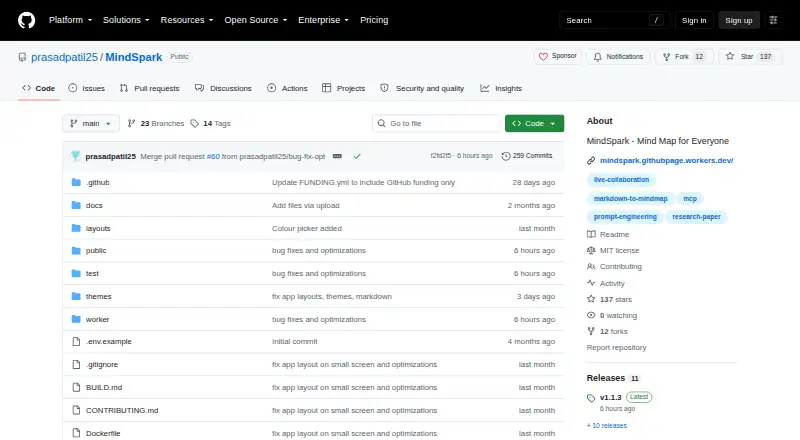
What MindSpark is
MindSpark is a free, open-source mind-mapping app for the browser that can also be self-hosted. Its editor combines an infinite canvas with keyboard-first editing, automatic layout, drag-and-drop reordering, map search, multiple layouts, and presentation mode. Users can switch between the canvas and a Markdown outline, with changes synchronized in both directions. Undo and redo are available while editing.
For research work, citation tools can fill in details from Crossref when given a DOI, and cited map nodes can be exported as a references list. For AI workflows, users can turn a branch into a prompt, estimate its token count, and run it with their own Anthropic or OpenAI API key. MindSpark imports JSON, OPML, Markdown, GitMind, and MindMeister files, and exports PNG, PDF, JSON, Markdown, Word, and Mermaid.
Maps can stay in a local self-hosted SQLite database or be saved as JSON files in a private repository. Repository-backed storage supports GitHub, Gitea, Forgejo, and GitLab. The project also describes a separate MCP server for compatible clients. MindSpark is released under the MIT license and is described as free without feature gates or usage limits.
Who it suits
MindSpark suits researchers and engineers who want to organize ideas, citations, or software work in maps and Markdown outlines. It also fits users who want to connect map branches to AI prompts with their own API key, or keep maps in a self-hosted database or private repository.
What it does well
- Maps and Markdown outlines stay synchronized in both directions.
- Citation details can be filled from Crossref using a DOI.
- Imports GitMind and MindMeister files, among other formats.
- Exports include PNG, PDF, Word, and Mermaid.
- Repository storage supports GitHub, Gitea, Forgejo, and GitLab.
- MIT-licensed and described as free without usage limits.
What to know first
- Real-time collaboration and shared links require the optional cloud worker.
- GitHub Pages sign-in does not provide OAuth or live collaboration.
- Self-hosting requires Node.js 22 or later.
Limits
The free plan is described as having no feature gates or usage limits. Real-time collaboration, editable shared links, and identity-based access controls require the optional cloud worker; GitHub Pages also lacks OAuth and live collaboration.
Plans
| Plan | Billed and limits | Price |
|---|---|---|
| Free | $0 forever · No accounts · no paywalls · no feature gates · no usage limits | Free |
As github.com lists them, read 8 Oct 2026. The maker's own page has the final word.
Getting started
- Open the MindSpark project website on GitHub.
- For self-hosting, use Node.js 22 or later and run `node server.js`.
- For browser repository storage, choose GitHub, Gitea, Forgejo, or GitLab.
- Use a GitHub fine-grained token if you want to limit access to one repository.
- Import a JSON, OPML, Markdown, GitMind, or MindMeister file, or start a map.
MindSpark is an open-source mind-mapping app that runs in a browser or on infrastructure you manage. It suits researchers and engineers who want visual planning tied to Markdown, citations, AI prompts, or a private repository. The main trade-off is deployment: collaboration features depend on an optional cloud worker, while self-hosting requires Node.js 22 or later.
Overview
MindSpark keeps maps under the user's control. Browser mode stores maps as JSON files in a private repository, with support for GitHub, Gitea, Forgejo, and GitLab; self-hosted mode uses SQLite. The project says browser mode sends tokens only to the selected Git host and places scripts and network destinations under a Content-Security-Policy. GitHub fine-grained tokens can be restricted to one repository, whereas tokens for Gitea, Forgejo, and GitLab are account-wide. That makes GitHub the more narrowly scoped option for users prioritizing repository-level access.
The MIT license and free, ungated model make MindSpark appealing for individuals and teams willing to operate their own storage or deployment. GitHub Pages is a simple static route, but it uses personal-access-token sign-in and does not provide OAuth or live collaboration.
Key features
The editor offers an infinite canvas, keyboard-first editing, automatic layout, several layout choices, drag-and-drop reordering, search, undo and redo, and presentation mode. It can therefore handle both visual organization and presenting a finished map. A Markdown outline and the canvas remain synchronized in both directions, which is valuable when a project needs a text-oriented working view as well as a diagram.
Research support goes beyond basic nodes. Entering a DOI can autofill citation information from Crossref, and cited nodes can produce a references list. Researchers can keep sources connected to ideas instead of assembling a bibliography separately.
AI tools use a bring-your-own-key model. A branch can be compiled into a prompt, its token count estimated, and the prompt run through Anthropic or OpenAI with the user's own API key. This avoids a separate MindSpark AI subscription, but puts provider credentials and usage management in the user's hands.
Import covers JSON, OPML, Markdown, GitMind, and MindMeister. Export includes PNG, PDF, JSON, Markdown or text, Word (.doc), and Mermaid, giving users practical paths to documents, diagrams, and reusable structured data. The project also describes an MCP server for Claude Desktop, Claude Code, ChatGPT, and other MCP-compatible clients.
Offline mode, real-time collaboration, editable shared links, and identity-based access controls are all part of the feature set, but collaboration-related functions require the optional cloud worker. Static hosting alone is not enough for a live shared workspace.
Pricing
The Free plan costs free, billed at $0 forever. It has no accounts, paywalls, feature gates, or usage limits, and there is no free trial because the product is free. The README describes both static deployment and Worker deployment at $0 on Cloudflare's free tier. This is an unusually permissive fit for individuals, open-source projects, and teams that can handle their own deployment. There are no paid tiers or seat charges to move up to, so organizations needing vendor-managed service or commercial support should look elsewhere.
Platforms
MindSpark is available on the web and as a self-hosted application, with API and Linux support. The self-hosted quick start requires Node.js 22 or later and runs with node server.js; SQLite is used for storage. Browser users can choose repository-backed storage instead of placing maps on an intermediate server.
Who it's for
Researchers benefit from DOI-based citations, references exports, Markdown synchronization, and broad interchange formats. Engineers and prompt designers get branch-to-prompt workflows, token estimates, Mermaid export, and MCP connectivity. It is also a strong fit for privacy-conscious users who want repository ownership or a local SQLite deployment. It is less suitable for teams seeking collaboration immediately from a static GitHub Pages deployment, since that setup lacks live collaboration and OAuth.
Pros and cons
Pros
- Free forever with no feature gates or usage limits, so the full feature set is available without tier planning.
- Repository-backed or self-hosted storage keeps maps in infrastructure the user controls.
- Two-way Markdown synchronization, Crossref citation autofill, and references export support serious research work.
- BYOK AI, MCP integration, and Mermaid export connect maps to prompt and developer workflows.
- Extensive imports and exports reduce lock-in.
Cons
- Live collaboration, shared links, and identity-based access require an additional cloud worker.
- Self-hosting requires Node.js 22 or later and operational responsibility for the server and SQLite data.
- GitHub Pages lacks OAuth and live collaboration, limiting its usefulness for shared team work.
- AI use requires users to supply and manage their own Anthropic or OpenAI keys.
- Non-GitHub hosts use account-wide tokens rather than repository-scoped tokens.
Alternatives
Readers comparing products can browse the Mind Mapping Software list for other dedicated mapping tools. SkyEmu, 3Beans, DeSmuME, dust, GB Enhanced+, melonDS, Delta, and iDroidDS are alternatives listed in other software categories.
Verdict
Choose MindSpark if you want a genuinely free mind-mapping workspace with repository ownership, synchronized Markdown, citation tooling, and user-controlled AI access. Its strongest case is for researchers and engineers comfortable with Git-based storage or self-hosting. Look elsewhere if you need turnkey, OAuth-based collaboration without configuring a cloud worker, or if you do not want to manage provider keys and deployment requirements.
Verdict
Choose MindSpark if you want a free mind-mapping app with research tools, Markdown synchronization, and repository-backed or self-hosted storage. Check the deployment requirements if you need collaboration features: they require the optional cloud worker, and GitHub Pages does not provide live collaboration.
Questions
How much does MindSpark cost?
The listed plan is Free, billed $0 forever.
Is there a free plan or trial?
MindSpark has a free plan and no free trial. The project describes the free app as having no feature gates or usage limits.
Which platforms does it support?
The listed platforms are API, Linux, self-hosted, and web. The app runs in a browser and can be self-hosted.
Is MindSpark open source?
Yes. It is released under the MIT license.
Where are maps stored?
Self-hosted mode stores maps in SQLite. Browser repository mode saves maps as JSON files in the user's private repository.
Which integrations are described?
MindSpark can use Anthropic or OpenAI with the user's own API key. A separate MCP server is described for Claude Desktop, Claude Code, ChatGPT, and other MCP-compatible clients.
Facts from MindSpark's own pages
- AI assistance
- Yes · github.com, 20 Sept 2026
- AI features
- Users can compile a map branch into a prompt, estimate tokens, and run it against Anthropic or OpenAI using their own API key. · github.com, 8 Oct 2026
- AI workflows
- Users can compile a map branch into a prompt and run it with their own Anthropic or OpenAI API key. · github.com, 8 Oct 2026
- Audience
- The maker describes MindSpark as built for researchers and engineers, with research, prompt-engineering, and software-engineering templates. · github.com, 8 Oct 2026
- Collaboration
- Real-time collaboration, editable shared links, and identity-based access controls require the optional cloud worker. · github.com, 8 Oct 2026
- Data storage
- Self-hosted mode stores maps in SQLite, while browser cloud mode saves maps as JSON files in the user's private repository. · github.com, 8 Oct 2026
- Deployment limit
- The GitHub Pages deployment uses personal access token sign-in and does not provide OAuth or live collaboration. · github.com, 8 Oct 2026
- Editing
- The editor includes an infinite canvas, keyboard-first editing, automatic layout, drag-and-drop reordering, and multiple layout options. · github.com, 8 Oct 2026
- Export formats
- PNG,PDF,JSON,Markdown/text,Word (.doc),Mermaid · github.com, 20 Sept 2026
- Free plan
- Yes · github.com, 20 Sept 2026
- Git hosts
- The app supports GitHub, Gitea, Forgejo, and GitLab for storing maps in repository-backed mode. · github.com, 8 Oct 2026
- Import and export
- MindSpark imports JSON, OPML, Markdown, GitMind, and MindMeister files and exports formats including PNG, PDF, Word, and Mermaid. · github.com, 8 Oct 2026
- Imports and exports
- MindSpark imports JSON, OPML, Markdown, GitMind, and MindMeister files, and exports formats including PNG, PDF, JSON, Markdown, Word, and Mermaid. · github.com, 8 Oct 2026
- Integrations
- The project describes a separate MCP server for connecting MindSpark with Claude Desktop, Claude Code, ChatGPT, and other MCP-compatible clients. · github.com, 8 Oct 2026
- License
- MindSpark is released under the MIT license. · github.com, 8 Oct 2026
- Markdown
- Its Markdown outline and mind-map canvas stay synchronized live in both directions. · github.com, 8 Oct 2026
- Mind mapping
- The editor provides an infinite canvas, automatic layout, multiple layouts, map search, presentation mode, and undo and redo. · github.com, 8 Oct 2026
- Offline mode
- Yes · github.com, 20 Sept 2026
- Supported platforms
- web,self_hosted · github.com, 20 Sept 2026
- Presentation mode
- Yes · github.com, 20 Sept 2026
- Pricing and limits
- The README describes the app as free with no feature gates or usage limits; the static deployment is listed at $0 and the Worker deployment at $0 on Cloudflare's free tier. · github.com, 8 Oct 2026
- Privacy
- In browser mode, maps are saved as private JSON files in the user's own repository, and the app says there is no server in between. · mindspark.githubpage.workers.dev, 8 Oct 2026
- Product
- MindSpark is an open-source mind-mapping app that stores maps locally or in a private repository owned by the user. · github.com, 8 Oct 2026
- Purpose
- MindSpark is an open-source mind-mapping app that runs in the browser and can be self-hosted. · github.com, 8 Oct 2026
Where MindSpark stands on Freedom251
- Mind mapping tools#13 of 72
- Mind Mapping Software#24 of 72
- Nintendo DS Emulators#7 of 18