Freedom251 › Nintendo 3DS Emulators
3Beans
What 3Beans is
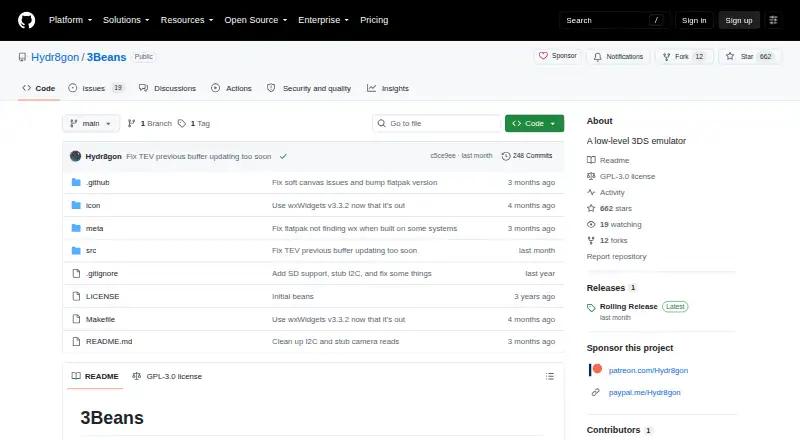
3Beans is a free, open-source Nintendo 3DS emulator that runs the system operating environment in a low-level way intended to resemble the original hardware. It can start the Home Menu and launch some games, though its maker describes the project as early and still affected by many issues. Graphics can use software or hardware GPU rendering, while the CPUs remain fully interpreted. Running the emulator requires boot9.bin, boot11.bin and nand.bin files dumped from a physical 3DS with homebrew access. Games must be encrypted cartridge dumps; users can also start without a cartridge or select one from the File menu. An optional sd.img can be any FAT-formatted image file and acts as an SD card. Controls can be viewed and changed in Settings. The repository identifies the project as GPL-3.0 licensed. Although Android and iOS are among the listed platforms, the maker provides builds for Windows, macOS and Linux. The maker invites testing, issue reports and feedback, and says pull requests will not be reviewed or accepted.
Who it suits
It suits users interested in trying a low-level 3DS emulator who have access to the required system files dumped from a physical console. The listed downloadable builds are for Windows, macOS and Linux.
What it does well
- Free and open-source under GPL-3.0.
- Supports software and hardware GPU rendering.
- Can boot the Home Menu and some games.
- Controls can be changed in Settings.
- Feedback and issue reports are invited.
What to know first
- Requires files dumped from a physical 3DS.
- Games must be encrypted cartridge dumps.
- The maker says the project still has many issues.
- Pull requests are not accepted.
Limits
The free emulator requires boot9.bin, boot11.bin, and nand.bin from a physical 3DS with homebrew access. Game use requires encrypted cartridge dumps, and the maker says the project is young and has plenty of issues.
Plans
| Plan | Billed and limits | Price |
|---|---|---|
| 3Beans | No price listed · requires files dumped from a physical 3DS with homebrew access | Free |
| Free/open-source build | Windows, macOS and Linux builds · requires user-dumped 3DS files · encrypted cartridge dumps required | Free |
As github.com lists them, read 30 Sept 2026. The maker's own page has the final word.
Getting started
- Open the 3Beans GitHub repository and releases page.
- Choose a Windows, macOS, or Linux build.
- Dump boot9.bin, boot11.bin, and nand.bin from a physical 3DS with homebrew access.
- Provide encrypted cartridge dumps for games, or boot without a cartridge.
- Optionally add a FAT-formatted sd.img to serve as an SD card.
- View or change controls in Settings.
3Beans runs the Nintendo 3DS operating system in an emulator, making it most relevant to technically comfortable users who can supply files from a homebrew-enabled console. Its desktop builds and configurable controls offer room to explore, but its early state is a poor match for reliable everyday play.
Overview
Rather than treating the 3DS as a game launcher alone, 3Beans emulates its system software as though it were running on hardware. It can reach the Home Menu and start some games, but the maker says the project is still young and has plenty of issues. That makes it a work in progress for experimentation, not a dependable choice for a particular game you expect to play.
Setup requires boot9.bin, boot11.bin, and nand.bin dumped from a physical 3DS with homebrew access. Cartridge play also requires encrypted dumps, although a cartridge is not needed to boot; users can select one through the File menu. An optional sd.img can be any FAT-formatted image and acts as the emulated SD card. These requirements make 3Beans a poor fit for readers who do not already have the console and a way to access its files.
Key features
Graphics and emulation
Software and hardware GPU rendering provide two ways to handle graphics. The CPUs remain fully interpreted, however, and the project’s current ability to launch some games does not amount to a broad compatibility promise. Users interested in low-level 3DS emulation may value the approach; those prioritizing consistent game support should look elsewhere.
Controls and project participation
Controls can be viewed and changed in Settings, giving users a way to adjust input rather than being locked into a fixed configuration. The maker invites testing, issue reports, and feedback, and links a Discord server for discussion. The project is personal, though, and pull requests will not be reviewed or accepted, so contributors should not expect to improve it by submitting code.
Pricing
3Beans is free and open source under GPL-3.0. Its sole plan, 3Beans, costs nothing. The main cost is practical rather than financial: users must provide the required files dumped from a physical 3DS with homebrew access, as well as encrypted cartridge dumps for game loading. There are no paid tiers to compare.
Platforms
The maker provides downloadable builds for Windows, macOS, and Linux, with the latest builds automatically supplied through GitHub Actions on the releases page. Although Android and iOS appear among the broader platform claims, downloadable builds are identified for desktop systems only. Choose 3Beans if one of those desktop systems suits you; it is not the choice for someone seeking an identified mobile build.
Who it's for
3Beans is best suited to emulator enthusiasts who want to explore how the 3DS system software runs and are comfortable preparing their own console files. Its rendering options, adjustable controls, and invitation to report issues give technically engaged users ways to investigate an unfinished project. It is not well suited to casual players who need predictable game compatibility or users without access to a homebrew-enabled 3DS.
Pros and cons
- Pros: It runs the 3DS system OS, can boot the Home Menu, and can launch some games, giving curious users a working starting point for system-level emulation.
- Pros: Software and hardware GPU rendering plus editable controls provide choices for graphics handling and input.
- Pros: It is free and GPL-3.0 licensed, with desktop builds for Windows, macOS, and Linux.
- Cons: The maker describes it as young and issue-prone, and the ability to start some games does not make it a reliable option for regular play.
- Cons: It requires several system files dumped from a physical 3DS with homebrew access; cartridge games also need encrypted dumps.
- Cons: CPUs are still fully interpreted, and the maker says pull requests will not be accepted, limiting the project’s appeal to would-be code contributors.
Alternatives
For a different console generation, SkyEmu is a free, open-source option with Android, iOS, Linux, macOS, web, and Windows support; its DS emulation is beta quality, so it suits readers who want broader platform reach and can accept that limitation. DeSmuME is a free, open-source Nintendo DS and DS Lite emulator for Windows, Linux, and Mac OS X, but it does not support DSi; choose it when DS or DS Lite emulation, rather than 3DS system emulation, is the goal.
GB Enhanced+ is a free, open-source GPLv2 emulator for Linux, macOS, and Windows, making it an option for readers seeking that alternative. melonDS is a free, open-source Nintendo DS emulator for the same desktop platforms and requires console BIOS and firmware dumps for some emulation; it is the closer fit for those seeking DS emulation and comfortable supplying those files.
Pilas-melonDS runs in a browser and has a free plan, so it fits readers who want a web-based alternative. nds4droid is a free, ad-free Android Nintendo DS emulator, making it a platform-specific option for Android users. dasShiny is a free option for Linux, macOS, and Windows. DSperate is a free Linux option.
For more choices, browse Nintendo 3DS Emulators or Nintendo DS Emulators.
Verdict
Choose 3Beans if you want to explore low-level Nintendo 3DS system emulation, have access to the required console dumps, and are willing to work around an unfinished project. Its free desktop builds and early Home Menu and game support make that exploration accessible. Look elsewhere if dependable game compatibility, mobile downloads, or an open path to contribute code matters more.
Verdict
3Beans offers a low-level approach to 3DS emulation, but the maker describes it as an early project with issues. Check that you have the required system files and a supported downloadable build.
Questions
Is 3Beans free?
Yes. It is listed as free and open source, and its repository identifies the license as GPL-3.0.
Which platforms are listed?
Android, iOS, Linux, macOS, and Windows are listed. The maker provides builds for Windows, macOS, and Linux.
What files do I need to use it?
You need boot9.bin, boot11.bin, and nand.bin dumped from a physical 3DS with homebrew access. Games require encrypted cartridge dumps.
Can I use it without a game cartridge?
Yes. 3Beans can boot without a cartridge, or you can choose one through the File menu.
Does it support an SD card image?
An optional sd.img can serve as an SD card, and it can be any FAT-formatted image file.
Who makes 3Beans?
The maker is identified as the author of a developer blog focused on emulation and other niche interests. The maker describes 3Beans as a personal project and says pull requests will not be reviewed or accepted.
Facts from 3Beans's own pages
- API and SDK
- The project page documents no public web API, SDK or extension interface. · github.com, 14 Oct 2026
- Cartridge boot
- Users can select a cartridge through the File menu or enable Cart Auto-Boot to skip the Home Menu. · github.com, 14 Oct 2026
- Community reaction
- A Reddit discussion about 3Beans included multiple commenters calling the project impressive or praising the work. · reddit.com, 14 Oct 2026
- Contribution limit
- The maker describes 3Beans as a personal project and says pull requests will not be reviewed or accepted. · github.com, 30 Sept 2026
- Contribution policy
- The maintainer says this is a personal project and will not review or accept pull requests, while still welcoming testing, issue reports and feedback. · github.com, 14 Oct 2026
- Controls
- Controls can be viewed and changed from the Settings menu. · github.com, 14 Oct 2026
- CPU emulation
- The CPUs are fully interpreted rather than dynamically recompiled. · github.com, 14 Oct 2026
- Current state
- It can boot the Home Menu and launch some games, but the maker says it is still young and has plenty of issues. · github.com, 30 Sept 2026
- Desktop platforms
- The project publishes builds for Windows, macOS and Linux through GitHub Actions releases. · github.com, 14 Oct 2026
- Documentation depth
- Documentation consists mainly of a README covering setup, usage, building and hardware references; no separate API or help center is provided. · github.com, 14 Oct 2026
- Downloads
- The maker lists Windows, macOS, and Linux builds, with latest builds automatically provided through GitHub Actions on the releases page. · github.com, 30 Sept 2026
- Encrypted ROM requirement
- 3Beans requires encrypted cartridge dumps, unlike many high-level emulators that usually use decrypted images. · github.com, 14 Oct 2026
- Game compatibility
- It can launch some games, but the project describes itself as young and affected by many issues. · github.com, 14 Oct 2026
- Game loading
- 3Beans requires encrypted cartridge dumps; users can boot without a cartridge or choose one through the File menu. · github.com, 30 Sept 2026
- GPU rendering
- 3Beans provides both software and hardware GPU rendering paths. · github.com, 14 Oct 2026
- Graphics
- It supports software and hardware GPU rendering. · github.com, 30 Sept 2026
- Home Menu
- The emulator can boot the 3DS Home Menu. · github.com, 14 Oct 2026
- Independent news
- GBAtemp reported the public launch and setup tutorial on 4 June 2026. · gbatemp.net, 14 Oct 2026
- Independent technical description
- BiteYourConsole describes the project as prioritizing hardware accuracy and preservation over the convenience and speed of high-level emulators. · biteyourconsole.net, 14 Oct 2026
- License
- The repository is licensed under GNU GPL-3.0. · github.com, 14 Oct 2026
- Limit: Android availability
- GBAtemp users noted that 3Beans was not available on Android at the time of discussion. · gbatemp.net, 14 Oct 2026
- Limit: Android request
- GitHub issue #19 is an open user request asking whether Android support will ever be possible. · github.com, 14 Oct 2026
- Limit: developer dumps
- GitHub issue #10 reports that a developer-unit NAND dump failed to boot with BOOTROM error 8046. · github.com, 14 Oct 2026
- Limit: digital titles
- BiteYourConsole reports that digital 3DS titles were inaccessible in the version it reviewed. · biteyourconsole.net, 14 Oct 2026
Where 3Beans stands on Freedom251
- Nintendo 3DS Emulators#1 of 14