Freedom251 › Nintendo DS Emulators
dasShiny
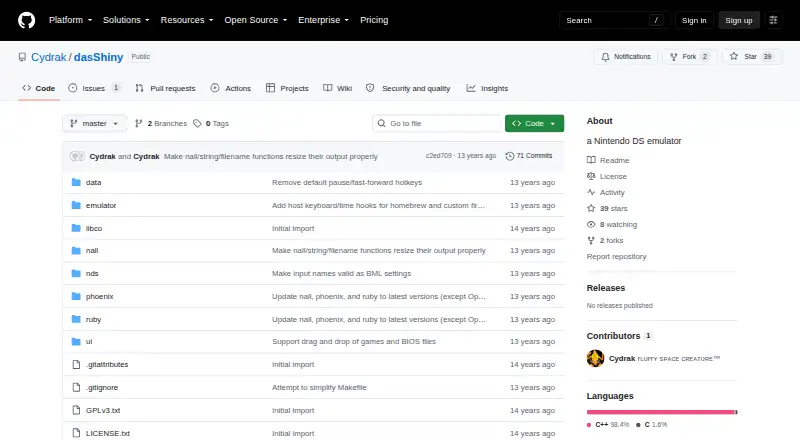
What dasShiny is
dasShiny is a Nintendo DS emulator for Windows, macOS, and Linux. Its maker describes it as highly experimental and directs it toward users familiar with cartridge folders and recent BSNES versions. The interface looks for a gamefolder.nds/manifest.xml file; with a blank manifest, it instead looks for a ROM in gamefolder.nds/rom, which can be up to 1 GB. Setup requires ARM7 and ARM9 BIOS files and firmware, and the maker advises backing up rewritable firmware. It can load homebrew ROMs, but DLDI support for FAT access is not implemented, so software that needs that access should not be expected to work. Listed examples known to run include Super Mario 64, Mario Kart DS, Animal Crossing: Wild World, and several DS demos. The maker warns that Pokémon Diamond/Pearl saves but crashes at the load menu. For 3D, the maker says a high-end Core 2, i5, or i7 is pretty much mandatory in the described context. The code is under GNU GPL version 3 or later.
Who it suits
dasShiny may suit users familiar with cartridge folders and recent BSNES versions who are comfortable with an experimental emulator and setting up BIOS and firmware files.
What it does well
- Runs on Windows, macOS, and Linux.
- Can load ROMs up to 1 GB.
- Several games and demos are listed as known to run.
- Code is distributed under GNU GPL version 3 or later.
What to know first
- The maker describes it as highly experimental.
- ARM7 and ARM9 BIOS files and firmware are required.
- DLDI support for FAT access is not implemented.
- Pokémon Diamond/Pearl crashes at the load menu.
Limits
The maker calls dasShiny highly experimental. DLDI support is absent, so homebrew requiring FAT access should not be expected to work; the maker also reports a load-menu crash for Pokémon Diamond/Pearl and says high-end hardware is pretty much mandatory for 3D.
Getting started
- Open the dasShiny project website on GitHub.
- Prepare ARM7 and ARM9 BIOS files and firmware; back up rewritable firmware.
- Arrange the game files in a gamefolder.nds directory with a manifest.xml file.
- With a blank manifest, place the ROM in gamefolder.nds/rom; ROMs can be up to 1 GB.
- On Windows, select XAudio2 for audio, as recommended by the maker.
Verdict
dasShiny has documented support for some DS games, but setup requirements and experimental status are central considerations. Software requiring FAT access is not expected to work.
Questions
What does dasShiny cost?
It is free, with a free plan.
Which operating systems does it support?
dasShiny supports Linux, macOS, and Windows.
What files are needed to get started?
Setup requires ARM7 and ARM9 BIOS files and firmware. The maker advises backing up rewritable firmware.
Can it run homebrew?
It can load ROMs from gamefolder.nds/rom, up to 1 GB. DLDI support for FAT access is not implemented, so homebrew that requires FAT access should not be expected to work.
Which games are known to run?
The maker lists Super Mario 64, Mario Kart DS, Animal Crossing: Wild World, and several DS demos. Pokémon Diamond/Pearl saves but crashes at the load menu.
What license does dasShiny use?
The code is distributed under GNU GPL version 3 or, at the user's option, any later version.
Facts from dasShiny's own pages
- Cartridge files
- A blank manifest makes the emulator look for gamefolder.nds/rom, which can be up to 1 GB. · github.com, 4 Oct 2026
- Compatibility
- The maker lists Mario Kart DS and Animal Crossing: Wild World among games known to run. · github.com, 4 Oct 2026
- Compatibility examples
- The maker lists Super Mario 64, Mario Kart DS, Animal Crossing: Wild World, and several DS demos among software known to run. · github.com, 4 Oct 2026
- Game setup
- The GUI looks for a gamefolder.nds/manifest.xml file. · github.com, 4 Oct 2026
- Homebrew limitation
- The maker says DLDI is not implemented, so software requiring FAT access should not be expected to work. · github.com, 4 Oct 2026
- Homebrew support
- The emulator can load a ROM from a gamefolder.nds/rom path, up to 1 GB, but has no DLDI support for FAT access. · github.com, 4 Oct 2026
- Intended users
- The release is aimed at people familiar with cartridge folders and recent versions of BSNES. · github.com, 4 Oct 2026
- Interface
- The GUI is described as little more than a standard ethos build and looks for gamefolder.nds/manifest.xml. · github.com, 4 Oct 2026
- Known game issue
- The maker warns that Pokémon Diamond/Pearl saves but crashes at the load menu. · github.com, 4 Oct 2026
- Known issue
- The maker warns that Pokémon Diamond/Pearl saves but crashes at the load menu. · github.com, 4 Oct 2026
- License
- The repository includes GPLv3 and license files. · github.com, 4 Oct 2026
- Performance
- The maker says a high-end Core 2, i5, or i7 is pretty much mandatory for 3D at the time described. · github.com, 4 Oct 2026
- Product
- dasShiny is a Nintendo DS emulator. · github.com, 4 Oct 2026
- Project status
- The maker describes the emulator as highly experimental. · github.com, 4 Oct 2026
- Required files
- Getting started requires ARM7 and ARM9 BIOS files and firmware. · github.com, 4 Oct 2026
- Setup
- Setup requires ARM7 BIOS, ARM9 BIOS, and firmware files, with the maker advising users to back up the rewritable firmware. · github.com, 4 Oct 2026
- Windows audio
- For Windows, the maker recommends XAudio2 over DirectSound and reports higher frame rates under load with XAudio2. · github.com, 4 Oct 2026
Where dasShiny stands on Freedom251
- Nintendo DS Emulators#5 of 18