Freedom251 › Nintendo 3DS Emulators
CitraVR
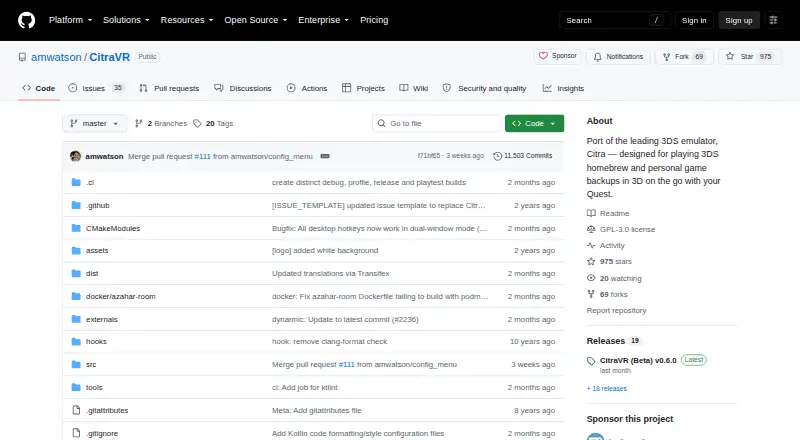
What CitraVR is
CitraVR is a free Quest app for playing 3DS homebrew and personal game backups in 3D. It supports stereoscopic rendering and mixed reality, with a large screen that users can move and resize. The listed compatible headsets are Meta Quest 2, Quest Pro, Quest 3, and Quest 3S. Players can use Touch controllers or third-party wired USB and wireless Bluetooth controllers. The app incorporates changes from Azahar and uses it as its upstream emulator project. CitraVR is an engineless OpenXR app, and its maker says it does not depend on the Meta SDK. The project is GPLv3 or later, with publicly available source code and releases on GitHub Releases. Games must be decrypted because the Azahar core no longer supports encrypted games. Release notes describe multiplayer rooms with private-room access, chat, and public-room browsing when an unofficial web API is configured. They also warn that Vulkan with asynchronous shader compilation may cause graphics artifacts or briefly incomplete visuals during compilation. For help, the maker points users to troubleshooting and known-issues pages, GitHub issues, and its Discord support channel.
Who it suits
CitraVR suits Quest owners who want to play 3DS homebrew or personal backups in 3D. Users need decrypted games and a listed compatible headset.
What it does well
- Supports stereoscopic rendering and mixed reality.
- Works with Touch and third-party USB or Bluetooth controllers.
- Compatible with Quest 2, Quest Pro, Quest 3, and Quest 3S.
- GPLv3-or-later source code is publicly available.
What to know first
- Encrypted games are not supported.
- Vulkan shader compilation may cause visual artifacts.
- Public-room browsing requires an unofficial web API configuration.
Limits
Games must be decrypted; the Azahar core no longer supports encrypted games. With Vulkan and asynchronous shader compilation, graphics artifacts or temporarily incomplete visuals may appear while shaders compile. Public-room browsing depends on configuring an unofficial web API.
Plans
| Plan | Billed and limits | Price |
|---|---|---|
| CitraVR (Beta) | GPL-licensed · Meta Quest 2, Quest Pro, Quest 3, Quest 3S | Free |
As github.com lists them, read 3 Oct 2026. The maker's own page has the final word.
Getting started
- Open the CitraVR GitHub project page.
- Get a release from the project’s GitHub Releases page.
- Use a Meta Quest 2, Quest Pro, Quest 3, or Quest 3S headset.
- Use Touch or a supported third-party wired USB or wireless Bluetooth controller.
- Use decrypted games; configure the unofficial web API if you want public-room browsing.
Verdict
CitraVR offers 3D playback features and controller options for several Quest headsets at no cost. Check game decryption requirements and the listed rendering caveat before use.
Questions
How much does CitraVR cost?
The CitraVR (Beta) plan is listed as free.
Which headsets does it support?
The listed headsets are Meta Quest 2, Quest Pro, Quest 3, and Quest 3S.
Can it play encrypted games?
No. Games must be decrypted because the Azahar core no longer supports encrypted games.
Is CitraVR open source?
Yes. The project is licensed under GPLv3 or later, and its source code is publicly available.
Does it support multiplayer?
Release notes describe Android multiplayer rooms with private rooms, chat, and public-room browsing when an unofficial web API is configured.
Where can I get releases and support?
Releases are provided through GitHub Releases. The maker points users to troubleshooting and known-issues pages, GitHub issues, and the CitraVR Discord support channel.
Facts from CitraVR's own pages
- Architecture
- CitraVR is an engineless OpenXR app, and the maker says it is independent of the Meta SDK. · github.com, 3 Oct 2026
- Controllers
- CitraVR supports Touch controllers and third-party wired USB and wireless Bluetooth controllers. · github.com, 3 Oct 2026
- Downloads
- The maker provides releases through the project’s GitHub Releases page. · github.com, 3 Oct 2026
- Emulator core
- CitraVR incorporates changes from Azahar and uses Azahar as its upstream emulator project. · github.com, 3 Oct 2026
- Game requirement
- Games must be decrypted; the release notes say encrypted games are no longer supported by the Azahar core. · github.com, 3 Oct 2026
- Headsets
- The listed compatible headsets are Meta Quest 2, Quest Pro, Quest 3, and Quest 3S. · github.com, 3 Oct 2026
- License and source
- The project is GPLv3 or later, and its source code is publicly available. · github.com, 3 Oct 2026
- Multiplayer
- The release notes describe Android multiplayer rooms with private rooms, chat, and public-room browsing when an unofficial web API is configured. · github.com, 3 Oct 2026
- Rendering
- The app supports stereoscopic rendering, mixed reality, and a large movable and resizable screen. · github.com, 3 Oct 2026
- Rendering caveat
- The release notes warn that Vulkan with asynchronous shader compilation may cause graphics artifacts or briefly show incomplete graphics while shaders compile. · github.com, 3 Oct 2026
- Support
- The maker directs users to troubleshooting and known-issues pages, GitHub issues, and the CitraVR Discord support channel. · github.com, 3 Oct 2026
- What it does
- CitraVR is a Quest app for playing 3DS homebrew and personal game backups in 3D. · github.com, 3 Oct 2026
Where CitraVR stands on Freedom251
- Nintendo 3DS Emulators#7 of 14