Freedom251 › Nintendo 3DS Emulators
Mandarine-Neo
What Mandarine-Neo is
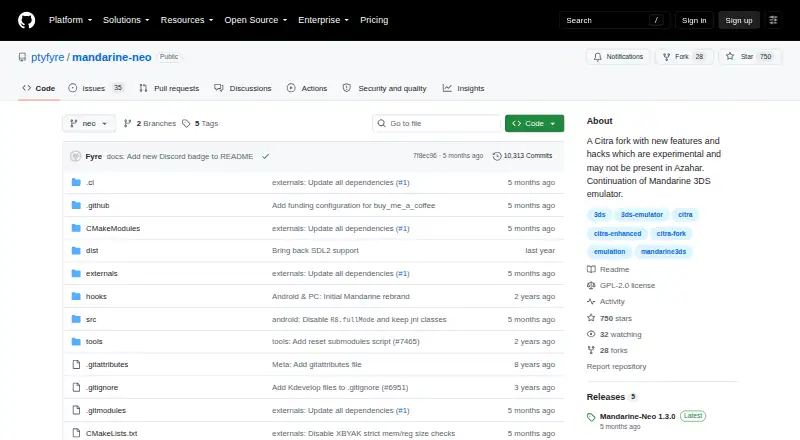
Mandarine-Neo is a free 3DS emulator for Android, Linux, macOS, and Windows. The project describes it as a continuation of the Mandarine 3DS emulator and a Citra fork with experimental features and hacks that may not be present in Azahar. Its README recommends Azahar for most users, while presenting Mandarine-Neo as an alternative for those who want its exclusive features or hacks.
Release notes describe Android options such as importing GPU drivers, customizing shortcut names and icons, tracking play time, and configuring FPS overlays. They also list automatic resolution scaling on Android. Desktop notes include Vulkan SPIR-V optimization, small-screen positioning, shortcuts, favorites, play-time tracking, Discord RPC, and a setting to disable the right-eye performance hack. Graphics upscaling is supported. The project labels its new features and hacks experimental. The Releases page lists version 1.3.0 as the latest release and describes it as a deliberately minimal release intended to gather feedback about the project’s direction.
Recommended desktop requirements include a 64-bit operating system, an x86-64 CPU, OpenGL 4.3 or Vulkan 1.1 support, and 2 GB RAM, with 4 GB recommended. Android recommendations include Android 9.0 or later, a Snapdragon 835 or better, OpenGL ES 3.2 or Vulkan 1.1 support, and 2 GB RAM, with 4 GB recommended. The repository identifies the license as GPL-2.0.
Who it suits
Mandarine-Neo suits 3DS emulator users who want to explore its experimental features and hacks, including Android and desktop options. The project recommends Azahar for most people, so this is an alternative for users specifically seeking Mandarine-Neo’s additions.
What it does well
- Free to use on Android, Linux, macOS, and Windows.
- Android release notes include GPU driver importing and resolution scaling.
- Desktop notes list shortcuts, favorites, play-time tracking, and Discord RPC.
- Graphics upscaling is supported.
- Repository license is GPL-2.0.
What to know first
- The project describes its new features and hacks as experimental.
- The latest listed release is described as minimal and intended to gather feedback.
- Recommended desktop and Android requirements include specific graphics support and hardware.
Getting started
- Open the Mandarine-Neo repository.
- Go to the repository’s Releases section.
- Download the release for your operating system.
- For Windows, consider the README’s recommended MSYS2 release, which does not require the Microsoft Visual C++ runtime.
- Check that your device meets the recommended requirements for its platform.
Verdict
Pick Mandarine-Neo if you want a free 3DS emulator with its experimental features and hacks across Android or desktop platforms. The project recommends Azahar for most people, so users without a specific interest in Mandarine-Neo’s additions may prefer that recommendation.
Questions
Does Mandarine-Neo cost anything?
It is free and has a free plan. No free trial is listed.
Which platforms are supported?
The listed platforms are Android, Linux, macOS, and Windows.
Where can I download it?
The README directs users to the repository’s Releases section to download a release for their operating system.
What operating system and hardware does it recommend?
Desktop recommendations include Windows 10 64-bit, macOS Ventura, or modern 64-bit Linux; an x86-64 CPU; OpenGL 4.3 or Vulkan 1.1 support; and 2 GB RAM, with 4 GB recommended. Android recommendations include Android 9.0 or later, Snapdragon 835 or better, OpenGL ES 3.2 or Vulkan 1.1 support, and 2 GB RAM, with 4 GB recommended.
Is Mandarine-Neo open source?
The repository identifies its license as GPL-2.0.
What is the latest listed release?
The Releases page lists Mandarine-Neo 1.3.0 as the latest release and describes it as a minimal release intended to gather feedback about the project’s direction.
Facts from Mandarine-Neo's own pages
- Android features
- Release notes list Android features including GPU driver importing, customizable shortcut names and icons, game play-time tracking, and configurable FPS overlay options. · github.com, 7 Oct 2026
- Android requirements
- Recommended Android requirements include Android 9.0+, a Snapdragon 835 or better, OpenGL ES 3.2 or Vulkan 1.1 support, and 2 GB RAM (4 GB recommended). · github.com, 7 Oct 2026
- Audience
- The README recommends Azahar for most people and presents Mandarine-Neo as an alternative for users seeking exclusive features or hacks. · github.com, 7 Oct 2026
- Desktop features
- Release notes list a small-screen-position feature and a setting to disable the right-eye performance hack. · github.com, 7 Oct 2026
- Desktop requirements
- Recommended desktop requirements include Windows 10 64-bit, macOS Ventura, or modern 64-bit Linux; an x86-64 CPU, OpenGL 4.3 or Vulkan 1.1 support, and 2 GB RAM (4 GB recommended). · github.com, 7 Oct 2026
- Distribution
- The README directs users to download the release for their operating system from the repository’s Releases section. · github.com, 7 Oct 2026
- Download
- The README directs users to download the release for their operating system from the repository’s Releases section. · github.com, 7 Oct 2026
- Experimental status
- The project says its new features and hacks are experimental. · github.com, 7 Oct 2026
- Graphics features
- The release notes list Vulkan SPIR-V optimization on desktop and an automatic resolution scale option on Android. · github.com, 7 Oct 2026
- Intended users
- The README recommends Azahar for most people and presents Mandarine-Neo as an alternative for people seeking exclusive features and hacks. · github.com, 7 Oct 2026
- License
- The repository identifies its license as GPL-2.0. · github.com, 7 Oct 2026
- Multiplayer
- A previous release says Android multiplayer was a work in progress at that time. · github.com, 7 Oct 2026
- PC features
- The Mandarine 1.0 release notes list desktop shortcuts, favorites, play-time tracking, and Discord RPC. · github.com, 7 Oct 2026
- Product
- Mandarine-Neo is a Citra fork with experimental features and hacks that may not be present in Azahar. · github.com, 7 Oct 2026
- Project history
- The project describes itself as a continuation of the Mandarine 3DS emulator. · github.com, 7 Oct 2026
- Recent release
- The Releases page lists Mandarine-Neo 1.3.0 as the latest release and says it was intentionally minimal to gather feedback about the project’s direction. · github.com, 7 Oct 2026
- Support and funding
- The README points users to the repository’s Releases section for downloads and links to a Buy Me a Coffee page for donations. · github.com, 7 Oct 2026
- Support and maturity
- The latest listed release says it was intentionally minimal and was meant to restart the project after almost a year while gathering feedback. · github.com, 7 Oct 2026
- Windows
- For Windows, the README recommends MSYS2 because it does not require the Microsoft Visual C++ runtime. · github.com, 7 Oct 2026
- Windows note
- The README recommends the MSYS2 Windows release because it does not require the Microsoft Visual C++ runtime. · github.com, 7 Oct 2026
Where Mandarine-Neo stands on Freedom251
- Nintendo 3DS Emulators#9 of 14