Freedom251 › File Manager Software

Midnight Commander
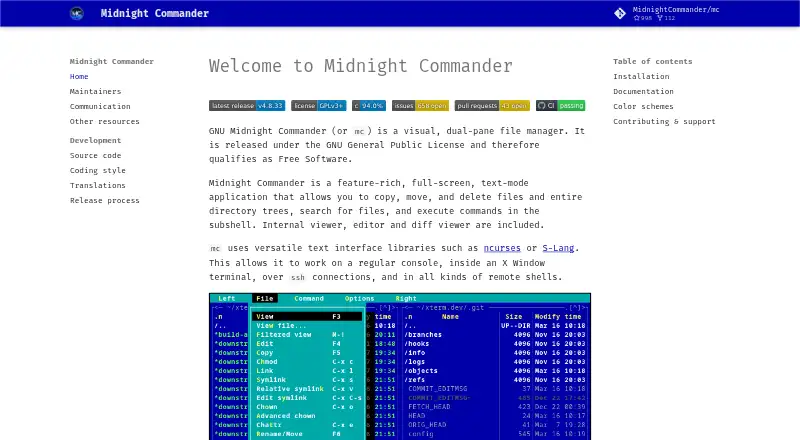
What Midnight Commander is
Midnight Commander is a file manager with a full-screen text interface and two panes for working with files and directory trees. It can copy, move, and delete files, search for them, and run commands in a subshell. An internal viewer, editor, and diff viewer provide ways to inspect and edit files within the program. It works in a console or X Window terminal, over SSH, and in remote shells. Its virtual filesystem supports FTP and shell connections; SFTP support requires compilation with sftpfs. A tar filesystem gives read-only access to tar and compressed tar archives, and scripts can add virtual filesystem features and file types. Midnight Commander is free under the GNU General Public License. It supports Linux and macOS, with installation options listed for several system package managers and operating systems. Users can also customize its appearance with included or user-created skins. Documentation includes context-sensitive F1 help and manual pages. The project uses mailing lists, GitHub Discussions, and an issue tracker for communication, but volunteer maintainers do not promise commercial-grade support, service-level agreements, or warranties.
Who it suits
It suits people who prefer a text-based, dual-pane file manager and need file operations, built-in inspection tools, or remote filesystem access. Users seeking commercial-grade support or warranties should note that the project does not provide them.
What it does well
- Dual-pane interface for file management
- Includes an internal viewer, editor, and diff viewer
- Supports FTP and shell connections
- Read-only access to tar archives
- Free under the GNU General Public License
What to know first
- SFTP requires compilation with sftpfs
- Tar archive access is read-only
- No commercial-grade support, service-level agreements, or warranties
Limits
The plan is free. Tar and compressed tar archives are available through a read-only filesystem; SFTP depends on compiling with sftpfs. Volunteer maintainers do not provide an entitlement to commercial-grade support, service-level agreements, or warranties.
Plans
| Plan | Billed and limits | Price |
|---|---|---|
| GNU Midnight Commander | GNU General Public License · free software | Free |
As midnight-commander.org lists them, read 7 Oct 2026. The maker's own page has the final word.
Getting started
- Visit the Midnight Commander website.
- Install through a system package manager; the project lists options for Debian/Ubuntu, Fedora/Red Hat, FreeBSD/OpenBSD, and macOS.
- Open Midnight Commander in a regular console or an X Window terminal.
- Use context-sensitive F1 help or the manual pages for guidance.
Overview
Midnight Commander is a full-screen file manager that brings two-pane navigation to text-mode terminals. It suits people who prefer console work and need file operations alongside viewing, editing, and remote access. The broad toolkit is compelling at no cost, but the text interface and build-dependent SFTP support make it a poor fit for users who need a graphical workflow or guaranteed SFTP.
Key features
Its dual-pane layout keeps two locations in view while you copy, move, or delete files and directory trees, search for files, and batch-rename items. That arrangement is well suited to deliberate work between folders; users seeking a conventional desktop file browser should choose something else.
An internal viewer, editor, and diff viewer cover common inspection and editing tasks without leaving the manager. A subshell for running commands makes it useful in command-line workflows, though the interface remains text-based even inside an X Window terminal.
Midnight Commander runs in a regular console, an X Window terminal, over SSH, and in remote shells. Its virtual filesystem supports FTP and shell connections. SFTP is available only in builds compiled with sftpfs, so users who depend on SFTP should confirm that support in their build before making it central to a workflow.
The tar filesystem opens tar and compressed tar archives in read-only mode. That is useful for inspecting archive contents, but not for editing them. Scripts can extend virtual filesystems and file types, and skins let users change the program's appearance within its text interface.
Pricing
GNU Midnight Commander costs nothing under the GNU General Public License. The free plan includes the file manager and its built-in tools without a paid tier or trial period. It is a straightforward choice for individuals and teams comfortable with volunteer-maintained software; there is no commercial support entitlement, service-level agreement, or warranty.
Platforms
Midnight Commander supports Linux and macOS, and is also categorized as self-hosted. The project recommends installation through system package managers and gives installation options for Debian and Ubuntu, Fedora and Red Hat, FreeBSD and OpenBSD, and macOS. Context-sensitive F1 help and manual pages are its primary documentation; project communication runs mainly through mailing lists, with GitHub Discussions and an issue tracker also available.
Who it's for
Choose Midnight Commander if you work in terminals, including remote shells, and want file operations plus basic viewing and editing in one place. Its dual panes and command access suit shell-oriented file work particularly well. It is less suitable if you need a graphical file manager, write access to tar archives, or assured SFTP support across builds. The project was founded around 1994 by Miguel de Icaza and is maintained by a team.
Pros and cons
- Pros: The dual-pane layout, batch rename, and file operations support focused work across directories.
- Pros: Built-in viewing, editing, and diff tools reduce the need to leave the manager for routine file tasks.
- Pros: Console, SSH, and remote-shell access make it practical for terminal-based environments.
- Cons: SFTP depends on compilation with sftpfs, so it is not assured in every build.
- Cons: Tar and compressed tar archives are read-only, limiting archive work to inspection.
- Cons: Volunteer support does not include commercial-grade support, SLAs, or warranties.
Alternatives
For a graphical Linux and Windows file manager with a free, open-source plan, consider Dolphin. Windows users focused on transfers across SFTP, FTP, FTPS, SCP, WebDAV, and S3 can choose free, open-source WinSCP. Filestash has a free Hobby plan for up to three users and a Self Served plan at $50 a month, billed monthly.
Linux users comparing free file managers can also consider Krusader, GNOME Commander, or Thunar. TagSpaces offers a freemium option across desktop, mobile, web, and self-hosted platforms. For Windows, Altap Salamander offers a freeware plan for commercial and non-commercial use with all plugins, plus 32-bit and 64-bit versions.
Browse more options in File Manager Software or Terminal File Managers.
Verdict
Midnight Commander is a strong free choice for terminal users who want dual-pane file work, built-in inspection and editing, and access from remote shells. Its main advantage is how much it brings into a console workflow without a price; look elsewhere if you need a graphical interface, editable tar archives, guaranteed SFTP, or commercial support.
Verdict
Midnight Commander combines file management and built-in viewing and editing tools in a text interface, with remote access options. Its read-only tar access and conditional SFTP support are worth considering alongside its volunteer support model.
Questions
How much does Midnight Commander cost?
The GNU Midnight Commander plan is free, and the project describes the software as free under the GNU General Public License.
Which platforms does it support?
The listed platforms are Linux and macOS.
Can it access remote filesystems?
Its virtual filesystem supports FTP and shell connections. SFTP is supported when compiled with sftpfs.
Can it open archives?
Its tar filesystem provides read-only access to tar and compressed tar archives.
Where can I get help or contact the project?
Context-sensitive F1 help and manual pages are its primary official documentation. Project communication is mainly through mailing lists, with GitHub Discussions and an issue tracker also available.
Facts from Midnight Commander's own pages
- Archives
- Its tar filesystem provides read-only access to tar and compressed tar archives. · source.midnight-commander.org, 7 Oct 2026
- Archive support
- Yes · midnight-commander.org, 20 Sept 2026
- Batch rename
- Yes · midnight-commander.org, 20 Sept 2026
- Built-in tools
- It includes an internal file viewer, editor, and diff viewer. · midnight-commander.org, 7 Oct 2026
- Documentation
- The project identifies context-sensitive F1 help and manual pages as its primary official documentation. · midnight-commander.org, 7 Oct 2026
- Dual-pane layout
- Yes · midnight-commander.org, 20 Sept 2026
- Extensibility
- An external virtual filesystem can add features and file types through scripts. · source.midnight-commander.org, 7 Oct 2026
- File manager
- Midnight Commander is a visual, dual-pane, full-screen text-mode file manager. · midnight-commander.org, 7 Oct 2026
- File operations
- It can copy, move, and delete files and directory trees, search for files, and execute commands in a subshell. · midnight-commander.org, 7 Oct 2026
- Free plan
- Yes · midnight-commander.org, 20 Sept 2026
- Installation
- The project recommends system package managers and lists Debian/Ubuntu, Fedora/Red Hat, FreeBSD/OpenBSD, and macOS installation options. · midnight-commander.org, 7 Oct 2026
- License
- The project says it is released under the GNU General Public License and qualifies as Free Software. · midnight-commander.org, 7 Oct 2026
- Supported platforms
- linux,macos · midnight-commander.org, 20 Sept 2026
- Project history
- The maintainers page says the project was founded around 1994 by Miguel de Icaza and is maintained by a team. · midnight-commander.org, 7 Oct 2026
- Remote filesystems
- Its virtual filesystem supports FTP and shell connections, and supports SFTP when compiled with sftpfs. · source.midnight-commander.org, 7 Oct 2026
- Support
- Project communication is primarily through mailing lists, with GitHub Discussions and an issue tracker also available. · midnight-commander.org, 7 Oct 2026
- Support limits
- The project says volunteer maintainers do not provide an entitlement to commercial-grade support, service-level agreements, or warranties. · midnight-commander.org, 7 Oct 2026
- Terminal access
- It works in a regular console, an X Window terminal, over SSH, and in remote shells. · midnight-commander.org, 7 Oct 2026
- Themes
- Midnight Commander supports skins included with the distribution or created by users. · midnight-commander.org, 7 Oct 2026
Where Midnight Commander stands on Freedom251
- File Manager Software#6 of 100
- Terminal File Managers#12 of 29
- File managers#15 of 29