Freedom251 › File Manager Software

Filestash
by Filestash
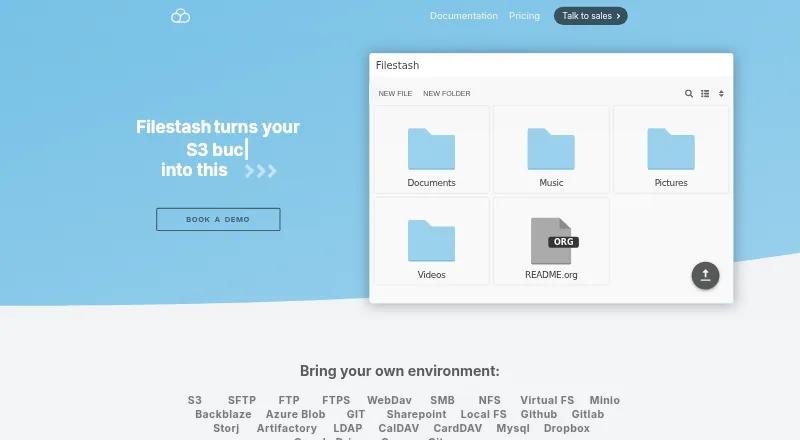
What Filestash is
Filestash brings file browsing, organization, and sharing across connected storage into a browser interface. It is an open source platform for file sharing, document management, managed file transfer, and archiving. Connections include FTP, WebDAV, SFTP, S3, SMB, Git, SharePoint, Google Drive, Dropbox, and Storj. Storage can also be exposed through SFTP, MCP, FTP, WebDAV, S3, or AS2 gateways. Its workflow engine links actions triggered by events and supports plugins. Authentication options include LDAP, SAML, and OIDC, with role-based access controls. The product lists audit logs, security plugins, and AI tools for semantic search, smart folders, and OCR, including local models via Ollama. Filestash supports web, Windows, macOS, Linux, iOS, and Android. The installation guide calls for a Linux server with Docker, Docker Compose, and curl. Hobby supports up to three users, while Self Served costs $50 a month and includes three seats. Enterprise Solutions costs $290 a month and includes unlimited users.
Who it suits
Filestash may suit individuals looking to connect several storage services through one interface, as well as companies seeking self-served or enterprise options. Self-hosting requires a Linux server with Docker, Docker Compose, and curl.
What it does well
- Connects to a range of storage services.
- Offers SFTP, MCP, FTP, WebDAV, S3, and AS2 gateways.
- Includes LDAP, SAML, and OIDC authentication options.
- Lists workflow automation and plugin support.
- Supports web, desktop, and mobile platforms.
What to know first
- Self-hosting requires a Linux server with Docker, Docker Compose, and curl.
- Self Served includes three seats.
- Self Served costs $50 a month.
- Enterprise Solutions costs $290 a month.
Limits
Hobby supports up to three users. Self Served costs $50 a month and includes three seats; Enterprise Solutions costs $290 a month and includes unlimited users.
Plans
| Plan | Billed and limits | Price |
|---|---|---|
| Self Served | From $50 / month · Cloud or self-hosted · commercial license · SSO (SAML, OIDC, LDAP) · RBAC · 3 seats · single node | $50 a month |
| Enterprise Solutions | From $290 / month · Unlimited users · audit and compliance · white-labeling · 24/7 support · high availability | $290 a month |
| Pro | — | On request |
| Hobby | Self-hosted · AGPL v3 · up to 3 users | Free |
As filestash.app lists them, read 14 Oct 2026. The maker's own page has the final word.
Getting started
- Visit the Filestash website.
- Choose the Hobby, Self Served, or Enterprise Solutions tier.
- For installation, prepare a Linux server with Docker, Docker Compose, and curl.
- Connect the storage services you want to browse or share.
- Use Filestash through the web, Windows, macOS, Linux, iOS, or Android platform.
Filestash is a browser-based file platform that connects existing storage and can expose it to other tools through protocol gateways. It suits teams that need shared access across different systems, with controls and automation layered on top. Its breadth is compelling, but the three-user Hobby limit makes the paid tiers the practical route for most business use.
Overview
Rather than replace storage, Filestash provides a common interface for browsing, organizing, and sharing files across services such as S3, SharePoint, Google Drive, and Dropbox, alongside FTP, WebDAV, SFTP, SMB, Git, and Storj. That makes it useful when files are spread across systems, though organizations seeking only a basic transfer client may not need its wider scope.
It also reaches beyond a browser interface: connected storage can be made available through gateways, and event-driven workflows can chain actions. Self-hosting gives organizations another deployment option, but it requires a Linux server with Docker, Docker Compose, and curl.
Key features
Connections, sharing, and gateways
Users can work across connected storage in one interface, and the supported protocols include SFTP, FTP, FTPS, WebDAV, SMB, S3, NFS, MCP, and AS2. Filestash can expose storage through SFTP, MCP, FTP, WebDAV, S3, or AS2 gateways. Folder synchronization, SSH key authentication, and remote file editing add practical file-management options. This combination is a strong fit for teams that need one access layer for varied systems; it is more than a narrow-purpose client requires.
Workflow and control
The workflow engine chains actions in response to events and can be extended with plugins; scripting is also supported. Role-based access control and configurable authorization let organizations define who can do what and where. LDAP, SAML, and OIDC SSO integrations are listed, while the plugin catalog includes audit logs, FIPS-compliant ciphers, activity detection, IP blocking, and ClamAV scanning.
The maker describes audit logs as immutable, tamper-proof, traceable, timestamped, and non-repudiable, and says they support GDPR compliance. AI options include semantic search, smart folders, and OCR, with local models supported through Ollama. These capabilities broaden the platform’s appeal to teams with governance or discovery needs, though the strongest controls sit in the paid tiers.
Deployment and support
The installation guide says 128 MB of RAM and one CPU core will suffice unless the deployment handles intensive video transcoding or thousands of simultaneous users. That modest baseline is useful for smaller deployments, but self-hosting still calls for Linux and Docker administration. Support services include technical help, security patches before public disclosure, deployment and hardening assistance, plugins, and consulting.
Pricing
Filestash uses a freemium model, with a Hobby tier for up to three users and paid monthly subscriptions for company plans. Hobby is the clearest fit for individuals or a small group; its user cap rules it out for larger teams.
- Hobby: Price not listed; up to 3 users. A small-team option, but the seat ceiling is restrictive for growing organizations.
- Self Served: $50 a month, billed monthly. Includes 3 seats, cloud or self-hosted deployment, a commercial license, SSO (SAML, OIDC, LDAP) plus RBAC, and a single-node deployment. It suits a small business needing identity controls and a choice of deployment, but the included seats and single node limit its fit for larger or highly available operations.
- Enterprise Solutions: $290 a month, billed monthly. Includes unlimited users, audit and compliance, whitelabeling, 24/7 support, and high availability. It is the relevant tier for organizations needing scale and operational resilience; smaller teams may not need those provisions.
- Pro: Price not listed.
The free plan and free trial offer ways to start without a paid subscription, while monthly billing avoids a longer stated commitment. Self Served costs less but limits seats and deployment to a single node; Enterprise adds unlimited users and high availability. The Hobby cap is three users, so it is not a substitute for those business capabilities at scale.
Platforms
Filestash supports web, Windows, macOS, Linux, iOS, and Android, and also lists API and self-hosted availability. The platform range accommodates desktop and mobile access, while the Linux-and-Docker installation requirement applies to self-hosted deployments.
Who it's for
Filestash is best suited to organizations that want a shared browser interface across multiple storage systems, with gateways, workflow automation, and access controls in the same platform. Its self-hosted option and low stated baseline resource needs can suit teams with Linux and Docker capacity. Individuals and small groups can start with Hobby, but teams over three users need another tier. A single-node Self Served deployment is less suited to organizations that require high availability.
Pros and cons
- Pro: Broad storage connections and protocol gateways can unify access without replacing existing systems.
- Pro: Workflow automation, configurable RBAC, SSO integrations, and security plugins cover needs beyond routine file transfer.
- Pro: The stated modest server baseline makes self-hosting plausible for smaller deployments.
- Con: Hobby supports only up to three users, limiting its usefulness for growing teams.
- Con: Self Served includes three seats and a single-node deployment, so larger teams or those needing high availability must consider Enterprise.
- Con: Self-hosting requires a Linux server and Docker tooling, adding operational work compared with using a standalone client.
Alternatives
For a narrower transfer-client choice, WinSCP is a free, open-source Windows client with SFTP, FTP, FTPS, SCP, WebDAV, and S3 support. FileZilla Client is a free Linux, macOS, and Windows client for FTP, FTPS, and SFTP. Choose either when those transfer protocols and a client are enough, rather than Filestash’s broader browser-based storage and workflow platform.
CrossFTP is a freemium client for Linux, macOS, and Windows. ExpanDrive offers a free forever personal plan covering up to 10 users or devices per year, all 15 cloud services and protocols, and community support; it is a fit when those stated limits meet the need. Cyberduck is a freemium option for macOS and Windows, while lftp is free software for Linux. Xftp is a freemium Windows choice with a free license limited to personal, home, and educational non-commercial use. Core FTP is a freemium Windows option with listed single-user plans.
Readers comparing categories can also browse SFTP Client Software or File Manager Software.
Verdict
Choose Filestash if your organization needs to bring varied storage systems behind one interface and values gateways, workflow automation, and access control in the same platform. Its strongest case is breadth without forcing a storage migration. Look elsewhere if all you need is a focused transfer client, or if a three-seat plan or single-node deployment cannot support your team.
Verdict
Filestash combines storage connections, sharing, gateways, and workflow tools in a browser-based platform. The Hobby tier supports up to three users; paid subscriptions have listed monthly prices.
Questions
Is Filestash open source?
Yes. Filestash describes itself as an open source platform.
Does Filestash have a free plan?
Yes. The Hobby tier is available, and it supports up to three users.
How much do the paid plans cost?
Self Served costs $50 a month and Enterprise Solutions costs $290 a month. Both are monthly subscriptions.
Which platforms does Filestash support?
Filestash lists web, Windows, macOS, Linux, iOS, and Android, as well as self-hosted and API access.
What storage services can Filestash connect to?
It connects to FTP, WebDAV, SFTP, S3, SMB, Git, SharePoint, Google Drive, Dropbox, and Storj.
What does the Enterprise Solutions plan include?
The plan includes unlimited users, audit and compliance, whitelabeling, 24/7 support, and high availability.
Facts from Filestash's own pages
- Access control
- The product supports access controls including RBAC and says authorization can be tailored to control who can do what and where. · filestash.app, 28 Sept 2026
- AI
- The site lists AI features for semantic search, smart folders, and OCR, including support for local models via Ollama. · filestash.app, 28 Sept 2026
- API
- The HTTP API documents session-token creation plus endpoints for listing, uploading, downloading, zipping, renaming, deleting, creating directories and creating empty files. · filestash.app, 14 Oct 2026
- Audit and compliance
- The site describes audit logs as immutable, tamper proof, traceable, timestamped, and non-repudiable, and says they support GDPR compliance. · filestash.app, 28 Sept 2026
- Authentication
- The site lists corporate SSO integrations for LDAP, SAML, and OIDC. · filestash.app, 28 Sept 2026
- Authentication integrations
- Available authentication methods include SAML, OIDC, LDAP, MFA, database authentication, signed URLs, proxy authentication and QR-code access, with vendors such as Okta, Auth0, Keycloak, AWS Cognito and Azure listed. · filestash.app, 14 Oct 2026
- Community activity
- The GitHub repository showed about 14.8 thousand stars, 1 thousand forks and more than 2,500 commits when opened. · github.com, 14 Oct 2026
- Company/maintainer
- The public project identifies Mickael Kerjean as its maintainer and original author. · github.com, 14 Oct 2026
- Core features
- The feature matrix includes API access, an MCP gateway, resumable TUS uploads, workflows, image and video viewers/transcoding, tagging, file and code editors, shared links, network-drive mounting and collaboration permissions. · filestash.app, 14 Oct 2026
- Deployment
- The installation guide says Filestash can be installed using its official Docker image and requires a Linux server with Docker, Docker Compose, and curl. · filestash.app, 28 Sept 2026
- Deployment options
- Getting-started documentation offers self-hosting, AWS Marketplace deployment with support and an online demo. · filestash.app, 14 Oct 2026
- Documentation depth
- Documentation covers installation and upgrades, storage, authentication, authorization, APIs, gateways, plugins, configuration, versioning and hardening. · filestash.app, 14 Oct 2026
- Extensibility
- Filestash uses a plugin architecture covering storage, authentication, authorization, viewers, editors, transcoding, security and themes. · downloads.filestash.app, 14 Oct 2026
- File-format support
- The installation guide says plugins add support for about 140 niche file formats. · filestash.app, 14 Oct 2026
- File sharing
- The site says users can browse, organize, and share files across storage solutions through one interface. · filestash.app, 28 Sept 2026
- Free plan
- Yes · filestash.app, 20 Sept 2026
- Gateways
- Gateways can expose connected storage through SFTP, S3, FTP, SMB, WebDAV, MCP and AS2 protocols. · filestash.app, 14 Oct 2026
- Headquarters
- West Ryde, New South Wales, Australia · filestash.app, 28 Sept 2026
- Intended users
- The site presents Hobby for individuals and separate Self Served and Enterprise Solutions tiers for companies. · filestash.app, 28 Sept 2026
- Licence
- The public repository is licensed under GNU AGPL version 3.0. · github.com, 14 Oct 2026
- Limit: collaboration scope
- An independent technical review says Filestash connects to existing storage rather than providing a full collaboration suite with calendars, groupware or native document co-editing. · hysenlabs.com, 14 Oct 2026
- Limit: configuration complexity
- Reddit users say the plugin-driven setup requires more manual decisions and configuration than turnkey tools such as Nextcloud. · reddit.com, 14 Oct 2026
- Limit: no native sync ecosystem parity
- Reddit criticism says Filestash lacks an Android client and sync-client breadth expected from a full Nextcloud replacement. · reddit.com, 14 Oct 2026
- Limit: SSO pricing
- Reddit commenters criticize that OAuth or SSO access requires the paid plan, which they consider expensive for homelab or family use. · reddit.com, 14 Oct 2026
Where Filestash stands on Freedom251
- File Manager Software#1 of 100
- SFTP Client Software#1 of 31