Freedom251 › FTP and SFTP clients

WinSCP
by WinSCP
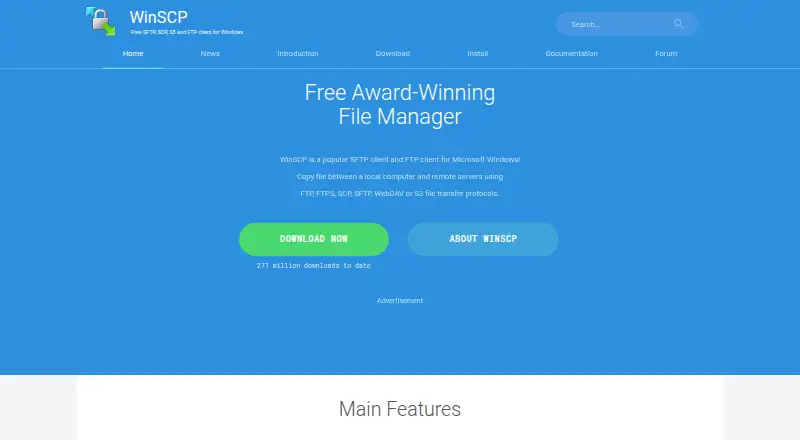
What WinSCP is
WinSCP is a free, open-source file manager and transfer client for Microsoft Windows. It copies files between a local computer and remote servers using SFTP, SCP, FTP, FTPS, WebDAV, and S3. Users can choose Explorer or Commander interfaces; Commander is designed around keyboard control. The software supports common file operations, directory synchronization, and an integrated text editor. For repeatable or advanced tasks, WinSCP provides scripting, command-line options, and a .NET assembly. It integrates with Windows and PuTTY, including sharing site settings with PuTTY. Documented authentication methods include password, keyboard-interactive, public key, and Kerberos, and stored site information can optionally be protected with a master password. A portable version is available, and workspaces support session management. The official site lists stable version 6.5.7. Its security guidance cautions that malicious software on the computer running WinSCP may steal credentials stored or entered there.
Who it suits
WinSCP suits Windows users who need to manage files and transfer them between a local computer and remote servers. Its scripting, command-line interface, and .NET assembly also serve users automating transfer tasks.
What it does well
- Supports SFTP, SCP, FTP, FTPS, WebDAV, and S3.
- Includes Explorer and keyboard-oriented Commander interfaces.
- Provides scripting, command-line options, and a .NET assembly.
- Stored site information can be protected with a master password.
- A portable version is available.
What to know first
- WinSCP is for Microsoft Windows.
- Malicious software on the computer may steal credentials.
- Stable version listed is 6.5.7.
Limits
WinSCP is a free client for Microsoft Windows that transfers files between a local and remote computer. The listed plan is free and covers the supported transfer protocols.
Plans
| Plan | Billed and limits | Price |
|---|---|---|
| WinSCP | Windows file transfer client · SFTP, FTP, FTPS, SCP, WebDAV and S3 protocols | Free |
As winscp.net lists them, read 30 Sept 2026. The maker's own page has the final word.
Getting started
- Open the WinSCP website and download the Windows client.
- Install WinSCP or choose the portable version.
- Choose the Explorer or Commander interface.
- Set up a connection using a supported protocol and authentication method.
- Use the graphical interface, scripting, command-line options or .NET assembly for file transfer tasks.
WinSCP is a Windows file manager and client for transferring files between local and remote computers. It suits Windows users who need broad protocol support, remote file operations or repeatable transfer automation. Its main limitation is equally clear: it is a Windows client, not a cross-platform option.
Overview
WinSCP combines a graphical interface with file transfers over FTP, FTPS, SCP, SFTP, WebDAV and S3. Explorer and Commander layouts accommodate different working styles, with Commander designed around keyboard control. Common file operations, directory synchronization and an integrated text editor make it useful for managing remote files as well as moving them.
The software is free and open source, and a portable version is available.
Key features
Transfers and file management
WinSCP supports FTP, FTPS, SCP, SFTP, WebDAV, WebDAVS and S3, giving Windows users one client for a range of transfer protocols. Workspaces support session management, and port forwarding is also supported. The integrated editor and familiar file operations help with routine remote file changes; directory synchronization is useful when keeping local and remote folders aligned.
Automation and integration
Scripting, a command-line interface and a .NET assembly support repeatable jobs and more advanced programming tasks. These tools make WinSCP a stronger fit for administrators and technical users than a client limited to manual transfers. Integration with Windows and PuTTY, including shared site settings with PuTTY and Pageant support for SSH public-key authentication, can help users working in that ecosystem.
Authentication and security
Documented authentication options include passwords, keyboard-interactive authentication, public keys and Kerberos. Stored site information can optionally be protected by a master password. That protection does not address malware on the computer itself: malicious software running where WinSCP is used can steal credentials entered or stored there.
Pricing
WinSCP costs nothing. The free plan includes the Windows file-transfer client and its SFTP, FTP, FTPS, SCP, WebDAV and S3 protocols. There is no free trial because the software is free, and there are no paid plan tiers to compare. The published pricing terms do not state recurring billing.
Platforms
WinSCP runs on Microsoft Windows, and a portable version is available. Its Windows focus is a practical constraint for people who need the same client on macOS or Linux.
Who it's for
WinSCP is well suited to Windows users who regularly connect to remote servers, want file management and synchronization alongside transfers, or need scripting and command-line automation. Its protocol range also makes it a practical choice for people who work across different transfer setups. Users who need a client for macOS or Linux should choose a cross-platform alternative instead.
Pros and cons
- Pros: Free and open source, with no paid tier required for its listed transfer protocols.
- Pros: File management, an integrated editor, directory synchronization and automation tools bring common transfer work into one Windows client.
- Pros: Password, keyboard-interactive, public-key and Kerberos authentication options support different connection needs.
- Cons: It is for Windows, ruling it out for users who need a native client on macOS or Linux.
- Cons: Credentials remain vulnerable if malware compromises the computer running WinSCP, even when stored site information is protected with a master password.
Alternatives
FileZilla Client is worth considering if you need a free client across Windows, macOS and Linux; its listed protocols are FTP, FTPS and SFTP, a narrower range than WinSCP's.
Cyberduck is another option for Windows and macOS users. It is freemium and GPL-licensed, with a paid registration key shown at $10 a month billed; choose it if that platform reach or licensing model better suits you.
FTP Rush supports Windows, macOS, Linux, iOS and Android, making it a candidate when device coverage matters more than WinSCP's Windows-only focus.
Core FTP is a Windows freemium alternative with paid Standard and Pro single-user licenses shown at $24.95 a month and $39.95 a month respectively. Consider it if you want to compare a free tier with paid single-user options.
lftp is a free Linux option for users who need a client on that platform rather than Windows.
gFTP is another free Linux alternative.
CrossFTP offers a free client and paid Pro and Enterprise options, with versions for Linux, macOS and Windows; consider it if you need that platform range.
sFTP Client is a freemium alternative for Windows, macOS and Linux.
For more options, browse FTP and SFTP clients, SFTP Client Software, Secure File Transfer Software, SSH Clients or File Manager Software.
Verdict
Choose WinSCP if you use Windows and want a free client that combines broad transfer-protocol support with file management and automation. Its main reasons to look elsewhere are the Windows-only platform and the risk that malware on the host computer can expose credentials.
Verdict
WinSCP combines file transfers with file management, synchronization, and automation tools for Windows. Its security guidance notes that malware on the computer can expose credentials entered or stored there.
Questions
How much does WinSCP cost?
WinSCP is free. The listed WinSCP plan costs nothing.
Which platforms does WinSCP support?
WinSCP is a client for Microsoft Windows. A portable version is also available.
Is WinSCP open source?
Yes. WinSCP is open source.
Which transfer protocols does WinSCP support?
It supports FTP, FTPS, SCP, SFTP, WebDAV, WebDAVS and S3.
Can WinSCP automate transfers?
Yes. It provides scripting, a command-line interface and a .NET assembly.
Who makes WinSCP?
The site identifies WinSCP.net as the publisher and says the project was founded in 2000.
Facts from WinSCP's own pages
- Authentication
- Documented authentication methods include password, keyboard-interactive, public key and Kerberos; WinSCP also integrates with Pageant for SSH public-key authentication. · winscp.net, 30 Sept 2026
- Automation
- It provides scripting, a command-line interface and a .NET assembly for advanced programming tasks. · winscp.net, 30 Sept 2026
- Billing terms
- The supplied pricing text does not state recurring billing terms. · winscp.net, 27 Sept 2026
- Company identity
- The site identifies the publisher as WinSCP.net and shows rights from 2000 to 2026. · winscp.net, 27 Sept 2026
- Credential protection
- Stored site information can optionally be protected with a master password. · winscp.net, 30 Sept 2026
- Download count
- The site reports 271,597,440 total downloads. · winscp.net, 27 Sept 2026
- File management
- Features include common local and remote file operations, an integrated text editor and directory synchronization. · winscp.net, 30 Sept 2026
- File operations
- Supports all common operations with files. · winscp.net, 27 Sept 2026
- File transfer
- Copies files between a local computer and remote servers. · winscp.net, 27 Sept 2026
- Founded
- 2000 · winscp.net, 23 Sept 2026
- Free plan
- Yes · winscp.net, 20 Sept 2026
- Free software
- WinSCP is presented as a free SFTP, SCP, S3 and FTP client for Windows. · winscp.net, 27 Sept 2026
- Graphical interface
- Provides a graphical user interface. · winscp.net, 27 Sept 2026
- Integrations
- WinSCP integrates with Windows and PuTTY, and can share site settings with PuTTY. · winscp.net, 30 Sept 2026
- Interfaces
- It offers Explorer and Commander interfaces, with the Commander interface focused on keyboard control. · winscp.net, 30 Sept 2026
- Language support
- The software is translated into many languages. · winscp.net, 27 Sept 2026
- Limit
- WinSCP is described as a file-transfer client between a local and remote computer; its listed platform is Windows. · winscp.net, 30 Sept 2026
- Open source
- A user review describes WinSCP as great Open Source software. · winscp.net, 27 Sept 2026
- Platform and version
- The official site describes WinSCP as a client for Microsoft Windows and lists stable version 6.5.7 as the supported release. · winscp.net, 30 Sept 2026
- Portable use
- The site provides a Portable Use section. · winscp.net, 27 Sept 2026
- Pricing model
- The pricing page presents donation amounts rather than paid software plans. · winscp.net, 27 Sept 2026
- Protocols
- It supports SFTP, SCP, FTP, FTPS, WebDAV and S3 file transfer protocols. · winscp.net, 30 Sept 2026
- Purpose
- WinSCP is an open source file manager and client for transferring files between a local computer and remote computers. · winscp.net, 30 Sept 2026
- Security guidance
- The security guidance warns that malicious software on the computer running WinSCP can steal credentials stored or entered there. · winscp.net, 30 Sept 2026
Where WinSCP stands on Freedom251
- FTP and SFTP clients#1 of 36
- File Manager Software#3 of 100
- Secure File Transfer Software#1 of 28
- SSH Clients#2 of 33
- SFTP Client Software#2 of 31