Freedom251 › FTP and SFTP clients
Cyberduck
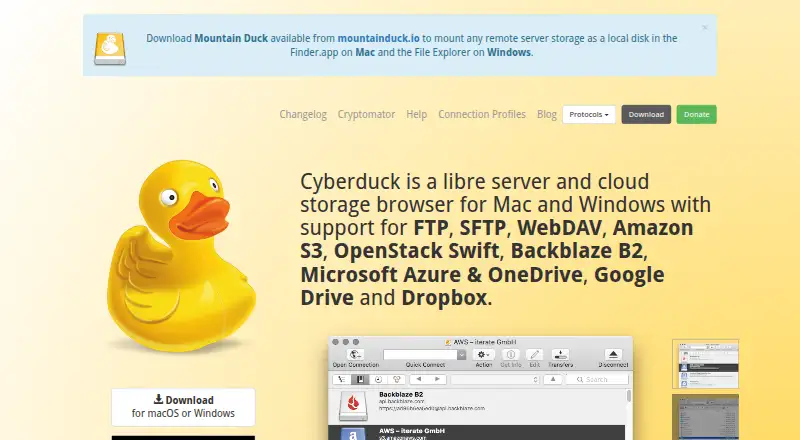
What Cyberduck is
Cyberduck is a libre server and cloud-storage browser for Mac and Windows, with connections to file-transfer protocols and cloud services. It supports FTP, SFTP, WebDAV, SMB, OpenStack Swift, Google Cloud Storage, Amazon S3, Azure, Backblaze B2, OneDrive, SharePoint, Google Drive, Box and Dropbox. Transfers include drag-and-drop, recursive and resumable operations, as well as copying files directly between servers. Directory synchronization previews the affected files before action. Users can edit server-side text or binary files in an external editor, and copy or open HTTP URLs; S3 support includes CDN and pre-signed URLs. Cryptomator integration provides client-side encryption, including encrypted filenames and individually encrypted files. SFTP supports public-key and two-factor authentication, and passwords are stored in the system Keychain. Cyberduck is GPL-licensed, with source code on GitHub, and the free software requires no account or registration. A personal registration key is listed at $10 a month as a minimum contribution shown by the vendor; a one-time contribution is also listed at $10, paid once.
Who it suits
Cyberduck suits people who need to move or synchronize files across servers and cloud storage from Mac or Windows. It also offers a free option for users who prefer GPL-licensed software.
What it does well
- Connects to many protocols and cloud services.
- Resumable transfers and direct server-to-server copying.
- Previews affected files before synchronization.
- Cryptomator integration provides client-side encryption.
What to know first
- Scheduled transfers are not supported.
- Modification dates cannot be retained on every protocol.
- Windows 10 64-bit or later is listed for downloads.
- The personal registration key is listed at $10 a month.
Limits
The free software is GPL-licensed and requires no account. The listed personal registration key costs $10 a month as a minimum contribution; a separate registration key contribution is listed at $10, paid once.
Plans
| Plan | Billed and limits | Price |
|---|---|---|
| Registration key | Minimum contribution shown by the vendor · Disables the donation prompt · Can be used on multiple computers · Personal registration key | $10 a month |
| Free software | GPL-licensed · no registration or account required | Free |
| Registration key contribution | minimum amount 10 USD · disables donation prompt · usable on multiple computers · personal and not shareable | $10, paid once |
As cyberduck.io lists them, read 20 Sept 2026. The maker's own page has the final word.
Getting started
- Visit the Cyberduck website.
- Download the version for Windows 10 64-bit or later, or macOS 10.13 or later on Intel or Apple M1.
- Start using the free GPL-licensed software without registration or an account.
- Connect to a supported server or storage service.
- Optionally use a personal registration key to disable the donation prompt.
Overview
Cyberduck is a file browser for servers and cloud storage on Mac and Windows. It suits people who move files among different protocols and services; its broad reach and synchronization preview are useful strengths, but protocol-dependent timestamp handling and no scheduled transfers are meaningful constraints.
Key features
Connections and transfers
Cyberduck connects to FTP, SFTP, WebDAV and SMB, alongside OpenStack Swift, Google Cloud Storage, Amazon S3, Azure and Backblaze B2. It also supports OneDrive, SharePoint, Google Drive, Box, Dropbox and other services. This breadth is valuable when work spans providers, rather than requiring a separate browser for each. Drag-and-drop, recursive directory transfers, resumable transfers and direct server-to-server copying cover common transfer needs. Transfer automation is supported, but scheduled transfers are not, making Cyberduck a poor fit for jobs that must run on a timetable.
Synchronization, editing and sharing
It synchronizes local and remote directories and previews affected files before acting, giving users a chance to review the scope of a sync. Files on a server can be edited through a preferred external editor. Cyberduck can also copy or open HTTP URLs, with CDN and pre-signed URL support for S3. Modification dates cannot be retained with every protocol, so users whose workflows depend on timestamps should check this limitation against their connections.
Security and integration
Cyberduck is GPL-licensed, with source code on GitHub. The site says it has no backdoors and requires no account or registration. SFTP supports strong ciphers, public-key authentication and two-factor authentication; passwords are kept in the system Keychain, and certificates use its trust settings. Cryptomator integration adds client-side encryption, including encrypted filenames and individually encrypted files. Finder integration, Windows notifications, Bonjour discovery and system protocol handlers connect it with the host environment. Community help, documentation, a public bug tracker and email support provide support channels, though no service level is stated.
Pricing
The free software plan costs nothing and is GPL-licensed, with no registration or account required. It is the straightforward choice for users comfortable with the donation prompt.
The Registration key costs $10 a month, with a minimum contribution shown by the vendor. It disables the donation prompt and supplies a personal key usable on multiple computers. The one-time Registration key contribution costs $10, paid once, a minimum amount; it likewise disables the prompt and works on multiple computers, but the personal key is not shareable. The monthly option suits people who prefer recurring support, while the one-time contribution avoids a recurring charge. Neither plan is described as adding transfer features over the free software.
Platforms
Cyberduck is for macOS and Windows. Current downloads require Windows 10 64-bit or later, or macOS 10.13 or later on Intel or Apple M1.
Who it's for
Choose Cyberduck if you need one desktop browser for a varied mix of cloud storage and server protocols, especially when synchronization previews, resumable transfers or server-to-server copies matter. Look elsewhere if scheduled transfers are essential, modification dates must be preserved for every connection, or you need the graphical application on Linux.
Pros and cons
- Broad protocol and service coverage: connects traditional servers, cloud platforms and storage services in one browser.
- Useful transfer controls: recursive and resumable transfers plus direct server-to-server copying address more than basic uploads and downloads.
- Preview before synchronization: affected files can be reviewed before changes are made.
- Open-source and account-free: GPL licensing and no registration requirement suit users who value inspectable software without an account.
- No scheduled transfers: automation does not include built-in scheduling, limiting unattended recurring workflows.
- Protocol-dependent timestamps: modification dates are not retained in every case, which can disrupt timestamp-sensitive work.
- Desktop platform limits: the graphical app supports macOS and Windows, not Linux.
Alternatives
For a focused shortlist, browse FTP and SFTP clients, WebDAV Client Software or SFTP Client Software.
WinSCP is a free, open-source Windows client supporting SFTP, FTP, FTPS, SCP, WebDAV and S3; choose it if Windows-only coverage is sufficient. FileZilla Client is free on Linux, macOS and Windows and covers FTP, FTPS and SFTP, a better match when those protocols are the priority. FTP Rush is freeware for Android, iOS, Linux, macOS and Windows, fitting readers who want a free option across those platforms.
lftp is a free GNU GPL option for Linux. CrossFTP offers a free client and paid Pro and Enterprise plans, each for one computer, with free trials. FTP Commander has a free plan and trial, with basic FTP transfers, file and folder management, multiple downloads and command-line mode. Core FTP offers a free plan as well as paid Standard and Pro single-user licenses for Windows. AndFTP is a free Android option for FTP, SFTP, FTPS and file management; its Pro plan adds SCP, folder synchronization, custom commands and settings import.
Verdict
Cyberduck is a strong choice for Mac and Windows users who need one open-source browser across varied server and cloud connections, with synchronization previews and capable transfer tools. Its central advantage is breadth without requiring an account; choose another client if scheduled transfers, consistent modification-date retention or a Linux desktop app is essential.
Verdict
Cyberduck covers transfers, synchronization and file access across a broad set of services. Review its platform requirements and protocol-specific modification-date limitation before choosing it.
Questions
Is Cyberduck free?
Yes. The free software is GPL-licensed and does not require registration or an account.
What does the registration key cost?
A personal registration key is listed at $10 a month as a minimum contribution. A separate registration key contribution is listed at $10, paid once.
Which platforms can run Cyberduck?
Cyberduck is available for macOS and Windows. Its CLI is available for Mac, Windows, and Linux.
Is Cyberduck open source?
Yes. It is licensed under the GPL, and its source code is available on GitHub.
Does Cyberduck support file synchronization?
Yes. It synchronizes local and remote directories and previews affected files before action.
Can Cyberduck retain modification dates?
Not for all protocols.
Facts from Cyberduck's own pages
- Authentication
- SFTP supports strong ciphers, public-key authentication and two-factor authentication. · cyberduck.io, 28 Sept 2026
- CLI
- Cyberduck CLI is available for Mac, Windows and Linux. · docs.cyberduck.io, 28 Sept 2026
- Credential storage
- Passwords are stored in the system Keychain and certificates are validated using Keychain trust settings. · cyberduck.io, 28 Sept 2026
- Current downloads
- The download page lists Windows 10 64-bit or later and macOS 10.13 or later on Intel or Apple M1. · cyberduck.io, 28 Sept 2026
- Editing
- It can edit text or binary files on a server using any preferred external editor. · cyberduck.io, 28 Sept 2026
- Encryption
- Cryptomator integration provides client-side encryption with encrypted filenames, obfuscated directory structures and individually encrypted files. · cyberduck.io, 28 Sept 2026
- File synchronization
- Yes · cyberduck.io, 20 Sept 2026
- Free plan
- Yes · cyberduck.io, 20 Sept 2026
- Open source
- Cyberduck is licensed under the GPL and its source code is available on GitHub. · cyberduck.io, 28 Sept 2026
- Supported platforms
- cross-platform · cyberduck.io, 20 Sept 2026
- Product
- Cyberduck is a libre server and cloud storage browser for Mac and Windows. · cyberduck.io, 28 Sept 2026
- Protocol coverage
- multi-protocol · cyberduck.io, 20 Sept 2026
- Protocol limit
- Retaining modification dates is not supported for all protocols. · docs.cyberduck.io, 28 Sept 2026
- Protocols
- It supports FTP, SFTP, WebDAV, SMB, OpenStack Swift, Google Cloud Storage, Amazon S3, Azure, Backblaze B2, OneDrive, SharePoint, Google Drive, Box, Dropbox and other services. · cyberduck.io, 28 Sept 2026
- Scheduled transfers
- No · cyberduck.io, 20 Sept 2026
- Security posture
- The site states that Cyberduck has no backdoors and requires no registration or account. · cyberduck.io, 28 Sept 2026
- Sharing
- It can copy or open HTTP URLs and includes CDN and pre-signed URLs for S3. · cyberduck.io, 28 Sept 2026
- Paid from
- 10 · cyberduck.io, 20 Sept 2026
- Support
- Support is provided through community help, documentation, a public bug tracker and [email protected]. · cyberduck.io, 28 Sept 2026
- Synchronization
- It synchronizes local and remote directories and previews affected files before action. · cyberduck.io, 28 Sept 2026
- System integration
- It integrates with Finder, Windows notifications, Bonjour service discovery and system protocol handlers. · cyberduck.io, 28 Sept 2026
- Transfer automation
- Yes · cyberduck.io, 20 Sept 2026
- Transfers
- It supports drag-and-drop uploads and downloads, recursive directory transfers, resumable transfers and copying files directly between servers. · cyberduck.io, 28 Sept 2026
Where Cyberduck stands on Freedom251
- FTP and SFTP clients#4 of 36
- SFTP Client Software#6 of 31
- WebDAV Client Software#9 of 26