Freedom251 › FTP and SFTP clients

FileZilla Client
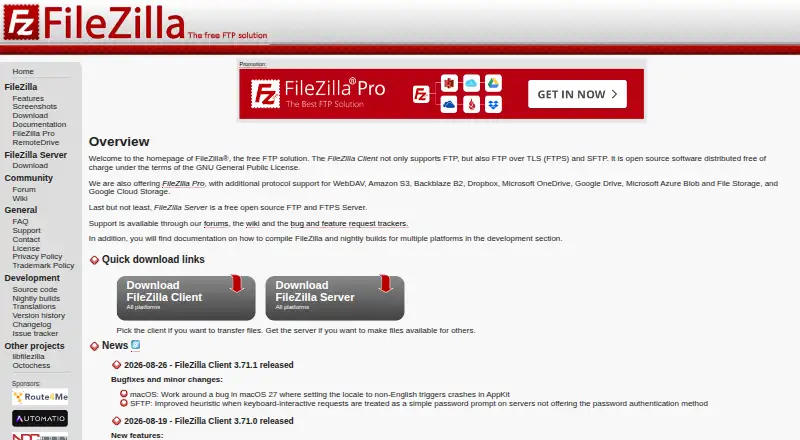
What FileZilla Client is
FileZilla Client is a free FTP solution for transferring files. The Client supports FTP, FTPS, and SFTP and runs on Linux, macOS, and Windows. The project provides a dedicated Client download and documentation with installation instructions for Windows, Linux, and Mac OS X. Its Wiki includes tutorials, usage guidance, troubleshooting for connection and transfer problems, and network configuration help. It also has a guide to key-based authentication with SFTP. Support resources include a community forum, Wiki, FAQ, support section, and contact page. The project site links to source code, an issue tracker, translations, nightly builds, and version history. FileZilla Client is presented separately from FileZilla Server, FileZilla Pro, and RemoteDrive. FileZilla Pro is a separate product whose listed protocol support includes FTP, SFTP, and FTPS, along with cloud services such as Amazon S3, Google Drive, Microsoft Azure, OneDrive, SharePoint, Backblaze B2, Box, and WebDAV. FileZilla Server is also a separate product with its own download. The Client plan is free and covers FTP, FTPS, and SFTP.
Who it suits
FileZilla Client suits people who need a free file transfer client on Linux, macOS, or Windows and need FTP, FTPS, or SFTP support. Its installation guides, tutorials, and troubleshooting resources can help users configure connections and transfers.
What it does well
- Free plan costs nothing.
- Supports FTP, FTPS, and SFTP.
- Available for Linux, macOS, and Windows.
- Wiki includes installation guides and connection troubleshooting.
- Key-based authentication with SFTP has a dedicated guide.
- Community forum, Wiki, FAQ, and support resources are available.
What to know first
- The listed Client protocols are FTP, FTPS, and SFTP.
- Cloud services are listed under the separate FileZilla Pro product.
- FileZilla Server is a separate product.
Plans
| Plan | Billed and limits | Price |
|---|---|---|
| FileZilla Client | FTP · FTPS · SFTP | Free |
As filezilla-project.org lists them, read 30 Sept 2026. The maker's own page has the final word.
Getting started
- Visit the FileZilla project website.
- Download FileZilla Client for Linux, macOS, or Windows.
- Follow the Wiki installation instructions for your operating system.
- Use the tutorials and usage guidance to get started.
- Consult the Wiki's connection, transfer, or network configuration help if needed.
FileZilla Client is a free file-transfer client for FTP, FTPS and SFTP on Linux, macOS and Windows. It suits people who need those protocols and want setup and troubleshooting guidance. Its scope is focused: cloud-service connections belong to FileZilla Pro, a separate product.
Overview
Three transfer protocols, desktop coverage across the major operating systems and a free plan make FileZilla Client a practical choice for routine server transfers. It is also a distinct product from FileZilla Server, which is offered separately. For users whose work fits FTP, FTPS or SFTP, that focused remit is an advantage; those seeking cloud storage integrations should look beyond the client.
Key features
The protocol set covers FTP, FTPS and SFTP, with a Wiki guide for key-based SFTP authentication. Installation instructions cover Windows, Linux and Mac OS X, while tutorials and usage guidance help users get started. The Wiki also addresses connection, transfer and network-configuration problems, making it a useful resource for people managing connections themselves.
Help extends beyond documentation: the project provides a community forum, general FAQ, support section and contact page. Source code, nightly builds, translations, version history and an issue tracker are also available. This range of project resources is a real benefit when users need guidance or want to follow development, though it does not expand the client’s protocol coverage.
FileZilla Pro is the relevant step up for users who need cloud services. Its overview adds services including Amazon S3, Google Drive, Microsoft Azure, OneDrive, SharePoint, Backblaze B2, Box and WebDAV, alongside FTP, SFTP and FTPS. Pro Enterprise Server is a separate offering; its stated features include FTP, FTPS, SFTP, two-factor authentication and unlimited users.
Pricing
FileZilla Client costs nothing, with FTP, FTPS and SFTP. There is no free trial because the client is already free. No paid client plan is described, so there is no published upgrade price or billing term to weigh. Readers who need only the three supported protocols can use the free client; those who need the cloud services covered by Pro should consider that separate product instead.
Platforms
FileZilla Client supports Linux, macOS and Windows. That breadth makes it a reasonable fit for mixed desktop environments. The installation guidance names Windows, Linux and Mac OS X.
Who it's for
Choose FileZilla Client for free FTP, FTPS or SFTP transfers on a desktop, particularly if access to setup instructions and connection troubleshooting matters. It is not the right choice when cloud-service connections are central to the workflow; FileZilla Pro covers a broader set of services.
Pros and cons
- Pros: Free access to FTP, FTPS and SFTP makes it useful for common server transfers without a paid client plan.
- Pros: Linux, macOS and Windows support suits individuals and teams using different desktop systems.
- Pros: Installation, authentication and troubleshooting guidance gives users practical help with setup and connection problems.
- Cons: Its protocol scope does not include the cloud services covered by FileZilla Pro, so cloud-focused users need another product.
Alternatives
FTP and SFTP clients, Secure File Transfer Software and SFTP Client Software provide broader categories to compare. WinSCP is a free, open-source Windows option that adds SCP, WebDAV and S3 to SFTP, FTP and FTPS. Pick it if you need those additional protocols and use Windows.
Cyberduck is another freemium alternative for macOS and Windows. FTP Rush is a free option spanning Android, iOS, Linux, macOS and Windows. lftp and gFTP are free Linux clients, while CrossFTP is a freemium client for Linux, macOS and Windows with a free plan and trial. NcFTP is a free client for Linux, macOS and Windows; Faro is a free, open-source option for those same platforms.
Verdict
FileZilla Client is a sound choice for anyone who wants a free client for FTP, FTPS or SFTP across Linux, macOS and Windows. Its useful documentation and troubleshooting guidance strengthen that focused offer. Look elsewhere if cloud-service connections are a requirement; those are part of the separate FileZilla Pro product.
Verdict
Choose FileZilla Client if you need a free client for FTP, FTPS, or SFTP on Linux, macOS, or Windows. If you need the cloud service support described for FileZilla Pro, that is a separate product.
Questions
How much does FileZilla Client cost?
The Client plan is free.
Which platforms does FileZilla Client support?
It is available for Linux, macOS, and Windows.
Which protocols does FileZilla Client support?
The listed protocols are FTP, FTPS, and SFTP.
Does FileZilla Client include cloud services such as Google Drive?
Cloud service support is described for the separate FileZilla Pro product, not FileZilla Client.
Where can I find setup and troubleshooting help?
The FileZilla Wiki provides installation instructions, tutorials, usage guidance, and help for connection, transfer, and network configuration problems.
Is FileZilla Server part of FileZilla Client?
The project presents FileZilla Server separately from FileZilla Client and provides it with its own download.
Facts from FileZilla Client's own pages
- Client features
- The maker has a dedicated FileZilla Client Features page. · filezilla-project.org, 30 Sept 2026
- Client Product
- The product is named FileZilla. · filezilla-project.org, 27 Sept 2026
- Community Support
- The site provides a community forum and wiki. · filezilla-project.org, 27 Sept 2026
- Direct Support
- The site includes a support section and contact page. · filezilla-project.org, 27 Sept 2026
- Documentation
- The Wiki lists client tutorials, usage instructions, connection and transfer troubleshooting, and FAQs. · wiki.filezilla-project.org, 30 Sept 2026
- Documentation platforms
- The FileZilla Wiki links to client installation instructions for Windows, Linux, and Mac OS X. · wiki.filezilla-project.org, 30 Sept 2026
- Downloads
- The download page provides a FileZilla Client download. · filezilla-project.org, 30 Sept 2026
- FAQ Support
- The site provides a general FAQ. · filezilla-project.org, 27 Sept 2026
- Free FTP Solution
- FileZilla is presented as a free FTP solution. · filezilla-project.org, 27 Sept 2026
- Free plan
- Yes · github.com, 20 Sept 2026
- Free Tier Limits
- No free-tier limits are stated on the supplied page text. · filezilla-project.org, 27 Sept 2026
- FTP Protocol
- The page identifies FileZilla as an FTP solution. · filezilla-project.org, 27 Sept 2026
- Issue Tracking
- The site links to an issue tracker. · filezilla-project.org, 27 Sept 2026
- Key-based authentication
- The Wiki includes a guide for key-based authentication with SFTP. · wiki.filezilla-project.org, 30 Sept 2026
- Legal Policies
- The site includes license, privacy, and trademark policy pages. · filezilla-project.org, 27 Sept 2026
- Nightly Builds
- The site links to nightly builds. · filezilla-project.org, 27 Sept 2026
- Supported platforms
- cross-platform · github.com, 20 Sept 2026
- Pricing Details
- No paid price or billing schedule is stated on the supplied page text. · filezilla-project.org, 27 Sept 2026
- Pro distinction
- The maker’s product overview describes FileZilla Pro as supporting FTP, SFTP, FTPS, and cloud services including S3, Google Drive, and OneDrive. · filezillapro.com, 30 Sept 2026
- Pro integrations
- The FileZilla Pro overview lists Amazon S3, Google Drive, Microsoft Azure, OneDrive, SharePoint, Backblaze B2, Box, and WebDAV among its cloud platforms. · filezillapro.com, 30 Sept 2026
- Pro Product
- The site includes a FileZilla Pro product. · filezilla-project.org, 27 Sept 2026
- Pro server security
- The Pro overview says its Enterprise Server supports FTP, FTPS, SFTP, two-factor authentication, and unlimited users. · filezillapro.com, 30 Sept 2026
- Protocol coverage
- ftp-ftps-sftp · github.com, 20 Sept 2026
- Purpose
- FileZilla describes itself as a free FTP solution. · filezilla-project.org, 30 Sept 2026
Where FileZilla Client stands on Freedom251
- FTP and SFTP clients#2 of 36
- Secure File Transfer Software#3 of 28
- FTP Server Software#6 of 33
- SFTP Client Software#7 of 31