Freedom251 › FTP and SFTP clients
gFTP
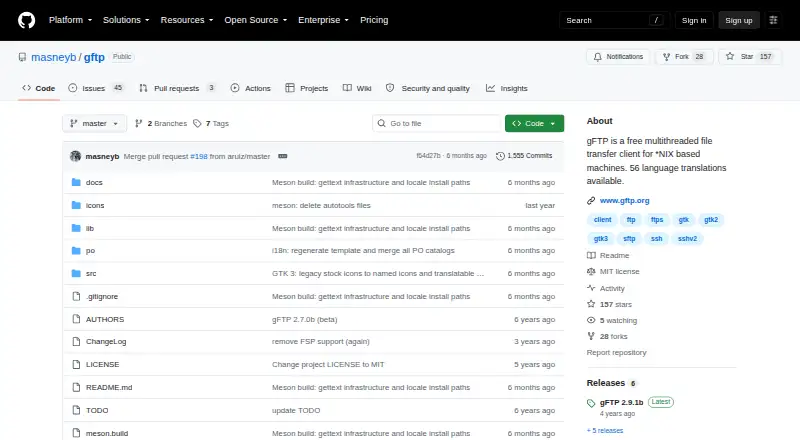
What gFTP is
gFTP is a free file transfer client for *NIX-based machines, known to run on Linux distributions. It supports FTP, explicit and implicit FTPS, SSH2 SFTP, and FSP, and offers both GTK and text interfaces through the `gftp-gtk` and `gftp-text` commands. The text interface can fetch a directory and its subdirectories in one run, and the project lists transfer automation. SSH2 SFTP support requires the OpenSSH client. For FTPS servers using self-signed certificates, the FAQ describes either turning off SSL peer verification or adding the CA public key to the OpenSSL certificates directory. gFTP follows the XDG Base Directory Specification for its settings and bookmarks, which are kept under the gftp configuration directory. It writes log-window contents to `gftp.log` and purges that file at startup. The project lists 56 available language translations and directs users to its GitHub issues page for bug reports. Its documented build process uses Meson and Ninja, with GTK 3 as the default interface build.
Who it suits
gFTP suits Linux users who need a free client with multiple transfer protocols and a choice of graphical or text interface. Its text interface may suit users who want to retrieve a directory tree in one run.
What it does well
- Supports FTP, FTPS, SSH2 SFTP, and FSP.
- Offers both GTK and text interfaces.
- Text mode can download directory trees.
- Supports transfer automation.
- Lists 56 language translations.
What to know first
- SSH2 SFTP requires the OpenSSH client.
- The project describes Linux distribution support.
- Startup purges the gftp.log file.
Plans
| Plan | Billed and limits | Price |
|---|---|---|
| gFTP | Free file transfer client | Free |
As gftp.org lists them, read 9 Oct 2026. The maker's own page has the final word.
Getting started
- Visit https://gftp.org/.
- Use a Linux distribution.
- Build with Meson and Ninja if building from source; GTK 3 is the default UI build.
- Launch the GTK interface with `gftp-gtk` or the text interface with `gftp-text`.
- Install the OpenSSH client for SSH2 SFTP connections.
Overview
gFTP is a free file-transfer client for Linux, with GTK and text interfaces. It suits Linux users who need to move files across several transfer protocols, especially those who want to fetch directory trees from a text interface. Its protocol range is useful, but its Linux focus and OpenSSH dependency for SFTP limit its fit for broader or mixed-platform use.
For a no-cost client, gFTP combines FTP, both explicit and implicit FTPS, SSH2 SFTP and FSP. The text interface can download a directory and its subdirectories in one run, while the GTK option offers a graphical workflow. That makes gFTP a practical specialist for Linux environments rather than a natural choice for teams spanning desktop operating systems.
Key features
- Multiple protocols: FTP, explicit and implicit FTPS, SSH2 SFTP and FSP cover a range of server setups from one client. SFTP requires the OpenSSH client, so users who need it must have that component available.
- GTK and text interfaces: The graphical and text interfaces launch through gftp-gtk and gftp-text. Text mode can retrieve directory trees in one run, a useful capability for command-line users managing nested downloads.
- Transfer automation: Automation is supported, which can reduce manual handling for users with recurring transfer workflows.
- Build and configuration: The documented build uses Meson and Ninja, with GTK 3 as the default UI build. Settings and bookmarks follow the XDG Base Directory Specification and live under the gFTP configuration directory, a familiar arrangement for Linux users.
- Certificates and logs: For FTPS connections to servers using self-signed certificates, users can disable SSL peer verification or add the CA public key to OpenSSL's certificates directory. Adding the CA keeps verification enabled; disabling peer verification is a security trade-off. The program writes log-window contents to gftp.log and purges that file when it starts, so it is not a persistent transfer archive.
- Translations: The project describes 56 language translations, which broadens its reach for users who prefer a localized interface.
Pricing
gFTP costs nothing. Its free plan is the client itself, with no paid tier or trial to consider. That makes it an easy fit when the required protocols and Linux platform align; it does not solve the platform limitation for users who need a client across Windows or macOS as well.
Platforms
gFTP is known to run on Linux distributions. The project documents a Meson-and-Ninja build, with GTK 3 as the default UI build, so users building from source should expect that toolchain and graphical toolkit in the default configuration. It is not the right pick for users seeking one client across Linux, macOS and Windows.
Who it's for
Choose gFTP if you use Linux, need FTP, FTPS, SFTP or FSP, and value having both a GTK interface and a text option. The text interface's ability to download directory trees in one run makes it particularly relevant for users who handle nested downloads from command-line workflows. Look elsewhere if you need a wider desktop platform range, or if you need SFTP without OpenSSH.
Pros and cons
- Pro — broad protocol coverage: FTP, explicit and implicit FTPS, SSH2 SFTP and FSP give Linux users flexibility across server types.
- Pro — text-mode directory downloads: It can fetch a directory and its subdirectories in one run, avoiding a one-directory-at-a-time workflow.
- Pro — no-cost use: The free plan carries no stated paid limits or upgrade decision.
- Con — Linux focus: Its known platform range does not suit users who need a shared client for Windows or macOS.
- Con — SFTP depends on OpenSSH: The protocol is not self-contained in gFTP; the OpenSSH client is required.
- Con — temporary logs: gftp.log is purged at startup, which makes it unsuitable as a lasting transfer record.
- Con — self-signed FTPS setup: Such connections can require certificate configuration, and disabling peer verification weakens verification.
Alternatives
For Windows-only use, WinSCP is a free client that supports SFTP, FTP, FTPS, SCP, WebDAV and S3. Choose FileZilla Client if you need a free client across Linux, macOS and Windows for FTP, FTPS and SFTP. Cyberduck is another option for macOS and Windows, with a free plan and a registration-key contribution priced at $10 a month.
FTP Rush is worth considering if you want a free client spanning Android, iOS, Linux, macOS and Windows. Linux users wanting another free option can consider lftp, distributed under the GNU GPL, or NcFTP, whose client programs are free and invite donations. CrossFTP and Faro are also alternatives; their stated platform ranges include Linux, macOS and Windows.
Browse FTP and SFTP clients for more options.
Verdict
gFTP is a solid fit for Linux users who want a free client with several protocols and a text interface capable of fetching directory trees in one run. Choose it when that combination matters more than cross-platform reach, and look elsewhere if you need Windows or macOS support or want SFTP without the OpenSSH client.
Verdict
gFTP offers several protocols and two interface types at no cost. SFTP users need OpenSSH, and users connecting to self-signed FTPS servers may need to adjust certificate verification.
Questions
How much does gFTP cost?
The listed plan is free.
Which protocols does gFTP support?
It supports FTP, explicit and implicit FTPS, SSH2 SFTP, and FSP.
Which platforms does it support?
The project says gFTP is known to run on Linux distributions.
Does gFTP have a graphical interface?
Yes. It provides GTK and text interfaces, launched with `gftp-gtk` and `gftp-text`.
What is required for SSH2 SFTP?
SSH2 SFTP support requires the OpenSSH client.
Where are settings and bookmarks stored?
They are stored under the gftp configuration directory, following the XDG Base Directory Specification.
Facts from gFTP's own pages
- Bug reports
- The project directs users to its GitHub issues page for bug reports. · github.com, 9 Oct 2026
- Build
- The documented build process uses Meson and Ninja, with GTK 3 as the default UI build. · github.com, 9 Oct 2026
- Configuration
- gFTP follows the XDG Base Directory Specification and stores its settings and bookmarks under the gftp configuration directory. · github.com, 9 Oct 2026
- Free plan
- Yes · github.com, 20 Sept 2026
- Interfaces
- It provides GTK and text interfaces, available through the gftp-gtk and gftp-text commands. · github.com, 9 Oct 2026
- Logs
- The FAQ says gFTP logs the log-window contents to gftp.log and purges that file when the program starts. · github.com, 9 Oct 2026
- Platform
- The project says gFTP is known to run on Linux distributions. · github.com, 9 Oct 2026
- Supported platforms
- linux · github.com, 20 Sept 2026
- Protocol coverage
- multi-protocol · github.com, 20 Sept 2026
- Protocols
- It supports FTP, explicit and implicit FTPS, SSH2 SFTP, and FSP. · github.com, 9 Oct 2026
- Purpose
- gFTP is a free, multithreaded file transfer client for *NIX based machines. · github.com, 9 Oct 2026
- SFTP requirement
- SSH2 SFTP support requires the OpenSSH client. · github.com, 9 Oct 2026
- TLS certificate setting
- For FTPS connections to servers using self-signed certificates, the FAQ says to disable SSL peer verification or add the CA public key to the OpenSSL certificates directory. · github.com, 9 Oct 2026
- Transfer automation
- Yes · github.com, 20 Sept 2026
- Transfers
- The text interface can download directories and their subdirectories in one run. · github.com, 9 Oct 2026
- Translations
- The project describes gFTP as having 56 language translations available. · github.com, 9 Oct 2026
Where gFTP stands on Freedom251
- FTP and SFTP clients#9 of 36