Freedom251 › File Manager Software
nnn
by nnn
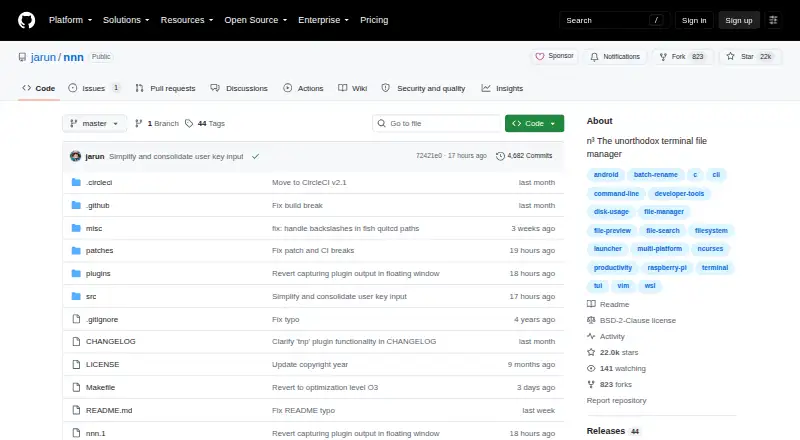
What nnn is
nnn is a terminal file manager designed to stay small and require little setup. It handles copying, moving, deleting, archiving, and linking selections, as well as batch renaming, disk-usage analysis, app launching, and file picking. Navigation features include contexts, sessions, bookmarks, directory marks, and remote mounts. Search options include instant filtering, fuzzy matching, regular expressions, and string filters. Directory and text previews are included, and plugins can add live previews, disk mounting, file comparison, and uploads. It can create, list, extract, and mount archives. Remote mounts rely on optional sshfs or rclone; desktop openers, shell integration, and FreeDesktop-compliant trash utilities are also supported. The project says nnn typically uses less than 3.5 MB of resident memory. It has no configuration file, using defaults with optional environment-variable settings. It is free and open source under the BSD-2-Clause license, with packages, a statically linked binary, and source compilation available. The project describes support for Android, Linux, macOS, and Windows, though its listed Windows support is marked no.
Who it suits
It suits terminal users who want file operations, search, previews, and optional plugins in a low-configuration tool. The project documents quickstarts for beginners and power users.
What it does well
- Includes directory and text previews.
- Supports fuzzy, regex, and instant filtering.
- Free and open source under BSD-2-Clause.
- Typically uses less than 3.5 MB of resident memory.
What to know first
- Remote mounts require optional sshfs or rclone.
- Some features need external utilities.
- Windows support is listed as no.
Plans
| Plan | Billed and limits | Price |
|---|---|---|
| Free | Open-source terminal file manager | Free |
As github.com lists them, read 5 Oct 2026. The maker's own page has the final word.
Getting started
- Visit the nnn GitHub project page.
- Choose a statically linked binary or package, or compile nnn from source.
- Install the wide-character curses library and libc dependencies.
- Add optional utilities such as sshfs or rclone if you need remote mounts.
- Use nnn's defaults or configure it with environment variables.
nnn is a free, open-source terminal file manager for people who want a broad set of file tools without a configuration file. It suits terminal-comfortable users who value speed and flexible navigation; its lack of a dual-pane view makes it a weaker fit for side-by-side file work.
Overview
nnn handles everyday file operations alongside disk-usage analysis, batch renaming, app launching, and file picking. It can copy, move, delete, archive, and link selections, giving it a wider role than a simple directory browser. The project says it typically uses less than 3.5 MB of resident memory, which makes it a sensible option where resource use matters.
There is no configuration file, and sensible defaults keep initial setup light; environment variables provide optional customization. That approach favors users who want to get to work without building a configuration first, but it offers less of a familiar visual workspace than a graphical manager. The project describes its privacy approach as avoiding unconfirmed user-data collection.
Key features
Navigation and search
Contexts, sessions, bookmarks, and directory marks help users move among locations and preserve useful navigation points. Search-as-you-type, fuzzy search, and string and regex filters provide several ways to narrow results. These options make nnn adaptable to different search habits, though the terminal interface is a prerequisite rather than an optional detail.
Previews, archives, and plugins
Directory and text previews, with support for preview plugins, help inspect files without leaving the manager. Archive tools can create, list, extract, and mount archives. Language-agnostic plugins can extend the workflow with live previews, disk mounting, file comparison, or uploads, but the extra capabilities depend on adding and maintaining those extensions.
Remote access and integrations
Remote mounts are possible through sshfs or rclone, and desktop openers, shell integration, and FreeDesktop-compliant trash utilities connect nnn to surrounding tools. The flexibility is useful for users who already rely on these utilities; remote mounting is not built in as a standalone capability and requires one of the optional dependencies. Some other features also rely on external utilities.
nnn requires a wide-character curses library and libc; libreadline is optional. It is available as a statically linked binary or packages, and can also be compiled from source. The project identifies its license as BSD-2-Clause. Its GitHub repository has no SECURITY.md file and no published security advisories.
Pricing
nnn is free and open source. Its Free plan costs nothing and provides the terminal file manager; there is no free-trial period or paid tier to weigh against it. The main trade-off is not price but the terminal-first interface and the setup of optional utilities for some workflows.
Platforms
nnn is available for Android, Linux, macOS, and Windows. The project also offers source compilation, packages, and a statically linked binary. A dual-pane view is not supported, so users who depend on two synchronized file lists should consider another tool.
Who it's for
nnn is a strong fit for users comfortable in a terminal who want file operations, search, previews, archives, and extensible workflows in a compact tool. Its beginner and power-user quickstarts suggest it aims to serve both new and experienced users, while the lack of a configuration file favors anyone who prefers sensible defaults. Users who need a conventional graphical interface, built-in dual panes, or remote mounts without external utilities should look elsewhere.
Pros and cons
- Pros: Broad file operations, search methods, previews, and archive handling cover a range of terminal workflows in one manager.
- Pros: No configuration file and typical resident memory use below 3.5 MB make it a lightweight choice with little initial setup.
- Pros: Plugins and shell and desktop integrations can extend the tool beyond basic file browsing.
- Cons: No dual-pane layout limits side-by-side selection and transfer workflows.
- Cons: Remote mounts require sshfs or rclone, and some features depend on external utilities.
- Cons: A terminal-based interface is unsuitable for users seeking a conventional graphical file manager.
Alternatives
For other options, browse Terminal File Managers or File Manager Software. FileManagerTUI is another free, open-source choice for Linux, macOS, and Windows, with MIT-licensed software. Newt is a free, open-source option for Linux, macOS, and Windows.
Rat Commander is a free, self-contained terminal file manager for Linux, macOS, and Windows, with no paid tiers or usage limits stated. Broot is free for Linux, macOS, and Windows, with source and precompiled binaries under the MIT license. Clifm is a free option for Android, Linux, and macOS, licensed under GPL version 2 or later.
elio is a free option for Linux, macOS, Windows, and self-hosted use. pointer is a free Linux and macOS option, distributed as a single binary under the Unlicense. Runa is a free option for Linux, macOS, and Windows.
Verdict
Choose nnn if you want a compact, no-configuration terminal manager that combines file operations, search, previews, and extensibility at no cost. Its breadth and low reported memory use are compelling for terminal-based workflows. Look elsewhere if you need dual panes, a graphical interface, or remote mounts that work without installing supporting utilities.
Verdict
nnn offers a broad set of file operations and navigation features in a terminal-based tool with minimal configuration. Users who need remote mounts or features that rely on external utilities should account for those dependencies.
Questions
How much does nnn cost?
The Free plan costs nothing. The project identifies nnn as open source.
Which platforms does nnn support?
The listed platforms are Android, Linux, macOS, and Windows. Linux and macOS support are marked yes; Windows support is marked no.
Is nnn open source?
Yes. The GitHub repository identifies its license as BSD-2-Clause.
Does nnn support remote file access?
Yes. Remote mounts can use sshfs or rclone, which are optional dependencies.
How can I install nnn?
The project offers a statically linked binary and packages. It can also be compiled from source.
Facts from nnn's own pages
- Archive support
- Yes · github.com, 21 Sept 2026
- Configuration
- nnn has no configuration file and uses sensible defaults with optional environment-variable configuration. · github.com, 5 Oct 2026
- Dependencies
- Optional integrations include sshfs and rclone for remote mounts, gio trash or trash-cli for trash, and advcpmv for copy and move progress. · github.com, 5 Oct 2026
- Dual-pane layout
- No · github.com, 21 Sept 2026
- File operations
- It can analyze disk usage, batch rename, launch apps, pick files, and copy, move, delete, archive, and link selections. · github.com, 5 Oct 2026
- Founded
- 2016 · github.com, 28 Sept 2026
- Installation
- The project offers a statically linked binary and packages, and can also be compiled from source. · github.com, 5 Oct 2026
- Integrations
- Remote mounts can use sshfs or rclone, and nnn supports desktop openers, shell integration, and FreeDesktop-compliant trash utilities. · github.com, 5 Oct 2026
- Intended users
- The project describes nnn as unobtrusive and designed for smart workflows, and documents beginner and power-user quickstarts. · github.com, 5 Oct 2026
- License
- The GitHub repository identifies the project license as BSD-2-Clause. · github.com, 5 Oct 2026
- Linux support
- Yes · github.com, 21 Sept 2026
- macOS support
- Yes · github.com, 21 Sept 2026
- Navigation
- It supports contexts, sessions, bookmarks, directory marks, and remote mounts through sshfs or rclone. · github.com, 5 Oct 2026
- Navigation and search
- It supports contexts, sessions, bookmarks, instant filtering, fuzzy search, and regex search. · github.com, 5 Oct 2026
- Platforms
- The project says nnn runs on Linux, macOS, Android through Termux, Cygwin, and WSL, among other environments. · github.com, 5 Oct 2026
- Plugins
- Language-agnostic plugins can add capabilities such as live previews, disk mounting, file comparison, and uploads. · github.com, 5 Oct 2026
- Preview and archives
- It includes directory and text previews, supports preview plugins, and can create, list, extract, and mount archives. · github.com, 5 Oct 2026
- Preview pane
- Yes · github.com, 21 Sept 2026
- Privacy
- The project describes nnn as privacy-aware, with no unconfirmed user data collection. · github.com, 5 Oct 2026
- Product
- nnn is a full-featured terminal file manager designed to be small, fast, and nearly zero-configuration. · github.com, 5 Oct 2026
- Purpose
- nnn is a full-featured terminal file manager. · github.com, 5 Oct 2026
- Remote file access
- Yes · github.com, 21 Sept 2026
- Remote mount limit
- Remote mounts require sshfs or rclone, and both are listed as optional dependencies. · github.com, 5 Oct 2026
- Requirements
- nnn depends on a wide-character curses library and libc; libreadline is optional, and some features need external utilities. · github.com, 5 Oct 2026
Where nnn stands on Freedom251
- File Manager Software#8 of 100
- File managers#8 of 29
- Terminal File Managers#10 of 29