Newt
What Newt is
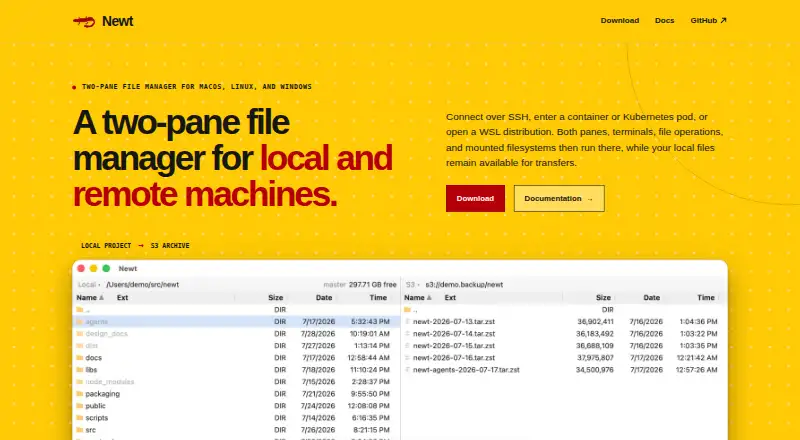
Newt is a free, open-source file manager for macOS, Linux and Windows. Its two-pane interface supports work across local and remote filesystems, connecting through SSH, containers, Kubernetes pods and WSL distributions. Remote sessions run panes, terminals, file operations, searches and mounts on the remote host. Users can view, copy, delete, move, edit, pack or reveal files from the interface. ZIP, TAR, compressed TAR and CPIO archives can be browsed as directories, including nested and encrypted archives. Newt also browses ISO 9660 and UDF disc images without extracting them. S3 filesystems can be mounted like other filesystems, with range reads for large images. Recursive filename and content searches stream results into a pane linked to the underlying files. Common operations have direct keyboard controls, alongside configurable bindings and mouse controls. The project names S3, SFTP, SSH, Docker, Podman, Kubernetes exec, WSL and custom transports among its integrations. Its source code is available under the GNU GPL v3 license.
Who it suits
It suits people who manage files across local and remote systems, including users of SSH, containers, Kubernetes or WSL. Its archive and disc-image browsing may also suit users who need to inspect those formats without extracting them.
What it does well
- Two-pane interface covers local and remote filesystems.
- Supports SSH, containers, Kubernetes pods and WSL.
- Browses nested and encrypted archives as directories.
- Opens ISO and UDF images without extraction.
- Source code is available under GNU GPL v3.
What to know first
- The listed desktop platforms are macOS, Linux and Windows.
- Remote sessions run operations on the remote host.
Plans
| Plan | Billed and limits | Price |
|---|---|---|
| Free software | — | On request |
As newt-fm.org lists them, read 27 Sept 2026. The maker's own page has the final word.
Getting started
- Visit the Newt website.
- Choose the release for macOS, Linux or Windows.
- Use the two-pane interface to work with local or remote filesystems.
- Connect to a supported remote environment or filesystem.
Overview
Newt is a two-pane file manager for local files and remote systems, aimed at people who move between machines, containers, or storage locations. Its standout strength is treating remote sessions and non-folder filesystems as places to work, not merely destinations for copying files; readers seeking a simpler local-only manager may not need that breadth.
Available for macOS, Linux, and Windows, Newt is free software under the GNU GPL v3. Its Rust backend and React/TypeScript interface are packaged with Tauri.
Key features
Remote work beyond file transfer
Newt connects to SSH hosts, containers, Kubernetes pods, and WSL distributions. Its named integrations include S3, SFTP, SSH, Docker, Podman, Kubernetes exec, WSL, and custom transports. The two panes can work with local and remote filesystems, while remote sessions can run panes, terminals, file operations, searches, and mounts on the remote host. That makes it a stronger fit for users who need to do work in the remote environment itself; readers who only need to browse local folders may find this capability set unnecessary.
From the interface, users can view, copy, delete, move, and edit files, as well as pack or reveal them. Keyboard shortcuts cover common operations, and bindings can be configured; mouse controls are also available. The choice of controls gives users room to adapt the workflow, though no particular shortcut scheme or customization range is established.
Archives, images, and search
ZIP, TAR, compressed TAR, and CPIO archives open as directories, including nested and encrypted archives. Newt also browses ISO 9660 and UDF disc images without extracting them. This is useful when inspecting packaged files without turning each archive into an extracted folder first.
S3 filesystems can be mounted alongside other filesystems, and large images support range reads. A recursive search filesystem streams filename and content matches into a pane linked to the underlying files. Together, these features make Newt more than a conventional two-pane browser, particularly for users who search across files or handle remote storage and disk images.
Pricing
Newt is free software, and its source is available under the GNU GPL v3. No free-tier limits are stated. There is no paid plan to compare, so its main trade-off is not a free-versus-premium feature split but whether its remote and filesystem capabilities suit your workflow.
Platforms
Newt supports macOS, Linux, and Windows, giving users of all three operating systems access to the same broad approach to local and remote filesystems.
Who it's for
Newt is best suited to people who regularly manage files across local machines, SSH systems, containers, Kubernetes pods, or WSL distributions, especially if they also need terminals, searches, or mounts in remote sessions. Its archive, image, S3, and search support also benefits users who want those resources to appear as browsable filesystems. A reader looking only for a basic local file manager may prefer a more focused option.
Pros and cons
Pros
- Remote sessions can do more than transfer files: panes, terminals, file operations, searches, and mounts can run on the remote host.
- Broad filesystem coverage: archives, ISO and UDF images, and S3 storage can be browsed as filesystems.
- Three desktop platforms: macOS, Linux, and Windows are supported.
- Free and open source: the GNU GPL v3 license makes the source code available under a stated open-source license.
Cons
- Its breadth is specialized: users who only manage local folders may gain little from its remote-session and filesystem features.
- The published plan is simply free software: there is no separate paid tier or plan comparison for users who want a defined set of service options.
Alternatives
For a different terminal file manager, browse the Terminal File Managers directory.
- FileManagerTUI is a free, open-source option for Linux, macOS, and Windows, with MIT-licensed software priced at $0.
- Rat Commander is a free, self-contained terminal file manager for Linux, macOS, and Windows, priced at $0.
- Broot is a free, MIT-licensed option for Linux, macOS, and Windows, with source and precompiled binaries available; it costs nothing.
- Pointer is a free single-binary option for Linux and macOS, released as public-domain software under the Unlicense, priced at $0.
- Runa is a free option for Linux, macOS, and Windows, priced at $0.
- superfile is a free, MIT-licensed self-installed terminal application for Linux, macOS, and Windows, priced at $0.
- Zeta is a free MIT-licensed terminal file manager for Linux, macOS, and Windows, with Linux and Windows binaries, priced at $0.
- far2l is a free GNU/GPLv2 option for Linux and macOS, marked beta and intended for use at your own risk; it costs nothing.
Verdict
Choose Newt if you want one two-pane interface for local files, remote sessions, archives, disc images, S3, and streaming searches—and value free, GPL v3 software across desktop platforms. Its strongest reason to choose it is the ability to run meaningful file work on remote hosts, not just copy between them. Look elsewhere if your needs are limited to local file browsing or you want a more narrowly focused terminal file manager.
Verdict
Newt combines a two-pane file manager with remote connections, archive browsing, S3 access and streaming searches. It is free and open source, with keyboard, configurable binding and mouse controls.
Questions
Is Newt free?
Its pricing model is free, and a Free software plan is listed. No price is stated for that plan.
Is Newt open source?
Yes. Its source code is available under the GNU GPL v3.
Which platforms does Newt support?
Newt supports macOS, Linux and Windows.
What remote connections does it support?
The listed connections include SSH, containers, Kubernetes pods, WSL distributions, S3, SFTP, Docker, Podman, Kubernetes exec and custom transports.
What archives and disc images can it browse?
It can open ZIP, TAR, compressed TAR and CPIO archives as directories, including nested and encrypted archives. It also browses ISO 9660 and UDF disc images without extracting them.
Facts from Newt's own pages
- Archive handling
- ZIP, TAR, compressed TAR, and CPIO archives can be entered as directories, including nested and encrypted archives. · newt-fm.org, 27 Sept 2026
- Archive support
- Yes · newt-fm.org, 21 Sept 2026
- Documentation source
- The site provides documentation and source code links through its navigation and project section. · newt-fm.org, 27 Sept 2026
- Dual-pane layout
- Yes · newt-fm.org, 21 Sept 2026
- File operations
- Users can view, copy, delete, move, edit, pack, or reveal files from the interface. · newt-fm.org, 27 Sept 2026
- Free plan
- Yes · newt-fm.org, 21 Sept 2026
- Free tier limits
- No free-tier limits are stated on the page. · newt-fm.org, 27 Sept 2026
- Integrations
- The page names S3, SFTP, SSH, Docker, Podman, Kubernetes exec, WSL, and custom transports. · newt-fm.org, 27 Sept 2026
- ISO support
- Newt browses ISO 9660 and UDF disc images without extracting them. · newt-fm.org, 27 Sept 2026
- Keyboard controls
- Direct keys cover common operations, with configurable bindings and mouse controls also available. · newt-fm.org, 27 Sept 2026
- Open source license
- Newt source code is available under the GNU GPL v3. · newt-fm.org, 27 Sept 2026
- Linux support
- Yes · newt-fm.org, 21 Sept 2026
- macOS support
- Yes · newt-fm.org, 21 Sept 2026
- Supported platforms
- Newt supports macOS, Linux, and Windows. · newt-fm.org, 27 Sept 2026
- Preview pane
- Yes · newt-fm.org, 21 Sept 2026
- Pricing model
- Newt is free software; no paid pricing or billing schedule is stated. · newt-fm.org, 27 Sept 2026
- Remote connections
- It connects over SSH, containers, Kubernetes pods, and WSL distributions. · newt-fm.org, 27 Sept 2026
- Remote execution
- Remote sessions run panes, terminals, file operations, searches, and mounts on the remote host. · newt-fm.org, 27 Sept 2026
- Remote file access
- Yes · newt-fm.org, 21 Sept 2026
- S3 browsing
- S3 filesystems are mounted like other filesystems, and large images support range reads. · newt-fm.org, 27 Sept 2026
- Search filesystem
- Recursive filename and content searches stream results into a pane linked to underlying files. · newt-fm.org, 27 Sept 2026
- Software stack
- The backend uses Rust; the interface uses React and TypeScript; packaging uses Tauri. · newt-fm.org, 27 Sept 2026
- Two-pane layout
- The interface uses two panes for working with local and remote filesystems. · newt-fm.org, 27 Sept 2026
- Windows support
- Yes · newt-fm.org, 21 Sept 2026
Where Newt stands on Freedom251
- File managers#1 of 29
- Terminal File Managers#2 of 29