Freedom251 › Terminal File Managers
Broot
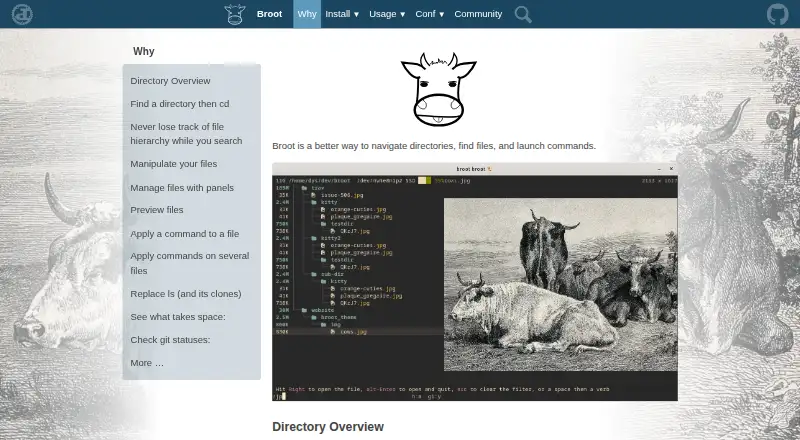
What Broot is
Broot is a directory navigation tool for finding files, viewing folders, and launching commands. It runs on Linux, macOS, and Windows, and is free under the MIT License. Its directory views account for `.gitignore` and `.ignore` files, while search can rank results by relevance, match regular expressions, search file contents, and use logical operators. Select a directory to return to the shell with that location active. Built-in file operations include moving, copying, removing, and creating directories; shortcuts and multiple navigation panels are also available. Synchronized preview panels can show files, and transformers can display PDF and Office documents. In Kitty and WezTerm, previews can also show high-resolution images using Kitty’s graphics protocol. A staging area groups files for commands, while size and date sorting and whale-spotting mode help locate space-consuming items. Git views show file states, branch, upstream divergence, and change statistics. Client-server control over Unix sockets is available only on Unix-like systems.
Who it suits
Broot suits people who want to navigate directories, search file contents, and run commands from a shell-oriented workflow. Its panels, previews, staging area, and Git views may also suit users managing files across multiple folders.
What it does well
- Free under the MIT License
- Runs on Linux, macOS, and Windows
- Search includes contents and logical operators
- Built-in move, copy, remove, and mkdir operations
- Git views include branch and change statistics
What to know first
- Archive support is not included
- Client-server mode is limited to Unix-like systems
Plans
| Plan | Billed and limits | Price |
|---|---|---|
| Broot | MIT-licensed · source and precompiled binaries available | Free |
As dystroy.org lists them, read 28 Sept 2026. The maker's own page has the final word.
Getting started
- Visit https://dystroy.org/broot/.
- Choose the source or a precompiled binary.
- Use Broot on Linux, macOS, or Windows.
Broot is a keyboard-driven terminal workspace for browsing directories, searching files, running commands, and managing items in place. It is best for command-line users who need project context, batch operations, and Git visibility without leaving the terminal. Choose it when a rich, navigable file view matters more than graphical convenience or archive handling.
Overview
Broot combines a directory tree with a command-oriented workflow. Its overviews account for .gitignore and .ignore files, which keeps repository browsing focused on files that matter. You can select a directory and return to your shell with that location as the current directory, so browsing leads directly into the next command rather than requiring a separate cd step.
This is a terminal tool rather than a graphical file manager. That makes it a natural fit for developers, administrators, and other keyboard-first users, but a poor match for anyone who expects drag-and-drop desktop conventions.
Key features
Search supports relevance ranking, regular expressions, content matching, and logical operators. In practice, that covers both quick discovery and more deliberate filtering across unfamiliar or large trees; it is considerably more flexible than a name-only browser.
Move, copy, remove, and mkdir commands are built in, and shortcuts can be added for routines you repeat. Multiple panels allow side-by-side navigation and transfers between locations, while customizable colors help distinguish panels and states. A staging area lets one command target several selected files, reducing repetitive one-item-at-a-time work.
Synchronized preview panels preserve file context as you move through a directory. High-resolution images can be shown through Kitty's graphics protocol in Kitty and WezTerm. Transformers add previews for PDF and Office documents, useful when filenames alone are not enough to identify a file. Archive support is absent, so compressed packages remain outside this preview-and-management workflow.
For storage cleanup, sorting by size or date and whale-spotting mode expose unusually large files or folders. Broot computes sizes, dates, and file counts in the background, giving you an overview without making every inspection a manual calculation.
Git views show file states, the current branch, upstream divergence, and change statistics. Those indicators make the browser useful inside active repositories, where file navigation and version-control context need to be considered together.
Client-server mode lets another process control Broot or query its state. It uses Unix sockets and is available only on Unix-like systems, so Windows users cannot rely on this integration point.
Pricing
Broot is free under the MIT License. The Broot plan costs free and includes MIT-licensed use, with source code and precompiled binaries. The license permits use, copying, modification, publication, distribution, sublicensing, and sale, subject to its conditions. There are no paid tiers, seat charges, usage quotas, or trial terms to weigh.
Platforms
Native support covers Linux, macOS, and Windows. Core navigation, search, file operations, panels, previews, storage analysis, and Git views are therefore available across the three desktop platforms. Client-server mode is the platform-specific exception: its Unix-socket design limits it to Unix-like systems.
Who it's for
Broot suits developers working in Git repositories, terminal-centric administrators, and power users who want directory search, previews, and batch actions in one interface. It is especially useful when ignored files, repository status, storage consumption, and shell hand-off all belong in the same browsing session.
Look elsewhere if you need archive browsing, a graphical desktop experience, or client-server control from Windows. Broot's breadth rewards users comfortable with terminal workflows; newcomers seeking conventional visual file management may face an unnecessary learning curve.
Pros and cons
Pros
- Broad search: relevance ranking, regular expressions, content search, and logical operators handle both simple and complex discovery.
- Repository-aware browsing: Git state, branch, divergence, and change statistics add useful context inside projects.
- Batch and panel workflows: staging and multiple panels make transfers and repeated commands more efficient.
- Informative previews: synchronized panels, image rendering in Kitty and WezTerm, and PDF/Office transformers reduce guesswork.
- Free and permissive: the MIT license allows modification and redistribution, with source and precompiled binaries supplied.
Cons
- No archive support: compressed files cannot be handled as part of the browsing workflow.
- Terminal-first design: users wanting a graphical file manager will find the interaction model unsuitable.
- Limited client-server reach: Unix sockets exclude Windows from that control and query mode.
Alternatives
The Terminal File Managers list is a useful starting point for comparing command-line browsers. Choose FileManagerTUI instead for another free, open-source option on Linux, macOS, and Windows under an MIT license. Newt is a similar free, open-source cross-platform choice when you want a different terminal interface.
Alfa is worth considering if API, web, or self-hosted deployment matters alongside desktop platforms. Pick nnn for a free open-source terminal file manager that also supports Android. Rat Commander offers a self-contained terminal manager with no paid tiers or stated usage limits.
Clifm is a free GPL-licensed alternative for Linux, macOS, and Android. elio covers Linux, macOS, Windows, and self-hosted setups without a paid plan or stated usage limits. pointer is a free single-binary option for Linux and macOS under the Unlicense.
Verdict
Choose Broot if you want one terminal tool to search deeply, inspect previews, perform file operations, analyze storage, and read Git state while moving through directories. Its MIT license and broad desktop support remove cost and platform barriers. Look elsewhere if archive handling, a graphical interface, or Windows-compatible client-server control is central to your workflow.
Verdict
Broot combines directory navigation, search, file operations, previews, and Git status views in a free tool for three desktop platforms. Note that archive support is absent and client-server mode is restricted to Unix-like systems.
Questions
How much does Broot cost?
Broot is free under the MIT License.
Which platforms does it support?
Broot runs on Linux, macOS, and Windows.
Can Broot preview documents and images?
Transformers can preview PDF and Office files. Kitty and WezTerm can display high-resolution images through Kitty's graphics protocol.
Does Broot include file operations?
Yes. It includes move, copy, remove, and mkdir operations, and lets users add shortcuts.
Can Broot show Git status?
Yes. Its Git status views show file states, branch name, upstream divergence, and change statistics.
What license does Broot use?
The repository is released under the MIT License, with source and precompiled binaries available.
Facts from Broot's own pages
- Archive support
- No · dystroy.org, 21 Sept 2026
- Client-server mode
- Broot can act as a client or server so another process can control it or query its state; this feature currently uses Unix sockets and is available only on Unix-like systems. · dystroy.org, 28 Sept 2026
- Directory overview
- It provides directory overviews and handles .gitignore and .ignore files. · dystroy.org, 28 Sept 2026
- Document preview
- With transformers, it can preview PDF and Office files. · dystroy.org, 28 Sept 2026
- Dual-pane layout
- Yes · dystroy.org, 21 Sept 2026
- File operations
- Move, copy, remove, and mkdir operations are built in, and users can add shortcuts. · dystroy.org, 28 Sept 2026
- Free plan
- Yes · dystroy.org, 21 Sept 2026
- Git integration
- Git status views show file states, branch name, upstream divergence, and change statistics. · dystroy.org, 28 Sept 2026
- License
- The repository is released under the MIT License, with permission to use, copy, modify, publish, distribute, sublicense, and sell the software subject to the license conditions. · github.com, 28 Sept 2026
- Linux support
- Yes · dystroy.org, 21 Sept 2026
- macOS support
- Yes · dystroy.org, 21 Sept 2026
- Navigation
- Users can select a directory and return to the shell with that directory as the current location. · dystroy.org, 28 Sept 2026
- Panels
- Multiple panels can be opened for navigation and copying or moving elements between panels, with customizable colors. · dystroy.org, 28 Sept 2026
- Preview
- It provides synchronized file preview panels and can display high-resolution images through Kitty's graphics protocol in Kitty and WezTerm. · dystroy.org, 28 Sept 2026
- Preview pane
- Yes · dystroy.org, 21 Sept 2026
- Purpose
- Broot is a way to navigate directories, find files, and launch commands. · dystroy.org, 28 Sept 2026
- Search
- It supports relevance-based search, regular expressions, content search, and logical search operators. · dystroy.org, 28 Sept 2026
- Staging area
- Its staging area lets users execute commands on several files in one go. · dystroy.org, 28 Sept 2026
- Storage analysis
- Sorting by size or date and whale-spotting mode help identify files or folders taking space, while sizes, dates, and file counts are computed in the background. · dystroy.org, 28 Sept 2026
- Support
- The maker provides contact by email and invites users to chat through Miaou. · dystroy.org, 28 Sept 2026
- Windows support
- Yes · dystroy.org, 21 Sept 2026
Where Broot stands on Freedom251
- Terminal File Managers#5 of 29
- File managers#10 of 29