Freedom251 › File Manager Software

muCommander
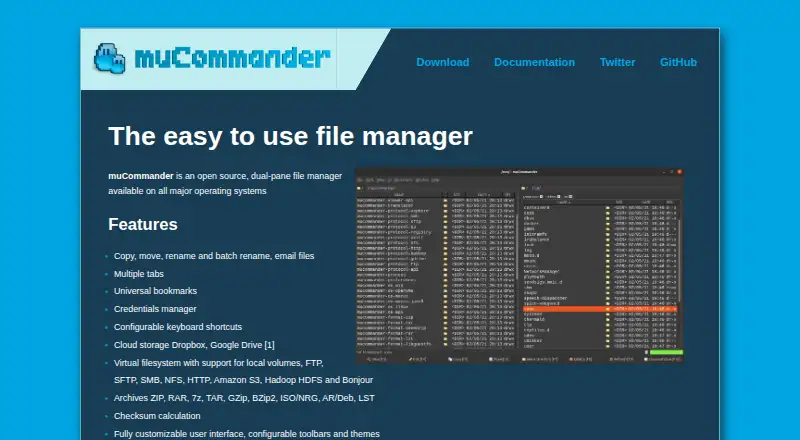
What muCommander is
muCommander is a free, open-source file manager for working with files across local, network, and cloud locations. Its dual-pane layout places two locations side by side, while tabs, universal bookmarks, a credentials manager, and configurable keyboard shortcuts support navigation. Users can copy, move, rename, batch rename, and email files. Its virtual filesystem covers local volumes and protocols and systems including FTP, SFTP, SMB, NFS, HTTP, Amazon S3, Hadoop HDFS, and Bonjour; Dropbox and Google Drive are the listed cloud services. It can open ZIP, RAR, 7z, TAR, GZip, BZip2, ISO/NRG, AR/Deb, and LST archives, and includes checksum calculation, customizable toolbars and themes, and many language options. muCommander runs on Windows, macOS, and Linux, with additional packages for FreeBSD and other Java-supporting systems. Java 11 or later is required. A portable version is available, and the software is released under the GNU GPL v3 license.
Who it suits
muCommander suits people who want a free file manager with two-pane browsing and batch file operations. It also fits users working with network systems, Dropbox, Google Drive, or supported archive formats.
What it does well
- Free and open source under GNU GPL v3
- Dual-pane browsing and multiple tabs
- Batch renaming and file emailing
- Supports Dropbox and Google Drive
- Portable version available
What to know first
- Requires Java 11 or later
- Cloud services listed are Dropbox and Google Drive
- Additional packages depend on Java-supporting systems
Plans
| Plan | Billed and limits | Price |
|---|---|---|
| muCommander | Open source · GNU GPL v3 | Free |
As mucommander.com lists them, read 7 Oct 2026. The maker's own page has the final word.
Getting started
- Visit https://www.mucommander.com/.
- Choose a download for Windows, macOS, or Linux, or a listed package for FreeBSD or another Java-supporting system.
- Make sure Java 11 or later is available to run the application.
- Use the portable version if you prefer that distribution option.
- Consult the FAQ, Gitter community, or GitHub issues for support.
Verdict
muCommander combines file operations, network access, and archive handling in a free desktop file manager. Check its Java requirement and supported services against your setup before choosing it.
Questions
How much does muCommander cost?
The listed price is free. It is open source under the GNU GPL v3 license.
Which operating systems does it support?
Downloads are listed for Windows, macOS, and Linux, with additional packages for FreeBSD and other Java-supporting operating systems.
Does muCommander require Java?
Yes. Java 11 or later is required to run it.
Which cloud storage services are listed?
Dropbox and Google Drive.
What archive formats can it open?
Supported formats include ZIP, RAR, 7z, TAR, GZip, BZip2, ISO/NRG, AR/Deb, and LST.
Where can users get support?
The listed support options are the FAQ, Gitter community, and GitHub issues.
Facts from muCommander's own pages
- Archives
- It supports ZIP, RAR, 7z, TAR, GZip, BZip2, ISO/NRG, AR/Deb, and LST archives. · mucommander.com, 7 Oct 2026
- Archive support
- Yes · mucommander.com, 20 Sept 2026
- Available systems
- Downloads are listed for macOS, Windows, and Linux, with additional packages for FreeBSD and other Java supporting operating systems. · mucommander.com, 7 Oct 2026
- Batch rename
- Yes · mucommander.com, 20 Sept 2026
- Cloud storage
- The listed cloud storage services are Dropbox and Google Drive. · mucommander.com, 7 Oct 2026
- Data handling
- The privacy policy says it does not transfer or disclose user information to third parties, while noting that requested operations may copy file content to remote services, remote servers, or local files. · mucommander.com, 7 Oct 2026
- Dual-pane view
- Yes · mucommander.com, 20 Sept 2026
- File operations
- It supports copying, moving, renaming, batch renaming, and emailing files. · mucommander.com, 7 Oct 2026
- File systems and protocols
- Its virtual filesystem supports local volumes, FTP, SFTP, SMB, NFS, HTTP, Amazon S3, Hadoop HDFS, and Bonjour. · mucommander.com, 7 Oct 2026
- License
- muCommander is released under the GNU GPL v3 license. · mucommander.com, 7 Oct 2026
- Navigation
- It supports multiple tabs, universal bookmarks, a credentials manager, and configurable keyboard shortcuts. · mucommander.com, 7 Oct 2026
- Other features
- It includes checksum calculation, customizable toolbars and themes, and support for many languages. · mucommander.com, 7 Oct 2026
- Supported platforms
- Windows,macOS,Linux · mucommander.com, 20 Sept 2026
- Portable version
- Yes · mucommander.com, 20 Sept 2026
- Privacy
- The privacy policy says the application may persist file names and paths locally, but does not retain file content or information about file content. · mucommander.com, 7 Oct 2026
- Product
- muCommander is an open source, dual-pane file manager. · mucommander.com, 7 Oct 2026
- Runtime requirement
- Java 11 or later is required to run muCommander. · mucommander.com, 7 Oct 2026
- Security
- The download page lists SHA-256 checksums for release packages and an RPM GPG key. · mucommander.com, 7 Oct 2026
- Support and community
- Users are directed to the Gitter community, GitHub issues, and FAQ for questions and support. · mucommander.com, 7 Oct 2026
- Tabbed interface
- Yes · mucommander.com, 20 Sept 2026
Where muCommander stands on Freedom251
- File Manager Software#10 of 100