Freedom251 › File Manager Software
GNOME Commander
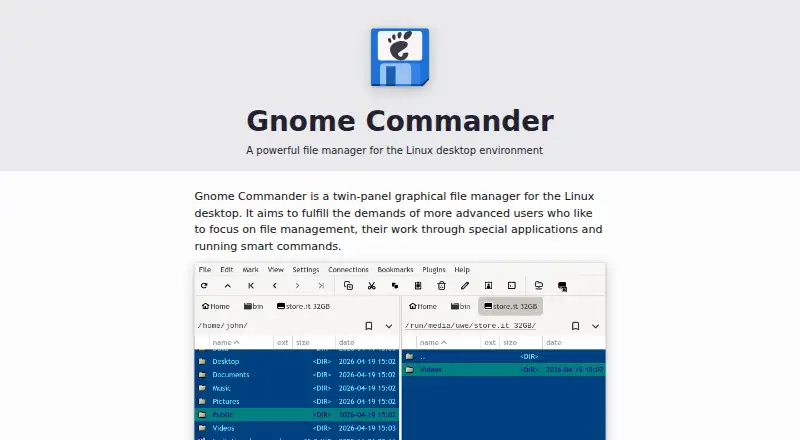
What GNOME Commander is
GNOME Commander is a free, twin-panel graphical file manager for Linux desktop users who need tools for working with files and directories. Its split-panel layout supports tabs, quick search, filtering, and advanced searches by file name or content. It can connect to SSH servers, FTP, Windows shares, and WebDAV. An internal viewer provides text, hex, and image views, while the included command line displays embedded terminal output. Its advanced rename tool can use file metadata. Other features include bookmarks and directory comparison, and users can customize keyboard shortcuts and panel colors. GNOME Commander is built with Rust using GTK and GIO, and is licensed under GPL-3.0-or-later. The project says it is packaged for most Linux distributions and provides instructions for installing from source. It directs users to GitLab to view or report issues and to the project’s releases for updates.
Who it suits
GNOME Commander suits Linux desktop users who prefer a two-panel file manager and need search, remote connections, or file-renaming tools. Its feature set is aimed at advanced users.
What it does well
- Split panels support tabs.
- Advanced search covers file names and content.
- Connects to SSH, FTP, Windows shares, and WebDAV.
- Rename tool can use file metadata.
- GPL-3.0-or-later licensed.
What to know first
- Available for Linux only.
- The project provides source-install instructions rather than listing other platforms.
Plans
| Plan | Billed and limits | Price |
|---|---|---|
| GNOME Commander | Linux desktop file manager · GPL-3.0-or-later | Free |
As gnome.pages.gitlab.gnome.org lists them, read 11 Oct 2026. The maker's own page has the final word.
Getting started
- Visit the GNOME Commander project website.
- Install the package for your Linux distribution if available.
- Follow the project’s instructions to install from source if needed.
- Consult the project’s releases for updates or GitLab to view or report issues.
GNOME Commander is a two-pane graphical file manager for Linux desktops, designed for advanced users who handle several locations and file operations at once. Its combination of network access, deep search, and metadata-aware renaming makes it a capable no-cost workstation tool, but its desktop reach stops at Linux.
Overview
GNOME Commander keeps two directories visible in a split-panel workspace, reducing the back-and-forth navigation that slows down multi-folder work. Tabs allow several locations to remain open, and bookmarks provide quick returns to commonly used directories. This concentrated layout is well suited to people who copy, compare, sort, or reorganize files regularly. For occasional browsing, the number of controls may be more than necessary.
The project is released under GPL-3.0-or-later and is built with Rust, GTK, and GIO. It is packaged for most Linux distributions, with source-installation guidance for users who need to build it themselves. GitLab is the destination for issue tracking, while releases provide updates.
Key features
Search covers quick filtering and more detailed queries by filename or file content. That gives users a way to find material even when names and folder structure are unreliable. The advanced rename tool can use file metadata and apply changes in batches, a meaningful advantage for photo, media, or document collections that need systematic naming. Directory comparison helps identify differences between two locations.
Network work is handled inside the same interface through connections to SSH servers, FTP, Windows shares, and WebDAV. This breadth is useful when local and remote folders belong in one workflow, although readers who only need a lightweight local browser may not benefit from it. The built-in viewer opens text, hexadecimal, and image representations, avoiding a separate viewer for basic inspection.
A command line with embedded terminal output keeps shell actions close to the panels. Keyboard shortcuts and panel colors can be customized, giving experienced users more control over a dense working environment. Together with tabs, bookmarks, and split panels, these tools favor deliberate, keyboard-oriented file management over a simplified consumer interface.
Pricing
| Plan | Price | Includes |
|---|---|---|
| GNOME Commander | free | Linux desktop file manager; GPL-3.0-or-later |
There is one free plan and no trial period or paid tier. Users get the complete product without seat charges or usage quotas, making it suitable for personal and organizational Linux deployments where the license fits.
Platforms
GNOME Commander supports Linux desktop use. Packages target most Linux distributions, and installation instructions are provided for building from source. Windows and macOS users need a different file manager.
Who it's for
Choose GNOME Commander if you work across multiple folders, need repeatable batch renaming, search file contents, compare directories, or connect to several network protocols from one Linux application. It is particularly apt for advanced users who value configurable shortcuts and a high-information interface. It is less appropriate for users wanting a minimal browser, or for anyone whose primary computer is not running Linux.
Pros and cons
Pros
- Two panels and tabs: Keep source and destination locations visible while retaining additional folders in tabs.
- Broad remote support: SSH, FTP, Windows shares, and WebDAV cover varied network storage arrangements.
- Powerful file operations: Content search, directory comparison, and metadata-based batch renaming address tasks basic browsers often leave to separate tools.
- Integrated inspection: Text, hex, and image viewing plus an embedded terminal reduce context switching.
- No purchase barrier: The full Linux desktop application is free under GPL-3.0-or-later.
Cons
- Linux only: It cannot serve readers who need a Windows or macOS desktop client.
- Dense workflow: The advanced, customizable control set may be excessive for simple folder browsing.
- Desktop focus: Its design is centered on a graphical Linux workstation rather than a broad cross-platform deployment.
Alternatives
Dolphin is a free, open-source option when Linux and Windows downloads are more important than GNOME Commander’s Linux-only focus.
WinSCP is the better choice on Windows when protocol-oriented transfer matters, with SFTP, FTP, FTPS, SCP, WebDAV, and S3 support.
Filestash suits readers seeking a web and self-hosted file interface across many platforms, with a free plan and paid self-served tier.
Krusader is another free Linux two-panel file manager.
Midnight Commander is a free alternative for Linux, macOS, and self-hosted environments.
TagSpaces is a freemium, cross-platform option centered on tagged file organization.
Thunar is a free Linux file manager for a simpler approach.
Altap Salamander is a Windows freeware alternative.
For a broader starting point, browse File Manager Software.
Verdict
GNOME Commander is a strong fit for advanced Linux users who want two-pane control, reliable network connections, content-aware search, and batch renaming in one free application. Choose it for a focused, configurable desktop workflow; look elsewhere if you require Windows or macOS support or prefer a minimal file browser.
Verdict
GNOME Commander offers a focused set of file-management tools, including remote connections, search, and metadata-based renaming. It is limited to Linux desktop use.
Questions
Is GNOME Commander free?
Yes. It is listed as free, and there is no free trial.
Which platforms does it support?
GNOME Commander supports Linux desktop systems.
Is GNOME Commander open source?
The project is licensed under GPL-3.0-or-later.
Can it connect to remote locations?
Yes. It supports SSH servers, FTP, Windows shares, and WebDAV.
How can I install it?
The project says it is packaged for most Linux distributions and provides instructions for installing from source.
Where can I find support or updates?
The project directs users to GitLab to view or report issues and to its releases for updates.
Facts from GNOME Commander's own pages
- Availability
- The project says it is packaged for most Linux distributions and provides instructions for installing from source. · gnome.pages.gitlab.gnome.org, 11 Oct 2026
- Batch rename
- Yes · gnome.pages.gitlab.gnome.org, 24 Sept 2026
- Command line
- It includes a command line with embedded terminal output. · gnome.pages.gitlab.gnome.org, 11 Oct 2026
- Customization
- Users can customize keyboard shortcuts and set colors for the panels. · gnome.pages.gitlab.gnome.org, 11 Oct 2026
- Dual-pane view
- Yes · gnome.pages.gitlab.gnome.org, 24 Sept 2026
- File viewing
- Its internal viewer supports text, hex, and image views. · gnome.pages.gitlab.gnome.org, 11 Oct 2026
- Free plan
- Yes · gnome.pages.gitlab.gnome.org, 24 Sept 2026
- License
- The project is licensed under GPL-3.0-or-later. · gnome.pages.gitlab.gnome.org, 11 Oct 2026
- Other file tools
- The feature list includes bookmarks and directory comparison. · gnome.pages.gitlab.gnome.org, 11 Oct 2026
- Panels and tabs
- Features include split panel view and support for tabs. · gnome.pages.gitlab.gnome.org, 11 Oct 2026
- Supported platforms
- linux · gnome.pages.gitlab.gnome.org, 24 Sept 2026
- Purpose
- GNOME Commander is a twin-panel graphical file manager for the Linux desktop, aimed at advanced users. · gnome.pages.gitlab.gnome.org, 11 Oct 2026
- Remote connections
- It supports remote connections to SSH servers, FTP, Windows shares, and WebDAV. · gnome.pages.gitlab.gnome.org, 11 Oct 2026
- Rename tool
- Its advanced rename tool supports file metadata. · gnome.pages.gitlab.gnome.org, 11 Oct 2026
- Search
- It provides quick search and filtering, plus advanced search by file name and content. · gnome.pages.gitlab.gnome.org, 11 Oct 2026
- Support and updates
- The project directs users to GitLab to report or view issues and to releases for updates. · gnome.pages.gitlab.gnome.org, 11 Oct 2026
- Tabbed interface
- Yes · gnome.pages.gitlab.gnome.org, 24 Sept 2026
- Technology
- GNOME Commander is built with Rust using GTK and GIO. · gnome.pages.gitlab.gnome.org, 11 Oct 2026
Where GNOME Commander stands on Freedom251
- File Manager Software#19 of 100