Freedom251 › File Manager Software
Krusader
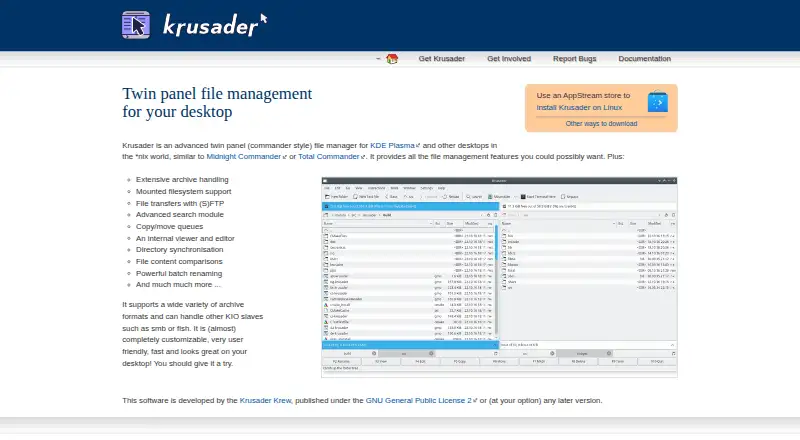
What Krusader is
Krusader is a free, dual-pane file manager for Linux, aimed at KDE Plasma and other *nix desktops. Its tabbed interface supports work across directories, while file tools include archive handling, mounted filesystems, (S)FTP transfers, advanced search, and queues for copy and move tasks. It also provides an internal viewer and editor, directory synchronization, file comparison, and batch renaming. Krusader can use KIO services such as SMB or fish, and its configuration is described as highly customizable. Custom User Actions provide an add-on option; KDE Store add-ons are unofficial and warrant caution. Linux users may be able to install it through an AppStream store or their distribution. The project lists stable version 2.9.0 and development version 2.10.0-dev, and offers source code downloads, checkout instructions, and a detailed handbook in online HTML and weekly PDF form. Bug reports go through Bugs.kde.org. Krusader is published under the GNU General Public License 2 or later.
Who it suits
Krusader suits Linux users who want a customizable two-panel manager for file operations, archives, transfers, and comparisons. It is also suited to users who value an internal viewer and editor or batch renaming.
What it does well
- Free under GNU General Public License 2 or later
- Tabbed dual-pane interface
- Supports archive handling and mounted filesystems
- Includes search, comparison, and batch renaming
- Offers an internal viewer and editor
What to know first
- Linux platform only
- KDE Store add-ons are unofficial
- Stable and development versions are listed separately
Plans
| Plan | Billed and limits | Price |
|---|---|---|
| Krusader | GNU General Public License 2 or later · Linux installation and source code offered | Free |
As krusader.org lists them, read 11 Oct 2026. The maker's own page has the final word.
Getting started
- Check whether Krusader is available through your Linux distribution.
- Alternatively, install it through an AppStream store.
- Consult the online HTML handbook for usage guidance.
- Use the project’s source code downloads or KDE Git checkout instructions if you want the source.
Krusader is a file manager for Linux desktops, including KDE Plasma, aimed at people who want detailed control over file work. It is a strong fit for users juggling transfers, archives, and multiple directories; its Linux-only reach makes it the wrong choice for a cross-platform setup.
Overview
Two directory panes put source and destination side by side, making file moves and comparisons easier to manage than in a single-location browser. Tabs and queued copy and move operations extend that workspace for people handling several tasks at once. The trade-off is a more involved tool than occasional folder browsing requires.
Krusader also works with mounted filesystems and KIO services such as SMB and fish, alongside (S)FTP transfers. Search, an internal viewer and editor, directory synchronization, file comparisons, archive handling, and batch renaming make it useful when file management involves more than moving items between folders.
Key features
Transfers and file operations
The breadth of file operations is Krusader’s main advantage: users can search, compare, synchronize, rename in batches, and work with archives without relying on a basic file browser alone. Queues help organize copy and move work. This concentration of tools suits frequent, varied file tasks, but users looking only for simple browsing may find the extra options unnecessary.
Customization and add-ons
Krusader can be customized extensively, and its User Actions support custom add-ons. That flexibility can make recurring workflows more specific to a user's needs, though it benefits those willing to configure their tools. KDE Store add-ons are unofficial, so they warrant caution.
Installation and documentation
Linux users may find Krusader through an AppStream store or their distribution's packages; source code and KDE Git checkout instructions are also offered. The project provides a detailed handbook online and a weekly PDF build. Stable version 2.9.0 and development version 2.10.0-dev are listed. Users can report bugs through Bugs.kde.org, and the project welcomes help with documentation, translation, testing, user support, packaging, bug work, and development.
Pricing
Krusader is free: its plan costs nothing and is published under the GNU General Public License 2 or later. The plan includes Linux installation and source code. There are no paid tiers to weigh against a free version.
Platforms
Krusader supports Linux, including KDE Plasma and other desktop environments in the *nix world. That focus suits Linux users but excludes anyone who needs the same file manager on Windows, macOS, or mobile platforms.
Who it's for
Choose Krusader if you use Linux and want a configurable, two-pane manager for transfers, archives, search, synchronization, comparisons, and batch operations. It is less compelling for casual file browsing or for users who need a file-management tool across multiple operating systems.
Pros and cons
- Pros: Two panes, tabs, and operation queues support work across multiple directories and tasks.
- Pros: Archive handling, search, synchronization, comparisons, and transfer protocols cover a broad range of file operations.
- Pros: It is free and offers source code, detailed documentation, and substantial customization.
- Cons: Linux-only support rules it out for users seeking a cross-platform manager.
- Cons: Its extensive controls may be unnecessary for simple, occasional browsing.
- Cons: KDE Store add-ons are unofficial and should be approached cautiously.
Alternatives
Dolphin is another free, open-source option if you need a file manager for both Linux and Windows.
WinSCP is a free, open-source Windows file-transfer client for SFTP, FTP, FTPS, SCP, WebDAV, and S3; choose it when those transfer protocols on Windows are the priority.
Filestash has a free plan and trial and supports a wider range of platforms, including web, mobile, and self-hosted use. Its Self Served plan costs $50 a month, billed monthly; its Hobby plan supports up to 3 users.
Midnight Commander is a free option for Linux, macOS, and self-hosted environments.
TagSpaces is a freemium alternative with support across desktop, mobile, web, and self-hosted platforms.
GNOME Commander is a free Linux desktop file manager.
Thunar is a free Linux option with a release tarball available.
Altap Salamander is a Windows alternative with a freeware plan for commercial and non-commercial use that includes all plugins.
For more options, browse File Manager Software.
Verdict
Krusader is a sensible choice for Linux users who want a free, configurable manager with two panes and a broad set of file operations. Its strongest reason to choose it is the range of work it brings together; look elsewhere if you need cross-platform support or prefer a simpler file browser.
Verdict
Krusader brings a broad set of file-management tools together in a free Linux application. Its dual-pane layout, archive handling, transfers, search, and customization options are useful considerations for users choosing a file manager.
Questions
Is Krusader free?
Yes. The listed plan costs nothing and the project publishes it under the GNU General Public License version 2 or later.
Which platforms does Krusader support?
Linux is the listed platform. The project describes it for KDE Plasma and other desktops in the *nix world.
Where can I install it?
It may be available through your Linux distribution or an AppStream store.
Is Krusader open source?
The project offers source code downloads and KDE Git repository checkout instructions. It is published under the GNU General Public License version 2 or later.
What file operations does it support?
It includes archive handling, mounted filesystem support, (S)FTP transfers, search, copy and move queues, an internal viewer and editor, directory synchronization, file comparisons, and batch renaming.
Can I add extensions?
Krusader supports custom add-ons called User Actions. The project says KDE Store add-ons are unofficial and should be used with caution.
Facts from Krusader's own pages
- Archive support
- Yes · krusader.org, 20 Sept 2026
- Batch rename
- Yes · krusader.org, 20 Sept 2026
- Customization
- The site describes Krusader as almost completely customizable. · krusader.org, 11 Oct 2026
- Distribution
- The site says Krusader can be installed on Linux using an AppStream store and may already be available through a user's distribution. · krusader.org, 11 Oct 2026
- Documentation
- The project provides a detailed handbook with an online HTML version and a weekly PDF build. · krusader.org, 11 Oct 2026
- Dual-pane view
- Yes · krusader.org, 20 Sept 2026
- Extensions
- Krusader supports custom add-ons called User Actions, and the site says KDE Store add-ons are unofficial and should be used with caution. · krusader.org, 11 Oct 2026
- File operations
- It includes extensive archive handling, mounted filesystem support, (S)FTP transfers, advanced search, copy and move queues, an internal viewer and editor, directory synchronisation, file comparisons, and batch renaming. · krusader.org, 11 Oct 2026
- Free plan
- Yes · krusader.org, 20 Sept 2026
- Issue reporting
- The site links users to Bugs.kde.org to report bugs. · krusader.org, 11 Oct 2026
- License
- The site says Krusader is published under the GNU General Public License 2 or any later version. · krusader.org, 11 Oct 2026
- Supported platforms
- linux · krusader.org, 20 Sept 2026
- Protocols
- It can handle other KIO slaves such as smb or fish. · krusader.org, 11 Oct 2026
- Purpose
- Krusader is an advanced twin panel file manager for KDE Plasma and other desktops in the *nix world. · krusader.org, 11 Oct 2026
- Release
- The page lists stable version 2.9.0 and development version 2.10.0-dev. · krusader.org, 11 Oct 2026
- Source code
- The project offers source code downloads and provides KDE Git repository checkout instructions. · krusader.org, 11 Oct 2026
- Support and participation
- The project invites people to help document, translate, test, support users, package, hunt bugs, and develop Krusader. · krusader.org, 11 Oct 2026
- Tabbed interface
- Yes · krusader.org, 20 Sept 2026
Where Krusader stands on Freedom251
- File Manager Software#17 of 100