Freedom251 › File Manager Software

Altap Salamander
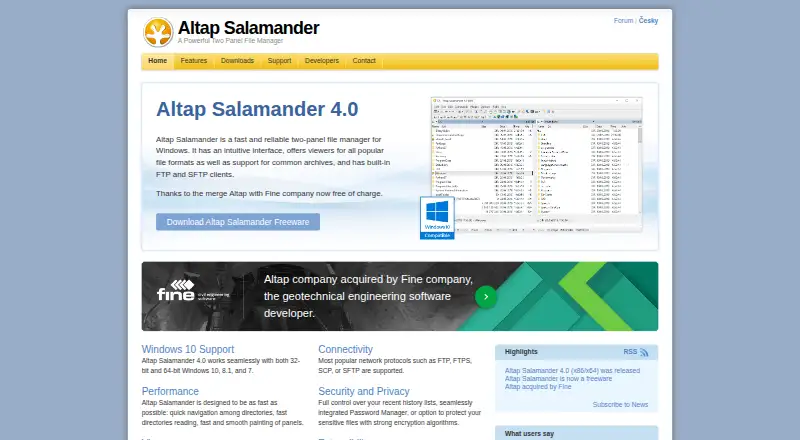
What Altap Salamander is
Altap Salamander is a free two-panel file manager for Windows. Its layout lets users work with two file locations, and its operations include copying, moving, deleting, renaming, viewing, editing, archiving, and emailing files. It can browse, extract, and pack ZIP, RAR, 7Zip, and TAR archives. Built-in viewers handle text, binary, image, and database files, while plugins can add more viewers and other tools. Network access includes FTP, FTPS, SCP, and SFTP, plus Windows shares through mapped drives or UNC paths. The Password Manager encrypts FTP and WinSCP bookmark passwords with 256-bit AES and requires a Master Password. The Encrypt plugin can encrypt selected files using 256-bit AES, 448-bit Blowfish, or 192-bit TripleDES. Windows clipboard commands, drag and drop, and right-click context menus are supported. Its Automation plugin handles Windows Script Host scripts, including JScript and VBScript. Altap Salamander 4.0 is free for commercial and non-commercial use and includes 32-bit and 64-bit versions. It requires Windows 7 or newer; the WinSCP plugin is missing from the 64-bit version.
Who it suits
It suits Windows users who want a free file manager for local files, archives, and network locations. Its plugin and automation support may also suit users who need additional viewers or Windows Script Host scripts.
What it does well
- Dual-pane file management.
- Handles ZIP, RAR, 7Zip, and TAR archives.
- Supports FTP, FTPS, SCP, and SFTP.
- Free for commercial and non-commercial use.
- Includes 32-bit and 64-bit versions.
What to know first
- Requires Windows 7 or newer.
- WinSCP plugin is missing from the 64-bit version.
Limits
Altap Salamander 4.0 is free for commercial and non-commercial use and includes all plugins. The WinSCP plugin is not included in the 64-bit version.
Plans
| Plan | Billed and limits | Price |
|---|---|---|
| Freeware | Commercial and non-commercial use · Includes all plugins · 32-bit and 64-bit versions | On request |
| Altap Salamander 4.0 | Free for commercial and non-commercial use · Windows 7 or newer · 32-bit and 64-bit versions | Free |
As altap.cz lists them, read 20 Sept 2026. The maker's own page has the final word.
Getting started
- Visit the Altap Salamander website.
- Download the Windows version for your system.
- Install Altap Salamander 4.0 on Windows 7 or newer.
- Use the included plugins or add supported plugins for additional tools.
Verdict
Altap Salamander provides file operations, archive handling, network access, and plugins in a free Windows application. Note the Windows version requirement and the missing WinSCP plugin in the 64-bit edition.
Questions
How much does Altap Salamander cost?
Altap Salamander 4.0 is free for commercial and non-commercial use.
Which platforms does it support?
It runs on Windows 7 or newer. The site lists Windows 7, 8.1, and 10 as supported systems.
Does it include plugins?
The Freeware plan includes all plugins. The WinSCP plugin is missing from the 64-bit version.
Which archive formats can it handle?
It supports browsing, extraction, and packing for ZIP, RAR, 7Zip, and TAR archives.
Where can I get help?
Altap directs users to its official support forum and online documentation.
Facts from Altap Salamander's own pages
- 64-bit limitation
- The maker says the WinSCP plugin is missing from the 64-bit version of Altap Salamander. · altap.cz, 9 Oct 2026
- Archive formats
- It supports archives including ZIP, RAR, 7Zip, and TAR, with browsing, extraction, and packing features. · altap.cz, 9 Oct 2026
- Archive support
- Yes · altap.cz, 20 Sept 2026
- Automation
- The Automation plugin supports scripts written for Windows Script Host, including JScript and VBScript. · altap.cz, 9 Oct 2026
- Batch rename
- Yes · altap.cz, 20 Sept 2026
- Cloud storage access
- Yes · altap.cz, 20 Sept 2026
- Compatibility limit
- Version 4.0 requires Windows 7 or newer, and the site lists Windows 7, 8.1, and 10 as supported systems. · altap.cz, 9 Oct 2026
- Corporate use
- Corporate features include configuration in the Windows Registry, quiet unattended installation, and Group Policy restrictions. · altap.cz, 9 Oct 2026
- Dual-pane view
- Yes · altap.cz, 20 Sept 2026
- Encryption
- The Encrypt plugin can encrypt selected files using 256-bit AES, 448-bit Blowfish, or 192-bit TripleDES. · altap.cz, 9 Oct 2026
- File operations
- It supports copying, moving, deleting, renaming, viewing, editing, archiving, and emailing files. · altap.cz, 9 Oct 2026
- File viewers
- Built-in viewers display text, binary files, images, and database files, with additional viewers available as plugins. · altap.cz, 9 Oct 2026
- Free plan
- Yes · altap.cz, 20 Sept 2026
- Network protocols
- It supports FTP, FTPS, SCP, and SFTP, and can access Windows shares through mapped drives or UNC paths. · altap.cz, 9 Oct 2026
- Supported platforms
- Windows · altap.cz, 20 Sept 2026
- Plugins
- Its open architecture supports plugins such as viewers, archivers, virtual file systems, and commands. · altap.cz, 9 Oct 2026
- Product
- Altap Salamander is a two-panel file manager for Windows. · altap.cz, 9 Oct 2026
- Security
- The Password Manager encrypts FTP and WinSCP bookmark passwords with 256-bit AES and requires a Master Password to access them. · altap.cz, 9 Oct 2026
- Support
- The maker directs users to its official support forum and online documentation for questions and help. · altap.cz, 9 Oct 2026
- Windows integration
- It supports Windows clipboard commands, drag and drop, and right-click context menus. · altap.cz, 9 Oct 2026
Where Altap Salamander stands on Freedom251
- File Manager Software#21 of 100