Freedom251 › Email Collaboration Software

Maxdesk
What Maxdesk is
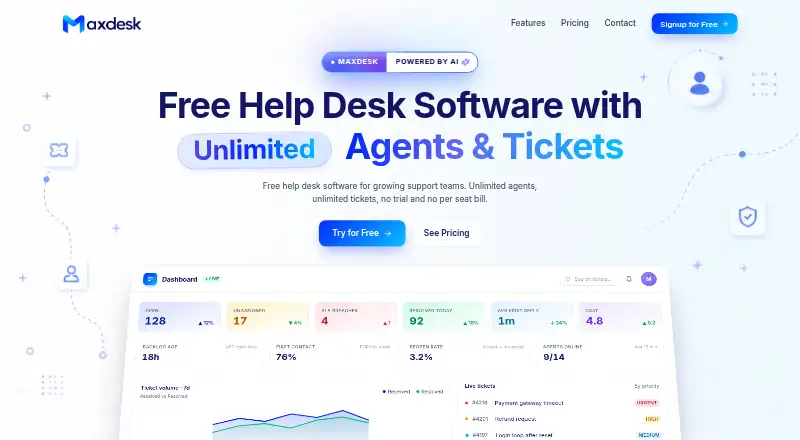
Maxdesk is a web-based help desk with a free tier for teams handling support tickets. Its Free plan costs nothing and includes email-to-ticket, unlimited agents, and unlimited tickets within fair usage, along with basic SLA policies and business hours. Teams also get templates, a knowledge base, and no-code automations with limited active rules. Maxdesk lists assignment automation and internal comments, and the service supports one shared mailbox. Pro costs $20 a month and adds custom logo and brand colors, advanced reports and export, higher storage and attachment limits, twelve-month rolling data retention, and removal of ads and the Maxdesk footer. Elite costs $99 a month and includes the Pro features plus two AI agents, up to 5,000 AI responses per month, context-aware conversations, an AI Copilot and response assistant, and live translations. The plans are billed monthly. Maxdesk’s mail platform is standalone, and the company is based in Bengaluru, India.
Who it suits
Maxdesk suits teams that want a web-based way to organize email support as tickets. Teams needing more storage, reporting, data retention, branding controls, or AI response features can consider its paid tiers.
What it does well
- Email-to-ticket is included in the Free plan
- Unlimited agents on Free
- Includes assignment automation and internal comments
- Pro adds twelve-month rolling data retention
- Elite includes up to 5,000 AI responses per month
What to know first
- Free tickets are subject to fair usage
- Free automations have limited active rules
- Supports one shared mailbox
- Pro costs $20 a month
Limits
The Free plan has fair-use ticket limits, limited active automations, standard storage and attachment limits, Maxdesk branding on outbound email, and three-month rolling ticket, report and audit history. Pro has twelve-month rolling data retention; Elite has twenty-four-month rolling data retention and up to 5,000 AI responses per month.
Plans
| Plan | Billed and limits | Price |
|---|---|---|
| Free | billed monthly · Unlimited agents · Unlimited tickets within fair usage · Email-to-ticket · Basic SLA policies and business hours · No-code automations with limited active rules · Templates and knowledge base | Free |
| Pro | billed monthly · Everything in Free · Custom logo and brand colors · Advanced reports and export · Higher storage and attachment limits · Twelve-month rolling data retention · No ads or Maxdesk footer | $20 a month |
| Elite | billed monthly · Everything in Pro · Two AI agents · Up to 5,000 AI responses per month · Context-aware conversations · AI Copilot and response assistant · Live translations | $99 a month |
| Free plan | $0 forever · Unlimited agents · unlimited tickets (fair usage) · 3-month rolling ticket, report & audit history · standard attachment/storage limits · ads and Maxdesk email branding | Free |
| Pro plan | $20/ workspace / month · Per workspace · 12-month rolling data retention · higher storage/attachment limits | $20 a month |
| Elite plan | $99/ workspace / month · Per workspace · 24-month rolling data retention · 2 AI agents · up to 5,000 AI responses / month | $99 a month |
| Enterprise plan | Talk to sales · For enterprise-scale needs · reliability, security review, procurement paths and dedicated support | On request |
As maxdesk.ai lists them, read 19 Sept 2026. The maker's own page has the final word.
Getting started
- Open the Maxdesk website.
- Use the web platform to access the hosted service.
- Start with the Free plan, which costs nothing and has no free trial.
- Set up a workspace support address to convert incoming email into tickets.
- Choose Pro at $20 a month per workspace or Elite at $99 a month per workspace for additional capabilities.
Maxdesk is a hosted help desk for teams that manage customer or internal IT requests through email. It is best suited to teams that can work from one shared mailbox and want to start without a subscription. Its strongest case is straightforward ticket handling with room to add reporting, retention and AI as needs grow.
Overview
Each workspace gets a support address that turns incoming email into threaded tickets. The ticket view brings conversations, priorities, statuses, assignments, internal notes and attachments together, giving teams a shared place to manage replies and handoffs. One shared mailbox is a meaningful constraint: teams that need separate inboxes for different departments or brands should look elsewhere.
Maxdesk also supports internal IT requests, but it is not a full ITSM suite. It fits service-desk and email-ticket workflows, not organizations seeking a broader IT service-management platform.
Key features
Ticket workflows and SLAs
No-code rules combine triggers, conditions and actions to route, tag, escalate or auto-reply to tickets. Assignment automation can reduce manual triage, while limited active rules on Free may be a constraint for teams with more involved routing. SLA targets can vary by priority and account for business hours; countdowns and breach alerts help teams see when commitments are at risk.
Reporting, permissions and AI
The dashboard tracks ticket counts, SLA breaches, CSAT, response time and trends, alongside a live activity feed. Custom roles, groups, a permission matrix and ticket-scope controls give administrators ways to manage access as teams grow. Elite adds two AI agents, up to 5,000 AI responses per month, context-aware conversations, response assistance, summaries, troubleshooting, translations, and sentiment and urgency detection. Those features are relevant to teams with enough ticket volume to use AI routinely, but they come at a substantial price step up from Pro.
The product centers on email-to-ticket; it does not provide a named third-party integration set. Teams that depend on connecting other support or business tools should weigh that narrow scope against their workflow needs.
Pricing
Maxdesk is freemium, with no free trial. The Free plan costs nothing, billed $0 forever, and includes unlimited agents and tickets within fair usage, email-to-ticket, basic SLA policies, business hours, templates, a knowledge base and no-code automations with limited active rules. It also includes a three-month rolling history for tickets, reports and audits, standard storage and attachment limits, ads and Maxdesk email branding. Email support is included. This is a practical starting point for a small operation, but fair-use ticket limits, storage caps, branding and short retention set clear boundaries.
Pro costs $20 a month, billed $20/ workspace / month. It includes everything in Free, custom logo and brand colors, advanced reports and export, higher storage and attachment limits, twelve-month rolling retention, no ads and no Maxdesk footer, plus priority email support. Pro suits teams that need branded customer emails, richer reporting or a longer record of ticket activity without buying AI features.
Elite costs $99 a month, billed $99/ workspace / month. It includes everything in Pro, 24-month rolling retention, two AI agents and up to 5,000 AI responses per month, as well as AI Copilot, response assistance, context-aware conversations and live translations. The higher price makes sense for teams that will actively use its AI and translation capabilities; otherwise, Pro covers the main reporting and retention upgrades for less.
Enterprise has custom pricing and is aimed at enterprise-scale needs, with reliability, security review, procurement paths and dedicated support. The workspace-based Pro and Elite prices matter when budgeting for multiple workspaces; the plans list unlimited agents, but Free ticket use remains subject to fair usage.
Platforms
Maxdesk is available on the web. Its mail setup is standalone and supports one shared mailbox.
Who it's for
Startups and growing support teams can use Free to organize email into assigned, prioritized tickets and basic SLA workflows. Teams that need longer retention, stronger reporting or their own email branding have a clear upgrade path to Pro. Elite is for operations that can justify paid AI assistance and translations. Larger organizations can consider Enterprise, while teams needing multiple shared inboxes or a full ITSM suite should choose another approach.
Pros and cons
- Pros: Unlimited agents and fair-use tickets on Free make it possible to begin without a per-agent cap.
- Pros: Priority-based SLAs, business-hour handling and breach alerts support response-time management.
- Pros: Pro adds advanced reporting, export and longer retention at $20 a month.
- Cons: One shared mailbox limits teams that need distinct inboxes for separate workflows.
- Cons: Free has fair-use ticketing, limited active automations, standard storage and attachment limits, branding, and only three months of rolling history.
- Cons: Elite costs $99 a month, a steep increase over Pro for teams that do not need its AI features.
- Cons: The product is not a full ITSM suite, and its described workflow is centered on email-to-ticket.
Alternatives
For a broader set of options, browse Shared Inbox Software. Choose Serif instead if you want a product whose paid Lite plan combines a meeting recorder, task manager, knowledge base, Serif AI and email triaging and drafting, with apps across iOS, macOS, web and Windows. Zoho TeamInbox is another option to compare for shared incoming and outgoing email channels, rules, internal discussions and draft sharing.
Coherence may suit teams looking for a free plan built around three users, 2,500 records and monthly AI credits. Help Scout is worth comparing if its free offer of five users, one inbox, one Docs site and 100 contacts per month fits the workload. Consider UnInbox if running open-source software locally is a priority. Zavu Inbox is a free alternative centered on shared messaging across WhatsApp, Telegram, Instagram and Messenger. MailStack is the alternative to consider for a self-hosted, single-node open-source deployment. Sharebox may be a better fit for teams that want up to two shared inboxes, unlimited team members, email assignment and status tracking, plus a Chrome extension sidebar.
Verdict
Choose Maxdesk if your team wants a free, email-centered ticketing system with assignments, basic SLAs and a path to stronger reporting and retention. Its main advantage is that unlimited agents can start on Free; its main drawbacks are the single shared mailbox, fair-use and storage limits, and the fact that it is not a full ITSM suite. Teams needing multiple inboxes, broader IT service management or a different support-channel mix should look elsewhere.
Verdict
Maxdesk covers email ticketing in its free tier, with paid plans adding reporting, storage, retention, branding, and AI features. Its listed mail setup is standalone and supports one shared mailbox.
Questions
Is Maxdesk free?
Yes. The Free plan costs nothing and includes unlimited agents and tickets within fair usage. It has no free trial.
How much do the paid plans cost?
Pro costs $20 a month per workspace. Elite costs $99 a month per workspace. Enterprise pricing is available by talking to sales.
Which platforms does Maxdesk support?
Maxdesk is available on the web.
Does Maxdesk connect to third-party services?
The listed email workflow converts incoming messages to tickets. No third-party integrations are named.
What does Elite add?
Elite includes two AI agents and up to 5,000 AI responses per month, plus context-aware conversations, AI response assistance and live translations.
Where is Maxdesk based?
Its headquarters are in Bengaluru, India.
Facts from Maxdesk's own pages
- AI
- Elite includes AI response assistance, translations, troubleshooting, ticket summaries and sentiment and urgency detection. · maxdesk.ai, 8 Oct 2026
- Analytics
- The dashboard includes ticket counts, SLA breaches, CSAT, response time, trends and a live activity feed. · maxdesk.ai, 8 Oct 2026
- Audience
- Maxdesk says it is for teams of all sizes, including startups, growing support teams and larger organizations; it also says it can be used for internal IT. · maxdesk.ai, 8 Oct 2026
- Automation
- No-code rules use triggers, conditions and actions, and can route, tag, escalate or auto-reply to tickets. · maxdesk.ai, 8 Oct 2026
- Each workspace gets a support address that converts incoming mail into threaded tickets. · maxdesk.ai, 8 Oct 2026
- Free-plan limits
- The Free plan has fair-use ticket limits, limited active automations, standard storage and attachment limits, and Maxdesk branding on outbound email. · maxdesk.ai, 8 Oct 2026
- Headquarters
- Bengaluru, India · maxdesk.ai, 28 Sept 2026
- Integrations
- The pages reviewed describe email-to-ticket but do not name third-party integrations. · maxdesk.ai, 8 Oct 2026
- Notable scope
- Maxdesk says it is not a full ITSM suite. · maxdesk.ai, 8 Oct 2026
- Permissions
- Maxdesk lists custom roles, groups, a permission matrix and ticket scope controls. · maxdesk.ai, 8 Oct 2026
- Product
- Maxdesk describes itself as a hosted help desk and ticketing system. · maxdesk.ai, 8 Oct 2026
- Security records
- The Free plan includes an audit trail and 3-month rolling ticket, report and audit history; Pro lists 12 months and Elite 24 months. · maxdesk.ai, 8 Oct 2026
- SLAs
- SLA targets can vary by priority and account for business hours, with ticket countdowns and breach alerts. · maxdesk.ai, 8 Oct 2026
- Support
- The Free plan includes email support, while Pro includes priority email support; the contact page says replies usually arrive within a working day. · maxdesk.ai, 8 Oct 2026
- Ticketing
- The ticket view combines conversations, priorities, statuses, assignments, internal notes and attachments. · maxdesk.ai, 8 Oct 2026
Where Maxdesk stands on Freedom251
- Email Collaboration Software#7 of 35
- Shared Inbox Software#7 of 30