Freedom251 › Email Collaboration Software

Coherence
What Coherence is
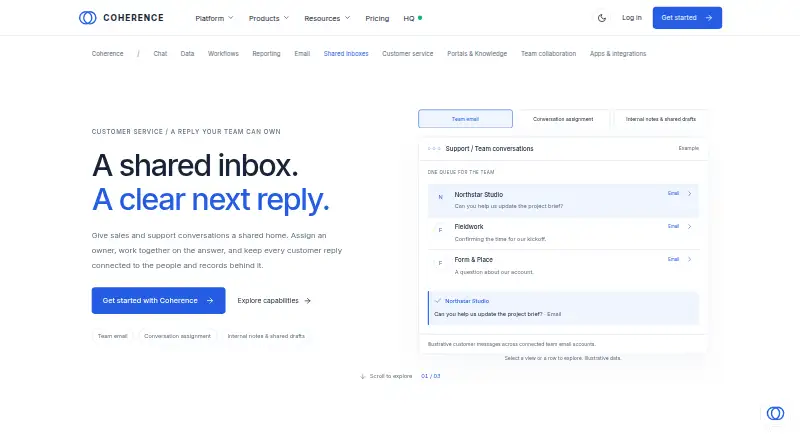
Coherence is a customer operations platform that brings CRM data, communications, workflows, websites, campaigns, and AI agents together. Its Shared Inbox gives sales, support, and operations teams one place to manage incoming conversations, with customer context, replies, and internal discussion available together. Teams can assign conversation owners, add internal notes, view teammate presence, and prepare shared drafts. Categories, custom fields, rules, assignment settings, response targets, snoozes, and reminders help manage the inbox queue. Staff can select published Knowledge articles and review suggested replies with source references, then edit a draft before sending. AI generation uses the workspace’s configured AI provider. Shared Inbox is included on Pro, Team, and Enterprise plans. Listed connections include two-way Gmail or Outlook email sync, Google or Microsoft Calendar sync, and a REST API. Coherence says it encrypts stored data with AES-256 and data in transit with TLS 1.2 or higher, and hosts data in the United States. The service is not currently available in the EEA, UK, Switzerland, Australia, Canada, and several other regions. The Coherence site identifies Brightyard, Inc. as the company behind the product.
Who it suits
Coherence suits businesses managing relationships with customers, partners, vendors, and team members, including service jobs, client projects, and consulting engagements. Shared Inbox is for sales, support, and operations teams that need shared conversation handling and assignment tools.
What it does well
- Combines customer context, replies, and internal discussion in one inbox.
- Supports ownership, teammate assignment, internal notes, and shared drafts.
- Organizes queues with rules, custom fields, targets, snoozes, and reminders.
- Knowledge suggestions include source references and can be edited before sending.
- Lists Gmail, Outlook, calendar, and REST API connections.
- Coherence says data is encrypted at rest and in transit.
What to know first
- Shared Inbox is not included on Free or Starter.
- Team requires a minimum of 10 paid seats.
- Service is unavailable in several regions, including the EEA, UK, and Canada.
Limits
The Free plan allows 3 users, 2,500 records, and 50 shared AI credits per month, but does not include Shared Inbox. Starter allows up to 10 users, 25,000 records, and 500 AI credits per month, and also excludes Shared Inbox. Team includes Shared Inbox and 10,000 AI credits per month, with a 10-seat minimum.
Plans
| Plan | Billed and limits | Price |
|---|---|---|
| Free | 50 AI credits/month · 2,500 records · 3 custom modules · 3 users | Free |
| Pro | per user per month · 2,500 AI credits/month · 100,000 records · 50 custom modules · Shared Inbox | $29 a month |
| Starter | per user per month · 500 AI credits/month · 25,000 records · 10 custom modules · 10 users | $12 a month |
| Team | per user per month; 10-seat minimum · 10,000 AI credits/month · 500,000 records · 100 custom modules · Shared Inbox | $79 a month |
As getcoherence.io lists them, read 15 Oct 2026. The maker's own page has the final word.
Getting started
- Open the Coherence Shared Inbox website.
- Choose a plan that includes Shared Inbox: Pro, Team, or Enterprise.
- Connect Gmail or Outlook for two-way email sync, if needed.
- Set up inbox categories, assignment settings, rules, and response targets.
- Use the web platform or install the Android app for mail, chat, calendar, tasks, and Nash.
Coherence brings shared customer conversations into a broader workspace for teams managing customer and partner relationships. It is best suited to businesses coordinating service jobs, client projects, or consulting work across several functions. Its strongest case is the combination of inbox collaboration and customer operations tools; teams that need only shared email may find the Pro per-seat commitment hard to justify.
Overview
Coherence connects CRM data, communications, workflows, websites, campaigns, and AI agents. Shared Inbox gives sales, support, and operations a common place to reply to incoming conversations while keeping customer context and internal discussion close at hand. That makes it relevant when conversation handling is part of a wider relationship or service workflow.
Conversation ownership, teammate assignment, internal notes, presence, and shared drafts support coordinated work. Categories, custom fields, rules, assignment settings, response targets, snoozes, and reminders give teams ways to organize queues and manage follow-up. These controls make the inbox more capable than a simple shared mailbox, though the value depends on needing that operational structure.
Key features
Collaboration and queue control
Shared drafts, internal discussion, and collision detection help teammates coordinate before a customer receives a reply. Ownership and assignment make responsibility clearer, while response targets, snoozes, and reminders help organize follow-up. Teams with a high volume of handoffs or multiple people covering the same queues are the clearest fit.
Knowledge suggestions and integrations
Staff can choose published Knowledge articles and review suggested replies with source references, then edit drafts before sending. AI generation uses the workspace’s configured AI provider. Gmail or Outlook email sync, Google or Microsoft Calendar sync, and a REST API connect the workspace to communication and calendar tools; webhooks are on the roadmap for Pro and Team.
Security and data location
Coherence says data is encrypted with AES-256 at rest and TLS 1.2 or higher in transit, and hosted on SOC 2 certified infrastructure. Role-based access controls and scoped, revocable workspace API keys are available; audit trails are available on Team plans. Data is stored in the United States, and the service is not currently available in the EEA, UK, Switzerland, Australia, Canada, and several other regions. That geographic restriction may rule it out for some organizations.
Pricing
Coherence uses a freemium model, with a free plan and a 7-day trial. The main pricing decision is straightforward: Shared Inbox begins on Pro, while Free and Starter do not include it.
| Plan | Price | What it includes and who it suits |
|---|---|---|
| Free | free | 3 users, 50 shared AI credits per month, and 2,500 records. A small team can explore the workspace, but this plan does not include Shared Inbox. |
| Starter | Custom pricing | Up to 10 users, 25,000 records, and 500 AI credits per month. It provides more capacity than Free but still excludes Shared Inbox, so it does not serve teams whose main requirement is shared conversation handling. |
| Pro | $29 a month, billed $29 per user per month | Up to 25 users, 2,500 AI credits per month, and 100,000 records, with Shared Inbox included. This is the first suitable tier for teams that need the inbox; per-user billing makes the cost rise with the team. |
| Team | Custom pricing | Up to 100 users, 500,000 records, 10,000 AI credits per month, and Shared Inbox. It requires a minimum of 10 paid seats, so it is aimed at larger teams that can use its added capacity and meet that floor. |
| Enterprise | Custom pricing | Shared Inbox is available. Teams seeking this tier should expect custom pricing. |
Community, email, and priority support are listed across the pricing options. The lower-cost Free and Starter tiers conserve spend but omit the feature that distinguishes this product for shared conversation work. Pro adds that capability with clear per-user pricing; Team raises the user, record, and AI-credit ceilings, but its 10-seat minimum creates a substantial commitment for smaller groups.
Platforms
Coherence lists Android, API, and web platforms. Its Android app includes mail, chat, calendar, tasks, and Nash, with push notifications configurable by category. Gmail and Outlook are supported for two-way email sync.
Who it's for
Coherence is a good fit for businesses that manage relationships across customers, partners, vendors, and team members, particularly when client projects, service jobs, and consulting engagements generate ongoing conversations and follow-up. Sales, support, and operations teams can share ownership and customer context in one inbox. It is a weaker fit for teams that want only a low-cost shared mailbox, need the service in one of its unavailable regions, or cannot justify Pro’s per-user cost.
Pros and cons
- Pros: Shared Inbox combines customer context, internal discussion, and replies, helping teams coordinate conversation work in one place.
- Pros: Assignment, collision detection, shared drafts, rules, response targets, snoozes, and reminders support structured handoffs and queue management.
- Pros: Knowledge suggestions include source references and remain editable before sending, giving staff a way to use existing articles while reviewing AI-assisted drafts.
- Cons: Free and Starter exclude Shared Inbox, so teams must move to Pro or a higher tier to use it.
- Cons: Pro is billed per user, while Team has custom pricing and a 10-seat minimum; either can be a poor fit for a small team focused on shared email.
- Cons: Service availability excludes the EEA, UK, Switzerland, Australia, Canada, and several other regions.
Alternatives
Compare shared inbox software if Coherence’s wider customer operations scope is more than your team needs. Serif is worth considering for teams seeking a paid option with a free plan and trial, and access to meeting recording, task management, a knowledge base, AI, and email triaging and drafting on its Lite plan at $30 a month, billed monthly. Zoho TeamInbox may suit teams looking for shared incoming and outgoing email channels, rules, internal discussion, and draft sharing on its Starter plan, which has custom pricing.
Help Scout offers a free plan for up to 5 users with 1 Inbox, 1 Docs site, and 100 contacts per month, a useful alternative for a small team with modest inbox needs. Maxdesk is another free-plan option. UnInbox is a free, open-source option that can be run locally. Zavu Inbox is free and supports shared messaging across WhatsApp, Telegram, Instagram, and Messenger. MailStack offers an open-source, self-hosted single-node reference deployment. Sharebox provides a free plan with up to 2 shared inboxes, unlimited team members, email assignment and status tracking, and a Chrome extension sidebar.
Verdict
Choose Coherence when customer conversations need to sit alongside CRM context, internal coordination, queue controls, and broader operational work. Shared Inbox is the central reason to consider it, and Pro is the entry point for teams that need that feature. Look elsewhere if shared email alone is the goal, the per-user Pro price is too high for your team, or your organization needs service in a region Coherence does not currently cover.
Verdict
Choose Coherence if your team wants shared handling of customer conversations alongside CRM data, workflows, and related operations. Shared Inbox is available on Pro, Team, and Enterprise; teams on Free or Starter would need another plan for that feature, and Team has a 10-seat minimum.
Questions
Is Coherence free?
Yes. Its Free plan costs nothing and allows 3 users, 2,500 records, and 50 shared AI credits per month. Shared Inbox is not included.
How much does a plan with Shared Inbox cost?
Pro is listed at $29 a month, billed at $29 per user per month. Team and Enterprise include Shared Inbox, but no prices are listed for them here.
Is there a free trial?
Yes. Coherence lists a 7-day trial.
Which platforms does Coherence support?
The listed platforms are Android, API, and web. Its Android app includes mail, chat, calendar, tasks, and Nash.
What integrations are listed?
The pricing page lists two-way Gmail or Outlook email sync, Google or Microsoft Calendar sync, and a REST API. Webhooks are described as being on the roadmap for Pro and Team.
Who makes Coherence?
The Coherence site footer identifies Brightyard, Inc. as the company behind the product.
Facts from Coherence's own pages
- Agents API
- The Agents API accepts natural-language messages at POST /v1/agents/messages and supports synchronous responses or optional server-sent-event streaming. · getcoherence.io, 15 Oct 2026
- Android app
- The Android app provides mail, chat, calendar, tasks, custom modules, Agent Home approvals and category-specific push notifications. · getcoherence.io, 15 Oct 2026
- API documentation
- Documentation includes API overview, authentication, SDK, modules, search, field types, versioning, errors and other reference sections, with an OpenAPI specification. · getcoherence.io, 15 Oct 2026
- API limitation
- File attachment management is marked planned and there is currently no public API for uploading or attaching files. · getcoherence.io, 15 Oct 2026
- Assignment and collaboration
- Shared Inbox supports conversation ownership, teammate assignment, internal notes, presence, and shared drafts. · getcoherence.io, 8 Oct 2026
- Capterra description
- Capterra describes Coherence as an extended relationship-management platform combining email, tasks, business data, AI and automation. · capterra.com, 15 Oct 2026
- Capterra feature count
- Capterra lists 35 features, including permissions, activity tracking, AI Copilot, API, calendar management and collaboration tools. · capterra.com, 15 Oct 2026
- Capterra integrations
- Capterra lists seven integrations, including ActiveCampaign, Airtable, Gmail, Google Calendar, Google Sheets, Microsoft 365 and Outlook. · capterra.com, 15 Oct 2026
- Capterra support
- Capterra lists email/help desk, FAQ or forum, knowledge base and chat support options. · capterra.com, 15 Oct 2026
- Changelog news
- On July 13, 2026 Coherence announced its official TypeScript SDK covering every v1 endpoint and typed agent streaming. · getcoherence.io, 15 Oct 2026
- Company
- The site footer identifies Brightyard, Inc. as the company behind Coherence. · getcoherence.io, 8 Oct 2026
- Company headquarters
- The DPA gives Brightyard, Inc.'s principal place of business as 3440 Bernese Ct, Carson City, Nevada 89705, United States. · getcoherence.io, 15 Oct 2026
- Company legal name
- The service is owned and operated by Brightyard, Inc., a Delaware corporation. · getcoherence.io, 15 Oct 2026
- Compliance and residency
- Coherence says it runs on SOC 2 certified infrastructure, stores data in United States data centers and excludes several regions from availability. · getcoherence.io, 15 Oct 2026
- Data location and availability
- Coherence says data is stored in the United States and the service is not currently available in the EEA, UK, Switzerland, Australia, Canada, and several other regions. · getcoherence.io, 8 Oct 2026
- Desktop installation
- Coherence can be installed as a progressive web app in a standalone desktop or mobile window with cached core assets. · getcoherence.io, 15 Oct 2026
- Email privacy
- Personal emails remain private unless explicitly shared or linked to shared records, while linked messages inherit record permissions. · getcoherence.io, 15 Oct 2026
- Email providers
- Two-way mailbox synchronization supports Gmail/Google Workspace and Outlook/Microsoft 365. · getcoherence.io, 15 Oct 2026
- Google Play data safety
- Google Play reports no third-party data sharing, possible collection of personal information and messages, encryption in transit and user-requested deletion. · play.google.com, 15 Oct 2026
- Google Play developer
- The Android app is published by Brightyard Inc. at 3440 Bernese Ct, Carson City, Nevada, with [email protected] as support contact. · play.google.com, 15 Oct 2026
- Google Play listing
- The Google Play listing describes Coherence as an AI-native all-in-one business platform and shows an August 3, 2026 update. · play.google.com, 15 Oct 2026
- Integrations
- The integration directory lists connections including HubSpot, Salesforce, Pipedrive, Gmail, Outlook, Slack, Microsoft Teams, Zoom, Google Calendar, Sheets, Drive, Notion, Airtable, Asana, ClickUp, Jira, Mailchimp, WordPress and Stripe. · getcoherence.io, 15 Oct 2026
- Intended users
- Coherence says its workspace is for businesses managing relationships across customers, partners, vendors, and team members, including service jobs, client projects, and consulting engagements. · getcoherence.io, 8 Oct 2026
- iOS limitation
- The roadmap lists an iOS app as planned while Android is available now. · getcoherence.io, 15 Oct 2026
Where Coherence stands on Freedom251
- Email Collaboration Software#1 of 35
- Shared Inbox Software#2 of 30