Freedom251 › Email Collaboration Software
Zoho TeamInbox
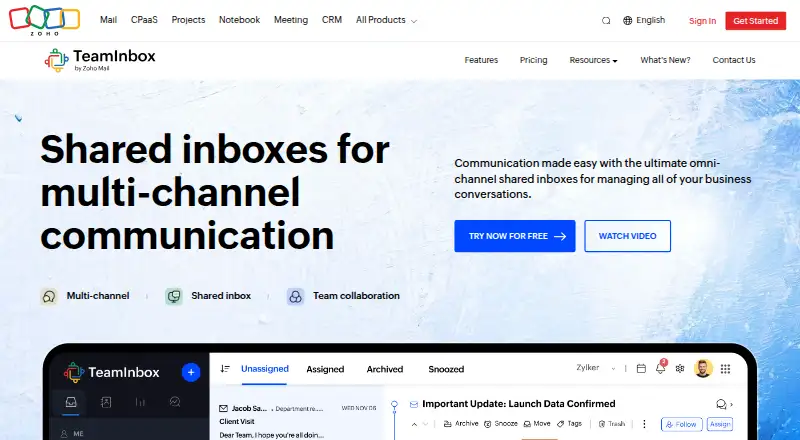
What Zoho TeamInbox is
Zoho TeamInbox gives teams a shared workspace for incoming and outgoing messages. Shared inboxes can connect email, WhatsApp, Telegram, Facebook Messenger and Instagram. Members can assign, delegate, comment on, follow, snooze and archive threads, and organize conversations into views. Teams can chat, share files, co-author emails and discuss messages internally. Automated workflows can send auto responses or assign and sort threads; the Professional plan includes analytics. Listed integrations include Zapier, Zoho CRM, n8n, Make and Microsoft Power Automate, while eWidgets include tools such as Zoho Desk, Asana and Trello. Zoho says email data is encrypted in transit and at rest, and lists multi-factor authentication, admin-controlled inbox access and activity logs. The Free plan supports up to 3 users and 30 conversations per month. Paid plans include Solo at $0.99 a month, Team at $4.99 a month and Team Plus at $7.99 a month. A 14-day trial provides Professional features for up to five users without payment information at signup. TeamInbox is available on Android, iOS and web.
Who it suits
It suits teams that distribute incoming messages and want shared thread handling across multiple channels. Zoho particularly describes shared inboxes as useful for teams managing high email volumes.
What it does well
- Combines email and four named messaging channels.
- Supports internal discussions, file sharing and email co-authoring.
- Automated workflows can assign and sort threads.
- Activity logs record actions by team members.
- Trial offers Professional features for up to five users.
What to know first
- Free plan allows 30 conversations per month.
- Free plan is limited to 3 users.
- WhatsApp conversations beyond the 1,000 monthly free service allowance require purchased credits.
Plans
| Plan | Billed and limits | Price |
|---|---|---|
| Free | Up to 3 users · 30 conversations/month · 5GB storage · 1 channel each for email, WhatsApp, Facebook Messenger, and Instagram DM | Free |
| Solo | 1 user · 500 conversations/month · Up to 5GB storage · 1 channel each for email, WhatsApp, Facebook Messenger, and Instagram DM | $0.99 a month |
| Team | Up to 3 users · 1,000 conversations/month · Up to 5GB storage · 1 channel each for email, WhatsApp, Facebook Messenger, and Instagram DM | $4.99 a month |
| Team Plus | Up to 5 users · 2,000 conversations/month · Up to 5GB storage · 1 channel each for email, WhatsApp, Facebook Messenger, and Instagram DM | $7.99 a month |
| Professional | billed annually; price not shown in opened page · 5 shared incoming channels · Unlimited rules · Unlimited personal sender addresses · 25 shared outgoing email channels · 1 personal incoming channel/user | On request |
| Starter | billed annually; price not shown in opened page · 3 shared incoming channels · 25 rules · 10 shared outgoing email channels | On request |
As zoho.com lists them, read 4 Oct 2026. The maker's own page has the final word.
Overview
Zoho TeamInbox is a shared messaging workspace that brings team email and selected social channels into a place to assign conversations and coordinate replies. It is a strong fit for small teams that need shared ownership of incoming messages; its low-cost plans make it easy to start, but conversation caps can limit growth.
Key features
Shared inboxes connect email, WhatsApp, Telegram, Facebook Messenger, and Instagram messages. Teams can assign or delegate threads, add comments, follow or snooze conversations, and archive them into organized views. Collision detection helps prevent overlapping replies, while internal chat, file sharing, draft sharing, and email co-authoring keep discussions alongside the messages they concern. This combination suits teams that need to distribute a busy inbox, though it is less compelling if a team only needs individual email accounts.
Automated workflows can send auto responses and assign or sort threads. Starter includes 25 rules, while Professional allows unlimited rules, a useful distinction for teams with increasingly complex routing. Professional also includes analytics and a personal incoming channel for each user. Integrations include Zapier, Zoho CRM, n8n, Make, and Microsoft Power Automate; eWidgets include Zoho CRM, Zoho Desk, Zoho Meeting, Zoho Recruit, Zoho Vault, Asana, Trello, and Zoho WorkDrive.
Zoho says email data is encrypted in transit and at rest, with multi-factor authentication and admin-controlled inbox access. Organization admins can review activity logs of team actions. Zoho also says it follows rules and strategies for processing personal data and collects only what the product needs to function.
Pricing
The Free plan costs nothing and supports up to 3 users, 30 conversations/month, 5GB storage, and one channel each for email, WhatsApp, Facebook Messenger, and Instagram DM. It is a useful trial of the shared workflow, but 30 conversations a month is a small allowance for an active team.
Solo costs $0.99 a month for one user, 500 conversations/month, up to 5GB storage, and one channel each for email, WhatsApp, Facebook Messenger, and Instagram DM. It is the lowest-cost paid option, but it does not add another seat. Team costs $4.99 a month and raises the allowance to up to 3 users and 1,000 conversations/month, with the same storage and channel allocation. Team Plus costs $7.99 a month for up to 5 users and 2,000 conversations/month, again with up to 5GB and one channel of each listed type. The stepped limits make Team and Team Plus more suitable when multiple people share the work; neither removes the need to monitor conversation volume.
Starter and Professional use custom pricing. Starter provides 3 shared incoming channels, 10 shared outgoing email channels, internal discussions and draft sharing, and 25 rules. Professional increases those limits to 5 shared incoming and 25 shared outgoing email channels, removes the rules cap, and adds analytics and a personal incoming channel per user. Starter is the more contained choice for teams with simpler routing; Professional is aimed at larger channel needs and teams that value analytics. A 14-day Professional trial covers up to five users and requires no payment information at signup. Each WhatsApp Business Account gets 1,000 free service conversations monthly; additional conversation credits must be purchased beyond that allowance.
Platforms
TeamInbox is available on the web, Android, and iOS. It is a standalone mail platform, with mobile apps for teams coordinating away from a desktop.
Who it's for
TeamInbox is best for small teams that distribute incoming messages, particularly those handling high email volumes or needing social channels alongside email. Its assignment tools, internal discussion, and automation suit shared responsibility for replies. Teams with more than five users on the listed low-cost plans, or conversation needs above their monthly caps, should weigh the custom-priced plans and their channel limits before committing.
Pros and cons
- Pros: One workspace spans email and four social messaging channels, with assignment, collision detection, and internal collaboration to coordinate team responses.
- Pros: The $0.99 a month Solo plan and free tier provide low-commitment ways to begin, while higher plans increase users and monthly conversation allowances.
- Cons: The free plan’s 30 conversations/month is restrictive for teams with regular message volume.
- Cons: The low-cost plans cap users and conversations, and the WhatsApp allowance can require paid credits once monthly free service conversations run out.
- Cons: Starter and Professional prices are custom, so teams must evaluate them against their channel and workflow needs.
Alternatives
Consider Coherence if its free tier’s 3 users and 2,500 records suit your workload and you do not need its shared inbox, which is excluded from that plan. Help Scout offers a free plan for 5 users with one Inbox and one Docs site, making it an alternative for teams whose needs fit those limits. Zavu Inbox is worth considering for its free plan with two connections and 2,000 shared messages/month across WhatsApp, Telegram, Instagram, and Messenger. MailStack is a neutral alternative for teams seeking an open-source, self-hosted single-node reference deployment. Maxdesk offers a free plan with unlimited agents and tickets within fair usage, email-to-ticket, and basic SLA policies. Sharebox has a free plan for up to two shared inboxes and unlimited team members. Cerb is another alternative. Drag is another alternative.
For a broader comparison, browse Shared Inbox Software.
Verdict
Choose Zoho TeamInbox if a small team wants shared ownership of email and social messages, with internal collaboration and routing automation in the same workspace. Its inexpensive entry plans and useful coordination tools are the case for it; the tight free quota, user ceilings, and WhatsApp credit costs are reasons to look elsewhere or compare custom-priced plans when message volume grows.
Verdict
Zoho TeamInbox brings shared messages, internal collaboration and workflow automation into one workspace, with a 14-day Professional trial. Check plan limits for users and conversations, and account for WhatsApp credits beyond the stated free allowance.
Facts from Zoho TeamInbox's own pages
- Analytics
- The Professional plan includes analytics. · zoho.com, 4 Oct 2026
- Audience
- Zoho describes shared inboxes as useful for teams distributing incoming messages, especially teams handling high email volumes. · zoho.com, 4 Oct 2026
- Audit
- The organization admin can review activity logs that record actions performed by team members. · zoho.com, 4 Oct 2026
- Automation
- Automated workflows can send auto responses and assign or sort threads. · zoho.com, 4 Oct 2026
- Channels
- Shared inboxes can connect email, WhatsApp, Telegram, Facebook Messenger, and Instagram messages. · zoho.com, 4 Oct 2026
- Collaboration
- Teams can chat, share files, co-author emails, and hold internal discussions alongside message threads. · zoho.com, 4 Oct 2026
- Extensions
- Available eWidgets include Zoho CRM, Zoho Desk, Zoho Meeting, Zoho Recruit, Zoho Vault, Asana, Trello, and Zoho WorkDrive. · zoho.com, 4 Oct 2026
- Founded
- 1996 · zoho.com, 28 Sept 2026
- GDPR
- Zoho states that it follows rules and strategies for processing personal data and collects only information needed for the product to function. · zoho.com, 4 Oct 2026
- Inbox tools
- Users can delegate, comment on, follow, snooze, and archive threads, with conversations organized into views. · zoho.com, 4 Oct 2026
- Integrations
- Listed integrations include Zapier, Zoho CRM, n8n, Make, and Microsoft Power Automate. · zoho.com, 4 Oct 2026
- Product
- Zoho TeamInbox gives teams a shared workspace to manage incoming and outgoing messages, assign threads, discuss internally, and share drafts. · zoho.com, 4 Oct 2026
- Security
- Zoho says email data is encrypted in transit and at rest, and supports multi-factor authentication and admin-controlled inbox access. · zoho.com, 4 Oct 2026
- Support
- Zoho lists [email protected] for questions. · zoho.com, 4 Oct 2026
- Trial
- The 14-day free trial provides Professional plan features for up to five users and does not require payment information at signup. · zoho.com, 4 Oct 2026
- WhatsApp limit
- Each WhatsApp Business Account receives 1,000 free service conversations monthly, and additional conversation credits must be purchased beyond that allowance. · zoho.com, 4 Oct 2026
Where Zoho TeamInbox stands on Freedom251
- Email Collaboration Software#10 of 35
- Shared Inbox Software#10 of 30