Freedom251 › Shared Inbox Software
UnInbox
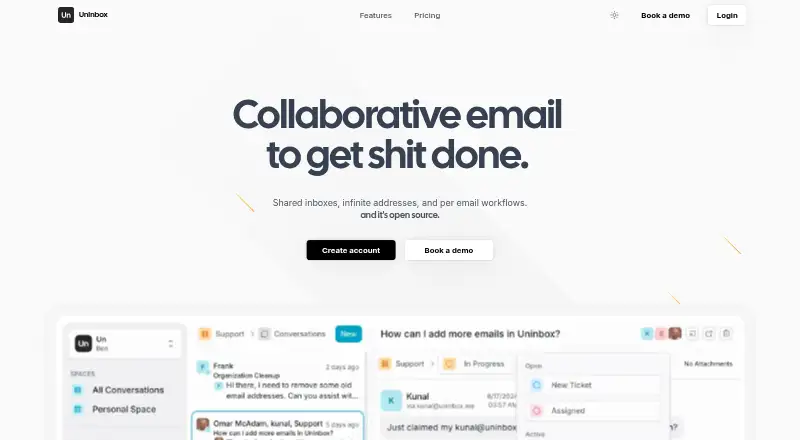
What UnInbox is
UnInbox is collaborative email for teams and professionals, built around shared inboxes, shared spaces, and workflow statuses. Teammates can comment on conversations and reply from shared addresses, while status tracking makes email work visible across the team. Users can add unlimited addresses, including examples such as admin@, support@, sales@, and billing@. The project describes its codebase as open source and provides instructions for local use. The Free plan includes an @uninbox.me address, personal spaces, three workflows per space, seven-day raw email retention, and community or email support. Pro costs $12 a month billed per user, and adds unlimited custom domains, teams, shared and public spaces, SMTP and API access, conversation assignees, and priority chat and video-call support. Enterprise has a 30-user minimum and includes a dedicated instance, custom IP, SAML SSO, ten-year conversation activity history and raw email retention, dedicated onboarding, and organization-wide video-call support. Self-hosting requires additional manual email configuration; the repository directs users to Discord for production guidance.
Who it suits
UnInbox suits teams and professionals who want shared email spaces, conversation comments, and visible workflow status. Its plans cover individual use through organizations with at least 30 users.
What it does well
- Shared spaces support comments and replies from shared addresses.
- Unlimited addresses are available.
- Pro includes SMTP and API access.
- Enterprise includes SAML SSO and ten-year retention.
What to know first
- Free raw email retention is 7 days.
- Enterprise requires a minimum of 30 users.
- Self-hosting requires manual email configuration.
Limits
The Free plan includes an @uninbox.me email address, Personal Spaces, three workflows per space and seven-day raw email retention. Enterprise has a 30-user minimum; it lists 10-year conversation activity history and raw email retention.
Plans
| Plan | Billed and limits | Price |
|---|---|---|
| Free | @uninbox.me email address · Personal Spaces · 3 Workflows per Space · 7 day raw email retention · Community/email support | Free |
| Pro | per user · Unlimited Custom Domains · Teams · Unlimited Shared & Public Spaces · SMTP & API Access · Convo Assignees · Priority Chat Support · Video Call Support | $12 a month |
| Enterprise | 30 Users Minimum · Everything in Pro · Dedicated Instance · Custom IP · SAML SSO · 10 year convo activity history · 10 year raw email retention · Dedicated Onboarding · Org Wide Video Call Support | On request |
As uninbox.com lists them, read 9 Oct 2026. The maker's own page has the final word.
Getting started
- Open the UnInbox website.
- Choose the Free plan or a paid plan; Pro is $12 a month, billed per user.
- Start with the Free plan’s @uninbox.me address, or use Pro’s unlimited custom domains.
- Create spaces and workflows, then add shared addresses for team conversations.
- For self-hosting, follow the repository’s local-run instructions and configure email manually.
UnInbox is a collaborative email workspace for teams that need shared conversations, comments, and visible work statuses. It suits professionals coordinating role-based mailboxes, particularly those comfortable with open-source software or a more involved self-hosted setup. The best choice depends on whether you value unlimited addresses and team workflow more than a turnkey inbox and long retention on the free tier.
Overview
UnInbox puts team email into shared spaces. Colleagues can comment on a conversation, reply from a shared address, and use workflow statuses to show whether work remains open or is complete. That combination gives support and operations teams a clearer handoff process than separate personal inboxes.
You can add unlimited addresses, including admin@, support@, sales@, and billing@. The codebase is open source, and the project provides instructions for running it locally. Running your own instance requires manual email configuration, with production guidance directed through the project’s Discord. Self-hosting therefore favors teams with someone willing to manage mail infrastructure rather than organizations seeking a fully managed deployment.
Key features
Shared collaboration
Shared spaces let teammates discuss conversations internally and send replies from shared addresses. Workflow tracking makes the state of each message visible to the group, which is useful for queues that involve handoffs, approvals, or follow-up. A personal mailbox user is unlikely to gain much from these team-oriented controls.
Addresses and extensibility
Unlimited addresses allow separate identities for functions such as sales and billing without imposing a published address count.
Open-source and self-hosted operation
The open-source repository offers a local installation path and more control over where the service runs. The trade-off is operational work: email configuration is manual, and production setup help is routed through Discord. Choose this route when control and source access outweigh the convenience of a hosted setup.
Pricing
Free
The Free plan costs nothing and provides an @uninbox.me email address, Personal Spaces, three workflows per space, seven-day raw email retention, and community/email support. It is suitable for an individual exploring the product or handling short-lived mail. The three-workflow cap and very short raw-email window make it a weak fit for teams that need a durable record or several distinct processes.
Pro
Pro costs $12 a month, billed per user. It adds unlimited custom domains, Teams, unlimited shared and public spaces, SMTP and API access, conversation assignees, priority chat support, and video call support. This is the practical tier for collaborative work: custom domains and shared spaces replace the personal focus of Free, while assignees make ownership explicit. Per-user billing means costs rise with the team, but the plan removes the Free tier’s listed workflow and address constraints.
Enterprise
Enterprise uses custom pricing and requires a minimum of 30 users. It includes everything in Pro plus a dedicated instance, custom IP, SAML SSO, 10-year conversation activity history, 10-year raw email retention, dedicated onboarding, and organization-wide video-call support. Large organizations with identity, isolation, and long-retention requirements are the intended audience; smaller teams cannot meet the stated minimum.
Platforms
UnInbox is offered through the web and API, with a self-hosted option. The API supports programmatic access, while self-hosting adds the configuration responsibilities described above. It is a standalone mail platform rather than a mobile application.
Who it's for
UnInbox fits professionals and teams sharing support, sales, administrative, or billing mail. Pro is the clearest match for teams that need multiple shared spaces, custom domains, assignments, and responsive support. Free works for personal experimentation or workflows where seven-day raw-email retention is acceptable. Enterprise is for organizations of at least 30 users that need SAML SSO, dedicated infrastructure, and decade-long retention. Readers wanting a conventional individual inbox or zero-configuration deployment should look elsewhere.
Pros and cons
Pros
- Unlimited addresses: separate role-based mail identities without a published address limit.
- Visible teamwork: comments, shared replies, statuses, and Pro assignees make responsibility easier to follow.
- Open-source option: technically capable teams can run the software locally and retain more operational control.
- Enterprise retention: ten-year conversation history and raw-email retention support long-lived records.
Cons
- Free retention is brief: raw email is retained for only seven days, limiting archival use.
- Self-hosting takes work: manual email configuration and Discord-directed production guidance add operational overhead.
- Free is personal: Personal Spaces and three workflows per space do not provide the team features in Pro.
- Enterprise has a high entry point: the 30-user minimum excludes smaller organizations needing SSO or dedicated infrastructure.
Alternatives
For a broader directory of shared-inbox products, see Shared Inbox Software.
- Serif is a paid, cross-platform option with a free plan and trial, plus email triaging and drafting alongside meeting, task, and knowledge-base tools.
- Zoho TeamInbox offers a freemium shared-inbox product for Android, iOS, and web users, with channels, rules, internal discussions, and draft sharing.
- Coherence is a freemium Android, API, and web service whose listed tiers combine shared records with AI credits and user limits.
- Help Scout provides a freemium API-based setup; its Free plan includes five users, one Inbox, one Docs site, and capped contacts, replies, and tags.
- Maxdesk is a web freemium help-desk option with unlimited agents, tickets within fair usage, email-to-ticket, and basic SLA policies on Free.
- Zavu Inbox is a free API and web service focused on shared WhatsApp, Telegram, Instagram, and Messenger connections, with monthly message limits.
- MailStack is a free, self-hosted, open-source alternative with a single-node reference deployment.
- Sharebox is a freemium web and extension product whose Free plan supports two shared inboxes, unlimited team members, assignments, and status tracking.
Verdict
Choose UnInbox if your team needs collaborative handling of many role-based addresses, explicit workflow status, and the option to run open-source software yourself. Pro is the sensible starting point for ongoing team use because it adds shared spaces, custom domains, assignments, and stronger support. Look elsewhere if you need a hands-off hosted inbox, a generous free archive, or enterprise controls for fewer than 30 users.
Verdict
UnInbox pairs collaborative inbox features with workflow tracking and plans for individuals, teams, and larger organizations. Consider the free plan’s short raw-email retention and the added setup work for self-hosting.
Questions
Is UnInbox free?
Yes. The Free plan costs 0.00 USD and includes an @uninbox.me address, Personal Spaces, three workflows per space and seven-day raw email retention.
How much does Pro cost?
Pro costs $12 a month, billed per user.
Is UnInbox open source?
Yes. The project’s GitHub repository identifies it as open source and provides instructions for running it locally.
What platforms are listed?
The listed platforms are web, self-hosted and API.
What does Enterprise include?
Enterprise requires a minimum of 30 users and lists a dedicated instance, custom IP, SAML SSO, 10-year conversation activity history and raw email retention, dedicated onboarding and organization-wide video-call support.
Facts from UnInbox's own pages
- Email addresses
- The site says users can add infinite addresses, listing examples such as admin@, support@, sales@, and billing@. · uninbox.com, 9 Oct 2026
- Enterprise onboarding
- The Enterprise plan lists dedicated onboarding and organization-wide video call support. · uninbox.com, 9 Oct 2026
- Integrations and access
- The Pro plan lists SMTP and API access. · uninbox.com, 9 Oct 2026
- Intended users
- The project describes UnInbox as modern email for teams and professionals. · github.com, 9 Oct 2026
- Open source
- The project’s GitHub repository identifies UnInbox as open source and provides instructions for running it locally. · github.com, 9 Oct 2026
- Product
- UnInbox describes itself as collaborative email with shared inboxes, infinite addresses, per-email workflows, and an open-source codebase. · uninbox.com, 9 Oct 2026
- Retention limits
- The Free plan lists 7 day raw email retention; Enterprise lists 10 year conversation activity history and 10 year raw email retention. · uninbox.com, 9 Oct 2026
- Security feature
- The Enterprise plan lists SAML SSO. · uninbox.com, 9 Oct 2026
- Self-hosting
- The repository says self-hosting requires additional manual email configuration and directs users to its Discord for production guidance. · github.com, 9 Oct 2026
- Support
- The Free plan lists community/email support, while Pro lists priority chat support and video call support. · uninbox.com, 9 Oct 2026
- Team collaboration
- Shared spaces let teams comment on conversations and reply from shared addresses. · uninbox.com, 9 Oct 2026
- Workflow tracking
- The product tracks email with workflow statuses so teammates can see whether work is done. · uninbox.com, 9 Oct 2026
Where UnInbox stands on Freedom251
- Shared Inbox Software#9 of 30