Freedom251 › Shared Inbox Software

Serif
What Serif is
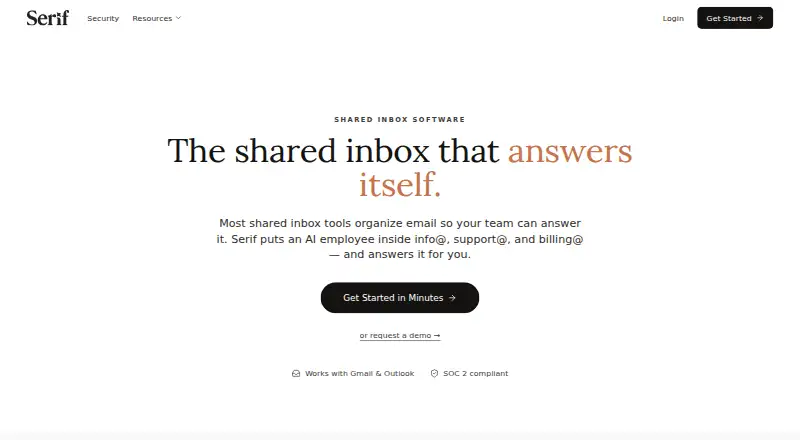
Serif places an AI employee in shared email addresses such as info@, support@, and billing@ to handle routine email and document work. It connects to Google Workspace or Microsoft 365, or can use an address of its own. The assistant can qualify and route inquiries, answer common questions, collect paperwork, send quotes, and follow up on unpaid invoices. It escalates ambiguous or sensitive messages to the team, and users can approve replies before allowing it to work independently. The shared inbox page offers $100 in free credits without a credit card; every plan includes a 7-day free trial with full access. Listed monthly plans include Lite at $30 a month, Standard at $50 a month, Pro at $200 a month, and Team at $50 a month per user. Serif says it is SOC 2 Type 2, GDPR, and HIPAA compliant, and that emails are not used to train general AI models or stored on its servers. Desktop downloads are listed for Mac and Windows, with an iOS app; Android is coming soon.
Who it suits
Serif suits small businesses and operations teams handling shared inboxes and routine email or document tasks. It supports Google Workspace and Microsoft 365, plus iOS and desktop downloads.
What it does well
- Can route inquiries and answer common questions.
- Escalates ambiguous or sensitive messages to the team.
- Offers $100 in free credits without a credit card.
- Every plan includes a 7-day free trial.
What to know first
- Lite costs $30 a month.
- Team costs $50 a month per user.
- Android is listed as coming soon.
Limits
The free option provides $100 in credits. The 7-day trial includes full access; Lite is listed at $30 a month, billed monthly. Enterprise plan pricing is available through sales.
Plans
| Plan | Billed and limits | Price |
|---|---|---|
| Lite | Billed monthly · meeting recorder · task manager · knowledge base · SOC 2 Type 2/GDPR/HIPAA · Serif AI · email triage and drafting | $30 a month |
| Standard | Billed monthly · Everything in Lite · 5x Lite usage · True Voice | $50 a month |
| Pro | Billed monthly · Everything in Standard · 20x Lite usage · dedicated support | $200 a month |
| Team | Billed monthly · Everything in Standard · pooled usage · shared playbooks and knowledge · centralized billing and team controls · priority support | $50 a month |
| Enterprise | Custom · Team features · onboarding specialist · custom AI models · SCIM/SSO/role-based access · custom data retention | On request |
| Free | $100 in free credits · No credit card required | Free |
As serif.ai lists them, read 14 Oct 2026. The maker's own page has the final word.
Getting started
- Open the Serif shared inbox page.
- Choose the free credits or a plan; every plan includes a 7-day free trial with full access.
- Connect Google Workspace or Microsoft 365, or use an address of Serif’s own.
- Use Serif to qualify and route inquiries, answer common questions, collect paperwork, send quotes, or follow up on unpaid invoices.
- Review and approve replies, and let the team handle messages Serif escalates.
Overview
Serif puts an AI employee in shared business email addresses to handle routine messages and related document work. It suits small businesses and operations teams with repeatable inbox tasks, especially those that want a human review path before trusting automation to act alone. Its blend of workflow automation and escalation is compelling, but monthly pricing and usage tiers make fit depend on how much email the team handles.
Key features
Serif can qualify and route inquiries, answer common questions, collect paperwork, send quotes, and follow up on unpaid invoices. That breadth is useful when a shared inbox is tied to operational work, not just customer replies; teams seeking only a drafting assistant may not need it. It connects to Google Workspace or Microsoft 365 and can also use an address of its own.
Ambiguous or sensitive messages are escalated to the team, and users can approve replies until they are comfortable letting Serif work independently. That offers a practical way to introduce automation without surrendering judgment on every conversation. Serif says emails are not used to train general AI models or stored on its servers; learned assistant data is encrypted at rest, emails are accessible only to the user and assistant, and data is never sold. It also states that it is SOC 2 Type 2, GDPR, and HIPAA compliant.
Pricing
The Free plan costs nothing and includes $100 in credits, with no credit card required. That makes it a low-commitment way to try the service, but credits are a finite allowance rather than an ongoing unlimited plan. Every plan includes a 7-day free trial with full access.
| Plan | Price and terms | What it includes | Best fit |
|---|---|---|---|
| Lite | $30 a month, billed monthly | Full access to meeting recorder, task manager, and knowledge base; Serif AI; email triaging and drafting | Individuals or small teams starting with core AI and email tools. |
| Standard | $50 a month, billed monthly | 5x usage of Lite; True Voice | Users who need more usage than Lite and want True Voice. |
| Pro | $200 a month, billed monthly | 20x usage of Lite; dedicated support | Higher-usage customers who value dedicated support; the substantial price jump makes it a poor default for lighter workloads. |
| Team | $50 a month per user, billed monthly | Pooled usage; shared playbooks and knowledge; centralized billing and team admin; priority support | Teams that need shared operating context and administration. Per-user billing means costs rise with seats. |
| Enterprise | Custom pricing | Dedicated onboarding; custom AI models; SCIM, SSO, and role-based access; custom data retention policies | Organizations that need enterprise access controls or tailored retention. |
The cheaper Lite plan has no stated usage multiplier or team administration features, while Standard and Pro scale usage at higher monthly prices. Team pricing is per user, but its pooled usage can suit groups sharing work; compare seat count against the flat individual tiers before choosing.
Platforms
Serif is available on web, iOS, macOS, and Windows, with desktop downloads for Mac arm and x64 as well as Windows. It works with Gmail and Outlook. Android is coming soon, so it is not a fit for teams that need an Android app today.
Who it's for
Serif is strongest for small businesses and operations teams handling recurring requests across shared addresses such as info@, support@, and billing@. It is a better match when routine messages can be automated but sensitive or unclear ones should remain with staff. Teams with low email volume, a strict need for Android, or no tolerance for monthly charges should consider alternatives.
Pros and cons
- Pros: Handles more than reply drafting, including routing, paperwork collection, quotes, and invoice follow-up, which can make an operational inbox more useful to automate.
- Pros: Escalation and reply approvals let teams build confidence before permitting independent handling.
- Pros: $100 in free credits without a card lowers the barrier to trying it.
- Cons: Paid plans start at $30 a month, and the most generous stated usage tier costs $200 a month.
- Cons: Team costs $50 a month per user, so expanding access increases the bill.
- Cons: Android is not yet available.
Alternatives
For a broader comparison, browse Shared Inbox Software or AI Email Assistants.
- Zoho TeamInbox is worth considering for teams that want shared incoming and outgoing channels, rules, and internal discussions; it also has Android, iOS, and web apps.
- Coherence may suit teams looking for a free entry point with 3 users, 50 shared AI credits per month, and 2,500 records, or a larger Starter allowance.
- Help Scout is a potential fit for a small support operation that can work within its free allowance of 5 users, 1 Inbox, 1 Docs site, and 100 contacts per month.
- Maxdesk is an option for teams that want a free web-based ticketing plan with unlimited agents and tickets within fair usage.
- UnInbox is an alternative for readers who prefer an open-source project they can run locally.
- Zavu Inbox is a free option for teams handling shared WhatsApp, Telegram, Instagram, and Messenger messages.
- MailStack is a self-hosted, open-source alternative with a single-node reference deployment.
- Sharebox may suit teams wanting up to two shared inboxes and unlimited team members on its free plan, with assignment and status tracking.
Verdict
Choose Serif if your small business or operations team wants to automate repetitive shared-inbox work while retaining human approval for uncertain or sensitive replies. Its practical appeal is the combination of operational tasks and controlled escalation; its main drawbacks are recurring, usage-tiered costs and the lack of Android support. The free credits and 7-day trial make it reasonable to assess before committing, but teams should weigh likely usage and seat count against the monthly bill.
Verdict
Serif combines routine email handling with a human review path for uncertain or sensitive messages. It offers free credits and a trial, but monthly plans have listed costs and Android is not yet available.
Questions
Does Serif have a free option?
Yes. The shared inbox page offers $100 in free credits without requiring a credit card.
How much does Serif cost?
Listed monthly plans are Lite at $30 a month, Standard at $50 a month, Pro at $200 a month, and Team at $50 a month per user. Enterprise pricing is available through sales.
Is there a free trial?
Yes. Every plan includes a 7-day free trial with full access.
Which email providers does Serif connect to?
Serif connects to Google Workspace or Microsoft 365 and can also use an address of its own.
Which platforms are available?
Serif lists web, macOS, Windows, and iOS. Android is coming soon.
What does Serif say about email privacy and security?
Serif states that it is SOC 2 Type 2, GDPR, and HIPAA compliant. It says emails are not used to train general AI models or stored on its servers, and learned assistant data is encrypted at rest.
Facts from Serif's own pages
- Audience
- Serif describes its platform as automating email and document work for small businesses and operations teams. · serif.ai, 10 Oct 2026
- Billing handling
- It can pursue unpaid invoices, answer payment questions and request missing paperwork. · serif.ai, 14 Oct 2026
- Calendar integration
- The calendar help article describes Google Calendar connection, working-hour rules, availability checks and meeting-link generation. · serif.ai, 14 Oct 2026
- Capabilities
- The capabilities page lists writing assistance, smart out-of-office responses, analytics, reusable templates and team sharing. · serif.ai, 14 Oct 2026
- Company
- The About page identifies founders Kevin Yang and James and says they met during their first week at Stanford. · serif.ai, 10 Oct 2026
- Company identity
- Crunchbase lists the private company as Serif.ai Inc., active and for-profit, with 1–10 employees. · crunchbase.com, 14 Oct 2026
- Company size
- LinkedIn describes Serif as privately held with 11–50 employees and focused on AI operations for real-estate brokerages. · linkedin.com, 14 Oct 2026
- Compliance
- The security page claims SOC 2 Type 2, GDPR, HIPAA, Google Verified and CASA Tier 2 status. · serif.ai, 14 Oct 2026
- Data privacy
- Serif says learned assistant data is encrypted at rest, emails are accessible only to the user and assistant, and data is never sold. · serif.ai, 10 Oct 2026
- Desktop and mobile
- Serif lists desktop downloads for Mac (arm), Mac (x64), and Windows, an iOS download, and says Android is coming soon. · serif.ai, 10 Oct 2026
- Documentation depth
- The help center contains basics, training, billing, account deletion and integration articles and promises support replies within 24 hours. · serif.ai, 14 Oct 2026
- Email connections
- The service connects to Google Workspace Gmail and Microsoft 365 Outlook through one-click setup. · serif.ai, 14 Oct 2026
- Email providers
- Serif connects to Google Workspace or Microsoft 365 and can also use an address of its own. · serif.ai, 10 Oct 2026
- Founders and team
- Serif says Kevin Yang and James founded it after meeting at Stanford and that its current team has seven engineers; it does not state a founding year. · serif.ai, 14 Oct 2026
- Free access
- The shared inbox page offers $100 in free credits without requiring a credit card. · serif.ai, 10 Oct 2026
- Free credits
- The shared-inbox page offers $100 in free credits without requiring a card and starts in approval mode. · serif.ai, 14 Oct 2026
- Human review
- Ambiguous or sensitive messages are escalated to the team, and users can approve replies until they trust Serif to work independently. · serif.ai, 10 Oct 2026
- Lead routing
- The shared-inbox product qualifies inquiries, routes vendor mail and escalates opportunities that need people. · serif.ai, 14 Oct 2026
- Limit: AIEmaily review
- AIEmaily says integration depth, autopilot edge cases, retention details and usage-meter behavior are not fully clear publicly. · aiemaily.com, 14 Oct 2026
- Limit: Fritz.ai review
- The reviewer reported few public reviews, no shared-inbox or team collaboration, and usage limits that could constrain high-volume senders. · fritz.ai, 14 Oct 2026
- Limit: G2 interface
- The same G2 review said the panel could be more colorful. · g2.com, 14 Oct 2026
- Limit: onboarding
- Today in AI reported that some early users quit within days because training was inconsistent, prompting Serif to rebuild onboarding and personal playbooks. · todayin-ai.com, 14 Oct 2026
- Limit: SerifReviews users
- The aggregator reports hit-or-miss multi-party scheduling, no native mobile app, and requests for per-thread do-not-draft controls. · serifreviews.com, 14 Oct 2026
- Notable news
- A May 14, 2026 Serif pricing article listed Lite at $30 monthly, Standard at $50, Team at $50 per user and Pro at $200, each with a seven-day trial. · serif.ai, 14 Oct 2026
Where Serif stands on Freedom251
- Shared Inbox Software#3 of 30
- Email Collaboration Software#4 of 35
- AI Email Assistants#16 of 46