Freedom251 › Architecture Software

Live Home 3D
What Live Home 3D is
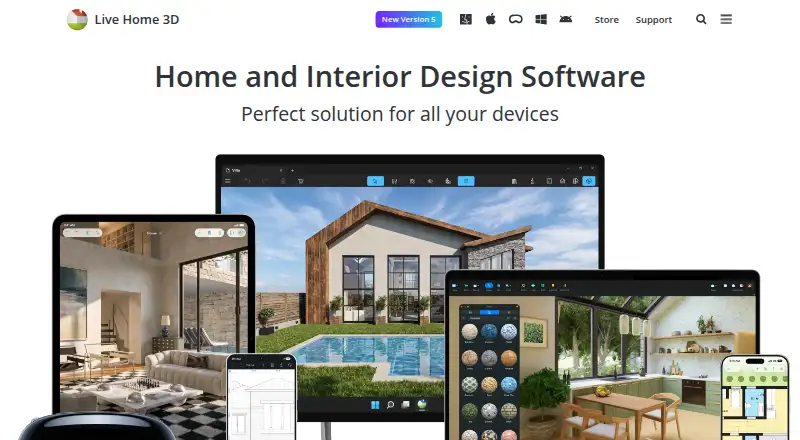
Live Home 3D is a home design app for making floor plans and 3D views of rooms, houses, exteriors, and terrain. It runs on Android, iOS, macOS, and Windows, and is described for amateur home designers as well as professionals. Users can draw walls, trace a plan image, mark dimensions, and create multiple stories, then switch to 3D to walk through a design or change furniture and finishes. The Mac app library lists 2,400 3D models and 2,100 materials. Listed integrations include importing objects from Trimble 3D Warehouse and browsing or importing Sketchfab models; Sketchfab use requires a free account. The Mac app lists imports in FBX, 3DS, COLLADA, and OBJ, plus exports such as PDF floor plans, images, panoramas, walkthrough videos, and 3D model formats. On-device offline ray-tracing renders are supported; AI cloud rendering uses purchased credits. The free version is limited to two stories, and exports contain watermarks, with formats varying by platform. Paid options include $5.99 a month, annual subscriptions, and lifetime licenses.
Who it suits
Live Home 3D suits amateur home designers and professional designers who want to plan rooms or homes and view designs in 3D. It runs across Android, iOS, macOS, and Windows, though available formats vary by platform.
What it does well
- Create floor plans and 3D views.
- Supports multiple stories and plan-image tracing.
- Mac library lists 2,400 models and 2,100 materials.
- Offline on-device ray-tracing renders are supported.
- Runs on Android, iOS, macOS, and Windows.
What to know first
- Free version is limited to two stories.
- Free exports contain watermarks.
- AI cloud rendering uses purchased credits.
- Sketchfab use requires a free account.
Limits
The free version is limited to two stories, and its exports contain watermarks. AI cloud rendering uses purchased credits; on-device offline ray-tracing is available on Mac.
Plans
| Plan | Billed and limits | Price |
|---|---|---|
| Live Home 3D (iPhone/iPad/Vision) | Free app; in-app Standard and Pro subscriptions and lifetime licenses | Free |
| Live Home 3D Pro (Mac) | $149.99 $129.99; Lifetime License · Requires macOS 13 or higher | $129.99, paid once |
| Live Home 3D Pro Features (Lifetime License) | $149.99$129.99 · In-app purchase | $129.99, paid once |
| Live Home 3D Pro Features (1 Month Subscription) | $14.99 · In-app purchase | $14.99 a month |
| Live Home 3D Standard Features (1 Year Subscription) | $19.99 · In-app purchase | $19.99 a year |
| Live Home 3D Pro Features (1 Year Subscription) | $49.99$39.99 · In-app purchase | $39.99 a year |
| Live Home 3D Standard Features (1 Month Subscription) | $5.99 · In-app purchase | $5.99 a month |
| Live Home 3D Standard Features (Lifetime License) | $69.99$59.99 · In-app purchase | $59.99, paid once |
The first 8 of 9 plans, as livehome3d.com lists them, read 3 Oct 2026. The maker's own page has the final word. Every plan
Getting started
- Visit the Live Home 3D website.
- Choose Android, iOS, macOS, or Windows.
- Start with the free plan or use the free trial.
- Choose a paid subscription or lifetime license if needed.
Overview
Live Home 3D is home-design software for turning floor plans into 3D views of rooms, houses, exteriors and terrain. It suits homeowners and design professionals who want to plan layouts and review them spatially. Its strongest case is the link between measured plans and walkthroughs; the main trade-off is that the free version caps stories and watermarks exports.
Key features
Plan, then walk through
Wall tools support drawing a layout, tracing a plan image and adding dimensions, with room for multiple stories. Switching from the 2D plan to 3D makes it easier to judge how a layout feels beyond the page; walkthroughs and editable furniture and finishes help refine that view. Real-time scenes, 360° tours and VR/AR support broaden presentation options, while video export can communicate a design in motion.
Models, materials and rendering
The Mac product page lists 2,400 3D models and 2,100 materials. The store feature chart also supports imports from Trimble 3D Warehouse and browsing and importing Sketchfab models; Sketchfab requires a free account. Mac users can import FBX, 3DS, COLLADA and OBJ objects, and export floor plans as PDF, along with images, panoramas, walkthrough videos and several 3D model formats. The Mac app's unlimited offline ray-tracing renders are a notable advantage for users who want to render on-device; AI cloud rendering instead uses purchased credits.
Pricing
The iPhone/iPad/Vision app is free, with in-app Standard and Pro subscriptions and lifetime licenses. Paid feature subscriptions start at $5.99 a month: Standard is $5.99 a month or $19.99 a year, while Pro is $14.99 a month or $39.99 a year.
Lifetime choices include Standard Features for $59.99, paid once and Pro Features for $129.99, paid once. On Mac, Standard costs $59.99, paid once and Pro costs $129.99, paid once; both require macOS 13 or higher. The one-time options suit users who prefer not to maintain a subscription, while Standard is the lower-cost paid tier and Pro is the higher-priced choice. The plan descriptions do not establish which specific features separate Standard from Pro.
Free is best for trying the workflow, but its two-story maximum can constrain larger homes and watermarks make exports less suitable for polished client or presentation use. Formats vary by platform. A free trial is offered, and purchases covered by the refund policy have a 30 day money back guarantee.
Platforms
Live Home 3D supports Android, iOS, macOS and Windows. The published import and export format details apply to the Mac page, so users choosing another platform should not assume the same format coverage. Usage statistics are collected only with permission; none are collected on Windows or Android. Technical support is available by email at [email protected].
Who it's for
Homeowners planning a remodel or new layout can use the measured plans and walkthroughs to consider space and finishes together. Designers who need visual presentations may value the 360° tours, video export and rendering options. It is a less natural fit for someone seeking project administration or a focused paint-selection tool: its stated strengths are planning, modeling and visualization.
Pros and cons
- Pro: The 2D-to-3D workflow combines dimensions, multistory plans and walkthroughs, helping users check both layout and spatial appearance.
- Pro: Mac users get offline ray-tracing renders and a broad selection of object import and presentation export formats.
- Pro: Subscriptions and lifetime licenses give users different payment approaches, including a lower annual Standard price.
- Con: The free plan stops at two stories and watermarks exports, limiting serious use without an upgrade.
- Con: Some rendering and model workflows have qualifications: AI cloud renders use purchased credits, Sketchfab needs a free account, and detailed format support is stated for Mac.
Alternatives
For a different floor-planning option, Sweet Home 3D has a free desktop and online version, with desktop support for Windows, macOS and Linux and online access requiring free registration. Coohom may suit users prioritizing a large furniture catalog on a free tier: its Starter plan includes 3,000+ furniture items, 10 renders per month and 3 shareable links, but no 360° panorama or photo-to-3D import.
Planner 5D is worth considering if converting an uploaded floor plan and using a full premium furniture catalog matter most; its Premium plan is $59.99 a year. RoomSketcher is another free option, with two starting credits, one free AI floor-plan conversion, 2D and 3D plans, snapshots and AI Render.
Arkio may fit collaborative modeling needs: its free Starter includes all modeling tools, 1:1 meetings and OBJ/GLB and image import/export, while Pro costs $35 a month per user. HomeByMe offers a free Starter tier with 2 projects, 5 Full HD images, unlimited 2D/3D screenshots and a 90k+ product catalog. Homestyler has a free Basic plan with unlimited 1K rendering and 100,000+ free models and materials; Kuula is a tour-oriented alternative with a free Basic tier capped at 300 posts and 100 uploads per month.
Explore more in 3D Visualization Software, Floor Plan Software, Architecture Software and 3D Home Design Software.
Verdict
Choose Live Home 3D if you need floor planning that carries through to immersive 3D review, and you value the choice of platforms and one-time licenses. Look elsewhere if the free tier's two-story cap and watermarked exports are unacceptable, or if your priority is a specialized workflow beyond design and visualization.
Verdict
Live Home 3D supports floor planning, 3D walkthroughs, and model imports across several platforms. The free version has story and export-watermark limits; paid options start at $5.99 a month.
Questions
Is Live Home 3D free?
Yes. A free plan is available, and a free trial is also listed.
What does Live Home 3D cost?
Paid options start at $5.99 a month. Listed options also include annual subscriptions and lifetime licenses.
Which platforms support Live Home 3D?
It is available on Android, iOS, macOS, and Windows.
Can I import models from other services?
The listed integrations include importing objects from Trimble 3D Warehouse and browsing or importing Sketchfab models. Sketchfab use requires a free account.
What are the free version’s limits?
The free version allows up to two stories, and its exports contain watermarks. Formats vary by platform.
Does Live Home 3D support offline rendering?
The Mac app supports unlimited on-device offline ray-tracing renders. AI cloud rendering uses purchased credits.
Facts from Live Home 3D's own pages
- 3D visualization
- Users can switch from a 2D floor plan to a 3D view, walk through the home, and rearrange furniture and finishes. · livehome3d.com, 3 Oct 2026
- Floor planning
- Users can draw floor plans with wall tools, trace a plan image, mark dimensions, and create multiple stories. · livehome3d.com, 3 Oct 2026
- Free trial
- The maker says a free trial is available for Mac, but does not state its duration on the opened page. · livehome3d.com, 3 Oct 2026
- Free-version limits
- The store comparison lists a two-story maximum for Free and says free exports contain watermarks; formats vary by platform. · livehome3d.com, 3 Oct 2026
- Imports and exports
- The Mac page lists object imports in FBX, 3DS, COLLADA, and OBJ and exports including PDF floor plans, image formats, panoramas, walkthrough videos, and several 3D model formats. · livehome3d.com, 3 Oct 2026
- Integrations
- The store feature chart lists importing objects from Trimble 3D Warehouse and browsing and importing models from Sketchfab; Sketchfab use requires a free account. · livehome3d.com, 3 Oct 2026
- Maker headquarters
- BeLight Software lists its headquarters in Odesa, Ukraine. · belightsoft.com, 3 Oct 2026
- Model library
- The Mac product page lists 2,400 3D models and 2,100 materials in the app library. · livehome3d.com, 3 Oct 2026
- Privacy
- The privacy statement says software usage statistics are collected only with permission and that no usage statistics are collected on Windows or Android. · livehome3d.com, 3 Oct 2026
- Purpose
- Live Home 3D helps users create detailed floor plans and 3D renderings for rooms, houses, exteriors, and terrain. · livehome3d.com, 3 Oct 2026
- Refunds
- The online store page says it offers a 30 day money back guarantee for purchases covered by its refund policy. · livehome3d.com, 3 Oct 2026
- Rendering
- The Mac app supports unlimited on-device offline ray-tracing renders using AMD Radeon ProRender or Cycles, while AI cloud rendering uses purchased credits. · livehome3d.com, 3 Oct 2026
- Support
- BeLight lists a technical support email address, [email protected]. · belightsoft.com, 3 Oct 2026
- Who it serves
- The maker describes Live Home 3D as a home design app for amateurs and professional designers. · belightsoft.com, 3 Oct 2026
Where Live Home 3D stands on Freedom251
- Architecture Software#6 of 36
- 3D Architecture Software#4 of 18
- Architecture Design software#5 of 20
- 3D Visualization Software#13 of 51
- Kitchen design software#7 of 23
- 3D Home Design Software#12 of 39
- Interior Design Software#6 of 19
- Floor Plan Software#9 of 25
- Bathroom design software#6 of 14