Freedom251 › Architectural Design Software

Bonsai
What Bonsai is
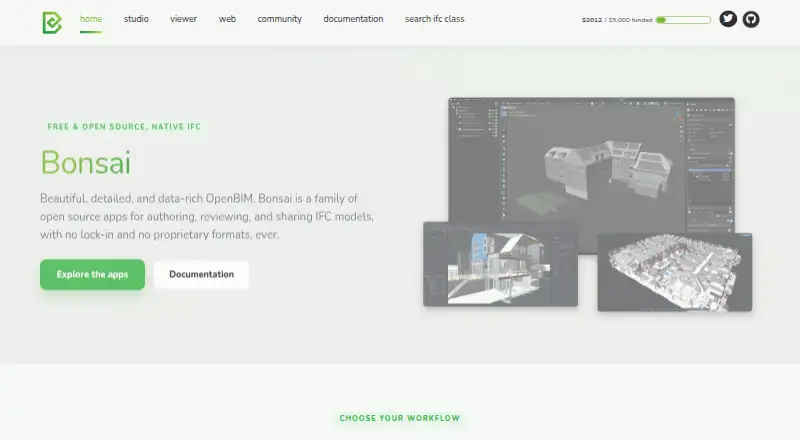
Bonsai is a free, open-source family of apps for authoring, reviewing, and sharing IFC models. Bonsai Studio is the authoring platform, built on Blender, for modeling, documentation, coordination, and BIM data management across disciplines. It can create linked 2D drawings, annotate them, and generate schedules and reports from model data. Bonsai Viewer is a separate desktop app for reviewing models, drawings, and data without the authoring environment. Its tools include search and filtering, clash detection, BCF issue management, federation of multiple models, and cloud sync for models and issues. Studio is powered by IfcOpenShell and includes Python scripting and an API; described workflows also cover structural analysis connections, MEP systems, 4D scheduling, 5D cost estimation, and COBie facility management data. Studio and Viewer support Windows, macOS, and Linux. Bonsai reads and writes native IFC and says it has no proprietary formats or lock-in. The Studio page labels the software alpha, while a browser-based version for viewing and sharing is described as coming soon.
Who it suits
Bonsai suits people working with IFC models across disciplines who need authoring or review tools on desktop. Teams looking to coordinate models can use Viewer’s federation, issue management, and cloud sync features.
What it does well
- Free, open-source Studio and Viewer apps.
- Reads and writes native IFC without proprietary formats.
- Viewer includes clash detection and BCF issue management.
- Studio generates linked drawings, schedules, and reports.
- Supports Windows, macOS, and Linux.
What to know first
- The Studio page labels the software alpha.
- Bonsai Web is described as coming soon.
- No mobile access is listed.
Limits
The Bonsai plan is free software forever and includes Studio and Viewer. Studio is labeled alpha; Bonsai Web is described as coming soon.
Plans
| Plan | Billed and limits | Price |
|---|---|---|
| Bonsai | Free software forever · open source · Studio and Viewer | Free |
As bonsaibim.org lists them, read 3 Oct 2026. The maker's own page has the final word.
Getting started
- Visit https://bonsaibim.org/.
- Choose Bonsai Studio for IFC authoring or Bonsai Viewer for model review.
- Use the Windows, macOS, or Linux version for your system.
- Start with the free Bonsai plan, which includes Studio and Viewer.
Bonsai is a free, open-source suite for authoring and reviewing IFC building models. It is best suited to multidisciplinary BIM users who want desktop tools built around an open file format. Its range is unusually broad for a free suite, but Studio’s alpha status is a material consideration.
Overview
Bonsai pairs Studio, an IFC authoring platform built on Blender, with Viewer, a separate desktop app for reviewing models, drawings, and data. Bonsai reads and writes native IFC and says it has no proprietary formats or lock-in. That makes it a strong fit for teams exchanging model data across disciplines; it is a weaker fit for those who need mobile access, which it does not provide.
Studio is labeled alpha, so its extensive workflow coverage comes with a less mature status. Bonsai Web, intended for browser-based viewing and sharing, is coming soon; the current Studio and Viewer applications support Windows, macOS, and Linux.
Key features
Authoring and model data
Studio covers modeling, documentation, coordination, and BIM data management across disciplines. It can generate and annotate linked 2D drawings, and produce schedules and reports from model data. That combination is useful when a team needs drawings and structured BIM information alongside model authoring, not just geometry.
Its described workflows also include structural analysis solver connections, MEP systems, 4D scheduling, 5D cost estimation, and COBie facility-management data. Blender foundations, IfcOpenShell, Python scripting, and an API give technically inclined users routes to extend or connect workflows. Users seeking a more established authoring environment should weigh those capabilities against the alpha label.
Review and coordination
Viewer handles model review without requiring the authoring environment. It supports search and filtering, clash detection, BCF issue management, and federation of multiple models, making it suited to coordination across disciplines. Cloud sync for models and issues supports team review and collaboration, while Viewer’s separation from Studio means reviewers can use a dedicated application.
Documentation directs users to live chat, community forums, and GitHub bug reports for help. This offers several support routes, though users should expect Studio’s alpha status to be part of the decision.
Pricing
Bonsai is free software forever and open source. Its free plan includes Studio and Viewer, with no free trial; the stated price is free. The plan’s lack of a subscription cost makes it accessible for individual users and teams evaluating an open IFC workflow, while the main trade-offs are desktop-only use and Studio’s alpha maturity rather than a paid tier’s feature restrictions.
IFC support, multi-discipline coverage, clash detection, quantity takeoff, and API access are included in the product’s stated capabilities. There is no mobile access. No separate paid Bonsai plan is described.
Platforms
Studio and Viewer support Windows, macOS, and Linux. There is no mobile access, and browser-based Bonsai Web is coming soon rather than part of the current desktop offering. Bonsai therefore suits teams working at desktop machines, not reviewers who need to coordinate from phones or tablets.
Who it's for
Bonsai is a good match for multidisciplinary BIM teams that exchange IFC models, need authoring and coordination tools, and value open formats and scripting. It is also worth considering for reviewers who need clash detection, issue management, and model federation without using the authoring environment. It is less suitable for mobile-first teams or users who prefer to avoid software labeled alpha.
Pros and cons
- Pro: Native IFC reading and writing without proprietary formats supports open exchange and reduces format lock-in concerns.
- Pro: Studio combines authoring, linked drawings, schedules, reports, and BIM data management across disciplines.
- Pro: Viewer brings clash detection, BCF issues, federation, and cloud sync to a separate review app.
- Pro: Studio and Viewer are free, open source desktop applications, with API and Python scripting workflows.
- Con: Studio is labeled alpha, which makes it a less conservative choice for work that depends on a settled product status.
- Con: No mobile access limits review and coordination away from Windows, macOS, or Linux desktops.
- Con: Browser viewing and sharing depend on Bonsai Web, which is coming soon.
Alternatives
Archicad is a paid alternative with a free educational license for eligible students and educators, valid for one year; consider it if that audience and its Android, iOS, macOS, web, and Windows platform range fit better.
usBIM.platform offers a free basic configuration with 10 GB of cloud storage and free online applications, making it an option for teams prioritizing browser access and cloud storage.
Cedreo has a free plan limited to one project and five photorealistic 3D renderings, with watermarked renderings for personal use; choose it if that bounded project-and-rendering offer matches the need.
Finch has a free single-user plan with editing tools and real-time building performance metrics, plus a free trial; it is an alternative for users seeking those stated capabilities.
LibreCAD is free, open-source 2D CAD for Windows, macOS, and Linux; choose it instead when the requirement is 2D CAD rather than IFC authoring and review.
Hypar offers a free Personal plan with three owned projects and a Professional plan at $100 a month; it may suit users whose project allowance and paid plan fit their needs.
DIALux provides free core lighting design functions on Windows, with access to member-manufacturer luminaires; it is the more focused alternative for lighting design.
Snaptrude has a web-based free plan with three projects, basic BIM and Revit export, and single-user ownership; it is worth considering when browser access and that project limit are a better fit.
Browse Architectural Design Software, Architecture Software, or BIM Software for more options.
Verdict
Choose Bonsai if you want free, open-source IFC authoring and review tools for multidisciplinary desktop BIM work, particularly when native IFC exchange, coordination, and scripting matter. Look elsewhere if Studio’s alpha status is too early for your needs, or if mobile and browser-based access are essential now.
Verdict
Bonsai combines IFC authoring and model review in a free, open-source desktop suite. The alpha label for Studio is important to consider, and Bonsai Web is not yet presented as available.
Questions
Is Bonsai free?
Yes. The Bonsai plan is listed as free and includes Studio and Viewer.
Is Bonsai open source?
Yes. Bonsai is a family of open source apps, and Studio is described as a free, open source IFC authoring platform.
Which platforms does Bonsai support?
Studio and Viewer support Windows, macOS, and Linux. Mobile access is listed as none.
Can Bonsai read and write IFC?
Yes. Bonsai reads and writes native IFC and says it has no proprietary formats or lock-in.
Does Bonsai support clash detection and quantity takeoff?
Clash detection is listed, and quantity takeoff is listed as supported.
Who makes Bonsai, and where can users get help?
The website is bonsaibim.org. Its documentation directs users to live chat, community forums, and GitHub bug reports for help.
Facts from Bonsai's own pages
- Additional workflows
- Studio describes structural analysis solver connections, MEP systems, 4D scheduling, 5D cost estimation, and COBie facility management data. · bonsaibim.org, 3 Oct 2026
- Authoring features
- Studio supports modeling, documentation, coordination, and BIM data management across disciplines. · bonsaibim.org, 3 Oct 2026
- Cloud sync
- Viewer lists cloud sync for models and issues to support team review and collaboration. · bonsaibim.org, 3 Oct 2026
- Coordination
- Viewer supports model search and filtering, clash detection, BCF issue management, and federation of multiple models. · bonsaibim.org, 3 Oct 2026
- Drawings and reports
- Studio can generate and annotate linked 2D drawings and produce schedules and reports from model data. · bonsaibim.org, 3 Oct 2026
- Integrations
- Studio is built on Blender and powered by IfcOpenShell; its workflows include Python scripting and an API. · bonsaibim.org, 3 Oct 2026
- Maturity
- The Studio page labels the software alpha. · bonsaibim.org, 3 Oct 2026
- Open formats
- Bonsai reads and writes native IFC and says it has no proprietary formats or lock-in. · bonsaibim.org, 3 Oct 2026
- Product
- Bonsai is a family of open source apps for authoring, reviewing, and sharing IFC models. · bonsaibim.org, 3 Oct 2026
- Studio
- Bonsai Studio is a free, open source IFC authoring platform built on Blender. · bonsaibim.org, 3 Oct 2026
- Support
- The documentation directs users to live chat, community forums, and GitHub bug reports for help. · docs.bonsaibim.org, 3 Oct 2026
- Supported systems
- Studio and Viewer list Windows, macOS, and Linux support. · bonsaibim.org, 3 Oct 2026
- Viewer
- Bonsai Viewer is a free desktop app for reviewing IFC models, drawings, and data without the authoring environment. · bonsaibim.org, 3 Oct 2026
- Web app status
- Bonsai Web is described as coming soon for viewing and sharing IFC models from a browser. · bonsaibim.org, 3 Oct 2026
Where Bonsai stands on Freedom251
- Architectural Design Software#2 of 29
- Architecture Software#3 of 36
- Architectural CAD Software#2 of 22
- Architecture Design software#2 of 20
- 3D Architecture Software#2 of 18
- Building Information Modeling Software#2 of 13
- BIM Software#6 of 30