Freedom251 › Lighting Design Software
DIALux
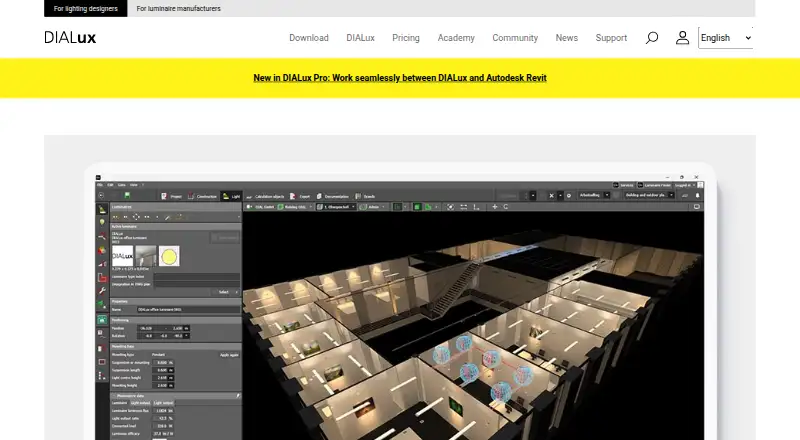
What DIALux is
DIALux is Windows software for designing lighting, with core lighting-design functions available on its free plan. The free tier provides access to luminaires from DIALux member manufacturers. Unlock Non-Members costs €5.99 per month and adds luminaires from manufacturers outside that group. Pro costs €19.99 per month in Region 2 and €29.99 per month in Region 1; it includes non-member luminaires, IFC import and export, project-data export to office formats, and custom report layouts. Monthly prices depend on region, and annual subscriptions are discounted. The listed trial lasts 30 days. DIALux includes rendering tools and construction-document capabilities, and supports IFC, but it is not a BIM authoring tool. The listed platform is Windows. The company is headquartered in Lüdenscheid, Germany. For users considering paid access, the main distinction is whether access to non-member luminaires alone is sufficient or whether the additional Pro export and reporting functions are needed.
Who it suits
DIALux suits lighting designers working on Windows who need lighting design, rendering, or construction-document capabilities. Users needing non-member luminaires or Pro export and report features can choose a paid plan.
What it does well
- Core lighting-design functions are available free.
- Offers a 30-day trial.
- Pro includes IFC import and export.
- Includes rendering and construction-document capabilities.
What to know first
- Windows only.
- Not a BIM authoring tool.
- Paid monthly prices depend on region.
Limits
The free plan provides core lighting design functions and access to member-manufacturer luminaires. Non-member luminaires require Unlock Non-Members at €5.99 per month or Pro at €19.99 per month in Region 2 and €29.99 per month in Region 1.
Plans
| Plan | Billed and limits | Price |
|---|---|---|
| Free | Core functions · over 2.5 million luminaires from > 450 DIALux Members · no luminaires from other manufacturers | Free |
| Unlock Non-Members | € 5.99 - € 9.99/month depending on region; annual subscription discounted · Luminaires from other manufacturers | €5.99 a month |
| Pro | € 19.99 - € 29.99/month depending on region; annual subscription discounted · All features · IFC import/export · PPT, XLS, DOC export · customised report layout · luminaires from other manufacturers | €19.99 a month |
| Unlock Non-Members | Region 1 annual subscription price; regional price selection is automatic · Luminaires from other manufacturers | €109.99 a year |
| Pro | Region 1 annual subscription price; regional price selection is automatic · All features · IFC import/export · PPT, XLS, DOC export · customised report layout · luminaires from other manufacturers | €329.99 a year |
As dialux.com lists them, read 14 Nov 2026. The maker's own page has the final word.
Getting started
- Visit the DIALux website.
- Use the listed 30-day trial or choose the free plan.
- Use the Windows platform to work with DIALux.
- Choose Unlock Non-Members or Pro if the required luminaires or Pro features call for a paid plan.
Verdict
DIALux offers a free starting point for lighting design and paid access to non-member luminaires and additional Pro features. Check the regional Pro price and feature requirements before choosing a paid plan.
Questions
Does DIALux have a free plan?
Yes. The Free plan costs nothing and includes core lighting design functions and access to member-manufacturer luminaires.
How much do the paid plans cost?
Unlock Non-Members costs €5.99 per month. Pro costs €19.99 per month in Region 2 and €29.99 per month in Region 1; monthly pricing depends on region, and annual subscriptions are discounted.
Is there a free trial?
A 30-day trial is listed.
Which platforms does DIALux support?
The listed platform is Windows.
Does DIALux support IFC?
Yes. Pro includes IFC import and export, and IFC support is listed.
Is DIALux a BIM authoring tool?
No. BIM authoring is listed as not supported.
Facts from DIALux's own pages
- BIM integration
- DIALux Bridge transfers lighting models between DIALux and Autodesk Revit using IFC and imports luminaires as native Revit families. · dialux.com, 14 Nov 2026
- Company
- DIAL GmbH is based in Lüdenscheid, Germany, and says it has worked in lighting design and building automation since 1989. · dialux.com, 14 Nov 2026
- Data protection
- DIAL GmbH identifies itself as the data controller under the EU GDPR for the online offers covered by its privacy policy. · dialux.com, 14 Nov 2026
- Free tier limit
- The free version only allows planning and calculation with luminaires from DIALux Members; other manufacturers require a subscription add-on. · dialux.com, 14 Nov 2026
- Headquarters
- Lüdenscheid, Germany · dialux.com, 4 Oct 2026
- Mac support
- DIALux evo is developed for Windows; Mac use through virtualization is possible but unsupported by DIAL. · dialux.com, 14 Nov 2026
- Operating system and hardware
- DIALux evo runs on 64-bit Windows 10 and Windows 11, requires x86-64 CPUs, at least 4 GB RAM, and an OpenGL 3.2 graphics card. · dialux.com, 14 Nov 2026
- Photometric data compatibility
- DIALux supports standard EULUMDAT .ldt and .ies photometric file formats. · dialux.com, 14 Nov 2026
- Privacy
- DIAL states that it does not sell users’ personal data. · dialux.com, 14 Nov 2026
- Product purpose
- DIALux evo is a professional lighting-design tool for calculating and visualising indoor and outdoor lighting, including daylight and emergency lighting. · dialux.com, 14 Nov 2026
- Pro functions
- Pro includes IFC import/export, export to presentation and office file formats, and customised report layouts. · dialux.com, 14 Nov 2026
- Revit requirements
- The Revit bridge requires DIALux evo 14 or later, Autodesk Revit 2025, and an active DIALux Pro subscription. · dialux.com, 14 Nov 2026
- Standards
- DIALux evo verifies regional and international lighting standards and helps document that verification. · dialux.com, 14 Nov 2026
- Support
- Support includes FAQs, seminars, community, tutorials, a knowledge base, project email support and telephone technical support. · dialux.com, 14 Nov 2026
Where DIALux stands on Freedom251
- Lighting Design Software#5 of 28
- Architectural Design Software#17 of 29