Freedom251 › Bathroom design software
Cedreo
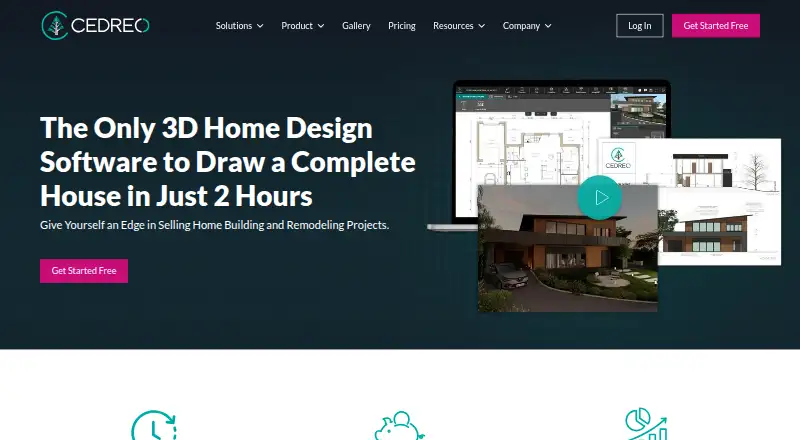
What Cedreo is
Cedreo is cloud-based 3D home design software for housing professionals. It runs in a browser without a download or installation and supports terrain, site, floor, cross-section, elevation, and roof plans, as well as surface-area tables. Its site-plan tools cover property boundaries, setbacks, terrain grades, elevation points, and contour lines. Cedreo turns 2D plans into photorealistic 3D renderings for construction and remodeling projects. The free plan costs nothing and includes one project and five renderings, with limited furnishing, room symbols, furniture, and materials. Free-plan renderings are watermarked for personal use, and the account is available for three years; if it has not been upgraded by then, the project is deleted. All plans include the Knowledge Base and tutorial videos. Professional and Enterprise subscribers also receive a dedicated Success Manager by phone, chat, or email. Cedreo recommends a stable internet connection and a recent browser, and publishes Windows and Mac system requirements on its pricing page.
Who it suits
Cedreo is aimed at home builders, contractors, remodelers, and interior designers who need 2D plans and 3D renderings. Its browser-based format suits users who do not want to install the software.
What it does well
- Creates multiple plan types and surface-area tables.
- Site plans include boundaries, setbacks, grades, and contours.
- Turns 2D plans into photorealistic 3D renderings.
- All plans include tutorials and a Knowledge Base.
What to know first
- Free plan is limited to one project.
- Free plan includes five watermarked renderings.
- Free account projects are deleted after three years without upgrade.
- A stable internet connection is recommended.
Limits
The Free plan includes one project and five photorealistic 3D renderings, with limited furnishing, room symbols, furniture, and materials. Its renderings are watermarked for personal use, and the project is deleted after three years if the account has not been upgraded.
Plans
| Plan | Billed and limits | Price |
|---|---|---|
| Free | 1 project · 5 photorealistic 3D renderings · Limited furnishing, room symbols, furniture, and materials · Watermarked renderings for personal use · Accessible for 3 years | Free |
| Professional | Monthly rendering allowance; price and billing frequency not stated on the opened English pages · Unlimited projects · 40 renderings per month · No watermarks · Blueprint downloads · Full catalog access | On request |
| Personal | One-time purchase; price not stated on the opened English pages · 1 project · 20 rendering credits · Full furnishing and materials catalog · Downloadable blueprints · Watermarked renderings for personal use | On request |
| Enterprise | Price not stated on the opened English pages · For teams · Share projects and collaborate · 80 renderings per user per month · Dedicated team features | On request |
As cedreo.com lists them, read 9 Oct 2026. The maker's own page has the final word.
Getting started
- Open the Cedreo website in a recent browser
- Use a stable internet connection
- Choose the Free plan or review the Professional, Personal, and Enterprise plans
- Create a project and use the plan and terrain tools
- Generate 3D renderings from 2D plans
Cedreo is cloud-based 3D home design software for housing professionals who need to develop plans and show clients a visual version of a project. It is most compelling for builders, contractors, remodelers, and interior designers whose work spans site planning and home design. Its free plan offers a way to start, but its single-project cap and limited renderings make it a narrow fit for ongoing work.
Overview
Cedreo brings several housing plan types together: terrain and site plans, floor plans, cross-sections, elevations, roof plans, and surface-area tables. It also converts 2D plans into photorealistic 3D renderings for construction and remodeling projects. That combination is useful when a project needs both technical layouts and visuals; a user looking only for basic room planning may not need its broader scope.
Site tools cover property boundaries, setbacks, terrain grades, elevation points, and contour lines. This gives builders and remodelers a way to account for site conditions while preparing a design, rather than treating the building footprint as the whole project.
Key features
Plans and terrain
The range of plan outputs makes Cedreo relevant to housing professionals working across the site and the building. Surface-area tables add project information alongside the drawings, while the terrain tools address grades and elevation as well as boundaries and setbacks. That breadth is a practical strength for residential projects with meaningful site constraints.
3D visualization
Photorealistic renderings turn 2D plans into a visual presentation for construction and remodeling work. Real-time scenes and AI visualization tools are also included among Cedreo's capabilities. The rendering quotas matter, though: the free plan permits five, Professional includes 40 per month, and Enterprise includes 80 per user per month. Monthly allowances expire each month; separately purchased renderings remain available until used.
Pricing
Cedreo uses a freemium model. Its free account is accessible for three years, after which the project is deleted if the account has not been upgraded. That makes the free plan a constrained starting point, not a dependable home for a long-lived project.
| Plan | What it includes | Best suited to |
|---|---|---|
| Free | free. One project and five photorealistic 3D renderings; limited furnishing, room symbols, furniture, and materials; watermarked renderings for personal use; access for three years. | A small personal project or an initial look at Cedreo, provided the project and rendering caps are sufficient. |
| Personal | Custom pricing. One-time purchase with 20 rendering credits, the full furnishing and materials catalog, and downloadable blueprints. Renderings carry a watermark for personal use. | A single project where broader catalog access and downloadable plans matter more than an ongoing monthly rendering allowance. |
| Professional | Custom pricing. Unlimited projects, 40 renderings per month, no watermarks, blueprint downloads, and full catalog access. The plan has a monthly rendering allowance. | Professionals with recurring projects who need unwatermarked renderings and blueprint downloads. |
| Enterprise | Custom pricing. Team project sharing and collaboration, dedicated team features, and 80 renderings per user per month. | Teams that need shared projects and a larger per-user rendering allowance. |
The free and Personal plans both limit users to one project; Personal adds credits, the full catalog, and blueprint downloads but keeps the personal-use watermark. Professional removes the project ceiling and watermark, while Enterprise adds collaboration for teams. All plans include the Knowledge Base and tutorial videos; Professional and Enterprise subscribers also get a dedicated Success Manager by phone, chat, or email.
Platforms
Cedreo runs in a web browser without a download or installation, which suits professionals who want to get started without setting up desktop software. It supports macOS and Windows as well as the web. Cedreo recommends a stable internet connection and a recent browser, and publishes Windows and Mac system requirements on its pricing page.
Who it's for
Cedreo is aimed at home builders, contractors, remodelers, and interior designers. It is a stronger match for practitioners who need residential plans, terrain details, and presentation renderings in the same workflow. The free plan may suit a limited personal project; users handling regular client work are more likely to need Professional, while teams needing shared projects should consider Enterprise.
Pros and cons
- Broad residential plan coverage: Site, terrain, floor, cross-section, elevation, and roof plans plus surface-area tables serve more of a housing project than floor planning alone.
- Site conditions are part of the workflow: Property boundaries, setbacks, grades, elevation points, and contour lines help represent the terrain around a project.
- Plans can become client-facing visuals: Photorealistic renderings connect 2D layouts to 3D presentations for construction and remodeling work.
- The free tier is tightly capped: One project, five renderings, limited catalog options, and watermarked personal-use output restrict its usefulness for professional work.
- Free projects have a time limit: An account that is not upgraded loses its project after three years.
- Rendering allowances are time-sensitive: Unused monthly Pro or Enterprise renderings expire, so those plans suit users able to make regular use of their quota.
Alternatives
Choose Archicad if you want a paid architecture product with a free educational license and trial, or need its listed Android and iOS support alongside desktop and web platforms. usBIM.platform is an option for users who want free online applications and 10 GB of cloud storage in its free basic configuration. Consider Finch if real-time building performance metrics are a priority; its free plan includes editing tools for a single user.
LibreCAD is a free, open-source 2D CAD option for users who do not need Cedreo's 3D renderings. Bonsai is a free, open-source alternative with Studio and Viewer. Hypar may suit users looking for a web-based option with a personal plan that includes three owned projects. DIALux is a free Windows option for core lighting design functions and access to member-manufacturer luminaires. Snaptrude is worth considering for web-based BIM: its free plan allows three projects and basic BIM and Revit export, with limited presentation outputs and no team environment.
Browse Architectural Design Software, Architecture Software, 3D Home Design Software, Floor Plan Software, and 3D Visualization Software for more options.
Verdict
Cedreo is a strong fit for housing professionals who need site-aware plans and photorealistic 3D presentations in a browser-based tool. Its mix of terrain details, multiple plan outputs, and rendering quotas gives builders and remodelers a clear reason to choose it. Look elsewhere if you need a generous free tier, permanent free-project access, or monthly renderings that do not expire.
Verdict
Cedreo combines planning tools and 3D renderings in a browser-based package for housing professionals. The free plan has clear project and rendering limits, and its project is deleted after three years if the account is not upgraded.
Questions
Is Cedreo free?
Yes. Its Free plan costs nothing and includes one project and five photorealistic 3D renderings.
Which platforms does Cedreo support?
Cedreo runs in a web browser and is listed for web, Windows, and macOS. It does not require a download or installation.
What does the Free plan include?
It includes one project and five renderings, with limited furnishing, room symbols, furniture, and materials. Renderings are watermarked for personal use.
How long is a free account accessible?
A free account is accessible for three years. After that, its project is deleted if the account has not been upgraded.
What do the paid plans include?
Professional includes unlimited projects, 40 renderings per month, blueprint downloads, and full catalog access. Personal is a one-time purchase with one project and 20 rendering credits; Enterprise is for teams and includes 80 renderings per user per month.
Facts from Cedreo's own pages
- 3D visualization
- Cedreo transforms 2D plans into photorealistic 3D renderings for construction and remodeling projects. · cedreo.com, 9 Oct 2026
- Audience
- Cedreo describes its users as home builders, contractors, remodelers, and interior designers. · cedreo.com, 9 Oct 2026
- Certification
- Cedreo states that it is B Corp certified and became a mission-driven company in 2022. · cedreo.com, 9 Oct 2026
- Company locations
- Cedreo says its team is based in Atlanta, Nantes, and Munich. · cedreo.com, 9 Oct 2026
- Design outputs
- It supports terrain, site, floor, cross-section, elevation, and roof plans, plus surface-area tables. · cedreo.com, 9 Oct 2026
- Free-plan duration
- A free account is accessible for three years, after which the project is deleted if the account has not been upgraded. · cedreo.com, 9 Oct 2026
- Platform and installation
- Cedreo runs in a web browser and does not require a download or installation. · cedreo.com, 9 Oct 2026
- Product
- Cedreo is cloud-based 3D home design software for housing professionals. · cedreo.com, 9 Oct 2026
- Rendering limits
- Unused monthly renderings on Pro or Enterprise plans expire monthly, while separately purchased renderings do not expire until used. · cedreo.com, 9 Oct 2026
- Support
- All plans include the Knowledge Base and tutorial videos; Professional and Enterprise subscribers get a dedicated Success Manager reachable by phone, chat, or email. · cedreo.com, 9 Oct 2026
- System requirements
- Cedreo recommends a stable internet connection and a recent browser, and publishes Windows and Mac system requirements on its pricing page. · cedreo.com, 9 Oct 2026
- Terrain tools
- Its site-plan tools include property boundaries, setbacks, terrain grades, elevation points, and contour lines. · cedreo.com, 9 Oct 2026
Where Cedreo stands on Freedom251
- Bathroom design software#1 of 14
- 3D Home Design Software#4 of 39
- Architectural Design Software#3 of 29
- Architecture Software#4 of 36
- Kitchen design software#3 of 23
- Architectural CAD Software#3 of 22
- Architecture Design software#3 of 20
- Floor Plan Software#4 of 25
- 3D Architecture Software#3 of 18
- 3D Visualization Software#10 of 51