Freedom251 › Engineering CAD Software
LibreCAD
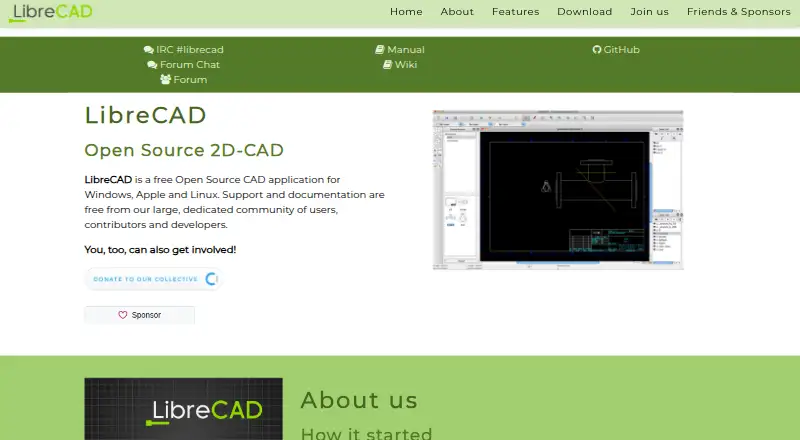
What LibreCAD is
LibreCAD is a free, open-source application for 2D computer-aided design, released under the GNU General Public License version 2. Its drawing tools include lines, circles, arcs, polylines, and splines, along with hatching, blocks, annotations, dimensions, and entity modification. DXF is its main format, with import and export; the application also exports PDF and images and supports limited DWG import. DWG support is basic and import-only, and the FAQ suggests converting DWG to DXF if import fails. LibreCAD does not support every Autodesk DXF feature and lists supported versions as R12, R14, 2000, 2004, and 2007. The interface is available in over 30 languages, and the software runs on Linux, macOS, and Windows. Community-developed plugins can help with some tasks. Support and documentation are provided free by the project community, which directs unanswered questions to its forum. The project describes itself as non-profit and community-driven. It distributes the software without warranty, including implied warranties of merchantability or fitness for a particular purpose.
Who it suits
LibreCAD suits people who need 2D CAD tools on Linux, macOS, or Windows, especially those working with DXF files. It may also suit users looking for community-supported open-source software.
What it does well
- Free, open-source 2D CAD application.
- Runs on Linux, macOS, and Windows.
- Interface available in over 30 languages.
- Supports DXF import and export.
What to know first
- DWG support is basic and import-only.
- Some Autodesk DXF features are unsupported.
- Software is distributed without warranty.
Limits
DWG import is basic and import-only. LibreCAD does not support every Autodesk DXF feature, and its listed supported DXF versions are R12, R14, 2000, 2004, and 2007.
Plans
| Plan | Billed and limits | Price |
|---|---|---|
| LibreCAD | Free open-source 2D CAD · no trials, subscriptions, license costs or annual fees | Free |
As librecad.org lists them, read 5 Oct 2026. The maker's own page has the final word.
Getting started
- Visit https://librecad.org/ and choose the download for your system.
- Download the Linux AppImage, macOS DMG, or Windows EXE.
- Install or launch the package for your platform.
- Build from source if you prefer, following the project’s instructions for your platform.
- Use the community forum if you need help.
LibreCAD is a free, open-source desktop application for 2D CAD drafting, best suited to people whose work is built around supported DXF files. It offers a practical set of drawing and annotation tools without a license fee, but is a poor fit when projects depend on reliable DWG exchange or 3D and BIM workflows.
Overview
LibreCAD covers core drafting operations: drawing lines, circles, arcs, polylines and splines, then modifying entities, adding hatches and blocks, and annotating with dimensions. PDF and image export make it possible to share finished drawings beyond CAD, while DXF import and export support the format the application is built around. That makes LibreCAD most convincing for 2D work already organized around compatible DXF files.
File compatibility needs care. DWG support is basic and import-only; if a DWG will not open, the project recommends converting it to DXF first. LibreCAD also does not handle every Autodesk DXF feature, and its supported DXF versions are R12, R14, 2000, 2004 and 2007. Those constraints can make it unsuitable where drawings must move faithfully between different CAD applications.
The project grew out of work to add CAM capabilities to QCad Community Edition for a Mechmate CNC router. LibreCAD remains a 2D CAD application rather than a broader design suite: it has no parametric modeling, BIM authoring, construction-document tools, rendering or IFC support.
Key features
Drafting and exchange
Geometry, entity editing, hatching, blocks, annotations and dimensions provide a useful foundation for conventional 2D drawings. DXF import and export are central to that workflow, with PDF and image export for sharing. The range is purposeful, but it should not be mistaken for 3D modeling or a complete DWG interchange solution.
Community and language support
The interface is available in over 30 languages, an advantage for teams and individuals who prefer to work in a language other than English. Plugins developed for LibreCAD can ease some tasks, though they do not change the application's 2D scope. Support and documentation come free from the user, contributor and developer community; the FAQ points people who cannot find an answer to the LibreCAD forum. That is a community route to help, rather than a stated commercial support service.
Pricing
LibreCAD costs free. Its free, open-source plan has no trials, subscriptions, license costs or annual fees, so it suits individuals and organizations seeking desktop 2D drafting without recurring software charges. There is no paid tier described to add capabilities or formal support.
The GNU General Public License version 2 (GPLv2) governs the software. The project states that LibreCAD is distributed without any warranty, including implied warranties of merchantability or fitness for a particular purpose. Users taking on project-critical work should weigh that exclusion alongside the file-format limits.
Platforms
LibreCAD supports Linux, macOS and Windows. The official site links Linux AppImage, macOS DMG and Windows EXE downloads, and describes building from source for all three platforms. This broad desktop coverage helps make it a practical option across common operating systems, though the stated workflow is desktop-based.
Who it's for
LibreCAD is a sound fit for learners, hobbyists, makers and budget-conscious drafters who need 2D tools, can work with compatible DXF files and are comfortable relying on community support. Its Mechmate CNC-router origins give it a practical drafting context, but do not imply support for every CAM workflow.
Look elsewhere if your work depends on dependable DWG editing, parametric or 3D design, BIM authoring, construction documents, rendering or IFC. Its basic, import-only DWG support and partial DXF compatibility are material constraints for teams exchanging complex files.
Pros and cons
- Pros: Free and open source, with no subscriptions or annual fees, makes it accessible for ongoing 2D drafting.
- Pros: Core geometry, editing, hatching, blocks and annotation tools cover a useful range of drafting tasks.
- Pros: More than 30 interface languages and Linux, macOS and Windows support suit a wide range of users.
- Cons: DWG is basic and import-only, so it is not a safe choice for workflows that rely on full DWG exchange.
- Cons: It does not support every Autodesk DXF feature; users may need to convert or adjust files to work within supported versions.
- Cons: Community-provided support and a no-warranty license leave users without stated commercial support or warranty protection.
Alternatives
For a broader scan of options, browse 2D CAD Software, CAD software or Architectural Design Software.
Choose nanoCAD instead if native DWG support is central: its nanoCAD 26 Platform plan includes native DWG support and 2D/3D drafting, at $289 a year. That is a paid alternative to LibreCAD's free 2D approach.
For eligible students and educators seeking a different design tool, Archicad offers a free educational license valid for one year. Bonsai is another free, open-source option, with Studio and Viewer included in its free software plan.
usBIM.platform may suit readers seeking cloud storage and online applications: its free basic configuration includes 10 GB of cloud storage. Hypar offers a Personal plan with three owned projects, while its Professional plan is $100 a month per user or $1,000 a year per user.
For lighting design, choose DIALux instead: its free plan includes core lighting-design functions and access to member-manufacturer luminaires. Finch offers a free plan for one user, while Snaptrude has a free plan capped at three projects, with basic BIM and Revit export for a single user.
Verdict
Choose LibreCAD when you need no-cost 2D drafting, supported DXF is sufficient and community support is acceptable. Its broad drawing toolkit, multilingual interface and lack of recurring fees are strong reasons to use it. Choose another tool if dependable DWG exchange, broader design capabilities or warranty protection are requirements.
Verdict
LibreCAD offers core 2D drawing tools and a multilingual interface at no listed cost. Its limited DWG support and stated warranty exclusions are worth considering when choosing it for project work.
Questions
Is LibreCAD free?
Yes. Its listed plan is free, with no trials, subscriptions, license costs, or annual fees.
Which operating systems does LibreCAD support?
It runs on Linux, macOS, and Windows. The official site links AppImage, DMG, and EXE packages for those platforms.
Is LibreCAD open source?
Yes. It is released under the GNU General Public License version 2 (GPLv2).
What file formats can it use?
DXF is its main format, with import and export. It also offers partial DWG import and PDF and image export.
What support is available?
The project provides free community support and documentation. Its FAQ directs users who still need help to the LibreCAD forum.
Facts from LibreCAD's own pages
- Drawing tools
- The project wiki lists line, circle, arc, polyline and spline drawing, plus entity modification, hatching, blocks, annotations and dimensions. · dokuwiki.librecad.org, 5 Oct 2026
- DWG limitation
- The FAQ says DWG support is basic and import only, and suggests converting DWG to DXF if import fails. · dokuwiki.librecad.org, 5 Oct 2026
- DXF limitation
- The FAQ says LibreCAD does not support every Autodesk DXF feature and lists supported DXF versions as R12, R14, 2000, 2004 and 2007. · dokuwiki.librecad.org, 5 Oct 2026
- File formats
- The wiki describes DXF import and export, partial DWG import, and PDF and image export; it identifies DXF as LibreCAD’s main format. · dokuwiki.librecad.org, 5 Oct 2026
- Free plan
- Yes · librecad.org, 20 Sept 2026
- Help channels
- The FAQ directs users who cannot find an answer to the LibreCAD forum. · dokuwiki.librecad.org, 5 Oct 2026
- Intended use
- The project says LibreCAD began as work to add CAM capabilities to QCad Community Edition for use with a Mechmate CNC router. · librecad.org, 5 Oct 2026
- Languages
- The interface is available in over 30 languages. · librecad.org, 5 Oct 2026
- License
- LibreCAD is released under the GNU General Public License version 2 (GPLv2). · docs.librecad.org, 5 Oct 2026
- Parametric modeling
- No · librecad.org, 20 Sept 2026
- Platform downloads
- The official site links macOS DMG, Windows EXE and Linux AppImage packages, and also describes building from source for all platforms. · librecad.org, 5 Oct 2026
- Plugins
- The project wiki says plugins have been developed to ease some tasks. · dokuwiki.librecad.org, 5 Oct 2026
- Project organization
- The project describes itself as a non-profit, community-driven open-source project. · librecad.org, 5 Oct 2026
- Purpose
- LibreCAD is a free, open-source 2D CAD application. · librecad.org, 5 Oct 2026
- Security and warranty
- The license page states that the program is distributed without any warranty, including implied warranties of merchantability or fitness for a particular purpose. · docs.librecad.org, 5 Oct 2026
- Support
- The project says support and documentation are free and provided by its community of users, contributors and developers. · librecad.org, 5 Oct 2026
Where LibreCAD stands on Freedom251
- Engineering CAD Software#3 of 27
- 2D CAD Software#5 of 41
- Architectural Design Software#6 of 29
- CAD software#7 of 31