Freedom251 › Architecture Software

Graphisoft BIMx
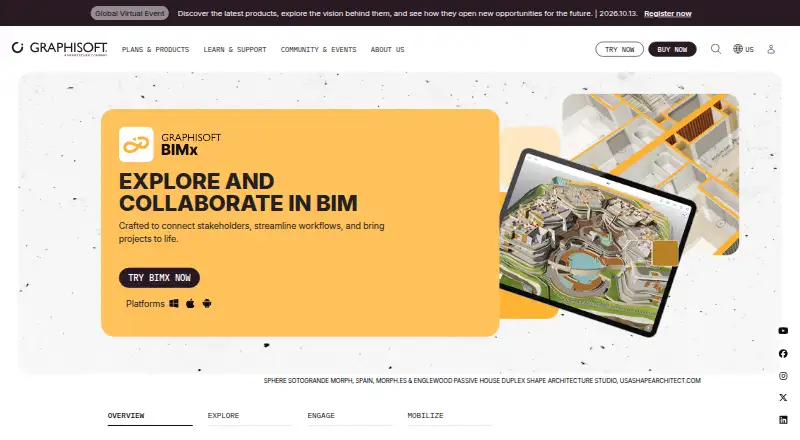
What Graphisoft BIMx is
Graphisoft BIMx brings layouts, 3D models, and BIM data together in a .bimx file for architecture and construction projects. It is intended for architects, engineers, construction teams, and clients, with versions for mobile, desktop, and web. Users can navigate 3D models with game-like movement and follow Hyper-model links to project documentation. BIMx Issues supports markup on 2D and 3D views, and the issues are BCF compliant. Presenter and Gallery support in-person presentations and client exploration, while the Web Viewer can be embedded on a website. Building-element information can include fire ratings and manufacturer-specific properties. Graphisoft says facility managers and owners can connect Facilities Management databases with a BIM model for maintenance. Models can be shared from BIMx Model Transfer through a web link; private Hyper-model sharing is for Graphisoft Subscribers, SSA, and Forward users. Opening projects on iOS, Android, or desktop requires a registered Graphisoft ID. Without signing in, users can access sample content and one additional custom model. After sign-in, authentication can last up to a year with occasional online access, or up to seven days offline.
Who it suits
BIMx suits architects, engineers, construction teams, and clients who need to view and discuss project models and documentation. Facility managers and owners may use connected Facilities Management data for maintenance.
What it does well
- Combines layouts, 3D models, and BIM data in one file
- Markup for 2D and 3D views
- Web Viewer can be embedded on a website
- Available on web, Windows, macOS, iOS, and Android
What to know first
- Graphisoft ID is required to open projects in apps
- Without sign-in, access is limited to sample content and one custom model
- Private Hyper-model sharing is limited to specified user groups
Limits
BIMx is free. Without signing in, users can access sample content and one additional custom model; opening projects in desktop and mobile apps requires a Graphisoft ID. Private Hyper-model sharing is limited to Graphisoft Subscribers, SSA, and Forward users.
Plans
| Plan | Billed and limits | Price |
|---|---|---|
| BIMx | Free app and browser viewer · a Graphisoft account is required to open projects on iOS, Android, and desktop · private Hyper-model sharing is for Graphisoft Subscribers, SSA, and Forward users | Free |
As graphisoft.com lists them, read 30 Sept 2026. The maker's own page has the final word.
Getting started
- Visit the BIMx website.
- Open the BIMx Web Viewer or use the app on Windows, macOS, iOS, or Android.
- Register a Graphisoft ID to open projects in the desktop or mobile app.
- Without signing in, open sample content or one additional custom model.
- Share a model from BIMx Model Transfer using a web link.
Overview
Graphisoft BIMx brings building layouts, 3D models and BIM data together in a .bimx file. It is best suited to architects, engineers, construction teams and clients who need to navigate a building model alongside its documentation. Its free viewer covers useful review and presentation work, but app access requires a Graphisoft ID and private Hyper-model sharing is restricted to eligible Graphisoft users.
Key features
Game-like 3D navigation and links from Hyper-models to project documentation let users move between a building view and related drawings. That pairing is more useful for project review than a standalone geometry viewer, particularly when clients or field teams need context. BIMx also displays element data such as fire ratings and manufacturer-specific properties, helping reviewers inspect model information without replacing the authoring workflow.
BIMx Issues supports markup on both 2D and 3D views, and its issues are BCF compliant. Together with measurement tools, that makes it a practical option for recording coordination feedback against the model. Presenter and Gallery support live presentations and client exploration at their own pace. The Web Viewer can be embedded on a website, broadening access for audiences who do not need a desktop app.
Models can be shared by web link through BIMx Model Transfer. Private Hyper-model sharing, however, is for Graphisoft Subscribers, SSA and Forward users, so teams outside those groups may have to use a less controlled sharing route. Graphisoft also says facility managers and owners can connect facilities-management databases with the BIM model for maintenance, extending its usefulness beyond project delivery.
Pricing
BIMx costs nothing. The free plan includes the app and browser viewer, with no free-trial period to manage. App users need a registered Graphisoft ID to open projects; without signing in, they can access sample content and one additional custom model. Private Hyper-model sharing is reserved for Graphisoft Subscribers, SSA and Forward users, making the free plan strongest for viewing, presentations and link-based sharing rather than restricted distribution.
After sign-in, authentication lasts up to one year with occasional online access, or up to seven days while offline. That supports intermittent connectivity, but users should not assume a permanently offline app workflow.
Platforms
BIMx supports web, Windows, macOS, iOS and Android, and uses the .bimx format. Graphisoft lists Windows 11 and macOS 26 or macOS 10.15 for BIMx Desktop, with iOS 15 and Android 11 as minimum mobile requirements. These OS requirements are worth checking before adopting it across a mixed-device project team.
Who it's for
BIMx is a strong fit for project participants who need a shared route from 3D context to drawings, element data and marked-up feedback, as well as architects presenting designs to clients. It is less suitable when viewers cannot register Graphisoft IDs, or when a team needs private Hyper-model sharing but lacks an eligible Graphisoft subscription or license status.
Pros and cons
- Pro: Links between 3D Hyper-models and project documentation keep model review connected to drawings.
- Pro: BCF-compliant Issues, 2D and 3D markup, and measurement tools support contextual coordination feedback.
- Pro: Browser viewing, embeddable Web Viewer and presentation features give teams several ways to show a model.
- Con: Opening projects in the apps requires a Graphisoft ID; unsigned users are limited to samples and one custom model.
- Con: Private Hyper-model sharing is limited to Graphisoft Subscribers, SSA and Forward users.
- Con: Offline authentication is limited to seven days, so extended disconnected use is not assured.
Alternatives
For broader 3D model sharing across platforms including Linux, consider Sketchfab; its free Basic plan caps each model at 50MB, while Pro costs $15 a month billed yearly.
If browser viewing is the priority, BIMx Web Viewer is free; BIMx Pro features on Model Transfer require membership in an eligible company and Graphisoft ID sign-in.
Marmoset Viewer is another viewer option, included with Toolbag versions 2.07 and newer.
Choose Dalux if its free punch-list tool, unlimited tasks and allowance of up to three active projects or buildings better match the project workflow.
Nanome is another option to consider.
For a hosted viewer with a small free allowance, OmniView 3D Starter supports three models and 100 MB of storage, but files are auto-deleted after three days and carry a watermark.
If you need a no-license-fee IFC viewer for desktop systems, consider Open IFC Viewer.
For a free desktop-only BIMx option, BIMx Desktop Viewer supports Windows and macOS.
Browse the 3D Model Viewer Software list or the Architecture Software list to compare more options.
Verdict
Choose Graphisoft BIMx if your team needs a free, cross-platform way to connect building models, documentation and review feedback, or to present projects to clients. Its clearest strengths are contextual navigation and coordination tools; look elsewhere if app viewers cannot be asked to sign in or private sharing must work without eligible Graphisoft status.
Verdict
BIMx provides model viewing, documentation links, markup, and presentation features across web and app platforms. App users need a Graphisoft ID to open projects, and private Hyper-model sharing has access restrictions.
Questions
How much does BIMx cost?
BIMx is free, with a free app and browser viewer.
Which platforms support BIMx?
It is available on the web, Windows, macOS, iOS, and Android.
Do I need an account to open a project?
Opening projects in the desktop, iOS, or Android app requires a registered Graphisoft ID. Without signing in, users can access sample content and one additional custom model.
Can BIMx models be shared?
Models can be shared from BIMx Model Transfer using a web link. Private Hyper-model sharing is available to Graphisoft Subscribers, SSA, and Forward users.
Does BIMx support markup and measurement?
Yes. BIMx Issues supports markup on 2D and 3D views, and BIMx includes measurement tools.
What are the listed system requirements?
Graphisoft lists Windows 11 and macOS 26 or macOS 10.15 for BIMx Desktop, plus iOS 15 or Android 11 as minimum mobile requirements.
Facts from Graphisoft BIMx's own pages
- Account requirement
- Opening projects in BIMx on iOS, Android, or desktop requires a registered Graphisoft ID; without sign-in, users can access sample content and one additional custom model. · support.graphisoft.com, 30 Sept 2026
- Company
- Graphisoft says it was founded in 1982 and is headquartered in Graphisoft Park, Budapest, Hungary. · graphisoft.com, 30 Sept 2026
- Facility management
- Graphisoft says facility managers and owners can integrate Facilities Management databases with the BIM model for maintenance. · graphisoft.com, 30 Sept 2026
- Founded
- 1982 · graphisoft.com, 28 Sept 2026
- Headquarters
- Budapest, Hungary · graphisoft.com, 28 Sept 2026
- Markup
- BIMx Issues lets users mark up 2D and 3D views, and the issues are BCF compliant. · graphisoft.com, 30 Sept 2026
- Model data
- BIMx displays building-element information, including fire ratings and manufacturer-specific properties. · graphisoft.com, 30 Sept 2026
- Navigation
- BIMx offers game-like 3D navigation and hyperlinks from Hyper-models to project documentation. · graphisoft.com, 30 Sept 2026
- Offline access
- After sign-in, BIMx remains authenticated for up to one year with occasional online access, or up to seven days while offline. · support.graphisoft.com, 30 Sept 2026
- Platforms
- Graphisoft lists BIMx Mobile, Desktop, and Apple Vision Pro downloads, plus viewing in a browser; its requirements page lists Windows and macOS for Desktop and iOS and Android for Mobile. · graphisoft.com, 30 Sept 2026
- Presentations
- BIMx Presenter and Gallery support in-person presentations and client exploration on their own time. · graphisoft.com, 30 Sept 2026
- Purpose
- BIMx connects layouts, 3D models, and BIM data in a single file for architects, engineers, construction teams, and clients. · graphisoft.com, 30 Sept 2026
- Sharing
- Models can be shared from BIMx Model Transfer using a web link, while private Hyper-model sharing is available to Graphisoft Subscribers, SSA, and Forward users. · graphisoft.com, 30 Sept 2026
- System requirements
- Graphisoft lists Windows 11 and macOS 26 or macOS 10.15 as BIMx Desktop operating systems, and iOS 15 or Android 11 as minimum mobile requirements. · graphisoft.com, 30 Sept 2026
- Web embedding
- The BIMx Web Viewer can be embedded on a website. · graphisoft.com, 30 Sept 2026
Where Graphisoft BIMx stands on Freedom251
- Architecture Software#5 of 36
- 3D Model Viewer Software#9 of 29