Freedom251 › Virtual Reality Software
Arkio
What Arkio is
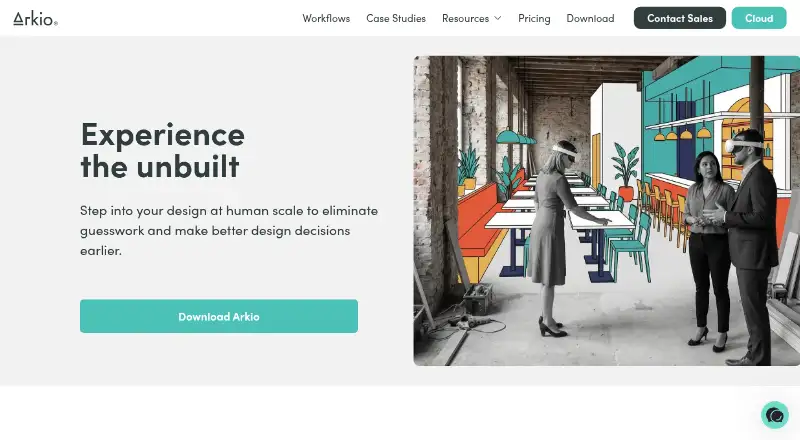
Arkio is a design collaboration tool for architects and other spatial designers. It combines real-time solid modeling, including boolean operations and parametric volumes, with meetings where participants can view and edit a shared scene. For design reviews, users can save views, add notes transcribed from voice, create AI renders, and work on 2D frames together. Plugins support importing or exporting models and related data with Archicad, Navisworks, Revit, Rhino, and SketchUp. The free Starter plan includes all modeling tools, one-on-one meetings, and OBJ, GLB, and image import and export. Pro costs $35/user/mo with annual billing or $45/user/mo with monthly billing; it allows up to six meeting participants and includes 500 AI credits per month. Enterprise is $85 per floating license per month with annual billing. Arkio is available on Android, iOS, macOS, and Windows. A Pro license may be installed on two devices, but only used on one at a time.
Who it suits
Arkio suits architects and spatial designers who want to model and review shared scenes with collaborators. Schools and educational institutions can apply for free educational licenses.
What it does well
- Real-time modeling includes boolean operations and parametric volumes.
- Meeting participants can edit the same scene together.
- Plugins support five named design applications.
- Starter includes all modeling tools at no charge.
What to know first
- Starter meetings are limited to one-on-one.
- Monthly billing for Pro costs $45/user/mo.
- A Pro license can be used on one device at a time.
Limits
Starter meetings are one-on-one and its listed import and export formats are OBJ, GLB, and images. The Pro trial lasts 14 days and includes 20 AI credits; each AI render uses one credit. Pro licenses can be installed on up to two devices but used on only one at a time.
Plans
| Plan | Billed and limits | Price |
|---|---|---|
| Starter | All modeling tools · 1:1 meetings · Import/export OBJ/GLB and images | Free |
| Pro | $35 month/user if billed annually, else $45 billed per month; tax not included · Up to 6 meeting participants · 500 AI credits/month · Revit, Rhino and SketchUp import/export · Archicad and Navisworks import | $35 a month |
| Enterprise | $85 month/floating license; annual billing only; tax not included · Up to 24 meeting participants · 1000 AI credits/month per license · Floating licenses · Priority support | $85 a month |
As arkio.is lists them, read 7 Oct 2026. The maker's own page has the final word.
Getting started
- Visit the Arkio website.
- Choose the free Starter plan or a paid plan.
- Use the free 14-day Pro trial, which includes 20 AI credits, if you want to try Pro.
- Use Arkio on Android, iOS, macOS, or Windows.
- Connect through a plugin for Archicad, Navisworks, Revit, Rhino, or SketchUp if needed.
Arkio is a design collaboration tool for architects and other spatial designers. It best suits teams that want to develop and review models together across mobile and XR devices. Its strongest case is live, shared design work; meeting-size caps, device concurrency, and AI-credit limits make plan choice consequential.
Overview
Arkio combines real-time solid modeling with meetings where participants can edit or view the same scene. Boolean operations and parametric volumes give designers tools to develop forms, while saved views, voice-transcribed notes, AI renders, and collaborative 2D frames support review. This makes it more than a viewer, but its practical fit depends on how many people need to meet and how much rendering the team expects.
Key features
Modeling and shared meetings
Real-time solid modeling, including boolean operations and parametric volumes, supports design development in the same environment used for collaboration. Participants can view and edit together during meetings, a useful combination for teams making decisions around a shared scene. Starter meetings are limited to one-on-one; larger groups need a paid plan.
Review and AI renders
Saved views, voice-transcribed notes, and 2D frames help teams record and discuss design feedback. AI renders add visualization, but each render costs one credit and monthly allowances renew monthly. Teams that render regularly should account for the monthly cap rather than assume unlimited use.
Application integrations
Plugins connect Arkio with Archicad, Navisworks, Revit, Rhino, and SketchUp for model and related-data import or export. Access varies by plan: Pro includes Revit, Rhino, and SketchUp import/export and Archicad and Navisworks import, while Starter is limited to OBJ/GLB and image import/export.
Pricing
Arkio has a free Starter plan, a 14-day Pro trial with 20 AI credits, and paid subscriptions. The trial is a useful way to assess the paid workflow before choosing a plan.
- Starter — free. Includes all modeling tools, one-on-one meetings, and OBJ/GLB and image import/export. It suits solo work or pairs with basic exchange needs, but its meeting size and narrower file support are significant constraints for team collaboration.
- Pro — $35 a month. Annual billing is $35 month/user if billed annually; otherwise it is $45 billed per month. Tax is not included. Pro supports up to six meeting participants, includes 500 AI credits/month, and adds Revit, Rhino, and SketchUp import/export plus Archicad and Navisworks import. It fits small teams that need those integrations and more than one-to-one meetings. A license can be installed on up to two devices but used on only one device at a time.
- Enterprise — $85 a month. Billed $85 month/floating license, annual billing only; tax is not included. It allows up to 24 meeting participants, includes 1000 AI credits/month per license, and adds floating licenses and priority support. This is the better fit for larger teams needing broader meetings or shared licensing, but annual-only billing is a commitment.
Arkio also offers free educational licenses for schools and educational institutions to apply for. A help center and community forum are available; Enterprise adds priority support, personal onboarding, and custom training plans.
Platforms
Arkio supports Android, iOS, macOS, and Windows, with VR/AR support and mobile viewing. That range suits teams working across desktop and mobile or XR devices, though Pro’s one-device-at-a-time rule limits simultaneous use of a license.
Who it's for
Arkio is a strong fit for architects and spatial designers who need to shape models and review them collaboratively, particularly when live scene meetings and its named application integrations are central to the workflow. It is less suited to teams that need large meetings on the free plan, unrestricted simultaneous device use, or AI rendering beyond their monthly credits.
Pros and cons
- Pro: Modeling, shared scene meetings, and review tools sit together, supporting both design development and feedback.
- Pro: Plugins cover five named design and coordination applications, with Pro adding several import/export paths beyond Starter’s OBJ/GLB and image exchange.
- Con: Starter meetings stop at one-on-one, so teams must pay to collaborate in larger groups.
- Con: AI rendering consumes monthly credits, and Pro use is limited to one device at a time even though the license can be installed on two.
- Con: Enterprise requires annual billing, making it a less flexible choice for teams unsure they need its larger meetings and floating licenses.
Alternatives
Archicad is worth considering for eligible students and educators seeking its free one-year educational license, or for teams looking for a paid option with a free trial. Graphisoft BIMx is a better match when a free app and browser viewer is enough; opening projects on mobile and desktop requires a Graphisoft account, and it has no free trial.
Live Home 3D offers a free app with in-app Standard and Pro subscriptions and lifetime licenses, which may suit users choosing among those purchase formats. usBIM.platform is an alternative for those seeking a free basic configuration with 10 GB cloud storage and free online applications; its subscriptions let users choose additional applications.
Bonsai is a free, open-source option for users who want Studio and Viewer software across Linux, macOS, or Windows. Rayon may suit teams seeking a free plan with full editing, unlimited public models, and limited PDF and DWG export, block and style libraries, and model history.
TAD Designer is another free option; its Lite plan is free to use, while the full version requires free teamTAD Discord membership. Twinmotion offers a free plan and a seat plan with one-year upgrades, Twinmotion Cloud, documentation, learning materials, and community forums.
Architecture Software and 3D Visualization Software are broader directories for comparing tools in those categories.
Verdict
Choose Arkio if your design work benefits from shared, editable scenes, review tools, and integration with the applications it supports. Starter is a credible way to work on models with one other person, while Pro is the practical step up for small teams needing six-person meetings and broader exchange. Look elsewhere if your team needs larger meetings without an annual Enterprise commitment, or expects AI rendering and concurrent device use without tight limits.
Verdict
Arkio brings modeling, shared scene meetings, design review, and several named application integrations into one tool. Its plan choice affects meeting size, AI credits, and device use.
Questions
Is there a free plan?
Yes. Starter costs nothing and includes all modeling tools, one-on-one meetings, and OBJ, GLB, and image import and export.
How much do the paid plans cost?
Pro is $35/user/mo with annual billing or $45/user/mo with monthly billing, before tax. Enterprise is $85 per floating license per month with annual billing, before tax.
Is there a free trial?
Yes. Arkio offers a 14-day Pro trial with 20 AI credits.
Which platforms does Arkio support?
Arkio is available on Android, iOS, macOS, and Windows.
Which design tools have Arkio plugins?
Plugins are listed for Archicad, Navisworks, Revit, Rhino, and SketchUp to import or export models and related data.
Can schools get a free license?
Schools and educational institutions can apply for free educational licenses.
Facts from Arkio's own pages
- AI rendering
- Each AI render uses one credit, and included AI credits renew monthly. · arkio.is, 7 Oct 2026
- Collaboration
- Participants can view and edit the same scene together in real time during meetings. · help.arkio.is, 7 Oct 2026
- Design review
- Users can save views, add voice-transcribed notes, create AI renders, and collaborate on 2D frames. · help.arkio.is, 7 Oct 2026
- Education
- Arkio invites schools and educational institutions to apply for free educational licenses. · arkio.is, 7 Oct 2026
- Free plan limit
- Starter meetings are one-on-one, and Starter includes OBJ/GLB and image import/export. · arkio.is, 7 Oct 2026
- Integrations
- Arkio provides plugins for Archicad, Navisworks, Revit, Rhino, and SketchUp to import or export models and related data. · arkio.is, 7 Oct 2026
- Licensing limit
- A Pro license can be installed on up to two devices but used on only one device at a time. · arkio.is, 7 Oct 2026
- Modeling
- Arkio provides real-time solid modeling with boolean operations and parametric volumes. · arkio.is, 7 Oct 2026
- Product
- Arkio is a design collaboration tool for architects and other spatial designers. · help.arkio.is, 7 Oct 2026
- Purpose
- Arkio says it aims to help users develop design ideas and work together using XR and mobile devices. · arkio.is, 7 Oct 2026
- Support
- Arkio lists a help center and community forum, while Enterprise includes priority support, personal onboarding, and custom training plans. · arkio.is, 7 Oct 2026
- Trial
- Arkio offers a free 14-day Pro trial that includes 20 AI credits. · arkio.is, 7 Oct 2026
Where Arkio stands on Freedom251
- Virtual Reality Software#1 of 30
- Extended Reality Software#1 of 26
- Architecture Software#2 of 36
- 3D Visualization Software#4 of 51