Freedom251 › Architecture Software

Rayon
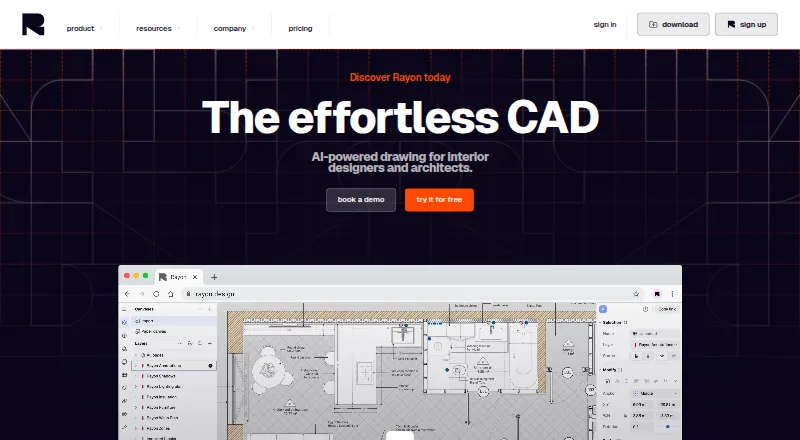
What Rayon is
Rayon is a 2D CAD tool for interior designers and architects, combining drafting commands with BIM tools for architectural plans. Its AI features can help find or generate assets, answer CAD questions, create architectural visuals, and turn images into vector sketches or wireframes. Teams can edit together in real time, leave comments and doodles, and share work through public links. The library includes more than 4,000 elements and more than 100 pre-built templates; users can also create their own libraries and templates. Rayon imports DWG, DXF, PDF, and image files up to 25 MB, and exports PNG, PDF, DWG, and DXF. It runs on the web and has desktop apps for Windows and macOS. A free plan is available; Pro costs $21 a month billed monthly, and Team costs $38 a month per editor billed monthly. Team includes a 15-day free trial.
Who it suits
Rayon suits interior designers and architects who need 2D architectural plans with CAD and BIM tools. Its real-time collaboration and shared libraries may also suit teams working on drawings together.
What it does well
- Combines drafting commands with BIM tools.
- Supports real-time editing, comments, and doodles.
- Includes more than 4,000 elements.
- Imports and exports DWG and DXF.
- Available on web, Windows, and macOS.
What to know first
- It is a 2D tool, not 3D software.
- Imports are capped at 25 MB.
- Free plan has limited PDF and DWG export.
- Free model history lasts 7 days.
Limits
The Free plan has limited PDF and DWG export, limited block and style libraries, and seven days of model history. Imports of DWG, DXF, PDF, and images are limited to 25 MB. Pro is $21 a month; Team is $38 a month per editor.
Plans
| Plan | Billed and limits | Price |
|---|---|---|
| Free | Full editing experience · Unlimited public models · Limited PDF & DWG export · Limited block & style libraries · 7 days model history · AI support only | Free |
| Pro | per month · Unlimited private models · Full PDF and DWG export · Full access to Rayon libraries · Unlimited model history · AI support & async personal support · Personal templates and libraries · 100 AI credits per week | $21 a month |
| Team | per month, per editor · Unlimited private models · Full PDF and DWG export · Full access to Rayon libraries · Unlimited model history · AI support & live personal support · Team templates and libraries · Team-level billing · 200 AI credits per week · 15-day free trial | $38 a month |
As rayon.design lists them, read 29 Sept 2026. The maker's own page has the final word.
Getting started
- Open Rayon on the web, or download its Windows or Mac desktop app.
- Choose the Free plan or a paid plan; the Team plan includes a 15-day free trial.
- Create or open a drawing and use the included drafting and BIM tools.
- Import a DWG, DXF, PDF, or image file up to 25 MB, if needed.
- Share work through a public link or collaborate in real time.
Rayon is a 2D CAD workspace for interior designers and architects creating architectural plans. It is best for people who want drafting, BIM tools, AI assistance, and live collaboration together; look elsewhere for 3D modeling or an uncapped free workflow.
Overview
Rayon focuses on architectural plans, pairing drafting commands with BIM tools rather than serving as a general-purpose 3D design suite. Shared editing, comments, doodles, public links, guest access, and presentation mode make it useful when clients or colleagues need to review a drawing. A brand kit adds support for presenting work consistently.
Its boundary is clear: Rayon is 2D software, not a 3D modeling tool. It imports DWG, DXF, PDF, and image files, but each import type has a 25 MB cap. Exports are PNG, PDF, DWG, and DXF; the Free plan limits PDF and DWG export, so users with regular document handoffs may need a paid tier.
Key features
Drafting, libraries, and AI
Rayon combines CAD commands and BIM tools for architectural plan work. More than 4,000 elements and over 100 pre-built templates provide reusable starting points, while personal libraries and templates let users build repeatable conventions. These resources are a practical advantage for recurring projects, though they do not change the product's 2D focus.
AI features cover several distinct tasks: finding or generating assets, answering CAD questions, creating architectural visuals, and converting images into vector sketches or wireframes. This breadth can help with both drawing preparation and exploration. AI use is metered on paid plans, so the weekly credit allowance matters to anyone relying on those tools frequently.
Collaboration and file handling
Realtime editing, comments, and doodles support feedback in the drawing itself, while public-link sharing and guest access make it easier to involve people who are not editors. The import and export formats suit common CAD and document exchanges, but the 25 MB import ceiling may rule out larger source files, and Free's restricted PDF and DWG exports can complicate final delivery.
Pricing
Rayon uses a freemium model. Free costs nothing and offers the full editing experience, unlimited public models, limited PDF and DWG export, limited block and style libraries, seven days of model history, and AI support only. It is a useful way to work in the editor without paying, but the export and history limits make it less suited to ongoing client or team projects.
Pro costs $21 a month, billed per month. It adds unlimited private models, full PDF and DWG export, full access to Rayon libraries, unlimited model history, AI support and async personal support, personal templates and libraries, and 100 AI credits per week. It fits individual users who need private work and unrestricted exports; it does not include the Team plan's live personal support or team-level billing.
Team costs $38 a month, billed per month, per editor. It includes the Pro export, private-model, library, and history features, plus team templates and libraries, team-level billing, live personal support, and 200 AI credits per week. A 15-day free trial gives teams a chance to assess the tier before committing. Per-editor pricing means the cost rises with the number of editors, so the additional support and shared resources are most compelling for active teams.
Rayon also offers desktop apps for Windows and Mac, alongside its web platform. It says personal data transfers use US-based processors with appropriate safeguards, including Standard Contractual Clauses where applicable.
Platforms
Rayon runs on the web and has desktop apps for Windows and macOS. That gives users a choice between browser access and installed desktop software, but it does not extend to mobile platforms.
Who it's for
Rayon is a strong fit for interior designers and architects who produce 2D plans, reuse drawing components, and need collaborators to review work in real time. Solo users can start on Free, while Pro suits individuals needing full exports and private models; teams that value live personal support and shared libraries should consider Team. It is not the right choice for workflows centered on 3D modeling, and large-file imports exceed its stated cap.
Pros and cons
- Pros: CAD drafting and BIM tools share one 2D plan workflow, with AI assistance spanning asset discovery, CAD questions, visuals, and image-to-vector conversion.
- Pros: Realtime collaboration, comments, doodles, guest access, and public links support review without limiting sharing to editors.
- Pros: A library of more than 4,000 elements and over 100 templates can support reuse, with options to create personal or team resources.
- Cons: Rayon is not 3D software, so it cannot serve users who need three-dimensional modeling.
- Cons: Imports are capped at 25 MB, which can exclude larger DWG, DXF, PDF, or image files.
- Cons: Free limits PDF and DWG export, libraries, and model history; meaningful ongoing use may require a paid plan.
- Cons: Team pricing is per editor, and AI credits remain finite even on paid tiers.
Alternatives
For broader architecture-software options, see Architecture Software. If you are comparing visual boards rather than architectural drafting tools, Mood Board Software is the relevant category.
Adobe Firefly is a freemium alternative with a free tier limited to daily generations and platform support for Android, iOS, web, and API; choose it when those platform options and generation-focused use matter more than Rayon’s CAD and BIM plan workflow.
Milanote is a freemium option with a free tier capped at 100 notes, images, or links and 10 file uploads, plus unlimited shared boards. Choose it for shared visual boards rather than architectural plan drafting.
Moodis offers a free tier for local mood boards and a Pro plan at €5 a month; consider it when mood-board work and its lower stated paid price are a closer fit than CAD drafting.
PureRef is another freemium alternative for readers comparing tools in this category.
ShopLook keeps its creative canvas free and offers ShopLook Pro for $3.99 a month; it is an option for creative-canvas use rather than architectural plan production.
Soleil Clusters has a free Demo tier with 50 cards, unlimited clusters and collaborators, and standard media only; choose it for collaborative clustering rather than CAD plans.
Kanvaz is free, MIT licensed, and has no feature paywall, making it worth considering when an entirely free desktop option is the priority.
LibreMoodboards is a free, open-source Windows app without subscriptions, microtransactions, or paywalls; it is an alternative for mood-board work on Windows.
Verdict
Choose Rayon if you need a collaborative 2D architectural drafting workspace with BIM tools, reusable libraries, and AI features in the same product. Its paid plans remove important export and history restrictions, but the 25 MB import cap and lack of 3D make it a poor fit for large-source-file or modeling-heavy work.
Verdict
Rayon brings 2D plan drafting, BIM tools, AI features, and team collaboration into one product. Check the import cap and plan-specific export and support limits when choosing a tier.
Questions
How much does Rayon cost?
The Free plan costs nothing. Pro is $21 a month, and Team is $38 a month per editor.
Is there a free trial?
Yes. The Team plan includes a 15-day free trial.
Which platforms does Rayon support?
Rayon is available on the web and as desktop apps for Windows and macOS.
Can Rayon import and export CAD files?
It imports DWG, DXF, PDF, and image files, with a 25 MB cap for those imports. It exports PNG, PDF, DWG, and DXF.
Does Rayon support collaboration?
Yes. It supports real-time collaborative editing, comments, doodles, and sharing through public links.
Facts from Rayon's own pages
- 2D drawings
- Rayon is a 2D drawing tool and is not 3D software. · docs.rayon.design, 29 Sept 2026
- AI features
- Its AI features include finding or generating assets, answering CAD questions, generating architectural visuals, and converting images into vector sketches or wireframes. · rayon.design, 29 Sept 2026
- CAD and BIM tools
- The product combines drafting commands with BIM tools for drawing architectural plans. · rayon.design, 29 Sept 2026
- Collaboration
- Rayon supports realtime collaborative editing, comments, doodles, and sharing through public links. · rayon.design, 29 Sept 2026
- Company founding
- Rayon says it was co-founded in October 2021 by Bastien Dolla and Stanislas Chaillou. · rayon.design, 29 Sept 2026
- Company location
- Rayon lists its registered address as 1 Rue de Stockholm, 75008 Paris, France. · rayon.design, 29 Sept 2026
- Desktop apps
- Rayon provides desktop app downloads for Windows and Mac. · rayon.design, 29 Sept 2026
- Founded
- 2021 · rayon.design, 23 Sept 2026
- Headquarters
- Paris, France · rayon.design, 23 Sept 2026
- Import and export
- Rayon imports DWG, DXF, PDF, and images, and exports PNG, PDF, DWG, and DXF. · docs.rayon.design, 29 Sept 2026
- Import limit
- DWG/DXF, PDF, and image imports are capped at 25 MB. · docs.rayon.design, 29 Sept 2026
- Libraries and templates
- Rayon offers more than 4,000 elements and more than 100 pre-built templates, and users can create their own libraries and templates. · rayon.design, 29 Sept 2026
- Privacy
- Rayon says it uses US-based processors and applies appropriate safeguards, including Standard Contractual Clauses where applicable, for transfers of personal data. · rayon.design, 29 Sept 2026
- Product
- Rayon describes itself as AI-powered CAD software for interior designers and architects. · rayon.design, 29 Sept 2026
- Support
- Free includes async support and AI support, Pro includes async personal support, and Team includes live personal support. · rayon.design, 29 Sept 2026
Where Rayon stands on Freedom251
- Architecture Software#9 of 36
- Mood Board Software#18 of 24