Freedom251 › Mood Board Software

Moodis
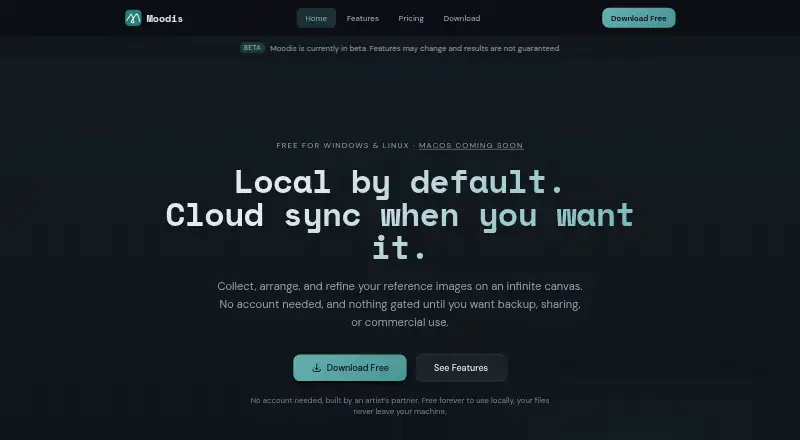
What Moodis is
Moodis is a visual mood board tool for artists who gather and arrange creative references on an infinite canvas. Users can pan and zoom, place images freely or snap them to a grid, then resize, rotate and layer them. Boards support keyboard shortcuts; users can create unlimited boards, switch between them and export images as PNG or JPEG. The desktop app works offline and stores boards and images on the user’s machine, with cloud sync available as an opt-in. Pro adds web access, cloud sync, 99 GB of storage and shareable board links. Team adds real-time collaborative editing, with three users and 999 GB of storage included. The free plan is for personal, non-commercial use; client work requires Pro or Team. Pro costs €5/mo and Team costs €50/mo. Cloud-account images are encrypted at rest and stored in the European Union. Moodis is in beta, and its maker says features may change and results are not guaranteed. Windows 10 or later and Linux x86_64 downloads are available; macOS is listed as coming soon.
Who it suits
Moodis suits artists who want to collect and organize visual references, including offline desktop use. Pro and Team are options for users who need web access, sharing or collaborative editing; commercial use requires one of those paid plans.
What it does well
- Unlimited boards and PNG or JPEG export
- Desktop app works offline
- Pro includes cloud sync and shareable links
- Team includes real-time collaborative editing
What to know first
- Free plan is limited to personal, non-commercial use
- Linux downloads are AppImage only
- No Linux ARM/aarch64 build is listed
- macOS is listed as coming soon
Limits
The Free plan is for personal, non-commercial use. Pro includes 99 GB of cloud storage; Team includes 999 GB and three users, with additional users at €10/user/mo.
Plans
| Plan | Billed and limits | Price |
|---|---|---|
| Free | €0/forever · Local mood boards · unlimited boards · personal, non-commercial use | Free |
| Pro | €5/mo · 99 GB cloud storage · cloud sync · sharing | €5 a month |
| Team | €50/mo · 3 users included · 999 GB cloud storage · additional users €10/user/mo | €50 a month |
As moodis.app lists them, read 2 Oct 2026. The maker's own page has the final word.
Getting started
- Visit the Moodis website.
- Download the Windows 10-or-later or Linux x86_64 desktop app, or use the web version with Pro.
- Create boards and arrange reference images on the canvas.
- Use the Free plan for personal, non-commercial use, or choose Pro or Team for commercial work and cloud features.
Moodis is a visual mood-board app for collecting and composing image references on an open canvas. It is best suited to artists who want offline desktop work, or teams that need to edit boards together. Its core appeal is local-first use; the catches are a commercial-use paywall and beta status.
Overview
Moodis keeps the focus on arranging images rather than building a broad project workspace. Unlimited boards help separate projects, and exporting a board as an image gives users a straightforward way to share a finished composition. The desktop app works offline and keeps boards and images on the user's machine, with cloud sync optional. That makes it a strong fit for private reference work, but users who want web access or shareable links need Pro.
Key features
The infinite canvas supports panning, zooming, free placement and optional grid snapping. Image resizing, rotation and layering provide useful control over composition, while keyboard shortcuts support a more direct editing workflow. Boards export as PNG or JPEG, a practical pair of formats for sharing images without requiring recipients to open Moodis.
Pro adds web access, cloud sync and shareable board links. Team adds real-time collaborative editing and guest access, so it is the more suitable tier when a board needs input from multiple people. These cloud conveniences trade some of the simplicity of a local-only workflow for access and collaboration.
For cloud accounts, images are encrypted at rest and stored in the European Union; account passwords are hashed by the authentication provider. The maker says it does not sell user data or share it with advertisers or data brokers. Its named service providers include Supabase, Wasabi, Bunny CDN, Vercel, Plausible Analytics, Lemon Squeezy, Resend, Sentry and Google Fonts. Support is available at [email protected].
Pricing
The Free plan costs €0/forever and includes local mood boards and unlimited boards, but it is limited to personal, non-commercial use. It suits hobby projects and private reference gathering; client work, freelancing and other commercial use require a paid plan.
Pro costs €5/mo and includes 99 GB of cloud storage, cloud sync and sharing. It is the sensible choice for a commercial solo user who needs online access or links, though the listed plan benefits do not include collaborative editing. Team costs €50/mo, includes three users and 999 GB of cloud storage, and charges €10/user/mo for additional users. Its real-time collaboration and guest access make the higher price relevant to groups rather than solo users. Moodis also offers a 14-day trial.
Platforms
Moodis supports Windows, Linux and web. Windows downloads require Windows 10 or later. Linux users get an x86_64 AppImage, but no .deb, .rpm, Flatpak, Snap or Arch package, and no ARM/aarch64 build; that narrows its fit for users who rely on a specific package format or ARM hardware. The maker says macOS is coming soon, so it is not a current option for Mac users.
Who it's for
Moodis is a good match for artists who want a focused image canvas, unlimited boards and offline desktop access, especially on Windows or x86_64 Linux. It is also worth considering for small teams that need shared, collaboratively edited boards. It is a poor fit for commercial users unwilling to pay, Mac users needing a current desktop app, or anyone who needs a stable release rather than beta software: Moodis says features may change and results are not guaranteed.
Pros and cons
- Pros: Offline local boards and opt-in cloud sync suit users who want to keep reference work on their own machine.
- Pros: Unlimited boards, image-layer controls and PNG/JPEG export support a flexible visual workflow.
- Pros: Team combines real-time collaboration, guest access and 999 GB of storage for group work.
- Cons: Free use excludes commercial work, so freelancers and client-facing artists must budget for a paid plan.
- Cons: Linux support is limited to an x86_64 AppImage, excluding common package formats and ARM builds.
- Cons: Beta status means features can change and results are not guaranteed.
Alternatives
For a broader choice of mood-board apps, browse Mood Board Software.
- Milanote is a better fit for users who want Android, iOS or macOS support; its free plan caps boards at 100 notes, images or links and uploads at 10.
- PureRef is an alternative for users seeking a free personal plan across Linux, macOS and Windows.
- Rayon suits users who want macOS support and a free plan with full editing, though PDF and DWG exports, libraries and model history are limited.
- Kanvaz is worth considering for a free, MIT-licensed option with no feature paywall on Linux, macOS or Windows.
- Mattoboard is a web-only alternative whose free tier includes AI credits and deep renders, with caps on images and uploaded materials.
- Moodboard is another free web option, with an evolving spatial board and starter templates.
- mood.site is an alternative for iOS and web users who want a paid premium board with a custom URL and customization.
- Morpholio Board is an alternative for users on iOS or macOS.
Verdict
Choose Moodis if you want a focused mood-board canvas with offline desktop use, unlimited boards and optional cloud collaboration. Its strongest reason to choose is the combination of local-first work and a clear route to sharing or team editing. Look elsewhere if you need a Mac desktop app now, free commercial use or confidence in a non-beta product.
Verdict
Moodis offers an offline desktop workflow alongside optional cloud features and collaboration. Check the plan limits and beta status, particularly if you need commercial use or a specific platform.
Questions
Is Moodis free?
Yes. Its Free plan is €0/forever and includes local mood boards and unlimited boards for personal, non-commercial use.
What do the paid plans cost?
Pro is €5/mo. Team is €50/mo, with additional users at €10/user/mo.
Which platforms does Moodis support?
Moodis lists Windows, Linux, and web. Desktop downloads are available for Windows 10 or later and Linux x86_64; macOS is coming soon.
Can I use Moodis for client work?
Commercial use, including client work and freelancing, requires Pro or Team.
Can I share or collaborate on boards?
Pro includes web access and shareable board links. Team adds collaborative editing in real time.
Where are cloud images stored?
For cloud accounts, images are encrypted at rest and stored in the European Union.
Facts from Moodis's own pages
- Beta status
- Moodis says it is currently in beta and that features may change and results are not guaranteed. · moodis.app, 2 Oct 2026
- Boards
- Users can create unlimited boards, switch between them, and export a board as an image. · moodis.app, 2 Oct 2026
- Canvas
- Users can pan, zoom, freely arrange images, and optionally snap them to a grid. · moodis.app, 2 Oct 2026
- Commercial use
- The free plan is for personal, non-commercial use; client work, freelancing, or other commercial use requires Pro or Team. · moodis.app, 2 Oct 2026
- Data handling
- The maker says it does not sell user data or share it with advertisers or data brokers. · moodis.app, 2 Oct 2026
- Editing
- Boards support resizing, rotating, layering images, and keyboard shortcuts. · moodis.app, 2 Oct 2026
- Headquarters
- Vantaa, Finland · moodis.app, 28 Sept 2026
- Integrations and providers
- The privacy policy names Supabase, Wasabi, Bunny CDN, Vercel, Plausible Analytics, Lemon Squeezy, Resend, Sentry, and Google Fonts as service providers. · moodis.app, 2 Oct 2026
- Linux limits
- The maker publishes an x86_64 AppImage and says it does not publish .deb, .rpm, Flatpak, Snap, or Arch packages, or an ARM/aarch64 build. · moodis.app, 2 Oct 2026
- Local privacy
- The desktop app works offline and stores boards and images on the user's machine; cloud sync is opt-in. · moodis.app, 2 Oct 2026
- Platform availability
- Windows 10 or later and Linux x86_64 downloads are available; the page says macOS is coming soon. · moodis.app, 2 Oct 2026
- Purpose
- Moodis is a visual mood board tool built for artists to collect, arrange, and refine creative references on an infinite canvas. · moodis.app, 2 Oct 2026
- Security
- For cloud accounts, images are encrypted at rest and stored in the European Union, and account passwords are hashed by the authentication provider. · moodis.app, 2 Oct 2026
- Sharing
- Pro offers web access and shareable board links, while the Team plan adds collaborative editing. · moodis.app, 2 Oct 2026
- Support
- Users can contact support at [email protected]. · moodis.app, 2 Oct 2026
Where Moodis stands on Freedom251
- Mood Board Software#7 of 24