Freedom251 › Remote desktop software
Iperius Remote
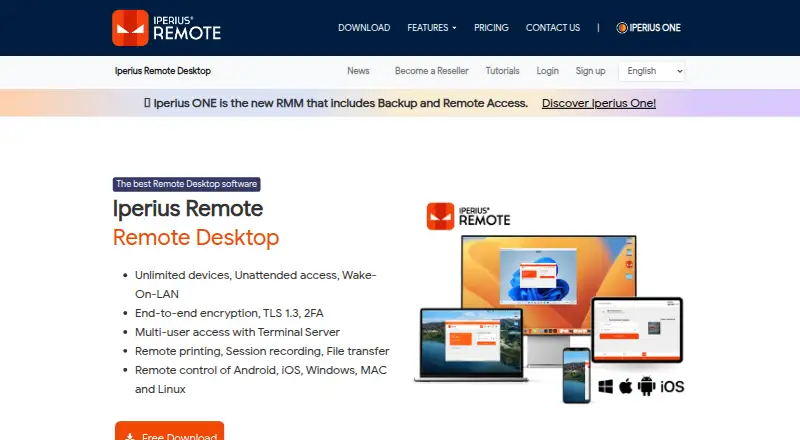
What Iperius Remote is
Iperius Remote provides remote desktop access and technical assistance for computers and mobile devices. It supports Windows, macOS, Linux, iOS, and Android, with attended connections and unattended access installed as a service. Users can transfer files, record sessions, share screens, chat, present, and work in multi-user sessions with multi-monitor support. Administrators can manage device groups, operators, permissions, address books, and connection statistics; deployment can use an MSI installer and Windows Group Policies. Paid licenses are based on concurrent connections and include unlimited devices and users. The free plan is listed as free for one connection; Small costs €8.39 a month billed annually, excluding VAT, for two concurrent connections. Medium costs €19.99 a month billed annually, excluding VAT, for five concurrent connections. A trial lasts up to 21 calendar days from installation, with a possible written extension. The maker describes encryption and two-factor authentication. The free edition cannot connect to mobile devices, and some features may vary by platform.
Who it suits
It suits people providing remote computer support or managing access to distributed devices. Teams needing mobile-device connections should note that this is not supported by the free edition.
What it does well
- Supports Windows, macOS, Linux, iOS, and Android.
- Includes file transfer and session recording.
- Unattended access can run as a service.
- Administrators can manage groups, permissions, and operators.
What to know first
- Free edition cannot connect to mobile devices.
- Some features may not be available on every platform.
- Small and Medium prices exclude VAT.
Limits
The Free plan is listed for one connection and does not support connections to mobile devices. Small provides two concurrent connections for €8.39 a month billed annually, excluding VAT; Medium provides five for €19.99 a month billed annually, excluding VAT.
Plans
| Plan | Billed and limits | Price |
|---|---|---|
| Pro | Business remote desktop and support features · Multiple simultaneous connections · Unlimited computers · Unlimited file and folder transfer · Remote access to mobile devices | On request |
| Free | 1 connection at a time · limited file transfer and connection history · no address book or mobile device connections · advanced features missing | Free |
| Medium | Month / VAT excluded; billed annually · 5 concurrent connections · unlimited devices · unlimited users | €1,999 a year |
| Small | Month / VAT excluded; billed annually · 2 concurrent connections · unlimited devices · unlimited users | €839 a year |
As iperiusremote.com lists them, read 20 Sept 2026. The maker's own page has the final word.
Getting started
- Visit the Iperius Remote website.
- Choose the Free plan or a paid plan based on concurrent connections.
- Install the service on a remote computer for unattended access.
- Use the supported Windows, macOS, Linux, iOS, or Android platform to connect.
- For Windows mass deployment, use the MSI installer and Windows Group Policies.
Iperius Remote is remote-support and administration software for computers and mobile devices, combining attended help with unattended access. It is a strong fit for support teams managing many endpoints or collaborating in live sessions. The main trade-off is capacity: paid plans allow unlimited devices and users, but limit simultaneous connections.
Overview
Iperius Remote covers remote desktop assistance, endpoint administration and collaborative sessions from one product. Installing it as a service enables unattended access, which is useful for servers and workstations that rarely have someone available to approve a connection. MSI packages and Windows Group Policies make larger Windows rollouts more manageable than manual installation.
Its licensing approach favors organizations with a broad device estate and a known number of concurrent operators. Unlimited devices and users prevent per-endpoint licensing from becoming the dominant cost, while the connection allowance determines how many support activities can happen at once.
Key features
Sessions can include screen sharing, chat, presentations, recording, multi-monitor support and multiple participants. Those tools suit guided troubleshooting, training and handoffs between technicians rather than simple one-to-one control. File transfer is included for moving support materials or retrieving documents.
Administrators can create device groups, manage operators and permissions, maintain address books and review connection statistics. Remote clients can restrict permitted actions, and incoming connections can be filtered by IP address or Iperius Remote ID. These controls provide useful separation between routine support and more sensitive access.
The security model described by the maker combines DTLS-SRTP with AES, TLS 1.2/1.3, HTTPS, WSS and two-factor authentication. Partner data centers are described as Tier IV and ISO 27001 certified, with DDoS protection. The service says it stores only data and logs needed to operate, not the audio, video, chat or file content transmitted between clients.
Some capabilities vary by platform. In particular, the free edition cannot connect to mobile devices, so a free deployment is limited to computer support even though mobile apps are available.
Pricing
Iperius Remote has a free edition and a 21-calendar-day evaluation period from installation; an extension is possible by written agreement. Paid licensing is billed annually and excludes VAT.
| Plan | Price | What it includes |
|---|---|---|
| Free | 0.00 USD | 1 connection |
| Small | €8.39 per month, billed annually | 2 concurrent connections, unlimited devices and users |
| Medium | €19.99 per month, billed annually | 5 concurrent connections, unlimited devices and users |
| Pro | Custom pricing | Business remote desktop and support, multiple simultaneous connections, unlimited computers and file/folder transfer, plus remote access to mobile devices |
Free is appropriate for occasional computer assistance by one operator, but it omits mobile connections. Small suits a compact support function that needs two simultaneous sessions; Medium is the more practical step for teams regularly handling up to five at once. Pro is aimed at larger or mobile-inclusive operations and removes the published plan limits through a business arrangement, but its price must be obtained from the vendor.
Platforms
Clients are available for Windows, macOS, Linux, iOS and Android, with attended and unattended access modes. The broad operating-system coverage helps mixed-device organizations, although feature parity is not guaranteed across every platform and the free edition excludes mobile-device connections.
Who it's for
Choose Iperius Remote if you operate a support desk or IT team with many endpoints, need unattended maintenance, or want multi-user sessions with recording, chat and presentations. Its unlimited-device model is especially well suited to fleets where only a few technicians work concurrently. It is a weaker fit for teams that need unrestricted parallel work on the lower tiers or free mobile support.
Pros and cons
Pros
- Unlimited devices and users on Small and Medium prevent endpoint counts from inflating the subscription.
- Unattended service installation, MSI deployment and Group Policy support suit managed Windows fleets.
- Collaboration features, recording, file transfer and multi-monitor support cover more than basic screen control.
- Granular permissions, action restrictions, connection filters and two-factor authentication strengthen operational control.
Cons
- Concurrent-connection caps can queue work when several operators need access simultaneously.
- The free edition cannot connect to mobile devices, despite support for mobile platforms in paid use.
- Some features may differ by operating system, complicating mixed-platform procedures.
- Pro has custom pricing, making larger deployments harder to budget from the published tiers alone.
Alternatives
dualmon is worth considering if you want a freemium service with web support and a Remote Assist plan priced at $99 per year, including 20 user accounts and five unattended devices.
DWService is the alternative for readers who prioritize a free, open-source agent under MPLv2 and broad desktop, mobile and web platform coverage.
TeamViewer Remote suits personal, non-commercial use with a free tier and support across desktop, mobile and web platforms.
Zoho Assist is a better match when a one-technician, five-device free plan or a $10-per-month Standard remote-support tier fits your scale.
AirDroid Remote Support offers a free channel with one licensed user, 10 hours per month and three unattended Windows/macOS devices.
Getscreen.me provides a free plan limited to two devices, 50 MB per file and one seat, with broader deployment options.
ManageEngine Remote Access Plus is an option for teams wanting a free allowance of up to 10 devices and an on-premises annual tier.
RustDesk is the alternative to examine for open-source remote access, with a free tier and an Individual plan from $11.88 per month.
Browse Remote Support Software and Remote desktop software for a wider shortlist.
Verdict
Iperius Remote is a sensible choice for professional support teams that need unattended maintenance, collaborative sessions and unlimited endpoint coverage under a concurrent-connection model. Choose it for the administrative controls and deployment tooling; look elsewhere if free mobile access or unrestricted simultaneous work is essential.
Verdict
Iperius Remote combines remote support, administration, and collaboration tools, with paid licensing based on concurrent connections. Check platform availability and the mobile-device restriction before choosing a plan.
Questions
Is Iperius Remote free?
Yes. The Free plan is listed as free for one connection.
What do the paid plans cost?
Small costs €8.39 a month billed annually, excluding VAT, for two concurrent connections. Medium costs €19.99 a month billed annually, excluding VAT, for five concurrent connections.
Is there a free trial?
An evaluation period lasts up to 21 calendar days from installation. The EULA allows a possible extension by written agreement.
Which platforms does it support?
It supports Windows, macOS, Linux, iOS, and Android. The Free edition does not support connections to mobile devices.
Who publishes Iperius Remote?
It is published by Enter Srl, a private EU-based company headquartered in Italy.
Does the paid licensing limit devices or users?
Paid licensing is based on concurrent connections and offers unlimited devices and users.
Facts from Iperius Remote's own pages
- Access controls
- Remote clients can restrict permitted actions and filter incoming connections by IP address or Iperius Remote ID. · iperiusremote.com, 4 Oct 2026
- Access mode
- both · iperiusremote.com, 20 Sept 2026
- Administration
- Administrators can manage device groups, operators, permissions, address books, and connection statistics. · iperiusremote.com, 4 Oct 2026
- Company
- Iperius Remote is published by Enter Srl, which describes itself as a private EU-based company headquartered in Italy. · iperiusremote.com, 4 Oct 2026
- Compatibility limit
- The free edition does not support connections to mobile devices, and some features may not be available on every platform. · iperiusremote.com, 4 Oct 2026
- Connection model
- Paid licensing is based on concurrent connections and offers unlimited devices and users. · iperiusremote.com, 4 Oct 2026
- Deployment
- The product supports mass deployment with an MSI installer and Windows Group Policies. · iperiusremote.com, 4 Oct 2026
- File transfer
- It supports bidirectional file and folder transfers, including copy/paste, drag-and-drop, and DELTA transfer of modified file portions. · iperiusremote.com, 4 Oct 2026
- Free plan
- Yes · iperiusremote.com, 20 Sept 2026
- Headquarters
- Cupra Marittima, Italy · iperiusremote.com, 28 Sept 2026
- Infrastructure
- The maker says its partner data centers are Tier IV and ISO 27001 certified and that its servers have DDoS protection. · iperiusremote.com, 4 Oct 2026
- Mobile apps
- Yes · iperiusremote.com, 20 Sept 2026
- Privacy
- The maker says it stores only service-required data and logs, and does not store session audio, video, chat, or file data transmitted between clients. · iperiusremote.com, 4 Oct 2026
- Remote collaboration
- Features include multi-user sessions, chat, presentations, screen sharing, session recording, and multi-monitor support. · iperiusremote.com, 4 Oct 2026
- Remote support
- The product provides remote desktop and technical assistance for computers and mobile devices. · iperiusremote.com, 4 Oct 2026
- Security
- The maker describes end-to-end encryption using DTLS-SRTP with AES, TLS 1.2/1.3, HTTPS, and WSS, along with two-factor authentication. · iperiusremote.com, 4 Oct 2026
- Session recording
- Yes · iperiusremote.com, 20 Sept 2026
- Supported platforms
- Windows,macOS,Linux,iOS,Android · iperiusremote.com, 20 Sept 2026
- Trial
- The EULA allows evaluation use for up to 21 calendar days from installation, with possible extension by written agreement. · iperiusremote.com, 4 Oct 2026
- Unattended access
- It can be installed as a service for remote access without action by a user at the remote computer. · iperiusremote.com, 4 Oct 2026
Where Iperius Remote stands on Freedom251
- Remote desktop software#15 of 135
- Remote support tools#6 of 47
- Remote Support Software#9 of 49