Freedom251 › Intranet Software
HubEngage
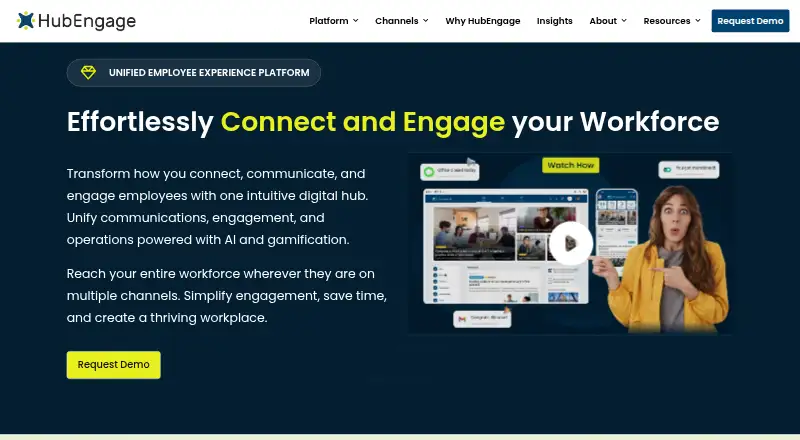
What HubEngage is
HubEngage is an employee experience and engagement platform that brings workplace communications, recognition, social engagement, surveys, intranet resources and workforce tools into one service. Organizations can choose from Communications, Recognition, Social Engagement, Surveys, Instant Messaging and AI Assistant hubs, then add capabilities as their needs change. People can reach the platform through mobile apps, the web, email, SMS, Microsoft Teams, Slack and digital signage. Its messaging works in iOS and Android apps, desktop apps for Windows, Mac and Linux, and a responsive website. Points, badges and leaderboard rankings add gamification across the employee experience.
HubEngage supports data exchange through APIs and custom employee communications integrations. Listed connections include SharePoint, Microsoft Teams, ADP, UKG (Ultipro), Workday, SSO, HRIS and payroll systems. Messaging is encrypted in transit and at rest, but does not use end-to-end encryption. The employee app can serve employees and external groups such as vendors, partners, suppliers, and prospective or former employees, with segmentation controlling which content each group can access. Starter is free for up to 200 users; Pro is $1 a month. Enterprise pricing is available on request.
Who it suits
HubEngage suits organizations that want to bring employee communications, recognition, surveys and social engagement into a configurable platform. Its channels and audience segmentation may also fit organizations that need to reach people beyond their employees, including vendors, partners and suppliers.
What it does well
- Starter is free for up to 200 users.
- Users can access it through mobile, web, email, SMS and digital signage.
- Organizations can select from six hubs as needs grow.
- Points, badges and leaderboards support gamification.
- Listed integrations include SharePoint, Workday, ADP and UKG.
What to know first
- Messaging does not offer end-to-end encryption.
- Enterprise pricing is available on request.
- Starter is limited to 200 users.
Limits
Starter is free for up to 200 users and includes Communications, Social, Recognitions, Surveys and Instant Messaging. Pro costs $1 a month and adds increased limits and further capabilities; Enterprise pricing is available on request.
Plans
| Plan | Billed and limits | Price |
|---|---|---|
| Starter | up to 200 users · Communications, Social, Recognitions, Surveys and Instant Messaging | Free |
| Pro | increased limits · scheduling · content calendars · dynamic user targeting · unlimited admins · advanced analytics · Email Campaigns · SMS Text Messaging · Digital Signage | $1 a month |
| Enterprise | all Pro features · Single Sign On · SLA · security compliance · integrations · dedicated account manager | On request |
| Custom proposal | Monthly, annual and multi-year contracts are offered; longer commitments receive discounts. · Employee-count-based proposal · Optional hubs and channels · SMS and digital signage may cost extra | On request |
As hubengage.com lists them, read 1 Oct 2026. The maker's own page has the final word.
Getting started
- Visit the HubEngage website.
- Choose the free Starter plan, Pro, or request Enterprise pricing.
- Select the hubs and capabilities that fit your organization.
- Use the Android or iOS app, web access, or a supported desktop app to reach the platform.
- Configure audiences and content access through segmentation.
Overview
HubEngage is a modular employee experience platform that brings communications, engagement and workforce tools into one service. It is best suited to organizations reaching desk-based and frontline teams, and potentially external workplace audiences, across several channels. Its breadth is appealing, but the lack of end-to-end message encryption makes it a poor fit for organizations that require it.
Key features
Channels and audience reach
Employees can access the platform through mobile and web, while communications can also run through email, SMS, Microsoft Teams, Slack and digital signage. Email publishing, audience targeting and content approvals help communications teams direct and manage content; full frontline channels make the offering relevant beyond office-based workforces. The employee app can also include vendors, partners, suppliers and prospective or former employees, with segmentation controlling what each audience can access.
Modular engagement tools
Organizations can choose Communications, Recognition, Social Engagement, Surveys, Instant Messaging and AI Assistant hubs, then add capabilities as requirements grow. That modularity avoids requiring every team to adopt every tool at once, though the breadth may be unnecessary for buyers seeking only a single-purpose communications product. Recognition and social engagement are supported by points, badges and leaderboard rankings, while surveys give teams another engagement channel.
Messaging, integrations and security
Messaging works through iOS and Android apps, Windows, Mac and Linux desktop apps, and a responsive website. HubEngage says a branded and configured messaging app can be deployed in 2–3 days; fully branded apps published through the App Store and Google Play may take 5–7 business days. Messages are encrypted in transit and at rest, but not end to end, an important limitation for organizations with that specific security requirement.
APIs can consume and export data, and the platform supports custom employee-communications integrations. Named integrations include SharePoint, Microsoft Teams, ADP, UKG (Ultipro), Workday, SSO, HRIS and payroll systems. HubEngage states that it complies with ISO 27001, SOC 2, HIPAA and GDPR. Its experts support customers from setup through rollout, with ongoing service and support.
Pricing
HubEngage has a free plan and a free trial. Starter costs nothing and supports up to 200 users, with Communications, Social, Recognitions, Surveys and Instant Messaging. That cap makes it a defined entry point for smaller deployments, but larger teams will need another plan.
Pro costs $1 a month and adds increased limits, scheduling, content calendars, dynamic user targeting, unlimited admins, advanced analytics, email campaigns, SMS text messaging and digital signage. It is the more capable option for teams that need campaign planning, targeting or those extra channels; the published plan does not state a seat quota or a billing term beyond the monthly price.
Enterprise has custom pricing and includes all Pro features, Single Sign On, an SLA, security compliance, integrations and a dedicated account manager. It is aimed at organizations that need enterprise-level support or those additions, rather than buyers seeking a published price. Starter and Pro do not include the Enterprise additions in their stated plan inclusions.
Platforms
HubEngage supports Android, iOS, Linux, macOS, web and Windows, as well as API access. Its messaging app therefore reaches mobile, desktop and browser users; the broader communications offering also spans email, SMS, Microsoft Teams, Slack and digital signage.
Who it's for
HubEngage is a strong candidate for organizations that want to combine employee communications with recognition, surveys and other workforce tools, particularly when they need to reach frontline staff or segmented audiences beyond employees. Teams that value configurable hubs can start with a subset and add capabilities over time. Organizations requiring end-to-end encrypted messaging should look elsewhere, as should buyers who need a clearly stated Enterprise price before engaging with the vendor.
Pros and cons
- Pros: Multiple channels, including frontline options, can reach staff across mobile, web, email, SMS, collaboration platforms and signage.
- Pros: Modular hubs let organizations combine communications, recognition, surveys and messaging without adopting every capability at once.
- Pros: Starter includes five named capabilities for up to 200 users at no cost.
- Cons: Messaging lacks end-to-end encryption, ruling it out where that protection is mandatory.
- Cons: Enterprise pricing is custom, so organizations cannot assess its cost from the plan price.
- Cons: Pro's $1 a month price does not state a seat cap or billing term, making direct budget comparisons harder.
Alternatives
Appspace Workplace is worth considering for buyers who want a free tier with 2 Premium Users, 1 Appspace Device ID, 5GB storage per month, 5GB bandwidth per month and 2 Admins; its Free plan provides a concrete starting allowance.
Cerkl Broadcast may suit organizations focused on email sending that can work within 5,000 monthly sends and 3 communicator seats on its free Foundations plan; additional sends cost $.09 each and extra seats cost $75/mo.
Teambridge Onboarding is an alternative for buyers considering a paid onboarding product.
Frontlyne is another paid option for buyers comparing employee platforms.
LumApps may suit organizations seeking an intranet subscription with user provisioning, site and content management, branding and analytics included; pricing is upon request.
Oak Engage is an option for buyers seeking intranet pricing tailored to their organisation.
Sociabble may fit buyers whose platform pricing needs to account for network size, support, services and hardware.
Staffbase is worth comparing for organizations seeking a solution tailored to workforce composition, channel mix, scale and commercial structure, including frontline-only or enterprise configurations.
For a broader shortlist, see Employee Communication Software and Intranet Software.
Verdict
Choose HubEngage if you want a configurable employee experience platform that combines communications, engagement and workforce tools across multiple channels, with hubs to add as needs grow. Its frontline reach, audience segmentation and modular setup are the main reasons to choose it. Look elsewhere if end-to-end message encryption is essential, or if you need a published Enterprise price before moving forward.
Verdict
Choose HubEngage if you want employee communications, engagement and workforce tools across multiple channels, with hubs you can add as needs grow. Look elsewhere if end-to-end message encryption is a requirement; HubEngage encrypts messages in transit and at rest but does not provide end-to-end encryption.
Questions
Is HubEngage free?
Yes. Starter is free for up to 200 users and includes Communications, Social, Recognitions, Surveys and Instant Messaging.
How much does Pro cost?
Pro is listed at $1 a month.
What platforms does HubEngage support?
Platforms listed include Android, iOS, Linux, macOS, web and Windows. The service also offers access through email, SMS, Microsoft Teams, Slack and digital signage.
Does HubEngage offer end-to-end encrypted messaging?
No. Messaging is encrypted in transit and at rest, but HubEngage does not offer end-to-end message encryption.
What integrations are listed?
Listed integrations include SharePoint, Microsoft Teams, ADP, UKG (Ultipro), Workday, SSO, HRIS and payroll systems. HubEngage also supports data exchange through APIs and custom employee communications integrations.
What does Enterprise include?
Enterprise includes Pro features, Single Sign On, SLA, security compliance, integrations and a dedicated account manager. Its price is available on request.
Facts from HubEngage's own pages
- AI and gamification
- The platform includes AI-assisted search, content creation, translation and analytics plus points, badges, leaderboards and rewards. · hubengage.com, 14 Oct 2026
- API extensibility
- HubEngage says it can consume data from APIs, export data through APIs and scope custom integrations with its development team. · hubengage.com, 14 Oct 2026
- Audience
- The employee app can include employees as well as vendors, partners, suppliers and prospective or former employees, with segmentation controlling relevant content access. · hubengage.com, 1 Oct 2026
- Channels
- The platform is accessible through mobile, web, email, SMS, Microsoft Teams, Slack and digital signage. · hubengage.com, 1 Oct 2026
- Communications Hub
- The Communications Hub distributes updates, announcements and policies to keep employees informed. · hubengage.com, 14 Oct 2026
- Company size
- LinkedIn lists HubEngage as a privately held software-development company with 11–50 employees. · linkedin.com, 14 Oct 2026
- Compliance
- The platform states compliance with ISO 27001, SOC 2, HIPAA and GDPR. · hubengage.com, 1 Oct 2026
- Connectivity requirement
- The FAQ says some content may be cached offline, but full access requires an internet connection. · kb.hubengage.com, 14 Oct 2026
- Deployment
- The messaging app can be branded, configured and deployed in 2–3 days; fully branded App Store and Google Play apps may take 5–7 business days. · hubengage.com, 1 Oct 2026
- Deployment timing
- HubEngage says a branded messaging deployment can take 2–3 days, or 5–7 business days when a fully branded app-store application is required. · hubengage.com, 14 Oct 2026
- Documentation and support
- The user FAQ covers login, SSO, surveys, recognition, documents, notifications, security and support contact procedures. · kb.hubengage.com, 14 Oct 2026
- Encryption
- Messages are encrypted in transit and at rest, but HubEngage says it does not provide end-to-end message encryption. · hubengage.com, 14 Oct 2026
- Enterprise systems
- Listed integrations include SharePoint, Microsoft Teams, ADP, UKG (Ultipro), Workday, SSO, HRIS and payroll systems. · hubengage.com, 1 Oct 2026
- Founded
- LinkedIn lists 2015 as the founding year. · linkedin.com, 14 Oct 2026
- Gamification
- HubEngage applies gamification across the employee experience, with points, badges and leaderboard rankings. · hubengage.com, 1 Oct 2026
- Headquarters
- HubEngage identifies 1035 Cambridge Street, Suite 1, Cambridge, Massachusetts 02141 as its global headquarters. · hubengage.com, 14 Oct 2026
- Independent pricing criticism
- iTechGuides reports proposal-based pricing with no public plan table, making direct budget comparison harder. · itechguides.com, 14 Oct 2026
- Independent review assessment
- iTechGuides describes HubEngage as strong for broad channel coverage and publishing controls, while saying its breadth may be excessive for teams needing only simple announcements. · itechguides.com, 14 Oct 2026
- Integrations
- Named integrations include Jive, WordPress, SharePoint, UltiPro, Microsoft Teams, Workday, ADP, Oracle Marketing Cloud, Microsoft Active Directory and Google Workspace. · hubengage.com, 14 Oct 2026
- Limit: Android attachments
- A Google Play reviewer reported that attachments in notices, including PDFs, sometimes would not open. · play.google.com, 14 Oct 2026
- Limit: setup complexity
- G2 review summaries repeatedly mention a learning curve, difficult setup and complex navigation, especially for advanced settings. · g2.com, 14 Oct 2026
- Messaging encryption
- Messaging is encrypted in transit and at rest, but HubEngage does not offer end-to-end message encryption. · hubengage.com, 1 Oct 2026
- Messaging Hub
- The Messaging Hub provides individual and group real-time messaging. · hubengage.com, 14 Oct 2026
- Messaging platforms
- Messaging is available through iOS and Android apps, Windows, Mac and Linux desktop apps, and a responsive website. · hubengage.com, 1 Oct 2026
Where HubEngage stands on Freedom251
- Intranet Software#4 of 74
- Digital Workplace Software#2 of 23
- Employee Communication Software#4 of 34
- Internal Newsletter Software#3 of 15