Freedom251 › Intranet Software
Noodle
What Noodle is
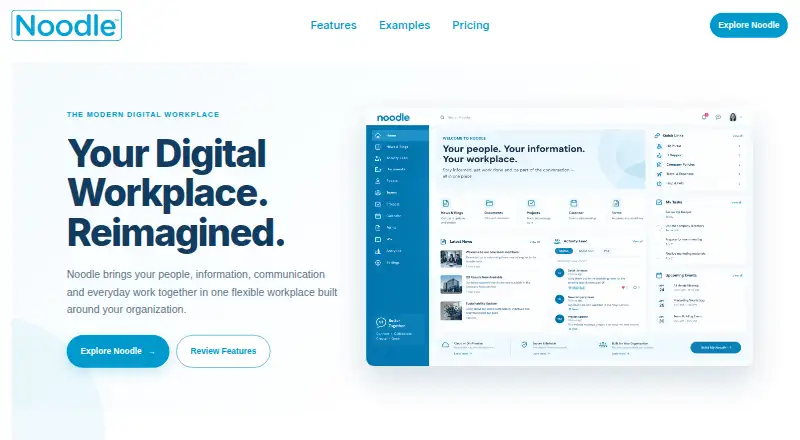
Noodle is a digital workplace that brings communication, collaboration, documents, knowledge, forms, tasks, and employee engagement together. Its features include news, an activity feed, a people directory, forums, chat, calendars, workflows, analytics, and a wiki. Organizations can customize navigation, branding, pages, widgets, portals, and group-based permissions.
Noodle is available as a cloud service or for installation on an organization’s own infrastructure. The listed platforms are web, Windows, and Linux, with mobile access through a progressive web app. Integrations include Active Directory, Google Workspace, Okta, OneLogin, Google Drive, and Google Calendar, as well as AI integrations including X, Google, Hugging Face, Anthropic, and OpenAI. Its APIs can share Noodle content with other applications or bring content into existing systems. The Noodle Free plan costs nothing for up to 5 users, 5GB storage, and unlimited sections. Noodle Cloud is $4 a month, billed per user per month, and includes 250GB storage, unlimited sections, and single sign-on.
Who it suits
Noodle is described for organizations of all sizes, including HR and IT teams, frontline staff, and remote teams. Its cloud and on-premises options may suit organizations with different deployment needs.
What it does well
- Combines directory, news, tasks, chat, and wiki features
- Cloud-hosted and on-premises deployment options
- Customizable pages, portals, and group-based permissions
- Free plan includes up to 5 users and 5GB storage
What to know first
- Noodle Free is limited to 5 users and 5GB storage
- On-premises trial requires Windows or Linux servers and MSSQL or PostgreSQL
- Cloud plan is billed per user per month
Limits
Noodle Free is limited to five users and 5GB of storage, with unlimited sections. Noodle Cloud includes 250GB of storage, unlimited sections, and single sign-on; it is billed per user per month. The on-premises plan allows up to 1,000 user access.
Plans
| Plan | Billed and limits | Price |
|---|---|---|
| Noodle Free | up to 5 users · complete app suite · custom intra.net domain · 5GB storage · unlimited sections | Free |
| On-Premise Upgrades & Support | per year · software updates and releases · security patches · maintenance updates · priority response for critical issues | $1,500 a year |
| Noodle Cloud | per user / per month · AWS hosting · complete app suite · custom intra.net domain · SSO · 250GB storage · unlimited sections · automatic upgrades · setup support | $4 a month |
| Noodle On-Premise | one-time fee · Windows or Linux · SSO · automatic upgrades · unlimited sections · up to 1000 user access · installation and setup support | $7,500, paid once |
| On-Premise | flat rate, one time · design · onboarding · prototyping · setup · user training | $7,500, paid once |
| Cloud Hosted | flat rate, per month · design · onboarding · prototyping · setup · user training | $800 a month |
As vialect.com lists them, read 15 Oct 2026. The maker's own page has the final word.
Getting started
- Visit the Vialect website.
- Choose the free plan, cloud service, or an on-premises option.
- For on-premises trial installation, use a Windows or Linux server with MSSQL or PostgreSQL.
- Use the web, Windows, or Linux platform; mobile access is through a progressive web app.
- Use the technical documentation, installation guides, how-to videos, or GPT chat support for guidance.
Noodle is a configurable digital workplace that puts publishing, collaboration, employee records and operational tools in one portal. It is best suited to HR and IT teams, distributed or frontline organizations, and buyers that need a choice between hosted software and self-managed infrastructure. Its breadth and deployment flexibility are persuasive, but the free edition is only for five users and a full on-premises purchase is expensive.
Vialect has built intranet and digital-workplace products since 2004. Noodle’s combination of communication, documents, workflows and employee information makes it a candidate for consolidating several internal systems, provided its plan limits fit your organization.
Overview
Noodle brings together documents, news, an activity feed, tasks, a people directory, forms, analytics, forums, chat, calendars, workflows and a wiki. Formal publishing can sit alongside daily discussion and structured work, giving teams one destination for announcements, reference material and coordination.
Administrators can reshape navigation, branding, pages, widgets and portals, then apply group-based permissions and audience targeting. That matters when departments, sites or roles need different content rather than a single undifferentiated homepage. News publishing, an employee directory and a page builder support a recognizable intranet experience. APIs can share Noodle content with third-party applications or push information into existing systems.
Key features
Communication and work
News, forums, chat and the activity feed cover announcements and informal conversation. Calendars, tasks and workflows add operational structure, while forms and analytics support collection and oversight. The wiki and document tools provide a place for durable knowledge instead of leaving procedures in scattered messages.
Identity, integration and security
Single sign-on is included in Noodle Cloud, and integrations listed by Noodle include Active Directory, Google Workspace, Okta, OneLogin, Google Drive and Google Calendar. AI integrations include X, Google, Hugging Face, Anthropic and OpenAI. Cloud controls include TLS, encrypted off-site monthly backups, regular security updates and Active Directory authentication. For self-managed installations, organizations can use disk encryption, firewalls, encrypted VPN or SSH tunnels and local-network isolation.
Languages and support
The interface supports English, French, Spanish, German, Italian, Dutch, Arabic, Mandarin and Portuguese. Customizable language files extend that list for organizations with additional localization needs. Documentation, installation guides, how-to videos and GPT chat support are available; the cloud plan includes setup support.
Pricing
| Plan | Price and terms | What you get |
|---|---|---|
| Noodle Free | free | Up to 5 users, 5GB storage and unlimited sections |
| Noodle Cloud | $4 a month, billed per user per month | 250GB storage, unlimited sections and single sign-on |
| On-Premise Upgrades & Support | $1,500 a year, billed per year | Software updates and new releases, security patches and priority response for critical issues |
| Noodle On-Premise | $7,500, paid once, one-time fee | Windows or Linux deployment, up to 1000 user access and unlimited sections |
Noodle Free is useful for a very small pilot or team, but five users and 5GB leave little room for a growing workforce or a substantial document library. Cloud removes that user ceiling and raises storage to 250GB while adding SSO; its per-user monthly billing scales with headcount, so larger organizations should model recurring cost. The on-premises license offers control and access for up to 1000 users, but the 7500.00 USD upfront fee is a serious commitment. The 1500.00 USD annual upgrades and support plan is the practical choice for organizations that need continuing releases, patches and critical-issue response. A free trial is offered, including an on-premises trial for Windows or Linux servers with MSSQL or PostgreSQL.
Platforms
Noodle runs on the web, Windows and Linux. Mobile access is provided through a progressive web app, making it suitable for staff who work away from a desktop without requiring a separately listed native mobile application. Cloud hosting avoids server administration; on-premises deployment lets organizations keep the system on their own infrastructure.
Who it's for
Choose Noodle when HR and IT need one configurable portal for employee news, directories, forms, documents and workflows, especially across remote, frontline or multi-site teams. Its permissions, targeting and language support also suit organizations with varied audiences. It is less compelling for a tiny group that needs only basic communication, or for buyers unwilling to fund and operate an on-premises installation.
Pros and cons
Pros
- Broad mix of publishing, collaboration, knowledge and workflow tools can replace several internal destinations.
- Deep configuration of navigation, branding, pages, widgets, portals and permissions supports departmental experiences.
- Cloud and self-managed deployment cover different governance and infrastructure requirements.
- SSO, directory integrations, APIs and documented security controls support enterprise administration.
- Eight listed languages plus customizable language files help multinational teams.
Cons
- The free plan stops at five users and 5GB, limiting it to small pilots.
- Cloud storage is fixed at 250GB in the listed plan, while per-user billing increases as the workforce grows.
- The 7500.00 USD one-time on-premises fee, plus 1500.00 USD yearly support, raises the entry cost for self-hosting.
- On-premises operation requires server and database infrastructure, including Windows or Linux with MSSQL or PostgreSQL for the trial.
Alternatives
Intranet Software is the broader category to browse when you want to compare more workplace portals.
Zoho Connect is a better fit for teams wanting Android and iOS apps, API access and a free plan capped at five users, with a higher-tier plan priced monthly or yearly.
Appspace Intranet suits organizations seeking a freemium product with native mobile platforms and a free allowance covering two premium users, one device ID, 5GB storage and 5GB monthly bandwidth.
HubEngage is worth considering when communications, recognition, surveys and instant messaging are the priority; its free Starter plan supports up to 200 users.
Netframe is an option for buyers who prefer an AGPL-licensed, self-hostable product with broad platform coverage.
Jostle offers paid Bronze and Silver tiers centered on news, activity feeds, recognition and discussions.
Silverpeas is a low-cost self-hosting route with a free offer, but it requires IT skills and hosting at your expense.
InStaff fits organizations focused on announcements, surveys and employee records through a web-only service.
Open Intranet is the alternative for buyers wanting a free, self-hosted GPL-2.0 platform with no licensing fees or user limits.
Verdict
Noodle is a strong choice for organizations that want a configurable intranet combining employee communication, knowledge, collaboration and workflows, with cloud convenience or infrastructure control. Choose it for its unusually broad workplace scope, targeting and deployment options. Look elsewhere if five free users are insufficient, recurring per-user cost is difficult to justify, or a 7500.00 USD on-premises commitment is beyond your budget.
Verdict
Noodle brings workplace publishing, collaboration, and staff information into a configurable platform with cloud and on-premises options. Compare the free plan’s user and storage limits with the paid cloud or one-time on-premises plans.
Questions
Does Noodle have a free plan?
Yes. Noodle Free costs nothing and supports up to five users, 5GB of storage, and unlimited sections.
How much does Noodle cost?
The listed Noodle Cloud plan costs $4 a month, billed per user per month. The pricing note says from $300/mo; Noodle On-Premise is a 7500.00 USD one-time fee, and upgrades and support cost $1,500 a year.
Which platforms does Noodle support?
Noodle is available on web, Windows, and Linux. Mobile access is provided through a progressive web app.
Can Noodle be installed on an organization’s own infrastructure?
Yes. It is available as a cloud-hosted service or for on-premises installation.
What integrations are listed?
They include Active Directory, Google Workspace, Okta, OneLogin, Google Drive, Google Calendar, Unsplash, and AI integrations including X, Google, Hugging Face, Anthropic, and OpenAI.
Which languages does Noodle list?
The FAQ lists English, French, Spanish, German, Italian, Dutch, Arabic, Mandarin, and Portuguese. Customizable language files can be used for additional languages.
Facts from Noodle's own pages
- AI integrations
- The maker says Noodle connects with X, Google, Hugging Face, Anthropic and OpenAI models for content assistance. · vialect.com, 15 Oct 2026
- Analytics and wiki
- The product offers workplace-usage analytics and a wiki for organizational knowledge. · vialect.com, 15 Oct 2026
- API
- Vialect says Noodle has extensive APIs that can share Noodle content with third-party applications or push external content into existing systems. · vialect.com, 15 Oct 2026
- API documentation
- Public technical documentation lists HTTP JSON and AJAX endpoints plus handlers for documents, tasks, users, calendars and other modules. · vialect.net, 15 Oct 2026
- APIs
- Noodle says its APIs can share Noodle content with third-party applications or push content into existing systems. · vialect.com, 8 Oct 2026
- Cloud security
- The security page lists encrypted off-site monthly backups, TLS, regular security updates, Active Directory authentication, and other cloud security controls. · vialect.com, 8 Oct 2026
- Communication
- The platform provides news and blogs, shout-outs, activity feeds, polls, forums and chat. · vialect.com, 15 Oct 2026
- Company description
- Crunchbase describes Vialect as the provider of Noodle, a social intranet covering microblogging, wikis, document sharing and instant messaging. · crunchbase.com, 15 Oct 2026
- Company history
- Vialect says it has been building intranet and digital workplace solutions for over 20 years. · vialect.com, 8 Oct 2026
- Company longevity
- Vialect’s own about page says it has supported organizations with Noodle for more than 20 years and serves thousands of end users. · vialect.com, 15 Oct 2026
- Company size
- Crunchbase lists Vialect as a private company with 11–50 employees. · crunchbase.com, 15 Oct 2026
- Company status
- Crunchbase lists Vialect as active and for-profit. · crunchbase.com, 15 Oct 2026
- Content management
- Users can store and share documents, create no-code pages, publish media, build portals and configure quick links. · vialect.com, 15 Oct 2026
- Core features
- Features include documents, news, activity feed, tasks, people directory, forms, analytics, forums, chat, calendars, workflows, and a wiki. · vialect.com, 8 Oct 2026
- Customization
- Administrators can customize navigation and branding, create department portals, use group-based access, set flexible permissions and drag-and-drop widgets. · vialect.com, 15 Oct 2026
- Database options
- The download page states that on-premise Noodle supports MSSQL or PostgreSQL. · vialect.com, 15 Oct 2026
- Deployment
- Noodle is offered as AWS-hosted cloud software or as an on-premise installation on the customer’s infrastructure. · vialect.com, 15 Oct 2026
- Documentation depth
- The help site provides installation, upgrade, system-application, section-building, content, branding, groups, users and access-rights guides for administrators, builders, users and programmers. · vialect.net, 15 Oct 2026
- Founded
- 2004 · vialect.com, 28 Sept 2026
- Founder
- Crunchbase identifies Tim Dorey as Vialect’s founder. · crunchbase.com, 15 Oct 2026
- Headquarters
- Crunchbase places Vialect in Tecumseh, Ontario, Canada. · crunchbase.com, 15 Oct 2026
- Integrations
- The integrations page names Active Directory, Google Workspace, Okta, OneLogin, Google Drive, Unsplash and Google Calendar. · vialect.com, 15 Oct 2026
- Intended users
- Noodle is described as serving organizations of all sizes, including HR and IT teams, frontline staff, and remote teams. · vialect.com, 8 Oct 2026
- Languages
- The FAQ lists English, French, Spanish, German, Italian, Dutch, Arabic, Mandarin, and Portuguese, with customizable language files for additional languages. · vialect.com, 8 Oct 2026
Where Noodle stands on Freedom251
- Intranet Software#6 of 74