Freedom251 › Intranet Software

Netframe
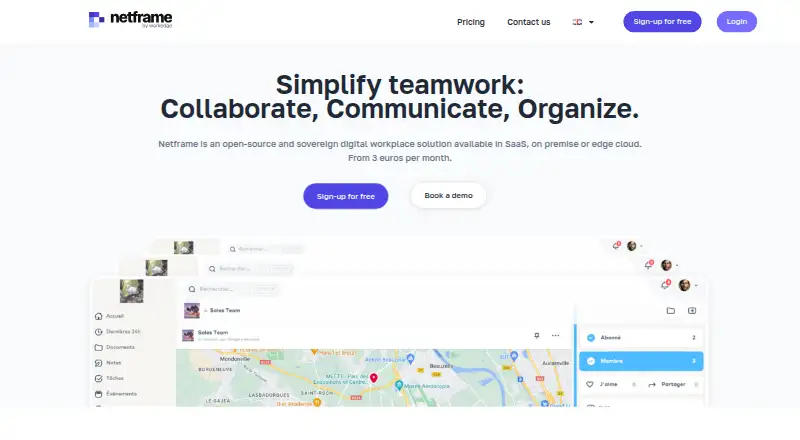
What Netframe is
Netframe is an open-source digital workplace for collaboration, communication and organization. Its workspace brings together email, instant messaging, file storage, calendar, office tools, video, shared notes and collaborative spaces. An internal social network adds activity feeds, groups, announcements, comments and sharing. Document management includes file sharing, version history, access controls and workflows.
Netframe supports connections between Dropbox or Google Drive and document management, and between Google Calendar or Outlook and the Netframe calendar. It is available as SaaS, on-premise or edge cloud, and can be deployed in a customer’s own infrastructure. The maker says its SaaS runs on sovereign infrastructure in Europe. It also says the code, excluding CSS, is on GitHub under the AGPL license.
Netframe says it complies with GDPR, limits internal data collection to what is needed to improve the product, and allows use without collection. The maker says customer data remains available in a practically usable format if they leave the service. Netframe works in major browsers on smartphones, tablets, laptops and desktops, with access for Windows, Mac, Linux, Android and iOS described as non-native format. Plans include a free option for families, associations and education, Business at €3 a month per user, and Administration from €3,000 a year.
Who it suits
Netframe suits businesses, public administration, communities, and sensitive industries or professions looking for a shared digital workspace. Organizations can choose SaaS or deploy it on-premise, in edge cloud, or in their own infrastructure.
What it does well
- Combines email, messaging, files, calendar, office tools and video.
- Includes internal feeds, groups, announcements, comments and sharing.
- Document tools include version history and access control.
- Available as SaaS, on-premise or edge cloud.
- Code excluding CSS is available under the AGPL license.
- Offers a free plan for families, associations and education.
What to know first
- Business storage is 5 GB per user.
- Administration has a one-year commitment.
- Windows, Mac, Linux, Android and iOS access is described as non-native format.
Limits
The free option is for families, associations and education. Business includes 5 GB storage per user; Administration includes 10 GB storage per user and a one-year commitment.
Plans
| Plan | Billed and limits | Price |
|---|---|---|
| Free for families, associations and education | Free for families, associations and education | Free |
| Business | per user · 5 GB storage per user · no commitment · chat and email support · SaaS, on-premise or edge-cloud deployment | €3 a month |
| Administration | from per year · 10 GB storage per user · one-year billing commitment · phone and on-site support · advanced administration | €3,000 a year |
As netframe.co lists them, read 11 Oct 2026. The maker's own page has the final word.
Getting started
- Visit the Netframe website.
- Choose the free plan for families, associations and education, Business, or Administration.
- Use Netframe as SaaS, or arrange on-premise, edge cloud or deployment in your own infrastructure.
- Connect Dropbox or Google Drive to document management if needed.
- Connect Google Calendar or Outlook to the Netframe calendar if needed.
- Access the workspace in a major browser on a smartphone, tablet, laptop or desktop.
Overview
Netframe is an open-source digital workplace that combines internal communication, collaboration and document tools. It is aimed at businesses, public administrations, communities and sensitive industries that want a choice of hosting arrangements. Its breadth and deployment flexibility are compelling, but the right plan depends on storage needs and whether an annual commitment fits.
Key features
The workspace brings together email, instant messaging, file storage, calendar, office tools, video, shared notes and collaborative spaces. An internal social network adds activity feeds, groups, announcements, comments and sharing, while an employee directory and news publishing support staff communication. This range makes Netframe a plausible home for everyday internal coordination; organizations already invested in separate tools should weigh whether consolidating them is worth the change.
Document management includes file sharing, version history, access control and workflows. Dropbox and Google Drive can connect to document management, and Google Calendar or Outlook can connect to Netframe’s calendar. These connections help retain some familiar services, though the named integrations are limited to those tools.
Netframe can be used as SaaS, on-premise or edge cloud, including deployment on a customer's own infrastructure. The maker says its SaaS runs on sovereign infrastructure in Europe. It also says it complies with GDPR, collects only data needed to improve the product internally, permits use without collection, and keeps customer data in a practically usable format if a customer leaves. Those commitments, alongside code published under AGPL (excluding CSS), make it relevant to organizations prioritizing control and portability; they do not remove the work of evaluating a deployment against an organization’s own requirements.
Pricing
The Free plan costs nothing and is described for families, associations and education. It offers a no-cost way for those groups to start, but the plan terms do not give a storage allowance or seat cap to compare against paid use.
Business costs €3 a month, billed 3€/month per user, with 5 GB storage per user and no commitment. Per-user billing makes the cost scale with team size, while the storage allowance is a practical constraint for organizations sharing many files. The plan includes chat and email support.
Administration starts at €3,000 a year, billed from 3000€/year, with 10 GB storage per user and a one-year commitment. Its higher storage allocation may suit organizations needing more room per person, but the annual minimum and commitment make it a substantially different purchase from Business. Direct phone and on-site support are also listed for this plan. A free trial is offered.
Platforms
Netframe supports web, Android, iOS, Linux, macOS and Windows, as well as self-hosting. The maker says it works in major browsers across phones, tablets, laptops and desktops, and describes mobile access as native. This gives teams a broad mix of access options without requiring one desktop operating system.
Who it's for
Netframe is best suited to organizations seeking a broad internal workspace and wanting a choice between SaaS and infrastructure they control. Its social and document features may be particularly useful where internal announcements, shared files and collaboration belong together. It is less persuasive for teams that need generous per-user storage on the lowest paid plan or cannot accept Administration’s annual commitment.
Pros and cons
- Pro: Communication, social networking, document management and office tools share one workspace, which can consolidate common internal work.
- Pro: SaaS, on-premise, edge-cloud and customer-infrastructure deployment give organizations meaningful hosting choice.
- Pro: The maker’s GDPR, data-use and portability commitments, plus AGPL-licensed code excluding CSS, will matter to organizations focused on privacy and control.
- Con: Business includes 5 GB per user, which can be restrictive for file-heavy teams.
- Con: Administration starts at €3,000 a year and requires a one-year commitment, so it is not a casual step up from monthly per-user billing.
Alternatives
For a wider category comparison, browse Intranet Software.
Zoho Connect is worth considering if a free plan capped at five users suits a small team, or if its Ultimate plan’s monthly or yearly billing—with yearly billing saving up to 20%—is a better fit.
Appspace Intranet may suit teams looking for a free tier with defined allowances: two Premium Users, one Appspace Device ID, 5GB storage, 5GB monthly bandwidth and up to two Admins.
HubEngage is an alternative for organizations whose priority is communications, social features, recognitions, surveys and instant messaging, with a free Starter plan for up to 200 users.
Jostle is another option to compare for news, activity feeds, employee recognition, discussions, email digests and mobile apps.
Silverpeas may fit technically capable organizations willing to host a free basic collaborative platform themselves; its free offer requires IT skills, places hosting at the customer’s expense and excludes additional modules.
Noodle offers a free plan for up to five users with 5GB storage and unlimited sections, which may better suit a small team looking for those limits.
InStaff is an alternative to consider for employee-records workflows, with an Employee Records Hub plan billed at 20¢ per employee per month.
Open Intranet may suit organizations seeking a free, self-installed and self-hosted community edition with all features and no user limits.
Verdict
Choose Netframe if your organization wants a broad collaboration workspace with social and document features, and values open-source code or flexible deployment. Its strongest case is the combination of functional breadth and hosting choice. Look elsewhere if 5 GB per user is too tight on Business or Administration’s annual price and commitment do not fit your budget.
Verdict
Choose Netframe if you want a broad collaboration workspace with social and document features, and value open-source code or flexible deployment. Check the plan terms before choosing: Business is billed per user, while Administration starts at €3,000 a year with a one-year commitment.
Questions
Does Netframe have a free plan?
Yes. The free option is for families, associations and education and is listed as free.
What does Business cost?
Business is listed at €3 a month, billed at 3€/month per user, with 5 GB storage per user and no commitment.
What does Administration cost?
Administration is listed from €3,000 a year, with 10 GB storage per user and a one-year commitment.
Is Netframe open source?
The maker says its code, excluding CSS, is available on GitHub under the AGPL license.
Where can Netframe be deployed?
It is available as SaaS, on-premise or edge cloud, and can also run in a customer’s own infrastructure.
Which services can connect to Netframe?
Dropbox and Google Drive can connect to document management. Google Calendar or Outlook can connect to the Netframe calendar.
Facts from Netframe's own pages
- Audience
- The maker describes Netframe as suitable for businesses, public administration, communities, and sensitive industries or professions. · netframe.co, 11 Oct 2026
- Calendars
- Personal and project calendars support events and synchronization with Outlook and Google Calendar. · netframe.co, 15 Oct 2026
- Changelog: multi-instance
- The service-status page records multi-instance support as released on 24 November 2024. · netframe.co, 15 Oct 2026
- Changelog: WebDAV
- The service-status page records production WebDAV access to workspace files on 26 August 2024. · netframe.co, 15 Oct 2026
- Collaborative notes
- The notes tool supports multiple people editing together in real time. · netframe.co, 15 Oct 2026
- Company
- Netframe.co says it has been established in Paris since 2018. · netframe.co, 11 Oct 2026
- Company facts
- LinkedIn lists Netframe as a privately held Paris software company founded in 2018 with 2–10 employees. · linkedin.com, 15 Oct 2026
- Corporate social network
- The platform provides an internal social network with posts, comments, sharing, activity feeds, pages and announcements. · netframe.co, 15 Oct 2026
- Custom intranet
- Administrators can customize logos, images, profiles, groups, backgrounds, themes, colors and initial resource libraries. · netframe.co, 15 Oct 2026
- Data portability
- The company says customer data remains available in a practically usable format if a customer leaves the service. · netframe.co, 15 Oct 2026
- Deployment
- Netframe can run as SaaS, on-premise, in a customer-selected public or private cloud, or on dedicated edge infrastructure. · netframe.co, 15 Oct 2026
- Devices
- Netframe says it works in major browsers on smartphones, tablets, laptops and desktops, including Windows, Mac, Linux, Android and iOS in non-native format. · netframe.co, 11 Oct 2026
- Document management
- Netframe stores and shares images, video, audio and documents, with document history and access control. · netframe.co, 15 Oct 2026
- Features
- The workspace includes email, instant messaging, file storage, calendar, office tools, video, shared notes and collaborative spaces. · netframe.co, 11 Oct 2026
- Founded
- 2018 · netframe.co, 28 Sept 2026
- Headquarters
- Paris, France · netframe.co, 28 Sept 2026
- Hosting
- The maker says its SaaS platform runs on sovereign infrastructure in Europe. · netframe.co, 11 Oct 2026
- Integrations
- Capterra lists native integrations with Google Drive, Dropbox Business, Google Calendar and Microsoft Outlook. · capterra.com, 15 Oct 2026
- Legal entity
- French registry information identifies NETFRAME.CO as a SAS founded in 2018, led by Valentin Przyluski, with €100,100 capital. · entreprises.lefigaro.fr, 15 Oct 2026
- Limit: breadth of options
- A Capterra reviewer said Netframe could offer more options while still being under development. · capterra.com, 15 Oct 2026
- Limit: visual and feature depth
- A Capterra reviewer said the product needed further development of its graphics and functionality. · capterra.com, 15 Oct 2026
- Messaging
- The feature set includes chat threads, private messaging, email and instant messaging. · netframe.co, 15 Oct 2026
- Notable news
- Agdatahub reported on 21 February 2025 that Netframe took over AgDataHub to expand its role as a digital technical operator for agriculture. · agdatahub.eu, 15 Oct 2026
- Office suite
- Netframe includes a collaborative OnlyOffice suite for word-processing, spreadsheets and presentations. · netframe.co, 15 Oct 2026
Where Netframe stands on Freedom251
- Intranet Software#1 of 74