Freedom251 › Intranet Software

Appspace Intranet
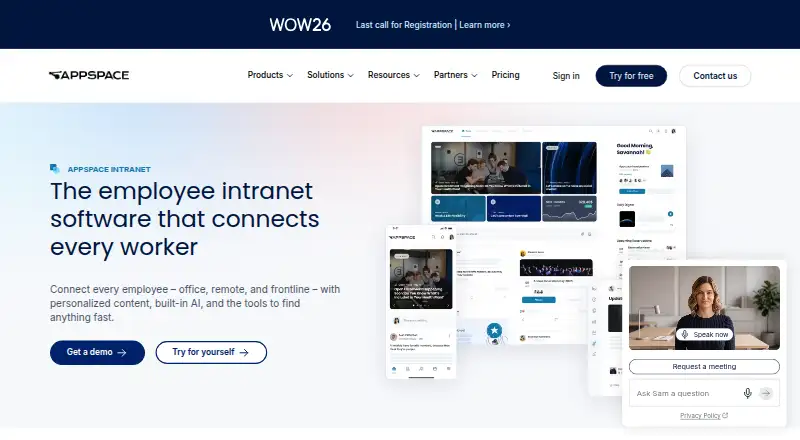
What Appspace Intranet is
Appspace Intranet connects office, remote, and frontline employees with personalized content, information-finding tools, and built-in AI. Teams can publish messages to the intranet, email, chat, and digital signage through one workflow, targeting campaigns by team, location, or role. AI supports content generation, summarization, translation, narration, question answering, and analytics without a separate license for those content workflows. It can tag and categorize material, while search spans documents, people, and other content, including colleagues by expertise or role. Employee communities, groups, posts, polls, praise, and comments support engagement, with mobile access for frontline workers who may not have company email. Listed integrations include Microsoft Teams, Microsoft 365, SharePoint, Slack, Google Workspace, Salesforce, and Webex. The Free plan includes two Premium Users, one Appspace Device ID, up to two admins, 5GB of storage, and 5GB monthly bandwidth. Express and Enterprise prices are not listed. A growing-business bundle advertises a 30-day free period without automatic billing afterward.
Who it suits
Appspace says its intranet is built for IT leaders, internal communications managers, HR teams, and digital workplace professionals at mid-market and enterprise organizations. It particularly identifies distributed, hybrid, and frontline workforces.
What it does well
- Targets campaigns by team, location, or role.
- AI content workflows need no separate license.
- Search covers documents, people, and content.
- Offers native mobile access for frontline workers.
- Lists Microsoft 365, Slack, and Salesforce integrations.
What to know first
- Free account is limited to two Premium Users.
- Free account allows one device ID.
- Free storage and monthly bandwidth are each 5GB.
- Express and Enterprise prices are not listed.
Plans
| Plan | Billed and limits | Price |
|---|---|---|
| Free | Unlimited account duration · 2 Premium Users · 1 Appspace Device ID · 5GB storage · 5GB monthly bandwidth | Free |
| Express | Month-to-month or annual · 25 Premium Users · 25 Device IDs · 25GB storage · 25GB monthly bandwidth · Single sign-on | On request |
| Enterprise | Month-to-month or annual · 50 Premium Users · 50+ Device IDs · 50GB+ storage · 50GB+ monthly bandwidth · Advanced channels · Device tasks | On request |
As appspace.com lists them, read 14 Oct 2026. The maker's own page has the final word.
Overview
Appspace Intranet is a workplace communications and knowledge platform for organizations bringing office, remote, and frontline employees together. Its strongest fit is a mid-market or enterprise team that needs to publish to multiple channels, organize company knowledge, and engage workers on mobile. It offers a notably broad toolkit, but the free account is too tightly capped for most organizations to use as a lasting company-wide hub.
Key features
Publishing across channels
Teams can send a message to the intranet, email, chat, and digital signage through one workflow, then target it by team, location, or role. That is useful for distributed organizations that need consistent announcements without treating every employee as part of one audience. News publishing, a page builder, and an employee directory also give the intranet a broader role than a simple announcement feed.
AI-supported content and search
Built-in AI can generate and summarize content, translate and narrate it, answer questions, and support analytics without a separate license for those content workflows. It also tags and categorizes content, while search covers documents, content, and people—including colleagues by expertise or role. This combination can help employees locate both information and the person who can provide it; organizations wanting AI for broader purposes should not assume these capabilities cover them.
Employee engagement and access
Communities, groups, posts, polls, praise, and comments provide ways for employees to interact beyond formal announcements. Native mobile access is particularly relevant for frontline workers who may not have company email. SSO support and integrations with Microsoft Teams, Microsoft 365, SharePoint, Slack, Google Workspace, Salesforce, Webex, and other workplace tools can help fit the intranet into an existing work environment.
Security and rollout
Appspace cites SOC 3 Type II, ISO 27001, ISO 27017, and Cloud Security Alliance, and says customer data is encrypted with TLS 1.2+ in transit and AES256 at rest. Support ranges from Base access to online documentation and tutorials to Elite support with a customer success manager, phone and ticket support, and stated response times. Appspace says communications or IT teams can configure and launch the intranet without custom coding and that most teams go live in weeks, a practical advantage for organizations that do not want implementation to depend on custom development.
Pricing
Appspace uses a freemium model. Its growing-business intranet bundle offers a 30-day free period, after which the customer chooses whether to continue; it does not automatically bill at the end of the period.
| Plan | Price and terms | Included limits and support |
|---|---|---|
| Free | free | 2 Premium Users, 1 Appspace Device ID, 5GB storage, 5GB monthly bandwidth, and up to 2 Admins |
| Express | Custom pricing; billed Month-to-Month or Annual | 25 Premium Users, 25 Device IDs, 25GB storage, 25GB monthly bandwidth, and Advanced support |
| Enterprise | Custom pricing; billed Month-to-Month or Annual | 50 Premium Users, 50+ Device IDs, 50GB+ storage, 50GB+ monthly bandwidth, and Premium or Elite support |
The free plan is suitable for a small evaluation, not a broad rollout: it allows just one compatible device and two Premium Users, and free accounts cannot purchase extra device IDs, storage, or bandwidth. Express raises those ceilings for smaller deployments, while Enterprise provides a larger starting allowance and higher support tiers for bigger ones. Both paid plans have custom pricing, so buyers need a quote to compare their costs.
Platforms
Appspace supports Android, iOS, Linux, macOS, web, and Windows, and lists an API platform. Native mobile access matters for employees away from a desk; the wide desktop and mobile coverage supports mixed-device workplaces.
Who it's for
Appspace is best suited to IT leaders, internal communications managers, HR teams, and digital workplace professionals at mid-market and enterprise organizations, especially those with hybrid, distributed, or frontline workforces. Its targeting, multi-channel publishing, and mobile engagement are most useful when employee groups rely on different channels or need distinct messages. A very small team that needs only a basic intranet may find the free user and device caps restrictive, while teams seeking a clearly priced paid plan may prefer an option with published pricing.
Pros and cons
- Pros: One publishing workflow spans intranet, email, chat, and digital signage, with targeting by team, location, or role.
- Pros: AI-assisted content workflows and search cover both company information and colleague discovery without a separate license for those workflows.
- Pros: Native mobile access and social engagement features serve frontline workers, including those without company email.
- Cons: The free tier's two Premium Users and one device make it a narrow pilot rather than a practical broad deployment.
- Cons: Free accounts cannot expand device, storage, or bandwidth allowances, and paid plans require custom pricing.
Alternatives
Consider Intranet Software for a broader category comparison. Zoho Connect is another freemium choice with a free plan for up to five users; its Ultimate plan has custom pricing and yearly billing can save up to 20%. HubEngage offers a free Starter plan for up to 200 users covering communications, social, recognitions, surveys, and instant messaging, making it worth considering when those named functions and a larger free user allowance are priorities. Netframe is another freemium option with web, iOS, Android, Windows, and macOS support. Silverpeas has a free offer for a basic collaborative platform, but its free version excludes additional modules, requires IT skills, and puts hosting at the customer's expense. Open Intranet is a free, web-based alternative. Huler is another freemium option available on the web. Akumina is a paid option with Android, iOS, self-hosted, and web support. Jalios Intranet offers a trial and custom pricing based on product and employee count, which suits buyers seeking a personalized offer.
Verdict
Appspace Intranet is a strong fit for mid-market and enterprise organizations that need coordinated communications, searchable knowledge, and engagement across distributed or frontline teams. Its most compelling advantage is the breadth of publishing, AI, search, and mobile features in one platform. Look elsewhere if a useful free deployment or transparent paid pricing is essential: two Premium Users, one device, and fixed free-tier quotas make the free plan a limited starting point, while paid costs are custom.
Verdict
Appspace Intranet combines publishing, search, AI content workflows, and employee engagement for distributed workforces. The free account has firm user, device, storage, and bandwidth limits; paid plan prices are not listed.
Facts from Appspace Intranet's own pages
- AI
- Built-in AI supports content generation, summarization, translation, narration, question answering, and analytics without a separate license for those content workflows. · appspace.com, 30 Sept 2026
- AI assistant
- The conversational assistant can find documents and people and book rooms. · appspace.com, 14 Oct 2026
- AI content tools
- Built-in AI can write, summarize, translate and narrate content. · appspace.com, 14 Oct 2026
- API
- Appspace API v3 exposes methods for channels, feeds and other cloud or platform services, with online method documentation. · appspace.com, 14 Oct 2026
- API documentation
- The API documentation lists authentication, pagination, roles, access tokens, accounts and user services, while older APIs are marked deprecated. · app9.cloud.appspace.com, 14 Oct 2026
- Campaign analytics
- Communications teams can target campaigns by team, location or role and track readership. · appspace.com, 14 Oct 2026
- Communications
- Teams can publish messages across the intranet, email, chat, and digital signage from one workflow, and target campaigns by team, location, or role. · appspace.com, 30 Sept 2026
- Communities
- Users can create communities for teams, projects or interests with posts, polls, praise and comments. · appspace.com, 14 Oct 2026
- Company facts
- LinkedIn lists Appspace as a privately held software company founded in 2002 with 201–500 employees and headquarters in Tampa, Florida. · linkedin.com, 14 Oct 2026
- Deployment
- Appspace supports cloud, on-premises and hybrid deployment models. · appspace.com, 14 Oct 2026
- Developer extensibility
- Custom widgets can call authenticated third-party APIs through Appspace Passports, which handle OAuth credentials and token refresh. · community.appspace.com, 14 Oct 2026
- Documentation
- The public Knowledge Center contains platform-management, signage, intranet, workspace and visitor-management guides. · community.appspace.com, 14 Oct 2026
- Encryption and backups
- Cloud traffic uses TLS 1.2 or higher, passwords use one-way hashes, and encrypted backups run at least every four hours with at least three months retention. · appspace.com, 14 Oct 2026
- Engagement
- The platform includes employee communities, groups, posts, polls, praise, and comments, with mobile access for frontline workers who may not have company email. · appspace.com, 30 Sept 2026
- Founded
- 2002 · appspace.com, 28 Sept 2026
- Free-tier restriction
- The free account supports one compatible device, two Premium Users, up to two Admins, 5GB storage, and 5GB monthly bandwidth; free accounts cannot buy extra device IDs, storage, or bandwidth. · appspace.com, 30 Sept 2026
- Frontline access
- The mobile app is intended to reach frontline workers without requiring a company email address. · appspace.com, 14 Oct 2026
- Headquarters
- Tampa, Florida, USA · appspace.com, 28 Sept 2026
- Implementation
- Appspace says most teams go live in weeks and can configure and launch the intranet through communications or IT teams without custom coding. · appspace.com, 30 Sept 2026
- Integrations
- Appspace lists Microsoft 365, Teams, SharePoint, Slack, Google, Salesforce, Workday, ServiceNow and Jira integrations. · appspace.com, 14 Oct 2026
- Intended customers
- Appspace says its intranet is built for IT leaders, internal communications managers, HR teams, and digital workplace professionals at mid-market and enterprise organizations, especially those with distributed, hybrid, or frontline workforces. · appspace.com, 30 Sept 2026
- Knowledge management
- Appspace automatically tags and categorizes content and searches documents, people and other content from one bar. · appspace.com, 14 Oct 2026
- Legal maker
- The end-user agreement identifies the maker as Appspace, Inc., a Delaware corporation with offices at 400 N Tampa Street, Suite 1725, Tampa, Florida. · appspace.com, 14 Oct 2026
- Licence
- The end-user agreement grants a limited, non-exclusive subscription right and reserves product intellectual property to Appspace and its licensors. · appspace.com, 14 Oct 2026
Where Appspace Intranet stands on Freedom251
- Intranet Software#2 of 74