Freedom251 › Church Presentation Software
Holyrics
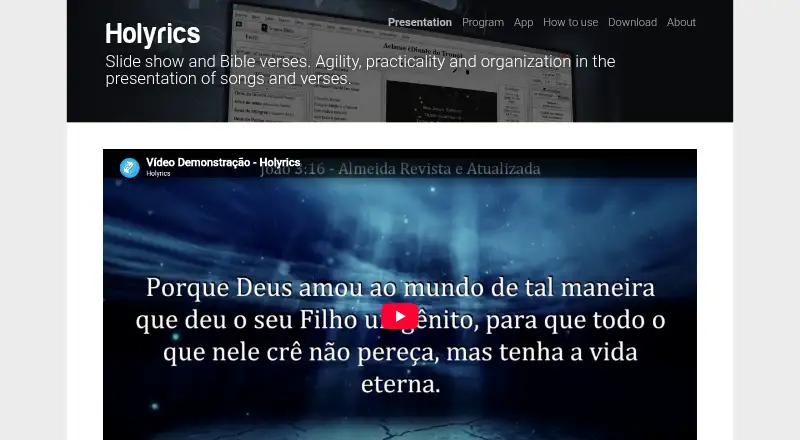
What Holyrics is
Holyrics is presentation software for churches that display lyrics and Bible verses during worship and events. It can put song lyrics, scripture, text, images, audio, video, countdowns, alerts, and stage-view content on screens, including multi-screen output. The media player supports VLC Media Player, while the mobile app can access program data and control presentations. Cloud synchronization shares program data and media files between computers, but not local settings.
Holyrics is available for Windows, Linux, macOS, Android, and iOS. Its desktop program requires Java 8; Java 9 does not work. It does not stream directly, but is compatible with streaming programs. Telegram features include questions, polls, draws, chat synchronization, and file transfer through a chatbot. Direct Telegram file transfers are limited to 20MB; larger files can be shared with a Google Drive link. The Advanced plan provides an online API for other applications to send HTTP requests to Holyrics. The Holyrics plan is free; Basic costs $5 a month, Advanced costs $10 a month, and Advanced + Worshipwide costs $25 a month. The iOS app costs $0.99, paid once.
Who it suits
Holyrics suits churches that need to present lyrics, Bible verses, and other media during worship or events. It may also suit teams that want mobile presentation control or cloud synchronization between computers.
What it does well
- Projects lyrics, Bible verses, and varied media.
- Supports multi-screen output and stage-view content.
- Mobile app can control presentations.
- Cloud sync shares program data and media files.
- Free Holyrics plan is listed.
What to know first
- Desktop program requires Java 8; Java 9 does not work.
- It does not stream directly.
- Direct Telegram file transfers are limited to 20MB.
- Cloud sync does not include local settings.
Limits
The free Holyrics plan is listed without a usage limit in the provided plan details. Basic costs $5 a month and allows up to 3 computers and 30 apps; Advanced costs $10 a month and allows up to 10 computers and 100 apps. Telegram files sent directly in chat are limited to 20MB.
Plans
| Plan | Billed and limits | Price |
|---|---|---|
| Basic | online sharing · Telegram polls/questions/draws · custom chatbot · Telegram chat sync · internet custom messages · up to 3 computers · up to 30 apps | $2 a month |
| Advanced | all Basic benefits · online API · up to 10 computers · up to 100 apps | $3 a month |
| Advanced + Worshipwide | all Advanced benefits · full gallery · new Worshipwide packs | $7 a month |
| Holyrics | free desktop software | Free |
| Holyrics iOS app | iPhone and iPad app | $0.99, paid once |
As holyrics.com.br lists them, read 15 Oct 2026. The maker's own page has the final word.
Getting started
- Visit the Holyrics website.
- Download the desktop program for Windows, Linux or Mac, or use the Android or iOS app.
- For desktop use, install Java 8; Java 9 does not work.
- Add program content such as lyrics, Bible verses, text or media for presentation.
- Use the mobile app to access program data and control presentations, or set up cloud synchronization between computers.
Holyrics is church presentation software for worship teams and event operators who need lyrics, Scripture, media playback and stage content in one presentation workflow. Its mobile control and computer-to-computer sync extend that workflow, but Java requirements and the absence of direct streaming make it a less complete fit for teams that want an all-in-one production system.
Overview
Holyrics is built to present song lyrics and Bible verses, with support for text, images, audio, video, countdowns, alerts and stage-view content. Multi-screen output makes it useful for services that need distinct presentation displays, while media playback broadens its role beyond slides.
The desktop program works with a mobile app that can access program data and control presentations. Cloud synchronization can share program data and media files between computers, but leaves local settings out of the sync. It is therefore useful for keeping service materials aligned, not for making every computer’s configuration identical.
Holyrics is compatible with streaming programs but does not stream directly. A church that needs its presentation software to handle the stream itself will need another tool for that job.
It sits within Church Presentation Software and the wider Presentation software category.
Key features
Service content and displays
Lyrics and Scripture are central strengths, but Holyrics also handles general text, images, audio and video, plus countdowns and alerts. Stage-view content and multi-screen output suit services where operators need to prepare material for more than one display role. The breadth is practical for worship events, though it does not remove the need for a separate streaming application.
Media, mobile control and messaging
The audio and video player supports VLC Media Player. The mobile app provides access to program data and presentation control, giving operators a phone-based control option. Telegram integration adds questions, polls, draws, chat synchronization and chatbot file transfer, which can support audience interaction and coordination. Files sent directly through Telegram chat are limited to 20MB; larger files can be shared through a Google Drive link.
Desktop and privacy
The downloadable desktop program is available for Windows, Linux and Mac and requires Java 8; Java 9 does not work. That requirement is a meaningful setup constraint for teams whose computers do not already meet it. The smartphone app says it does not store or collect personal data. Camera access is used for QR-code reading, and microphone access for sending audio in chat.
Holyrics provides video tutorials, tips and an FAQ for the software and app. Its license is non-exclusive and revocable, and prohibits modifying the source code or reverse engineering the applications.
Pricing
Holyrics is freemium, with a free Holyrics plan at no cost. The paid monthly plans add computer and app capacity, while the iOS app is a separate one-time purchase.
- Holyrics: free. This is the no-cost starting point for teams that can work within the free plan.
- Basic: $5 a month for up to 3 computers and up to 30 apps. It fits smaller teams that need a modest paid capacity.
- Advanced: $10 a month for up to 10 computers and up to 100 apps. This is the more suitable tier for larger deployments; it also provides an online API so other applications can send HTTP requests to Holyrics over the internet.
- Advanced + Worshipwide: $25 a month, with all Advanced benefits plus the full gallery and new Worshipwide packs. It is for teams that want those added materials as well as Advanced capacity.
- Holyrics iOS app: $0.99, paid once for the iOS app.
The published capacity caps make Basic and Advanced easier to assess against a team’s number of computers and apps. The free plan’s specific caps are not given here, so teams should check that it accommodates their intended use before relying on it. Holyrics launched in November 2016; Lima Giran Ltda. was created in March 2023 to officially provide the program.
Platforms
The desktop program is available for Windows, Linux and macOS, and the platform list also includes Android and iOS. The Java 8 requirement applies to the downloadable desktop program, with Java 9 incompatible. The separate iOS app has a one-time price of $0.99, paid once.
Who it's for
Holyrics is a strong fit for churches that want lyrics, Bible passages, media, stage content and mobile presentation control in one system, especially when Telegram features or cross-computer synchronization are useful. Its Advanced plan is the clearest choice for organizations needing more than three computers or 30 apps, or an online API; the Advanced + Worshipwide tier adds the full gallery and new packs. It is less suited to teams that require direct streaming, cannot meet the desktop Java requirement, or need cloud sync to include local settings.
Pros and cons
- Pro: Handles lyrics, Scripture, media, stage content, alerts and countdowns, reducing the need to split common service presentation tasks across separate tools.
- Pro: Mobile control and cloud synchronization support operators working across devices and computers, although local settings do not sync.
- Pro: Telegram offers polls, questions, draws, synchronized chat and file transfer, giving teams several interaction and coordination options.
- Con: Direct Telegram file transfers stop at 20MB, so larger files require a Google Drive link.
- Con: The desktop program requires Java 8 and will not work with Java 9, adding a compatibility hurdle.
- Con: Holyrics does not stream directly, so streaming requires a compatible separate program.
Alternatives
VerseVIEW is worth considering for a free option across desktop, mobile and web: its plan is free forever, with no ads and free access for everyone.
Church Presenter may suit teams looking for a free option with no subscription or seat limits; its Free Forever plan costs nothing and uses the GNU GPL v3 license.
WorshipTools Presenter is an alternative for teams prioritizing defined cloud and service quotas in a free tier: it includes 500 MB cloud storage, 10 users, 15 items per service, and unlimited services and songs.
DisplayWord is another freemium alternative for teams seeking a free plan with hall screen and Bible features, a song library and editor, PDF chord sheets, offline use, media and backgrounds.
FreeShow is a free presentation software option whose maker says it will always be free.
VerseCAST may be relevant for teams looking for Bible presentation across Android, iOS and web; its free demo limits slide count and functionality.
SoftProjector is a free, open-source alternative for teams using Linux, macOS or Windows.
Quelea is another free-to-use, open-source option for Linux, macOS or Windows.
Verdict
Choose Holyrics if your church needs a broad worship presentation toolkit with mobile control, multi-screen support, Telegram features and synchronization between computers. Its strongest case is the combination of service content and operator tools; look elsewhere if direct streaming, Java-free desktop setup or synchronization of local settings is essential.
Verdict
Holyrics combines church presentation tools with mobile control, cloud synchronization, and Telegram features. Check the Java requirement, file-transfer limit, and listed plan prices against your setup.
Questions
Is Holyrics free?
Yes. Holyrics is listed as a free plan at no cost.
What do the paid plans cost?
Basic is $5 a month, Advanced is $10 a month, and Advanced + Worshipwide is $25 a month. The iOS app is listed separately at $0.99, paid once.
Which platforms does Holyrics support?
It is listed for Android, iOS, Linux, macOS and Windows. The downloadable desktop program is available for Windows, Linux and Mac.
Does Holyrics stream presentations?
Holyrics does not stream directly, but it is compatible with streaming programs.
What does the Advanced plan add?
It provides an online API that lets other applications send HTTP requests to Holyrics over the internet.
Does Holyrics collect personal data through its smartphone app?
The smartphone app states that it does not store or collect personal data. Camera access is used for QR-code reading, and microphone access is used for sending audio in chat.
Facts from Holyrics's own pages
- API
- The Advanced plan provides an online API that lets other applications send HTTP requests to Holyrics over the internet. · holyrics.com.br, 30 Sept 2026
- API server
- A built-in HTTP API server exposes actions and program data for integrations. · holyrics.com.br, 15 Oct 2026
- Apple price
- The iPhone and iPad app is listed at $0.99. · apps.apple.com, 15 Oct 2026
- App privacy
- The maker states that its smartphone app does not store or collect personal data, while camera and microphone access support QR scanning and chat audio. · holyrics.com.br, 15 Oct 2026
- Bible
- It displays Bible passages from multiple translations and can show several versions simultaneously. · holyrics.com.br, 15 Oct 2026
- Changelog news
- Version 2.30.0 dated 15 September 2026 added a User Data API and Google Drive synchronization conflict handling. · holyrics.com.br, 15 Oct 2026
- Cloud sync
- Cloud synchronization can synchronize program data and media files between computers, except local settings. · holyrics.com.br, 30 Sept 2026
- Company
- LinkedIn identifies the maker as Holyrics, a self-owned software-development company founded in 2016. · linkedin.com, 15 Oct 2026
- Company size
- LinkedIn lists Holyrics as having 2–10 employees and shows no headquarters location. · linkedin.com, 15 Oct 2026
- Desktop downloads
- Installers are provided for Windows 64-bit and 32-bit, Linux 64-bit and Mac, with Java 8 required and Java 9 unsupported. · holyrics.com.br, 15 Oct 2026
- Desktop platforms
- The downloadable desktop program is available for Windows, Linux and Mac, and requires Java 8; Java 9 does not work. · holyrics.com.br, 30 Sept 2026
- Documentation
- The maker provides feature references, FAQ articles and multi-hour video tutorials covering setup, media, Bible, events, apps and backups. · holyrics.com.br, 15 Oct 2026
- Extensibility
- API items can send HTTP requests, MIDI messages or JavaScript and can be run manually or by triggers. · holyrics.com.br, 15 Oct 2026
- File limit
- Files sent directly through the Telegram chat are limited to 20MB; larger files can be shared using a Google Drive link. · holyrics.com.br, 30 Sept 2026
- Free plan
- Yes · holyrics.com.br, 20 Sept 2026
- Google Play adoption
- The Android app listing reports 500K+ downloads. · play.google.com, 15 Oct 2026
- Google Play data safety
- Google Play says the app may share location and personal data, encrypts data in transit and supports deletion requests. · play.google.com, 15 Oct 2026
- Integrations
- The documentation demonstrates controlling OBS Studio scenes and network PTZ cameras through API receivers. · holyrics.com.br, 15 Oct 2026
- Legal developer
- Google Play identifies the developer as Lima Giran Ltda. and gives a Sorocaba, São Paulo, Brazil address. · play.google.com, 15 Oct 2026
- Limit: Android feature request
- A Google Play reviewer wanted background motion or static backgrounds for lower-third items used in live streaming. · play.google.com, 15 Oct 2026
- Limit: audio
- A Software Informer commenter reported no audio when playing videos despite repeated reinstalls and apparently correct computer connections. · holyrics.software.informer.com, 15 Oct 2026
- Limit: iOS editing
- An App Store reviewer said the app could not create lyrics because copy and paste did not work. · apps.apple.com, 15 Oct 2026
- Limit: iOS networking
- An App Store reviewer reported that the iPhone/iPad app could not find Holyrics on the network or connect to the computer. · apps.apple.com, 15 Oct 2026
- Lyrics
- It stores song lyrics, supports title or excerpt searching, grouping and custom themes. · holyrics.com.br, 15 Oct 2026
Where Holyrics stands on Freedom251
- Church Presentation Software#5 of 35
- Presentation software#36 of 93