Freedom251 › Church Presentation Software
MakeChurchEasy
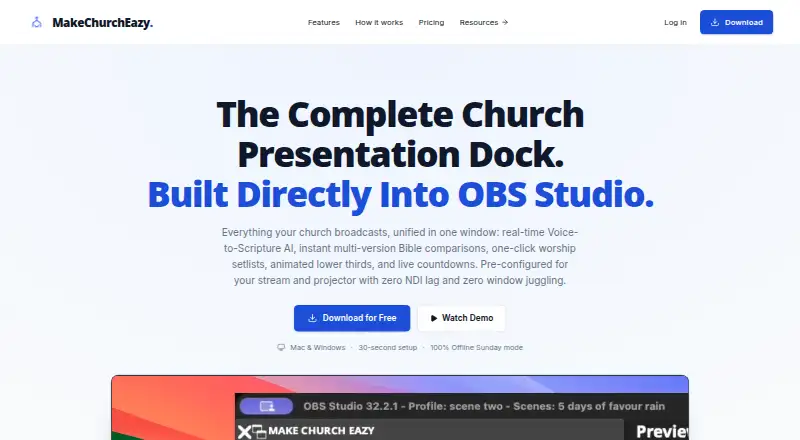
What MakeChurchEasy is
MakeChurchEasy is a church presentation dock built into OBS Studio for Bible passages, worship lyrics, media and livestream production. Its Scripture dock supports passage search and side-by-side comparison of passages and translations, and the site says it provides access to more than 10,000 Bible translations. Verse AI can listen to microphone or OBS audio, suggest Bible references for an operator to review, and support sermon quote capture and transcripts. These AI functions need an internet connection and depend on the plan and credits. Worship teams can organize songs, prepare lyric slides, and display lyrics full screen or as lower thirds. The dock also includes media presentation, announcement tickers, countdowns, timers, clocks and multi-view layouts, with lyrics, scripture, media playback and multi-screen output among its supported presentation functions. It integrates directly with OBS Studio, and EasyWorship and ProPresenter content can be imported free on every plan. After setup, many local presentation actions can work offline with downloaded content; sign-in, downloads, cloud sync, billing, updates and AI services need internet access. Downloads support Windows 10/11 and macOS 13 or later, with 4 GB RAM, 500 MB free disk space and OBS Studio 30.0 or later recommended. Plans range from Free to Pro Multi-Campus, with paid options from $7 a month.
Who it suits
MakeChurchEasy suits church media teams and volunteers who manage service presentations and livestreams. It is a fit for teams using OBS Studio that need Bible, lyric, media and broadcast tools in one dock.
What it does well
- Searches scripture and compares passages and translations side by side.
- Organizes worship songs and presents lyrics full screen or as lower thirds.
- Includes timers, clocks, tickers, countdowns and multi-view layouts.
- Imports EasyWorship and ProPresenter content free on every plan.
- Many local presentation actions can work offline after setup.
What to know first
- Free plan is limited to 10 songs, lyrics and media and 5 Bible versions.
- AI speech-to-scripture on Free is limited to a 30-minute trial.
- Sign-in, downloads, cloud sync, billing, updates and AI need internet access.
Limits
The Free plan allows up to 10 songs, lyrics and media and 5 Bible versions, with a 30-minute speech-to-scripture trial. Basic includes 4 speech-to-scripture hours per month; Growth includes 10, and Pro Multi-Campus includes 20. AI features depend on plan and credits and require internet access.
Plans
| Plan | Billed and limits | Price |
|---|---|---|
| Free | $0/mo (Global pricing) · Up to 10 songs, lyrics & media · 5 Bible versions · 30-minute speech-to-scripture trial · Free EasyWorship/ProPresenter import | Free |
| Growth | $12/mo (Global pricing) · Everything in Basic · Cloud storage and sync across operators · Mobile control app · Lower thirds & sermon export · 10 speech-to-scripture hours/month · Priority support | $12 a month |
| Pro Multi-Campus | $20/mo (Global pricing) · Everything in Growth · Unlimited multi-campus content sync · 20 speech-to-scripture hours/month · Full phone support & direct line · Online remote laptop control coming soon | $20 a month |
| Basic | $7/mo (Global pricing) · Unlimited local songs, lyrics & media · All Bible versions · Automatic OBS scenes & sources · 4 speech-to-scripture hours/month · Hour top-ups included | $7 a month |
As makechurcheazy.com lists them, read 8 Oct 2026. The maker's own page has the final word.
Getting started
- Visit https://makechurcheazy.com/.
- Choose the Free plan or review a paid plan; the site also offers a 14-day trial.
- Download for Windows 10/11 or macOS 13 or later.
- Use OBS Studio 30.0 or later, which is recommended.
- Set up the OBS dock and download content for local presentation use.
MakeChurchEasy is an OBS Studio dock for running Bible passages, worship lyrics, media, and livestream graphics from one workspace. It is best suited to church media teams and volunteers already building services in OBS. The main trade-off is breadth: the free tier is a useful starting point, but substantial libraries, collaboration, and AI usage sit behind paid plans.
Overview
MakeChurchEasy combines service presentation with broadcast operation instead of treating them as separate jobs. Operators can search scripture, compare passages and translations side by side, prepare songs, play media, and control announcements, countdowns, timers, clocks, lower thirds, and multi-view layouts from the OBS dock. Full-screen and lower-third lyric output, multi-screen support, and media playback cover both in-room presentation and streamed services.
Its direct OBS integration is the defining advantage for teams already committed to that production environment. EasyWorship and ProPresenter content import is free on every plan, reducing the friction of moving an existing library. After setup, many local presentation actions can work with downloaded content, but account sign-in, downloads, cloud sync, billing, updates, and AI services require an internet connection.
Key features
Scripture and Verse AI
The Bible dock provides scripture search and side-by-side translation comparison, with access to more than 10,000 Bible translations. That makes it practical for churches serving multilingual congregations or switching versions during a service. Verse AI listens to microphone or OBS audio, proposes spoken Bible references for operator approval, and can capture sermon quotes and transcripts. It is an operator-assistance feature rather than unattended automation: internet access and plan credits or quotas apply, so teams dependent on it should budget speech-to-scripture hours and maintain a reliable connection.
Worship and broadcast controls
Song organization and lyric-slide preparation support repeatable worship sets, while full-screen or lower-third presentation gives operators options for both venue screens and streams. Lower thirds, announcement tickers, timers, clocks, countdowns, media presentation, and multi-view layouts extend the dock beyond lyrics and verses. Automatic OBS scenes and sources arrive with Basic, making that tier more useful for teams that want less manual scene setup.
Import and operating requirements
Free EasyWorship and ProPresenter imports are included at every level. The download supports Windows 10/11 and macOS 13 or later on both Apple Silicon and Intel Macs; browser presentation links are also supported. The published minimum is 4 GB of RAM and 500 MB of free disk space, with OBS Studio 30.0 or later recommended. Android and iOS are supported alongside Windows and macOS, with the Growth plan adding a mobile control app.
Pricing
| Plan | Price | What you get |
|---|---|---|
| Free | free, billed $0/mo (Global pricing) | Up to 10 songs, lyrics and media; 5 Bible versions; a 30-minute speech-to-scripture trial; free EasyWorship/ProPresenter import. |
| Basic | $7 a month, billed $7/mo (Global pricing) | Unlimited local songs, lyrics and media; all Bible versions; automatic OBS scenes and sources; 4 speech-to-scripture hours per month; hour top-ups included. |
| Growth | $12 a month, billed $12/mo (Global pricing) | Everything in Basic, plus cloud storage and sync across operators, mobile control, lower thirds and sermon export, 10 speech-to-scripture hours monthly, and priority support. |
| Pro Multi-Campus | $20 a month, billed $20/mo (Global pricing) | Everything in Growth, unlimited multi-campus content sync, 20 speech-to-scripture hours monthly, and full phone support with a direct line. Online remote laptop control is coming soon. |
Free fits a small team testing the workflow, provided ten songs, five Bible versions, and the short AI allowance are enough. Basic is the sensible single-campus upgrade when local libraries, all versions, automatic OBS setup, or regular Verse AI use matter. Growth earns its premium for operators sharing content across locations or needing mobile control, sermon export, and priority support. Pro Multi-Campus targets organizations coordinating multiple campuses; its higher AI allowance and phone support address operational scale, while the forthcoming remote-control feature should not be treated as available now. A 14-day trial gives prospective users a short period to evaluate paid capabilities before committing.
Platforms
MakeChurchEasy supports Android, iOS, Windows, and macOS, with browser presentation links. Windows 10/11 and macOS 13 or later are supported, including Intel and Apple Silicon Macs. Plan around the 4 GB RAM minimum, 500 MB disk requirement, and recommended OBS Studio 30.0 or later.
Who it's for
This is a strong choice for church media teams and volunteers whose services already run through OBS and combine scripture, worship songs, media, and livestream graphics. It is particularly useful when EasyWorship or ProPresenter material must be imported without an extra fee, or when one operator needs presentation and broadcast controls together. Teams that work mostly offline can use downloaded local content, but those relying on cloud sync, account administration, updates, or Verse AI need dependable internet. Churches without an OBS-centered workflow may find the dock's main advantage less relevant.
Pros and cons
- Pro: Scripture, lyrics, media, overlays, timers, and multi-view controls share one OBS workspace.
- Pro: More than 10,000 Bible translations and side-by-side comparison support varied congregations and translation policies.
- Pro: EasyWorship and ProPresenter import is free on every plan.
- Pro: Growth and Pro provide progressively stronger coordination and support for multi-operator or multi-campus teams.
- Con: Free limits teams to 10 songs/media items, five Bible versions, and a 30-minute speech-to-scripture trial.
- Con: Verse AI consumes plan hours or credits and requires internet access.
- Con: Cloud sync and mobile control begin at Growth, while multi-campus sync and phone support cost more at Pro.
Alternatives
For a broad comparison, see Church Presentation Software.
Church Presenter is the better pick for a completely free, open-source option with no subscription or seat limits and support for Linux as well as major desktop and mobile platforms.
Choose Holyrics instead when computer and app-count limits suit your church and a lower-cost freemium structure is preferable, with plans from $5.00 per month.
OpenLP suits teams wanting free, open-source presentation software that can be installed on as many copies as needed, including web and Linux support.
VerseVIEW is an alternative for users seeking free-forever software with no ads.
WorshipTools Presenter fits churches wanting a free tier with 500 MB cloud storage, 10 users, and 15 items per service.
FreeShow is a free presentation option whose maker says it will remain free, with Linux, macOS, web, and Windows support.
Prezans is a no-subscription church product offering all features, subject to desktop-install serial limits.
SongShow Plus is the alternative to consider when a paid product with a free trial and separately priced Bible plug-ins matches your purchasing approach.
Verdict
Choose MakeChurchEasy when your church already produces services in OBS and wants scripture, worship, media, and livestream graphics coordinated in one dock, with a clear path from a capped free plan to cloud and multi-campus tiers. Look elsewhere if you need a fully free, open-source tool, broad Linux deployment, or presentation software that does not depend on an OBS-centered workflow and paid AI or sync allowances.
Verdict
Church teams working in OBS Studio should consider MakeChurchEasy for scripture, worship lyrics, media and livestream presentation tools in one dock. The Free plan offers a starting point, while teams needing more songs, Bible versions, cloud sync or speech-to-scripture hours will need a paid plan. Teams requiring AI functions should account for their internet and plan-credit requirements.
Questions
Is MakeChurchEasy free?
Yes. Its Free plan costs nothing and includes up to 10 songs, lyrics and media, 5 Bible versions, a 30-minute speech-to-scripture trial, and free EasyWorship and ProPresenter import.
What do the paid plans cost?
Basic costs $7 a month, Growth costs $12 a month, and Pro Multi-Campus costs $20 a month.
Which platforms does it support?
Downloads are available for Windows 10/11 and macOS 13 or later, including Apple Silicon and Intel Macs. Browser presentation links are also supported.
Does it work with OBS Studio?
Yes. MakeChurchEasy is built into OBS Studio and integrates directly with it.
Can it be used offline?
Many local presentation actions work after setup with downloaded content. Sign-in, downloads, cloud sync, billing, updates and AI services require internet access.
What support is available?
Support is available by email and through step-by-step video tutorials. Growth includes priority support, and Pro Multi-Campus includes phone support with a direct line.
Facts from MakeChurchEasy's own pages
- Broadcast features
- The dock includes lower thirds, media presentation, announcement tickers, countdowns, timers, clocks, and multi-view layouts. · makechurcheazy.com, 8 Oct 2026
- Integrations
- MakeChurchEazy integrates directly with OBS Studio, and EasyWorship and ProPresenter content import is free on every plan. · makechurcheazy.com, 8 Oct 2026
- Intended users
- The product is presented for church media teams and volunteers who manage service presentations and livestreams. · makechurcheazy.com, 8 Oct 2026
- Offline use
- The site says many local presentation actions work after setup with downloaded content, while sign-in, downloads, cloud sync, billing, updates, and AI services require internet access. · makechurcheazy.com, 8 Oct 2026
- Operating systems
- The download page supports Windows 10/11 and macOS 13 or later, including Apple Silicon and Intel Macs. · makechurcheazy.com, 8 Oct 2026
- Purpose
- MakeChurchEazy is a church presentation dock built into OBS Studio for Bible presentation, worship lyrics, media, and livestream production. · makechurcheazy.com, 8 Oct 2026
- Scripture
- The Bible dock supports scripture search and side-by-side comparison of passages and translations, and the site says it includes access to 10,000+ Bible translations. · makechurcheazy.com, 8 Oct 2026
- Support
- Support is available by email at [email protected] and through step-by-step video tutorials; the Growth plan includes priority support and Pro includes phone support with a direct line. · makechurcheazy.com, 8 Oct 2026
- System requirements
- The download page lists 4 GB RAM minimum, 500 MB free disk space, and OBS Studio 30.0 or later recommended. · makechurcheazy.com, 8 Oct 2026
- Voice-to-scripture
- Verse AI listens to microphone or OBS audio, suggests spoken Bible references for operator review, and supports sermon quote capture and transcripts; these AI features require an internet connection and depend on plan and credits. · makechurcheazy.com, 8 Oct 2026
- Worship tools
- Users can organize worship songs, prepare lyric slides, and present lyrics full screen or as a lower third from the OBS dock. · makechurcheazy.com, 8 Oct 2026
Where MakeChurchEasy stands on Freedom251
- Church Presentation Software#6 of 35