Freedom251 › Church Presentation Software
FreeShow
What FreeShow is
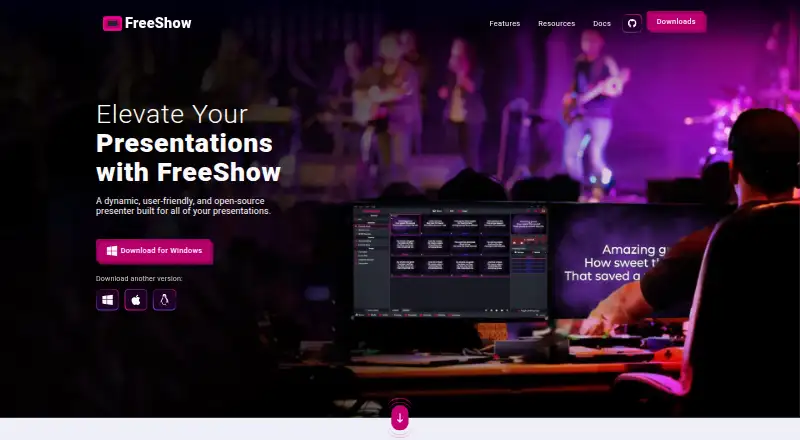
FreeShow is a free, open-source presenter for creating and showing lyrics, slides, scripture, and media, with a focus on worship presentations. It runs on Windows, macOS, and Linux. Its editor can change text font, size, and color, add outlines and shadows, and edit text during a presentation. Slides can autoplay on timers, and countdowns and MIDI commands can handle slide changes or external actions. Output options include simultaneous views, web output for mobile devices, NDI, and mobile remote control. Users can add images and videos as backgrounds, and built-in YouTube and Vimeo players are listed. The software can look up scripture passages and create song slides from title searches; its features page describes access to over 200 Bibles through API.Bible. Imports include PowerPoint, ProPresenter, EasyWorship, and OpenSong, with exports available in multiple formats. Cloud sync supports work on presentations from different computers, while media uses a repository linked to the local file system.
Who it suits
FreeShow suits worship presenters and churches looking for free presentation software for lyrics, scripture, slides, and media. Its multi-output, MIDI, and mobile remote-control options may also fit presentations that need more than one display.
What it does well
- Free and open-source presentation software.
- Runs on Windows, macOS, and Linux.
- Supports scripture and song-title searches.
- Offers simultaneous outputs and mobile remote control.
What to know first
- Cloud-synced media uses a repository linked to the local file system.
- The privacy policy does not specifically describe FreeShow application security or certification.
Plans
| Plan | Billed and limits | Price |
|---|---|---|
| FreeShow | Free presentation software · the maker says it will always be free | Free |
As freeshow.app lists them, read 2 Oct 2026. The maker's own page has the final word.
Getting started
- Visit https://freeshow.app/.
- Choose the free FreeShow plan, priced at $0.
- Use it on Windows, macOS, or Linux.
- Import an existing presentation from PowerPoint, ProPresenter, EasyWorship, or OpenSong, or create content in FreeShow.
- Add lyrics, scripture, slides, or media, then select an output view.
FreeShow is open-source presentation software for worship lyrics, scripture, slides, and media. It is a strong fit for churches that need live-service controls and multiple display outputs without a software fee. Its broad import support is useful; teams should weigh the local-file-linked media repository when planning cloud-synced work.
Overview
FreeShow brings worship content and general presentation tools into one application. Presenters can look up scripture and create slides from song-title searches, while adding text and media to presentations. The maker says its mission is to provide church software free of charge, and its FreeShow plan is free.
The project began in late 2021 and released its first version in February 2022. Its website connects it to Live Church Solutions, a 501(c)(3) organization. For a church deciding whether to adopt it, the more immediate consideration is whether its workflow for sharing presentations and media suits the team.
Key features
Editing and automation
The editor can change text font, size, and color, add outlines and shadows, and edit text while a presentation is running. Autoplay timers, countdowns, and MIDI commands can advance slides or trigger external actions. These controls suit services with timed sequences or MIDI-linked equipment; simpler lyric presentations may not need that degree of automation.
Outputs and media
FreeShow supports simultaneous output views, including web output for mobile devices, NDI output, and mobile remote control. Images and videos can serve as slide backgrounds, and built-in YouTube and Vimeo players extend media options. The combination is useful for teams presenting to more than one screen or coordinating playback, though the range of outputs matters less to a church with a single display and a simple service format.
Scripture, lyrics, and portability
The software offers scripture lookup and song-title searches for creating slides; its features page describes access to more than 200 Bibles through API.Bible. It imports presentations from PowerPoint, ProPresenter, EasyWorship, and OpenSong, and can export content in multiple formats. That import range may reduce the work of moving an existing library, while Bible access and lyric search put common worship material close to the presentation workflow.
Cloud sync supports multiple people working on presentations from different computers, with songs and settings included. Media uses a repository linked to the local file system, so teams need to plan for the location and availability of those files rather than assume they travel with synced presentation data.
Pricing
FreeShow — free. The free plan includes the presentation software, and the maker says it will always be free. There is no free trial because the software itself is free. This makes it a straightforward choice for churches avoiding software fees; the trade-off is that teams must judge the workflow and local media handling on their own needs rather than choosing among paid feature tiers.
Platforms
FreeShow supports Windows, macOS, and Linux. The listed platform set also includes web, and web output lets mobile devices display an output view. Mobile remote control is supported, but the desktop application is the listed platform offering.
Who it's for
FreeShow suits churches and worship teams that want lyric and scripture presentation, multiple outputs, media playback, and service automation without a subscription. It is particularly relevant to teams migrating from other presentation tools, given its named import formats. A team whose priority is cloud-managed media sharing should first decide whether a repository linked to local files fits its setup.
Pros and cons
- Free to use: the maker says the software will always be free, removing a software charge for churches adopting it.
- Broad presentation controls: text styling, live edits, timers, countdowns, and MIDI commands can support more structured services.
- Multiple output paths: simultaneous views, NDI, web output, and mobile remote control give teams options beyond a single projection screen.
- Useful migration support: imports from PowerPoint, ProPresenter, EasyWorship, and OpenSong can help preserve existing presentation content.
- Media sync needs planning: media is stored in a repository linked to the local file system, unlike synced songs and settings.
Alternatives
Church Presentation Software is the broader category to browse for other worship presentation options.
- Church Presenter is another free option; its Free Forever plan is GNU GPL v3, has no subscription, and sets no seat limits.
- Holyrics may suit teams that want paid tiers with stated computer and app limits: Basic is $5 a month for up to 3 computers and 30 apps, while Advanced is $10 a month for up to 10 computers and 100 apps.
- OpenLP is another open-source, free option, with installs allowed on as many copies as needed.
- VerseVIEW is a free alternative whose plan specifies no ads and free access for everyone.
- WorshipTools Presenter may fit teams seeking cloud storage and user caps in a free tier: it includes 500 MB, 10 users, and 15 items per service, with unlimited services and songs.
- MakeChurchEasy is another freemium option, with a free plan capped at 10 songs, lyrics, and media and five Bible versions.
- Prezans offers a free plan with all features for churches, no subscription, and desktop installs limited by an issued serial.
- SongShow Plus is a paid alternative with a free trial.
Verdict
Choose FreeShow if your church wants a no-cost presenter that combines lyrics, scripture, media, automation, and flexible outputs, especially when importing from a supported presentation tool. Look elsewhere if your team needs media itself to sync without managing local-file-linked storage, or if a different plan structure better matches your deployment.
Verdict
FreeShow combines worship-focused presentation tools with multiple output options and support for common presentation imports. Consider how its local-file-linked media repository fits your cloud-sync workflow.
Questions
How much does FreeShow cost?
The FreeShow plan is listed as free. The maker says the presentation software will always be free.
Is FreeShow open source?
Yes. FreeShow is described as open-source presentation software.
Which platforms does FreeShow support?
The listed supported desktop platforms are Windows, macOS, and Linux. Web output for mobile devices is also supported.
Can FreeShow display lyrics and scripture?
Yes. It supports lyrics and scripture display, including scripture lookups and song slides created from title searches.
Can teams work on presentations together?
FreeShow offers cloud sync so multiple people can work on presentations from different computers. Sync covers songs and settings; media uses a repository linked to the local file system.
Who develops FreeShow?
The website links FreeShow to Live Church Solutions, which it identifies as a 501(c)(3) organization.
Facts from FreeShow's own pages
- Audience
- The maker describes FreeShow as presentation software for worship and says its mission is to provide church software free of charge. · freeshow.app, 2 Oct 2026
- Automation
- Slides can autoplay on timers, and the software includes countdowns and MIDI commands for slide changes or external actions. · freeshow.app, 2 Oct 2026
- Cloud sync
- FreeShow offers cloud sync for multiple people to work on presentations from different computers; its features page says sync covers songs and settings, with media using a repository linked to the local file system. · freeshow.app, 2 Oct 2026
- Developer
- The documentation says the project started in late 2021 and its first release was in February 2022. · freeshow.app, 2 Oct 2026
- Editing
- Its editor can change text font, size, and color, add outlines and shadows, and edit text during a presentation. · freeshow.app, 2 Oct 2026
- Founded
- 2021 · freeshow.app, 23 Sept 2026
- Headquarters
- Broken Arrow, Oklahoma, United States · freeshow.app, 23 Sept 2026
- Import and export
- The homepage lists imports from PowerPoint, ProPresenter, EasyWorship, and OpenSong, and says content can be exported in multiple formats. · freeshow.app, 2 Oct 2026
- Media
- Users can add images and videos as slide backgrounds, and the features page also describes built-in YouTube and Vimeo players. · freeshow.app, 2 Oct 2026
- Organization
- The website identifies Live Church Solutions as a 501(c)(3) organization and links FreeShow to it. · freeshow.app, 2 Oct 2026
- Outputs
- FreeShow supports simultaneous output views, web output for mobile devices, NDI output, and remote control from a mobile device. · freeshow.app, 2 Oct 2026
- Platforms
- The documentation says FreeShow is available on Windows, macOS, and Linux. · freeshow.app, 2 Oct 2026
- Purpose
- FreeShow is an open-source presenter for creating and showing lyrics, slides, scripture, and media. · freeshow.app, 2 Oct 2026
- Scripture and lyrics
- The homepage says users can look up scripture passages and create slides from song-title searches; the features page says it offers over 200 Bibles through API.Bible. · freeshow.app, 2 Oct 2026
- Security and compliance
- The linked privacy policy describes security measures for ChurchApps services, including HTTPS encryption and firewalled databases, but does not specifically describe FreeShow application security or compliance certification. · churchapps.org, 2 Oct 2026
- Support
- The maker lists [email protected] and links to GitHub for bug reports and feature requests. · freeshow.app, 2 Oct 2026
Where FreeShow stands on Freedom251
- Church Presentation Software#2 of 35