Freedom251 › Church Presentation Software

Church Presenter
What Church Presenter is
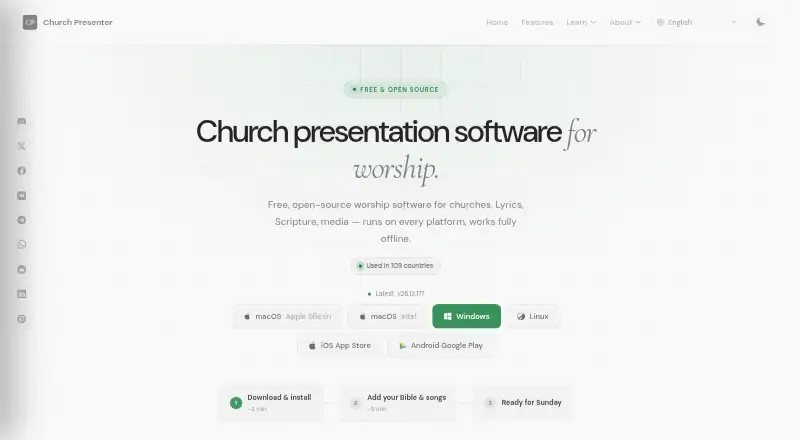
Church Presenter is a free, open-source presentation platform aimed primarily at churches, ministries, missionaries, nonprofit organizations and educational institutions. Schedules can combine Bible verses, songs, videos, presentations, announcements and web pages, and the app can display up to six Bible translations at once. It opens PowerPoint, Keynote and PDF files directly without requiring Microsoft Office or Apple Keynote. Android and iOS apps can control the desktop version remotely or present independently to a TV, projector or browser. Production features include automatic OBS Studio scene switching, Blackmagic ATEM upstream-key control, and action mapping to Stream Deck buttons through Bitfocus Companion. Attendees can submit questions by QR code for administrators to review, approve and display. The software tracks displayed songs and Bible verses and exports CCLI usage data as CSV or Excel. Most presentation content and project data stay local rather than being sent to Church Presenter servers. Desktop use needs no account; the mobile app uses anonymous crash and usage reporting. The code is public on GitHub under GNU GPL v3.
Who it suits
Church Presenter fits churches and other organizations that prepare services, events or educational presentations. It may suit teams that need scripture and song displays, production controls, or mobile remote control.
What it does well
- Free, open-source software with no seat limits
- Displays up to six Bible translations at once
- Opens PowerPoint, Keynote and PDF files directly
- Exports song and Bible verse usage for CCLI
- Most presentation data is stored locally
What to know first
- Mobile apps use anonymous crash and usage reporting
- Bug reports and feature requests go to GitHub Issues
- Maintained by a small team with community contributions
Plans
| Plan | Billed and limits | Price |
|---|---|---|
| Free Forever | Free Forever · GNU GPL v3 · No subscription · No seat limits | Free |
As churchpresenter.org lists them, read 30 Sept 2026. The maker's own page has the final word.
Getting started
- Visit the Church Presenter website.
- Choose the desktop version for Windows, macOS, or Linux, or the mobile app for Android or iOS.
- Use the desktop app without creating an account.
- Build a schedule from scripture, songs, videos, presentations, announcements, or web pages.
- Connect mobile control or presentation output as needed.
Overview
Church Presenter is a free, open-source presentation system built around church services and similar events. It is best suited to organizations that want a local-first desktop workflow, broad production integrations, and no subscription. Its breadth comes with a trade-off: the project is community-maintained by a small team.
Most content and project data stay on the device, and the desktop app needs no account and collects no data. The mobile apps use Firebase Analytics, Crashlytics, and Sentry for anonymous crash and usage reporting. That distinction matters to privacy-conscious teams choosing between desktop and mobile use.
The public code is licensed under GNU GPL v3. Bug reports and feature requests go through GitHub Issues, so organizations should be comfortable relying on a small team and community contributions rather than assuming a commercial support operation.
Key features
Service schedules can combine scripture, songs, videos, presentations, announcements, and web pages. This makes Church Presenter useful when a service moves between different content types rather than relying on a lyric-only workflow. It can display up to six Bible translations simultaneously, and its catalog draws on more than 1,500 translations in over 1,000 languages from eBible.org and the Zefania Archive.
PowerPoint, Keynote, and PDF files open directly without Microsoft Office or Apple Keynote. That reduces the need to convert existing presentation files, though it does not replace every tool used to create them.
Android and iOS apps can control the desktop presentation remotely or present independently to a TV, projector, or browser. For production teams, Church Presenter can switch OBS Studio scenes as content changes, control the upstream key on Blackmagic ATEM switchers when lower thirds go live or clear, and send actions through Bitfocus Companion to Stream Deck buttons and other supported hardware. These connections make it a stronger fit for services with a production setup than for teams seeking only basic slides.
Attendees can submit questions through a QR code. Administrators can moderate and approve questions before display, and can optionally enable voting. The software also tracks displayed songs and Bible verses and exports usage as CSV or Excel for CCLI licence compliance.
Pricing
Free Forever: free, billed Free Forever. It is released under GNU GPL v3, has no subscription, and imposes no seat limits. That makes it a practical option for organizations that want the full open-source product without recurring fees or a seat-count calculation. Its cost is not the only consideration: teams should weigh the small-team maintenance model and GitHub-based support alongside the price.
Platforms
Church Presenter supports Windows, macOS, and Linux on desktop, plus Android and iOS. The mobile apps can serve as remote controls or as standalone presentation tools, giving teams more than one way to use phones and tablets during an event.
Who it's for
Churches, ministries, missionaries, nonprofits, and educational institutions are the intended audience. It is particularly well suited to organizations combining scripture and lyrics with mixed service content, multiple displays, or live video production. Teams that require a larger formal support structure, or want mobile apps without anonymous usage and crash reporting, may prefer another option.
Pros and cons
- Broad service scheduling: One schedule can mix scripture, songs, videos, presentations, announcements, and web pages, which suits varied services.
- Useful production links: OBS, ATEM, and Bitfocus Companion integrations connect presentation changes with other production controls.
- No subscription or seat cap: The Free Forever plan removes recurring charges and seat-count limits.
- Local-first desktop privacy: Desktop data stays local, and the desktop app collects no data or account details.
- Small-team maintenance: Support routes through GitHub Issues and community contributions, which may not fit organizations expecting a commercial support channel.
- Mobile reporting differs: The Android and iOS apps use third-party services for anonymous crash and usage reporting, unlike the desktop app.
Alternatives
For a wider comparison, see Church Presentation Software.
- Holyrics is another cross-platform option with a free plan and paid tiers at $5 a month and $10 a month, with the listed tiers capped by computers and apps.
- SongShow Plus is a paid option with a free trial, and includes a free workstation license for preparing presentations, programs, and other media on non-projection machines.
- VerseVIEW is a free, cross-platform alternative whose plan is described as free forever with no ads.
- WorshipTools Presenter offers a free plan with 500 MB cloud storage, 10 users, and 15 items per service, while allowing unlimited services and songs.
- FreeShow is a free alternative for Linux, macOS, web, and Windows.
- Praisenter is a free Linux, macOS, and Windows option with no registration, sign-up, trial period, or limited feature set.
- Crown Cast is a free Linux, macOS, and Windows alternative.
- DisplayWord is a freemium option for macOS, web, and Windows, with a free church plan covering hall screen and Bible, song library and editor, PDF chord sheets, offline use, media, and backgrounds.
Verdict
Choose Church Presenter if your organization wants a subscription-free, locally oriented presentation system that can handle varied service content and connect with production hardware and software. Its strongest case is the combination of broad scheduling, scripture tools, and live-production integrations without seat limits. Look elsewhere if your priority is a larger support operation or a desktop-and-mobile privacy profile that is consistent across apps.
Verdict
Church Presenter combines service scheduling, presentation playback, production controls and audience Q&A without a subscription. Its local-first desktop approach and broad integrations suit organizations comfortable with a community-maintained open-source project.
Questions
How much does Church Presenter cost?
The Free Forever plan costs nothing and has no subscription or seat limits.
Is Church Presenter open source?
Yes. Its code is public on GitHub under the GNU GPL v3 license.
Which platforms does it support?
It supports Windows, macOS, Linux, iOS, and Android.
Can it display multiple Bible translations?
Yes. It can show up to six translations at once, and its catalog includes more than 1,500 translations in over 1,000 languages.
Does Church Presenter require an account?
The desktop app requires no account. The mobile apps use Firebase Analytics, Crashlytics, and Sentry for anonymous crash and usage reporting.
What presentation files can it open?
It opens PowerPoint, Keynote, and PDF files directly.
Facts from Church Presenter's own pages
- ATEM integration
- The software integrates with Blackmagic ATEM switchers to control the upstream key when lower thirds go live or clear. · churchpresenter.org, 30 Sept 2026
- Audience Q&A
- Attendees can submit questions by scanning a QR code, while administrators moderate, approve, display, and optionally vote on them. · churchpresenter.org, 30 Sept 2026
- Bible catalog
- Users can browse more than 1,500 Bible translations in over 1,000 languages from eBible.org and the Zefania Archive. · churchpresenter.org, 30 Sept 2026
- Bible display
- The app can display up to six Bible translations at once. · churchpresenter.org, 30 Sept 2026
- CCLI reporting
- The software tracks songs and Bible verses displayed and exports usage data as CSV or Excel for CCLI licence compliance. · churchpresenter.org, 30 Sept 2026
- Data collection
- The desktop app collects no data and requires no account; the mobile app uses Firebase Analytics, Crashlytics, and Sentry for anonymous crash and usage reporting only. · churchpresenter.org, 30 Sept 2026
- Mobile apps
- Android and iOS apps can remotely control the desktop or present standalone to a TV, projector, or browser. · churchpresenter.org, 30 Sept 2026
- OBS integration
- Church Presenter can automatically switch OBS Studio scenes as content changes. · churchpresenter.org, 30 Sept 2026
- Offline operation
- Most presentation content, media files, schedules, settings, and project data are stored locally and are not transmitted to Church Presenter servers. · churchpresenter.org, 30 Sept 2026
- Open-source license
- The codebase is public on GitHub and released under the GNU GPL v3 license. · churchpresenter.org, 30 Sept 2026
- Presentation files
- Church Presenter opens PowerPoint, Keynote, and PDF files directly, without Microsoft Office or Apple Keynote. · churchpresenter.org, 30 Sept 2026
- Purpose
- Church Presenter is an open-source presentation platform designed primarily for churches, ministries, missionaries, nonprofit organizations, and educational institutions. · churchpresenter.org, 30 Sept 2026
- Service scheduling
- Schedules can mix Bible verses, songs, videos, presentations, announcements, and web pages. · churchpresenter.org, 30 Sept 2026
- Stream Deck
- Bitfocus Companion can map Church Presenter actions to Stream Deck buttons or other supported hardware. · churchpresenter.org, 30 Sept 2026
- Support
- The project directs feature requests and bug reports to GitHub Issues and is maintained by a small team with community contributions. · churchpresenter.org, 30 Sept 2026
Where Church Presenter stands on Freedom251
- Church Presentation Software#1 of 35