Freedom251 › Church Presentation Software
SoftProjector
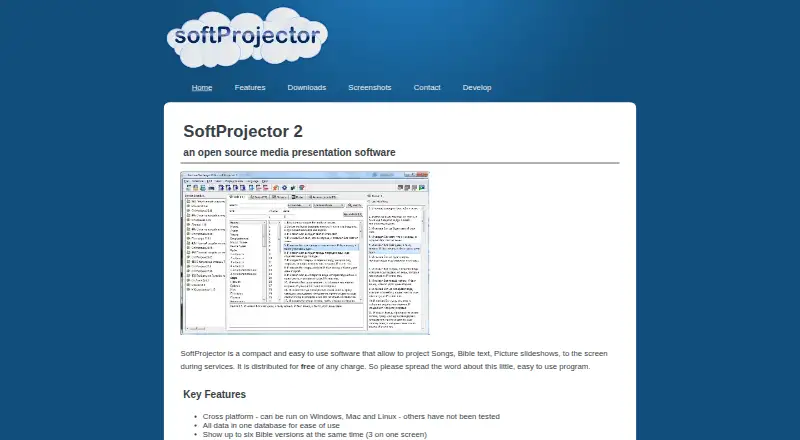
What SoftProjector is
SoftProjector is free software for projecting songs, Bible text, picture slideshows, and announcements during services. It runs on Windows, macOS, and Linux and can send content to up to two display screens. Bible tools include full-text search, verse lookup, and import and export; more than 270 Bibles are available. Presentations can display up to six Bible versions, with no more than three on one screen. Users can assemble service schedules from verses, songs, announcements, slideshows, and media items, then order, save, reopen, or print them. Song tools support creating and editing songs, importing and exporting songbooks, searching by title or number, and setting automatic chorus repeats. Presentation settings include themes, static or fade transitions, text shadows, image or black backgrounds, and separate themes for Bible text, songs, and announcements. Bible modules, songbooks, and themes can be downloaded and imported online. Audio and video playback depends on installed codecs, and linked media may stop working if its file is moved or deleted. The maker identifies it as free software under the GNU General Public License version 3.
Who it suits
SoftProjector suits churches and service organizers who need to project songs, Bible text, announcements, or slideshows. It is available across Windows, macOS, and Linux.
What it does well
- Free software under GNU General Public License version 3.
- Runs on Windows, macOS, and Linux.
- Supports up to two display screens.
- More than 270 Bibles are available.
- Service schedules can be saved and printed.
What to know first
- Audio and video playback depends on installed codecs.
- Moving or deleting linked media can interrupt playback.
- USB presenter support is partial and device-dependent.
Limits
SoftProjector is free to use under the GNU General Public License version 3. Its media playback depends on codecs installed on the computer, and linked media can become unavailable if files are moved or deleted.
Plans
| Plan | Billed and limits | Price |
|---|---|---|
| SoftProjector | Free and open source · no charge to use | Free |
As softprojector.org lists them, read 4 Oct 2026. The maker's own page has the final word.
Getting started
- Open https://www.softprojector.org/.
- Install SoftProjector for Windows, macOS, or Linux.
- Download and import Bible modules, songbooks, or themes as needed.
- Create or import songs and arrange verses, announcements, slideshows, or media into a service schedule.
- Connect up to two display screens and configure presentation themes and transitions.
Verdict
SoftProjector combines service scheduling, Bible tools, songbook management, and presentation controls across three desktop platforms. Media playback depends on local codecs, and linked files must remain in place.
Questions
Is SoftProjector free?
Yes. Its listed plan costs nothing, and the maker identifies it as free software under the GNU General Public License version 3.
Which platforms does SoftProjector support?
It supports Windows, macOS, and Linux.
How many screens and Bible versions can it display?
It supports up to two display screens and can show up to six Bible versions, with up to three on one screen.
Can I use my own media files?
Schedules can include media items, but playback depends on multimedia codecs installed on the computer. SoftProjector links to media files, so moving or deleting one can prevent playback.
Does SoftProjector support a stage display?
No. Its listed stage display capability is no.
Who makes SoftProjector?
The maker is not named in the listed facts. The software was founded in 2009.
Facts from SoftProjector's own pages
- Bible tools
- Bible features include full-text search, verse finding, import and export, and support for more than 270 available Bibles. · softprojector.org, 4 Oct 2026
- Displays
- It supports up to two display screens and can show up to six Bible versions, with up to three on one screen. · softprojector.org, 4 Oct 2026
- Founded
- 2009 · softprojector.org, 28 Sept 2026
- Intended users
- The maker describes SoftProjector as software for projecting songs, Bible text, and slideshows during services. · softprojector.org, 4 Oct 2026
- License
- The maker identifies SoftProjector as free software under the GNU General Public License version 3. · softprojector.org, 4 Oct 2026
- Media limitation
- SoftProjector stores links to media files, so moving or deleting a linked file can prevent playback. · softprojector.org, 4 Oct 2026
- Media playback
- Audio and video playback depends on the multimedia codecs installed on the computer. · softprojector.org, 4 Oct 2026
- Online content
- Users can download and import Bible modules, songbooks, and themes online. · softprojector.org, 4 Oct 2026
- Presenter controls
- USB presenter support is partial and may vary by device; the maker says next, previous, and hide buttons should work. · softprojector.org, 4 Oct 2026
- Purpose
- SoftProjector projects songs, Bible text, picture slideshows, and announcements onto a screen during services. · softprojector.org, 4 Oct 2026
- Service schedules
- Users can create, order, save, reopen, and print service schedules containing verses, songs, announcements, slideshows, and media items. · softprojector.org, 4 Oct 2026
- Songbooks
- Users can create and edit songs, import and export songbooks, search by title or number, and configure automatic chorus repeats. · softprojector.org, 4 Oct 2026
- Support contact
- The contact form accepts general messages, bug reports, and feature requests, and includes a field for the sender's church. · softprojector.org, 4 Oct 2026
- Visual presentation
- The software offers themes, static or fade transitions, text shadowing, image or black backgrounds, and separate theme settings for Bible text, songs, and announcements. · softprojector.org, 4 Oct 2026
Where SoftProjector stands on Freedom251
- Church Presentation Software#16 of 35